
Blinx 2: Masters of Time and Space
Sobre el proyecto
Blinx 2: Masters of Time and Space es un juego de plataformas desarrollado por Artoon y publicado por Microsoft Game Studios. Fue lanzado para la Xbox el 18 de noviembre de 2004. Es secuela de Blinx: The Time Sweeper, que fue lanzada para Xbox en 2002.
Información oficial del proyecto
BLiNX 2 static recompilation
[!TIP] The easy way: download
blinx2-wizard-*for your system from the latest release, point it at your own disc image, and it builds and installs the game for you. The by-hand route is under Build the game.
BLiNX 2: Masters of Time & Space was an original Xbox game. This project turns your own copy of it into a native program for your PC or Mac: the game's x86 code is lifted to C by the xboxrecomp toolkit and compiled together with a replacement Xbox kernel, GPU (NV2A) and audio (APU) runtime. No emulator, no disc in a drive: one command builds a private, installable bundle from your disc dump.
No game data is included or distributed. You need your own copy of the game; everything built from it stays on your own machines.
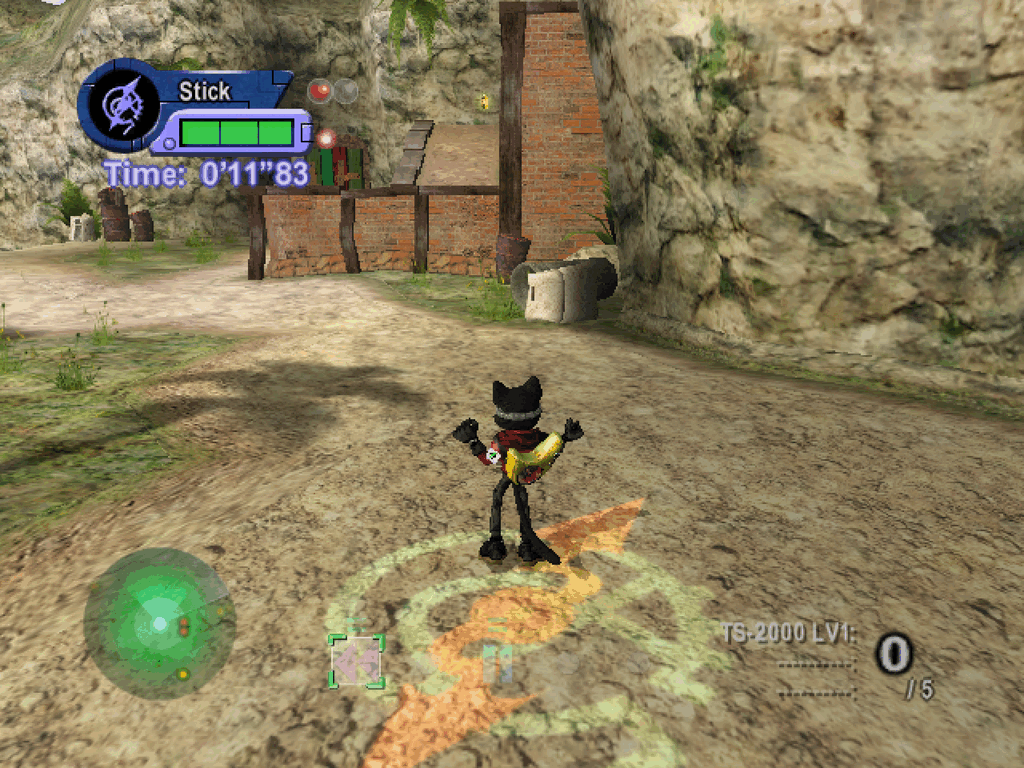
Contents: For players (what you need, platforms, install, options, widescreen, free camera, HUD texture pack, known issues, screenshots, help) | For developers (architecture, build from source, the toolchain, testing, environment variables, docs, contributing, legal).
For players
What you need
| Item | Why |
|---|---|
Your own, legally obtained copy of BLiNX 2: a disc image (.iso) or the extracted folder with default.xbe | The game's code and assets come from it. This project does not provide or link to them, and refuses other titles. |
| A build machine: a Mac (Apple silicon), a Linux PC or a Windows PC, with about 15 GB free | The bundle is built from your dump on your machine. A Mac can build every target; Linux and Windows build the Windows and SteamOS bundles. |
| uv, git and Python 3.9 or newer | ./blinx2 fetches everything else (CMake, Ninja, the compiler, the toolkit), each download checked against a pinned sha256; it uses git to fetch the toolchain. macOS: brew install uv; git and Python come with the Command Line Tools (xcode-select --install). Linux: curl -LsSf https://astral.sh/uv/install.sh | sh; git and Python from your distribution. Windows: winget install --id=astral-sh.uv -e (uv only), Git for Windows, and Python 3.9 or newer from python.org with the py launcher. |
| A controller, or the keyboard | Any Xbox, PlayStation or other SDL-supported pad is player 1; the keyboard works too. |
Platforms
| You play on | Bundle | Graphics | Audio | Input | Status |
|---|---|---|---|---|---|
| Steam Deck (stock SteamOS), or a Linux gaming PC | steamos (the Windows build, run under Proton through umu-run) | Direct3D 11 (DXVK) | XAudio2 (FAudio) | Controller (XInput) and keyboard | Plays with sound and saves. The Deck is the regular manual test machine. Set the Steam entry's Game Resolution to Native (1280x800) so Steam does not rescale the game, then set scale = 2, or leave it at 1 and rely on FSR; aspect = "16:10" fills the Deck's screen. |
| Linux desktop with Proton | steamos, or the bare build under umu-run | Direct3D 11 (DXVK) | XAudio2 (FAudio) | Controller and keyboard | Plays; this is the tested Linux route (GE-Proton 11). Window resize does not reach the game there; fullscreen does. |
| macOS (Apple silicon) | macos (.dmg) | Metal | SDL2 (CoreAudio) | Controller (SDL GameController) and keyboard | Plays with sound and saves. |
| Windows x86-64 | windows (a setup program) | Direct3D 11 | XAudio2 | Controller (XInput) and keyboard | Builds and installs, but untested on native Windows: the setup program and the game have only been run under Proton. |
The game runs at 30 frames per second and 4:3, as on the Xbox. Widescreen is opt-in (Hor+, see Options); at 4:3 a wide window or screen is pillarboxed, never stretched. A 60 fps mode is not planned (the stage logic steps a fixed 1/30 s, so a faster loop plays at double speed). External frame-generation tools (Lossless Scaling, lsfg-vk, AMD AFMF, NVIDIA Smooth Motion) can show it at 60; they are unsupported, see docs/frame-generation.md.
Every stage and boss has been reached in scripted runs; the title, attract mode, stage 1 and the story route to the hub are checked frame by frame against reference frames on every build, on Metal and on Direct3D 11.
Sister project. Burnout 3: Takedown is recompiled with the same toolkit and build wizard, as a fork of sp00nz's project; its README has its own platforms table and releases, so you can compare how far each game has come. Neither repository publishes game files, frames, audio or saves.
Build the game
The short route: the build wizard. From the release that carries it on, each release has a small program for Windows, macOS and Linux (Steam Deck included): download yours, point it at your disc image, pick the options, and it builds and installs the game for you. It runs the same commands as below. docs/packaging.md has the steps, the SmartScreen and Gatekeeper prompts, and where it puts things.
By hand. Get this project, then go into its folder (one line at a time, in Terminal on macOS and Linux or in PowerShell on Windows):
git clone https://github.com/apexJCL/blinx2-recomp.git
cd blinx2-recomp
Then give it your disc image, or the folder with default.xbe:
./blinx2 /path/to/your/BLiNX2.iso
In PowerShell that is .\blinx2 C:\path\to\BLiNX2.iso (blinx2 C:\path\to\BLiNX2.iso in the Command Prompt). On Windows, keep the path
short (C:\b2) and run git config --global core.longpaths true once
before the clone.
It checks that the disc is BLiNX 2, puts its files in game_files/ in this
folder (git ignores it), fetches the toolchain, lifts the game and builds a
bundle for this computer: macos on a Mac, steamos on Linux, windows on
Windows. The first run takes a while (between about 20 and 40 minutes in the
runs timed so far); later runs only rebuild what changed. The bundle lands in
dist/. You can also copy the disc's files into game_files/ yourself and
run ./blinx2 alone.
./blinx2 package windows|steamos|macos   # the same, for another target
./blinx2 doctor      # what this machine has, what it can package, and what to install first
Copy the bundle to the machine you play on (a USB stick, scp, a share) and
install it there:
| Target | Install | Saves, settings and logs |
|---|---|---|
Steam Deck / Linux (dist/BLiNX2-<v>-steamos.tar) | In Desktop Mode: tar -xf BLiNX2-<v>-steamos.tar, cd BLiNX2-<v>-steamos, ./install.sh --steam (Steam open: it adds "BLiNX2" as a non-Steam game). A stock Deck has no umu-run; the installer offers to download the pinned umu-launcher (1.4.4), or run ./install.sh --fetch-umu. The first launch downloads the Steam Linux Runtime and GE-Proton and makes the Wine prefix, which takes a few minutes. In Game Mode, set the entry's Properties > General > Game Resolution to Native (1280x800). Later versions: ./install.sh; ./install.sh rollback goes back one. | ~/Games/BLiNX2/{hdd,config,logs} |
macOS (dist/BLiNX2-<v>.dmg) | Open the .dmg and drag BLiNX2.app to Applications (replace the old one to update). The app is signed ad hoc, not notarized: on another Mac, right-click > Open once, or xattr -dr com.apple.quarantine /Applications/BLiNX2.app. | ~/Library/Application Support/BLiNX2/{hdd,config,logs} |
Windows (dist/BLiNX2-<v>-windows/) | Keep the folder together (the setup reads game_files\ beside it) and run BLiNX2-<v>-setup.exe. It installs for your user only, no administrator rights, with a Start Menu entry. SmartScreen will warn (unsigned, built on your machine): More info > Run anyway. A newer setup installs on top. | %LOCALAPPDATA%\BLiNX2\{hdd,config,logs} |
Saves (hdd/), settings (config/) and logs (logs/) live outside the
program files and survive every update, rollback and uninstall.
docs/packaging.md has the long version: every installer
option, updating, uninstalling, moving saves (the menu's Saves page) and a
troubleshooting list.
Updating to a new release. Run the new release's wizard on the same
build folder, or by hand git pull and then ./blinx2 in this folder.
Either way the toolchain moves to the new release's pins before the build;
then install the new bundle as above.
A bundle is private. It contains your copy of the game and code generated from it. Keep it on your own machines; never share, upload or publish it.
Bring your saves
Saves from a console, another install or another PC import into the save folder of the table above:
./blinx2 saves list --from PATH          # what PATH holds, and what would import
./blinx2 saves import --from PATH --dry-run
./blinx2 saves import --from PATH        # add --replace to overwrite a save already there
PATH is a folder or a zip: another install's hdd folder, a console's
E: copy (from a dashboard or FTP), a UDATA folder or one title folder
(4d530065), or a zip of any of those, including the menu's Saves export.
Saves need no console keys: each import re-signs blinx2data.bin for this
build. Close the game first; the import refuses while it runs. Before the
first write it zips the saves already there to
config/exports/save-backups/, beside the menu's own Saves backups, and it
never overwrites a save unless you pass --replace. Add
--to <data folder>/hdd when the game is installed on another machine or
in another place. Disc images (xemu qcow2, raw disks, memory units) come
later; copy the saves out with xemu or a FATX tool until then.
Controls
A controller is player 1. The keyboard and the mouse are merged onto
player 1 while the game window has the focus. Focusing the window grabs the
mouse; F9 frees the cursor and grabs it again. Change a key under
[input.bindings] in config/config.toml; docs/input.md
has the names, examples and the mouse settings.
| Keys and mouse | Xbox control | Keys and mouse | Xbox control |
|---|---|---|---|
| W/S/A/D (or numpad 8/2/4/6) | Left stick (move) | Mouse, or I/K/J/L | Right stick (look) |
| Arrows | D-pad | Space | A (jump) |
| Left click or R | Right trigger (sweep, shoot) | Right click or F | B (action) |
| E | X (time control) | Q | Y |
| C, Z | White, Black | Left Shift | Left trigger |
| Tab, middle click | Left, right stick click | ||
| Enter or Escape | START (pause) | Backspace | BACK |
| Left Alt (hold) | walk | F9 | free the cursor |
Options
The game runs stock by default. Enhancements are opt-in. Every option and
its default is in config.default.toml, which ships beside the game (in
Contents/Resources in the macOS app) and is replaced by each update. Your
changes go in config/config.toml in the data folder above: it holds only
the keys you set, wins over the defaults, and no update touches it (the
first launch writes it as a comment header, and renames a
config/enhance.toml from an earlier version). Each key can also be set as
an environment variable, which wins over both files; config/launch.env
takes KEY=value lines for any RECOMP_* variable.
| Option | config.toml key | Environment variable | Values (default first) | What it does |
|---|---|---|---|---|
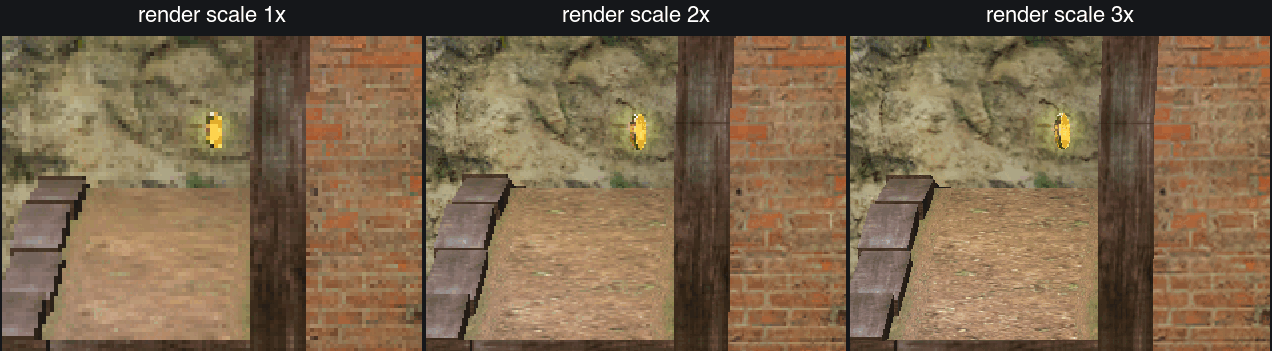
| Render scale | render.scale | RECOMP_RENDER_SCALE | 1, 2, 3, 4 | Draws the 3D at a multiple of the stock 640x480. Metal and Direct3D 11; the CPU renderer ignores it. |
| Anisotropic filtering | render.aniso | RECOMP_RENDER_ANISO | 0 (off), 2 to 16 | Sharper ground and walls seen at a slant. A small change in this game, most visible at render scale 1. Metal and Direct3D 11. |
| Aspect | display.aspect | RECOMP_DISPLAY_ASPECT | "4:3", "16:9", "16:10", "21:9" or another wider "W:H" | Hor+ widescreen: a wider aspect shows more of the world at the sides instead of stretching it, see below. The HUD moves to the edges (the HUD mod below). Metal and Direct3D 11. |
| Movies in widescreen | display.movie | RECOMP_DISPLAY_MOVIE | "fill", "black", "fit" | With a wide aspect, how the movies fill the frame: scaled to cover it (top and bottom cropped, so the title movie fills the width), pillarboxed, or stretched to the width. Nothing at 4:3. |
| HUD at the edges | mods."hud.enable" | RECOMP_HUD | "on", "off" | On by default. With a wide aspect, the radar, the time panel and the counters move out to the screen's edges, as on a 4:3 TV; menus, dialogue and the pause panel stay centred. display.hud_aspect and display.hud_margin set where the edges are. Nothing at 4:3. Also on the menu's Mods page. Metal and Direct3D 11. |
| Overscan | display.overscan | RECOMP_DISPLAY_OVERSCAN | 0 to 64 | Crops this many pixels of the 640-wide frame from the left and right edges (top and bottom in proportion, so it stays 4:3) and zooms the rest. BLiNX 2 needs none; ignored with a wide aspect. Metal and Direct3D 11. |
| Fullscreen | present.fullscreen | RECOMP_PRESENT_FULLSCREEN | false, true | Opens the window borderless fullscreen (no mode change). |
| Scaling filter | present.filter | RECOMP_PRESENT_FILTER | "nearest", "linear", "integer" | How the 4:3 frame fills the window: letterboxed nearest, letterboxed bilinear, or the largest whole multiple that fits, centred. |
| Frame pacing | present.pacing | RECOMP_PRESENT_PACING | "sleep", "spin" | sleep lets the game's frame wait sleep until the next vblank: less heat and battery on a laptop or a Deck, the same frames. spin is the console-original timing, where the wait holds a CPU core as it did on the Xbox. |
| Shader | present.shader | RECOMP_PRESENT_SHADER | "none", "crt-lottes", "crt-lottes-fast", "crt-hyllian", "fsr", a .slangp path | A CRT look (shadow mask, scanlines) on the final picture, run by librashader on Metal and Direct3D 11; fsr is AMD's upscaler instead. Also on the menu's Shaders page, with the preset's settings (present.shader_params). Nothing extra to install: on Windows the bundle ships a build that needs no Visual C++ runtime or D3DX9. Without the library the game says so in its log and looks stock. |
| Shader profile | present.profile | RECOMP_PRESENT_PROFILE | "none", a profile name | A chain of up to 8 shaders with their settings, built and saved on the menu's Shaders page (Add shader, then Save) as config/shader-profiles/<name>.toml, for example fsr then crt-lottes. When set it wins over present.shader. |
| Present surface | present.surface | RECOMP_PRESENT_SURFACE | "auto", "window", "internal" | internal hands the compositor the frame at its own size to scale (gamescope's FSR on a Deck needs it, at scale = 1); window draws at the window's size. auto picks internal under the SteamOS launcher in gamescope, window elsewhere. |
| HUD texture pack | textures.pack | RECOMP_TEXTURES_PACK | none, a path | Your own 4x HUD and font pack, see below. A relative path is taken from the executable's folder. |
| Bloom | fx.glow, fx.glow_intensity | RECOMP_GLOW, RECOMP_GLOW_INTENSITY | "on"/"off"; 1.0 (0.0 to 2.0) | Turns the game's bloom (screen glow) pass off, or scales it. |
| Free camera | camera.free and camera.free_* | RECOMP_CAMERA_FREE and RECOMP_CAMERA_FREE_* | "off", "on" | F6 (or Guide+Y, or Back+R3 held 0.4 s) starts and stops a camera you fly anywhere in the stage while Blinx stands still: left stick moves, right stick or mouse looks, RT/X up, LT/Y down, White fast, Black slow. F7 hides the HUD, End stops the world, Home goes back to the game's camera. Speed, look and mouse sensitivity, the fast and slow multipliers and both inverts are on the menu's Mods page and in config.default.toml; the keys are under [input.actions]. Metal and Direct3D 11; see below. |
| In-game menu | menu.enabled | RECOMP_MENU | true, false | On by default. F10 (or Guide+A, an Elite's P1, or Back+L3 held 0.4 s) opens a menu over the game to change these options while it runs, rebind the host actions and turn mods on or off; Save keeps only what you changed in config/config.toml. The game keeps running behind it and sees no input. |
| Stats strip | overlay.stats | RECOMP_OVERLAY_STATS | false, true | fps, frame time, pacing, scale and backend in the window's corner; F3 (while the menu is on) or the menu's Stats page toggles it while you play. |
| Window size | (none) | RECOMP_WINDOW_SCALE | 2 | Initial window size, 640x480 times this (the SDL window on macOS). |
| Frame rate | fps.mode | RECOMP_FPS_MODE | "lock30" only | lock60 and free are reported as not available (see Platforms); for a 60 fps look, see external frame generation. |
# config/config.toml, for example
[render]
scale = 2

[present]
fullscreen = true
pacing = "spin"

[fx]
glow = "off"
Render scale at 1x, 2x and 3x on the same detail of stage 1 (Metal, in a window at twice the stock size; stock behaviour and the automated checks stay at 1x):
Widescreen
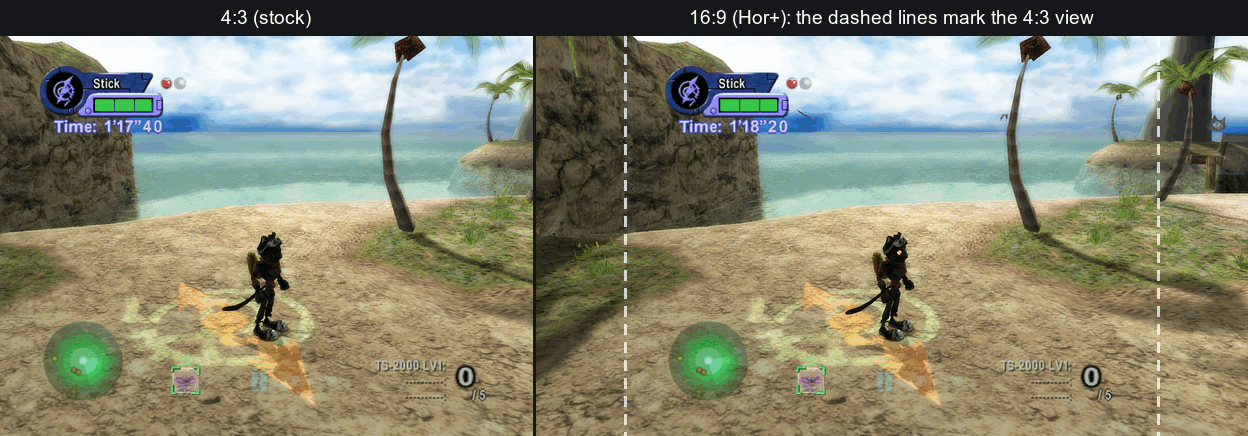
aspect = "16:9" (or "16:10", "21:9") widens the view instead of
stretching it: the game keeps its vertical field of view and draws more of
the stage at the sides (Hor+). The HUD mod moves the radar, the time panel
and the counters to the edges, menus and dialogue stay centred, and the
movies fill the width (display.movie). The pair is the same moment of stage
1 at 4:3 and at 16:9 (Metal, render scale 2; the timers differ because they
are two runs):
[display]
aspect = "16:9"
Free camera
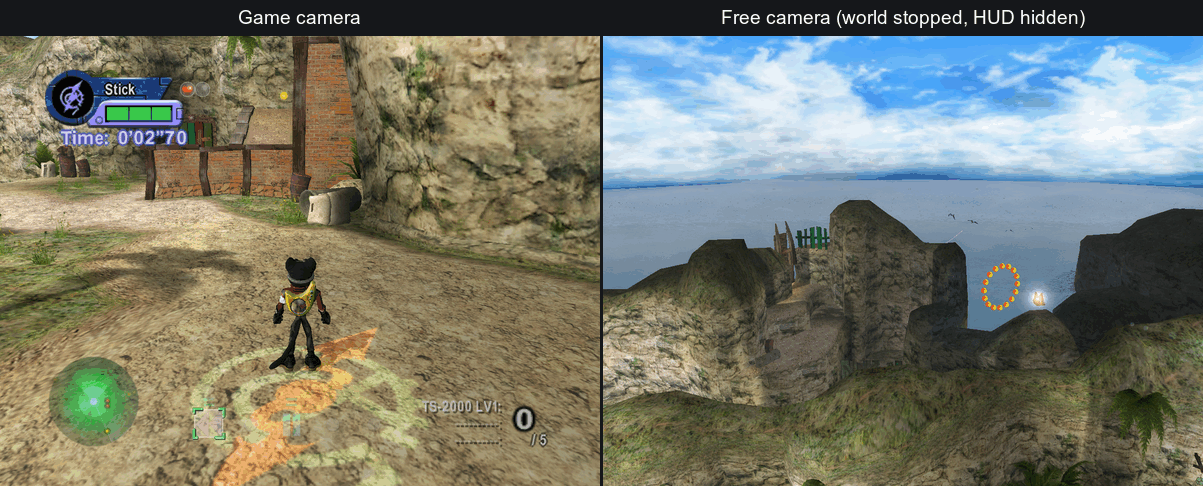
With camera.free = "on" (or Free camera on the menu's Mods page), F6,
Guide+Y or Back+R3 held 0.4 s (Back first; for pads whose Guide the game
never sees, as on the Deck) detaches the camera from Blinx and lets you fly it anywhere in the
stage; End stops the world and F7 hides the HUD, for a clean shot, and Home
puts the camera back on the game's.
| Control | Default |
|---|---|
| Toggle flight | F6, Guide+Y, Back+R3 held 0.4 s |
| Toggle HUD, Freeze game, Reset camera | F7, End, Home (while flying) |
| Move, look | left stick, right stick or the mouse |
| Rise, sink | RT or X, LT or Y |
| Fast, slow | White, Black |
The four keys are host actions (camera.free.toggle, .hud, .freeze,
.reset under [input.actions]), rebound on the menu's Controls page or the
camera's Mods page. The old camera.free_toggle, _hud_key, _freeze_key
and _reset_key keys are still read.
HUD texture pack
At render scale 2 or 3 the 3D is sharp, but the HUD, menus and font are still the game's own small textures, stretched. A HUD texture pack replaces them with versions at 4x: an xBR upscale of the HUD art, and the Latin font redrawn from PT Sans Narrow Bold, glyph by glyph in the stock layout. The Mission Objectives screen's pre-rendered text is in the pack too; the mission summary (results) text and languages other than US English are not yet, and stay stock. The pair shows the same stage 1 HUD without and with the pack, from the Metal backend at render scale 2 in a window at twice the stock size (1:1 crops; the timers differ because they are two runs).
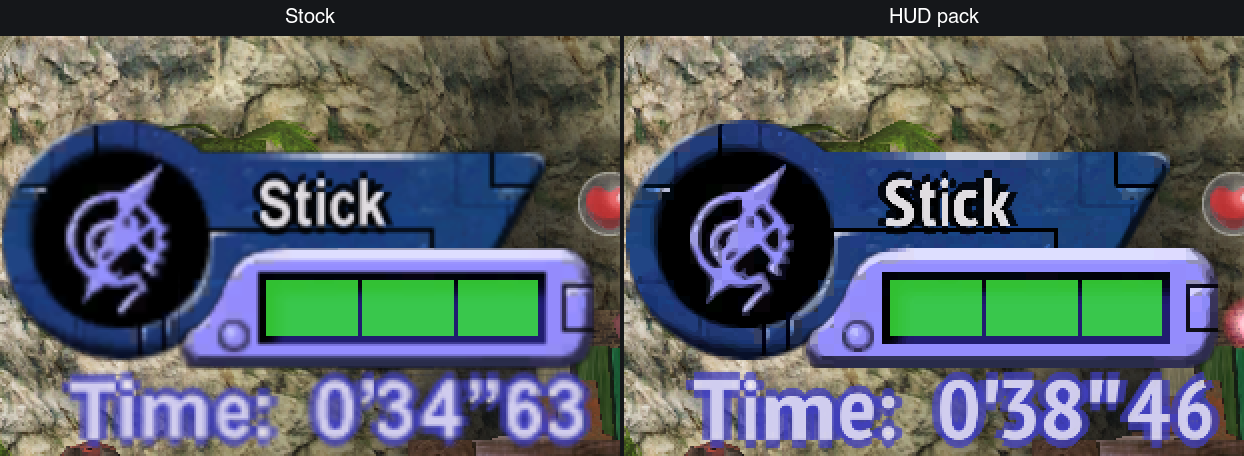
The pack is optional and off by default. No pack is distributed: you make
your own from your own game files, and it stays on your machines like the
game. On Linux and Windows install PT Sans Narrow (ParaType; a Google Fonts
family) for your user first; macOS ships it. Build the game first
(./blinx2 /path/to/your/BLiNX2.iso, above), then make the pack and package
with it:
./blinx2 enhance hud                   # writes dist/enhance/hud/hud.pack (--font FILE for another font file)
./blinx2 package macos --hud-pack      # or windows, steamos: puts the pack in the bundle and turns it on
--hud-pack turns the pack on in the bundle's config.default.toml, so
it is on after a first install and after an upgrade alike. For the stock
HUD, put this in your config/config.toml:
[textures]
pack = "none"
At start the log says [ENHANCE] textures.pack=<path> (<n> entries, scale 4), and every 600 flips [metal] textures.pack: N hits so far ([d3d11]
on Direct3D 11) counts the textures drawn from the pack. Metal and
Direct3D 11 draw the pack; the CPU renderer ignores it, and the automated
checks never use one. ./blinx2 enhance hud --help lists the options
(--scale 2|4, --only PATTERN, --list).
Known issues
| Issue | Where | State |
|---|---|---|
| The game can crash in stage 5-1 after about 90 s (seen once, in a scripted run) | macOS | Being investigated. |
| Resizing the window by hand does not reach the game | Linux/Proton (GE-Proton 11, KWin) | Fullscreen and render scale work; use them instead. |
| Bump-environment mapping (the stage 1 ocean, the Boss 3 ripple) draws as a plain texture | CPU renderer | Metal and Direct3D 11 draw it. |
| A few boss-stage artefacts: sky wedges in Boss 1, shadow shapes in two later bosses | All backends alike | Still being checked against the original hardware; they may be the game's own. |
| Movies: audio-to-video drift has not been measured | All | The game's own Sofdec decoder plays them. |
| Native Windows | Windows | The build is tested under Proton only. |
Fixed in current builds, and verified on the Steam Deck: the freeze on the results screen after mission 1 and after the mission 3 boss, dark ground and water on multi-core PCs, and the stage 1 wading stutter.
Quick fixes for the usual symptoms:
| Symptom | Fix |
|---|---|
| "Files are missing", or music, voices or a movie are missing, or the game says the disc is dirty | Your game_files/ is incomplete: the game's log names each missing file on a [FILE] missing line. Import the disc again with ./blinx2 import /path/to/BLiNX2.iso --replace (import --check lists what differs first), then rebuild with ./blinx2. |
| No sound | Audio is on by default. Check that config/launch.env does not set RECOMP_AC97_READY=0, and that SDL_AUDIODRIVER is not dummy. |
| The keyboard does nothing | The game window must have the focus, input.keyboard must not be false in config/config.toml, and RECOMP_KEYBOARD must not be 0. |
| The mouse does nothing | Click in the game window or focus it to grab the cursor (input.mouse_capture), or press F9 if you freed it; input.mouse must not be false and RECOMP_MOUSE must not be 0. |
| Steam Deck: "umu-run is not installed" | In Desktop Mode, run ./install.sh --fetch-umu from the unpacked bundle. |
| Steam Deck: the first launch shows only a notice for a few minutes | It is downloading the runtime and Proton; ~/Games/BLiNX2/logs/umu.log shows the progress. The notice closes when the game starts. |
| macOS: "the app is damaged" or cannot be opened | Gatekeeper: right-click > Open once, or xattr -dr com.apple.quarantine /Applications/BLiNX2.app. |
Screenshots
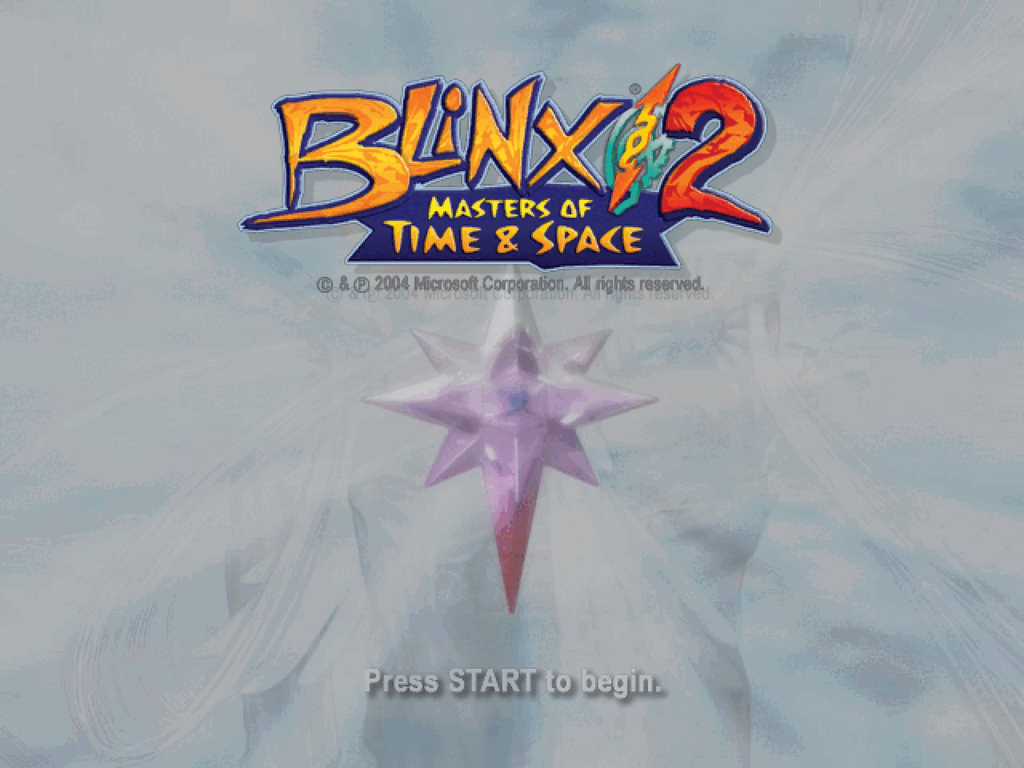
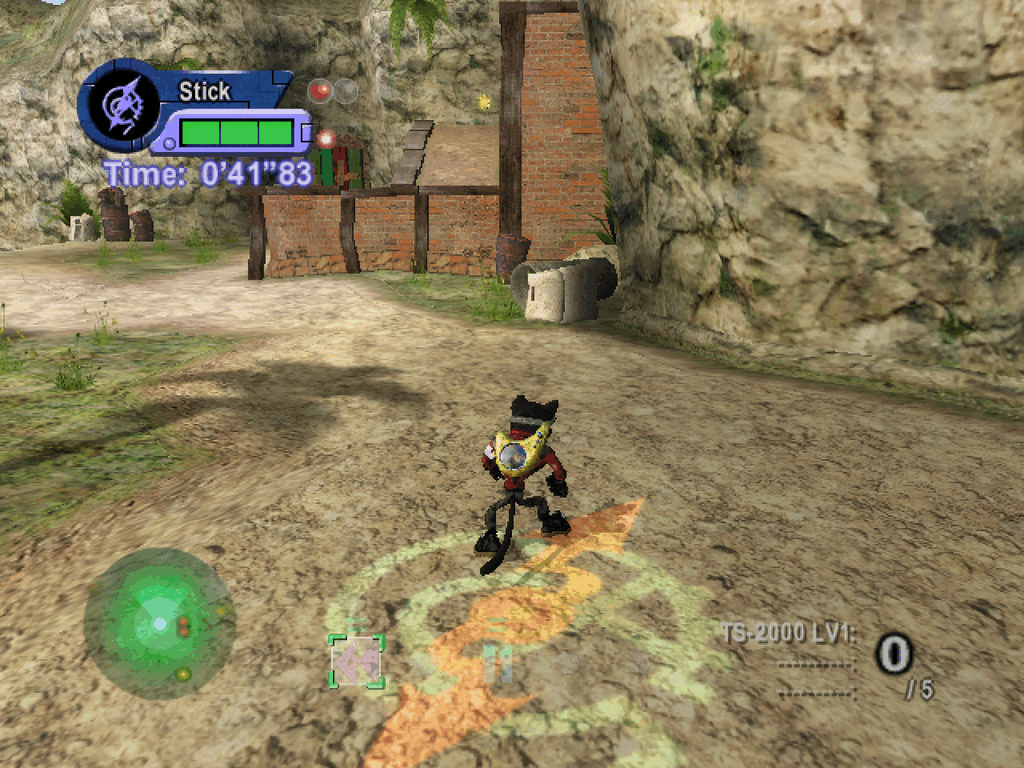
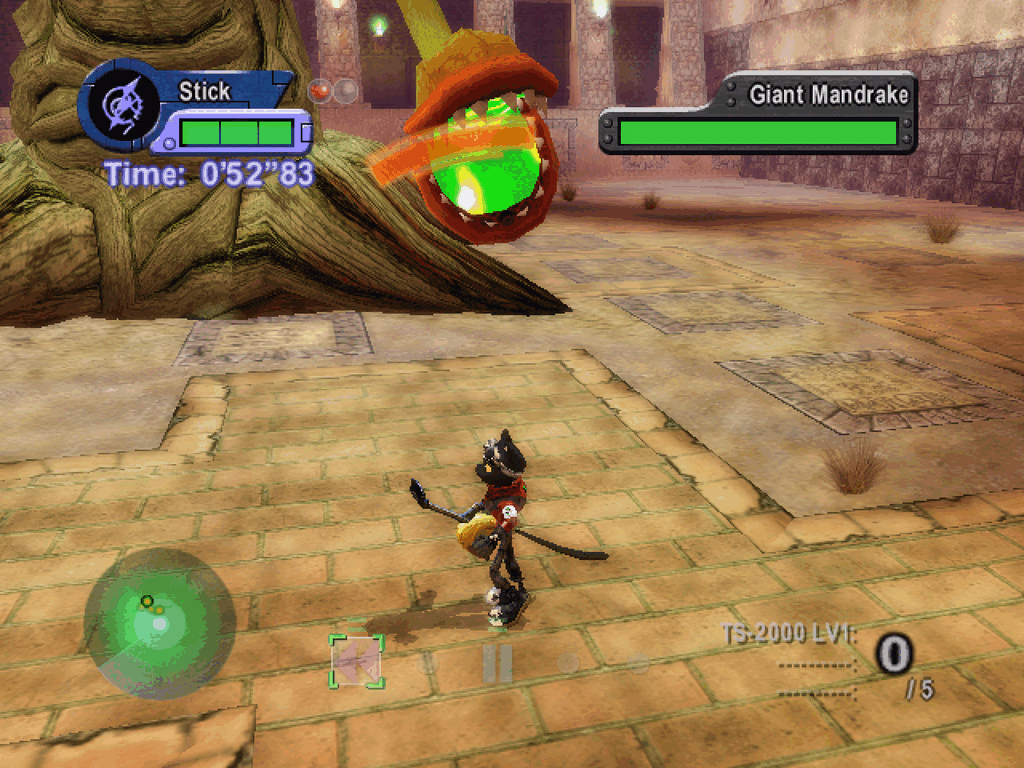
Getting help
Open an issue on this repository. Say which platform and bundle version you
run (the version is in the bundle's name and in logs/), what you did, and
attach the newest logs/game-*.log from the data folder in the
install table. Never attach your game files, a save or
the bundle itself.
If the game crashes or does not start:
- Note what you saw: an error box (its text or a screenshot), the window closing, or nothing at all. Add your GPU, its driver version and your OS version.
- Attach the newest
logs/game-*.logandlogs/xbox_kernel.logfrom the data folder. The kernel log is rewritten on every launch, so copy it before starting the game again. An emptylogs/is worth saying too. - Attach the system's crash record:
- Windows: in PowerShell, run
Get-WinEvent -FilterHashtable @{LogName='Application'; ProviderName='Application Error'} -MaxEvents 3 | Format-List TimeCreated,Messageand paste what it prints. - macOS: the newest
cat_recomp-*.ipsin~/Library/Logs/DiagnosticReports/. - Steam Deck or Linux: also
logs/umu.log.
- Windows: in PowerShell, run
- If asked, run once more with extra logging: put these two lines in
config/launch.envin the data folder (on Windows, check the file does not end in.txt), start the game the usual way and attach the newgame-*.logandxbox_kernel.log.
They only add log lines; delete the file afterwards.RECOMP_LOG_LEVEL=3 RECOMP_TRACE=missing=all,flip,stub
docs/packaging.md has the details.
For developers
Architecture
game_files/default.xbe
   │  blinx2 analyze      parse the XBE, disassemble, find functions, recover ABIs   (xbr, xboxrecomp-cli)
   │  blinx2 recomp       lift x86 to C                                             (xboxrecomp tools)
   ▼
src/recomp/gen/*.c       the lifted game (generated on your machine, never committed)
   +  src/                this game's boot code, hand-written XDK replacements, pad input, save seeding
   +  xboxrecomp runtime  replacement Xbox kernel, NV2A pushbuffer executor (Metal, D3D11, CPU), APU audio
   │  blinx2 build        CMake + Ninja; llvm-mingw cross-compiles the Windows build on every host
   ▼
build/cat_recomp (macOS) or build-win/cat_recomp.exe (Windows, Proton)
   │  blinx2 package      a private bundle: macOS .dmg, Windows setup program, SteamOS tar with installer
   ▼
dist/
This repository holds the game-specific half: the boot code, hand-written replacements for a few XDK library functions, the game's environment keys, the packaging templates, the bench and golden-frame harness, and the design notes. The generic halves live in two other repositories:
| Repository | Role |
|---|---|
apexJCL/xboxrecomp, branch blinx2/portability | The toolkit: lifter, host runtime (kernel, NV2A, APU), enhancements layer. A fork of sp00nznet/xboxrecomp; this project needs changes that are only in the fork. |
| apexJCL/xboxrecomp-cli | xbr, the game-agnostic command-line tool. ./blinx2 is a standard-library bootstrap that runs it at the release game.toml pins. |
| Path | Contents |
|---|---|
src/ | boot code (main.c), XDK replacements (recomp_manual.c), pad input, save seeding, the glow toggle, this game's rows of the environment table (env/) |
game.toml | everything the CLI knows about this game: names, paths, pipeline flags, packaging, bench, the HUD pack set, and the toolkit and CLI pins |
blinx2.py, blinx2, blinx2.cmd | the bootstrap and its wrappers |
packaging/ | the launchers, defaults (config.default.toml, launch.env.default.*) and README parts the bundles carry |
config/ | pipeline inputs: seed functions, spin-wait sites, the download pins |
scripts/ | this game's helpers (input scripts, xemu references, the public export, compare-bundles.py) and their tests |
analysis/ | golden references (golden/), research notes, the pipeline's output |
docs/ | environment variables, packaging, the README images |
openspec/ | specs and change proposals |
Build from source
The pipeline and the Windows cross-build run on macOS, Linux or Windows; the macOS build needs a Mac. Builds are tested on these:
| Host | OS | Toolchain | Dependencies | Backend |
|---|---|---|---|---|
| macOS (Apple silicon, M4) | macOS 27.0 | Xcode Command Line Tools 27.0 (Apple clang 21.0.0), CMake 4.4 and Ninja 1.13 from the venv | Homebrew sdl2 (sdl2-compat 2.32), sdl3, openssl (3.6), libepoxy; Python 3.14 | Metal |
| Linux x86-64 (Proton) | Fedora 44-based, kernel 7.2 | llvm-mingw 20260922 (clang 23.1.2), CMake and Ninja in a Fedora 42 distrobox | GE-Proton11-7 via umu-launcher 1.4.4, DXVK 3.1 (as bundled); NVIDIA GeForce RTX 2060 | Direct3D 11 (DXVK) |
| Windows x86-64 | not tested as a build host | llvm-mingw (fetched by setup), NSIS | Python from python.org, Git for Windows | Direct3D 11 |
No minimum versions have been established. Per host, before the first build:
- All hosts: Python 3.9 or newer for the bootstrap (uv gives the CLI the
3.12 it needs), uv on
PATH, git, about 15 GB free. uv: macOSbrew install uv; Linuxcurl -LsSf https://astral.sh/uv/install.sh | sh; Windowswinget install --id=astral-sh.uv -e. - macOS: the Command Line Tools (
xcode-select --install); for the macos targetbrew install sdl2 sdl3 openssl libepoxy; for the windows targetbrew install makensis. - Linux: for the windows target, the distribution's
makensis(nsisormingw32-nsis); on an immutable system it goes in a toolbox or distrobox (blinx2 doctorprints the commands). - Windows: a short checkout path (
C:\b2) andgit config --global core.longpaths true.
./blinx2 import /path/to/BLiNX2.iso   # once: the dump into game_files/ (or copy the files there by hand)
./blinx2 setup       # once: .venv (uv sync from uv.lock), llvm-mingw, the toolkit at its pin; ends with doctor
./blinx2 analyze     # parse the XBE, find functions, classify, recover ABIs
./blinx2 recomp      # lift to C: src/recomp/gen/
./blinx2 build       # macOS: build/cat_recomp; elsewhere: build-win/cat_recomp.exe (windows|macos picks)
blinx2 sets DEVELOPER_DIR=/Library/Developer/CommandLineTools itself;
set it yourself when running CMake by hand on macOS.
./blinx2 <command> --help lists the options. package builds in its own
build-pkg-macos/ and build-pkg-win/ with the stock options, so your
build/ and build-win/ keep whatever options you set; it refuses a Debug
or non-stock build (CAT_GEN_OPT, XBOXRECOMP_ENHANCE=OFF) unless told
otherwise. The optional ghidra stage (slow, cached) only improves function
names; it needs Ghidra (GHIDRA_HOME) and a PyGhidra venv at
.venv-ghidra. Never edit src/recomp/gen/ by hand: a function the
disassembler missed goes in config/seed_functions.json, then analyze
and recomp again (recomp alone misses new seeds).
Running the development build:
# macOS (Metal); RECOMP_PB_BACKEND unset is the slow CPU rasteriser
RECOMP_PB_BACKEND=metal ./build/cat_recomp
Run it from this directory: the game files are looked up in game_files/
(or wherever RECOMP_GAME_FILES points), and saves go to the toolkit's
default save root unless RECOMP_HDD_DIR says otherwise. Host pads are on
in every build on every host, except while an input script is set (unless RECOMP_HOST_PAD=1), so
scripted and golden runs never see one (RECOMP_HOST_PAD=0 keeps them out).
The keyboard and the mouse come from
build/config.default.toml in every build, with or without host pads. Under
Proton, run build-win/cat_recomp.exe with umu-run and
RECOMP_PB_BACKEND=d3d11; host pads are on there by default.
The Python tests and the lint run from the locked dev environment
(pyproject.toml, uv.lock):
uv run pytest scripts
uv run ruff check . && uv run ruff format --check .
The toolchain and its pins
game.toml pins every moving part; setup fetches them and blinx2 doctor
reports what is in use and whether it is the pin.
| Component | Pinned at | Where | Notes |
|---|---|---|---|
xboxrecomp-cli (xbr) | tag v0.20.0, commit d047f6c | game.toml [cli] | The commit locks the tag: a tag moved to another commit is refused. |
| xboxrecomp toolkit (fork) | tag blinx2-v0.13.0, commit 40ed51d, branch blinx2/portability | game.toml [toolkit] | Cloned into external/xboxrecomp by setup. |
| llvm-mingw | 20260922 (clang 23.1.2) | game.toml [toolchain], hashes in config/setup-pins.json | Cross-compiles the Windows build on every host. |
| NSIS | 3.13 | game.toml [toolchain] | Fetched on Windows; Homebrew or the distribution elsewhere. |
| umu-launcher | 1.4.4 | the CLI | What the SteamOS installer offers to download on a stock Deck. |
| Python packages | uv.lock | pyproject.toml, uv.lock | capstone and pefile stay on exact versions: another capstone could change gen/. |
The toolkit is looked up in this order by CMake, blinx2 and blinx2 bench:
$XBOXRECOMP_DIR (or -DXBOXRECOMP_DIR=...), then external/xboxrecomp,
then ../xboxrecomp beside this checkout. The CLI: $XBOXRECOMP_CLI_DIR,
then external/xboxrecomp-cli (only at the pin), then ../xboxrecomp-cli,
otherwise a clone at the pin into external/xboxrecomp-cli. Maintainers
move a pin by editing tag and commit together; blinx2 pins refresh
re-pins the downloads and prints the newest releases.
Both the CLI and the toolkit fork are public and MIT licensed (the toolkit with the exceptions in its NOTICE). This project builds against the fork, not upstream; upstream-bound changes are offered to sp00nznet/xboxrecomp as pull requests.
Testing and goldens
Three scripted scenarios are compared frame by frame against reference
frames (analysis/golden/golden.json, references in
analysis/golden/frames/) on every integration build, on both GPU backends,
at stock settings (the check fails a run whose log shows a non-stock
[ENHANCE] value):
| Scenario | Route | Run time | Backends |
|---|---|---|---|
attract | title and attract mode | 75 s | Metal, D3D11, CPU |
stage1 | stage 1 gameplay | 105 s | Metal, D3D11 |
story | the story route to the hub | 100 s | Metal, D3D11 |
./blinx2 golden run                 # Mac: the Metal build in build/, headless and silent, one scenario at a time
./blinx2 golden run --backend cpu   # the CPU rasteriser (slow; a reference path, not in the routine gates)
./blinx2 bench golden               # a Linux/Proton host over ssh: sync, build in a distrobox, run under Proton, compare
Verdicts land in bench-logs/<stamp>.../golden.txt. ./blinx2 bench --help
lists the bench commands (setup, sync, build, run, tests, pacing,
gc, ...) and their settings (BENCH_HOST and so on). The CPU rasteriser
only has to keep building and passing one check after large merges; speed
and A/B work are Metal and D3D11.
The guest runs as on the console's one CPU: RECOMP_GUEST_LOCK (on in this
game) runs one guest thread at a time, released at kernel calls, on every
host; on Windows and Linux the threads are also pinned to one core
(RECOMP_GUEST_CPUS, =all is the A/B). The game relies on it: two of its
threads add stage lights to one list without a lock, and on several cores
they lost entries and left the ground and water unlit.
Environment variables
Every setting the runtime reads goes through one table, read once at startup,
in three tiers: config (one variable each), trace
(RECOMP_TRACE=flip,tex,..., printing only) and debug
(RECOMP_DEBUG=pb_fast=0,fb_dump=/tmp/f_,..., anything that changes
behaviour). The ones you meet first:
| Variable | Values (default first) | Meaning |
|---|---|---|
RECOMP_PB_BACKEND | cpu, metal, d3d11, null | the renderer |
RECOMP_GAME_FILES | game_files/ in the working directory | where the dump is |
RECOMP_HDD_DIR | the toolkit's save root | the emulated hard disk: saves, caches |
RECOMP_HOST_PAD | unset: on, except in scripted runs | host gamepads in or out (0/1) |
RECOMP_KEYBOARD | input.keyboard: on in config.default.toml, off with RECOMP_CONFIG=none and in scripted runs | the keyboard as pad 1 |
RECOMP_MOUSE | input.mouse: as RECOMP_KEYBOARD | the mouse as pad 1 (motion is the right stick) |
RECOMP_AC97_READY | on (x86-64 Windows/Proton; arm64 macOS and Linux); off on native x86-64 Linux | audio; =0 turns it off |
RECOMP_INPUT_SCRIPT | @attract, @stage1, @stage1-enemies, @stage1-2, @stage1-2-barricade, @story-hub, @story-load, @story-idle, a file | a scripted pad for reproducible runs |
RECOMP_HEADLESS | 0, 1 | no window, and silent (it sets SDL_AUDIODRIVER=dummy unless set) |
RECOMP_CONFIG | config/config.toml (over config.default.toml beside the executable), a path, none | the player's config file; none reads no file, not even the defaults (the old name RECOMP_ENHANCE_CONFIG still works) |
The full list, with defaults, source references and the trace and debug keys,
is docs/env.md. New keys get a row in the table
(src/env/recomp_env_game.h for this game's own) and a row in that file;
fork code has no raw getenv.
Documentation
| Document | What it covers |
|---|---|
| docs/packaging.md | building and installing the bundles on every target, settings, the HUD pack, troubleshooting, maintainers' pins |
| docs/input.md | playing on keyboard and mouse: the default keys, rebinding, the mouse settings |
| docs/frame-generation.md | external frame-generation tools for a 60 fps look (unsupported): what each needs, what to expect from a 30 fps base, the settings that help |
| docs/env.md | every environment variable, by tier, with defaults and where it is read |
| game.toml | the manifest the CLI reads; the CLI's docs/manifest.md documents each key |
| analysis/golden/golden.json | the golden scenarios, their frames and tolerances |
openspec/ | specs (specs/), open changes (changes/) and the archive; the deviations spec records every departure from the original hardware's behaviour |
| xboxrecomp-cli README | xbr: starting a new game, the commands, the bench, how a game finds the CLI |
| xboxrecomp README | the toolkit: pipeline, runtime, docs/runtime/config.md (the config.toml keys) |
Contributing
The project uses OpenSpec for
change tracking. Each piece of work is a change under
openspec/changes/<name>/ with a proposal, a design, tasks and spec deltas;
finished changes are archived under openspec/changes/archive/ and their
requirements merged into openspec/specs/. Departures from the original
hardware's behaviour are recorded as requirements in the deviations spec.
Rules that every change follows:
- opt-in features default off and never change stock behaviour; the golden checks always run at stock;
- a behaviour change on one GPU backend (Metal or Direct3D 11) is mirrored on the other, or recorded as a follow-up;
- generated code is never hand-edited; environment variables go through the
table and
docs/env.md; - toolkit changes go to apexJCL/xboxrecomp,
branch
blinx2/portability; CLI changes to apexJCL/xboxrecomp-cli.
Legal
This repository contains no game data and no game code:
- no game files, assets or saves;
- no lifted (recompiled) game code.
src/recomp/gen/is generated on your machine by the pipeline and is never committed.
To build it you need your own legally obtained copy of BLiNX 2. BLiNX 2 and
its assets belong to their respective owners; this project is not affiliated
with them. A bundle made by blinx2 package contains your copy of the game
and code generated from it: it is for your own machines only, and is not
yours to redistribute. The same goes for a HUD texture pack made by
blinx2 enhance hud: it is built from your game files.
License and credits
MIT, see LICENSE. Parts of src/main.c, src/recomp_manual.c and
CMakeLists.txt started from xboxrecomp's MIT-licensed new-game templates; the
license file carries that notice too.
The toolkit that the build links in statically carries LGPL-2.1 APU code extracted from xemu. If you distribute a built binary, read NOTICE first.
Built on xboxrecomp by sp00nznet. The HUD pack's Latin font is redrawn from PT Sans Narrow Bold (ParaType, OFL 1.1), which you install yourself; it is never vendored.