
Fatal Frame (MikuPan)
Fatal Frame
OrigenPlayStation 2
TecnologíaRecompilación Estática (C/C++ nativo)
Disponible paraWindows, Linux
Ver proyecto oficialSobre el proyecto
×Project Zero, conocido como Fatal Frame en Estados Unidos y Zero en Japón, es una saga de videojuegos de terror creada por el japonés Makoto Shibata. Es un exponente destacado del horror de supervivencia, y consta de cinco partes, una versión y dos spin-off, producidas por Tecmo.
Información oficial del proyecto
What is MikuPan?
MikuPan is an in progress port of Fatal Frame 1 PS2 to PC running natively, no emulation. Still very early work.

Build
For now, building in debug is highly recommended due to issues related to the release build. The build process was made to automatically fetch all required dependencies of the project.
CMake presets
Use the CMake presets to switch between the NTSC-U and PAL/EU builds without
editing cache variables manually. The default presets target NTSC-U game data;
the *-eu presets set BUILD_EU_VERSION=ON and target PAL/EU game data.
cmake --preset debug
cmake --build --preset debug

cmake --preset debug-eu
cmake --build --preset debug-eu
Available native presets are debug, debug-eu, release, release-eu,
relwithdebinfo, and relwithdebinfo-eu.
Assets
You need to copy the files IMG_HD.BIN and IMG_BD.BIN from the matching Fatal Frame ISO to the folder containing the MikuPan executable.
Use the NTSC-U (USA) ISO with the default presets, or the PAL (EU) ISO with an *-eu preset. NTSC-J (Japan) ISOs will NOT work.
The executable will be located at {CMake-Build-Directory}/MikuPan.
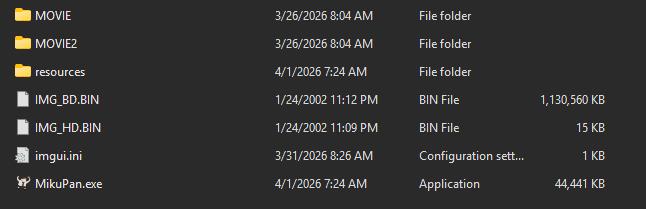
On first launch MikuPan converts the model and 2D textures of these files once
(a few seconds) into IMG_TEX.BIN next to its configuration; the game data
itself is not modified. Delete IMG_TEX.BIN to convert again.
Optionally, run sgdstitch on the two files to merge the small PS2-sized mesh batches of the 3D models: characters need about half the draw calls while drawing the same triangles.
Windows
You need either MinGW or Cygwin with gcc and CMake in order to build MikuPan. MSVC with CMake will ALSO work.
Linux
GCC, CMake, Make and Git are required to build MikuPan.
FFmpeg is built automatically with only MPEG-1/2 video decoding, MPEG program
stream demuxing, MPEG elementary-stream probing, local file access and colour conversion. Movie audio uses
MikuPan's own decoder; FFmpeg audio codecs and resampling are disabled.
cmake -S . -B build -DCMAKE_BUILD_TYPE=Release
cmake --build build -j
To reuse shader bytecode already generated or downloaded, configure with
-DMIKUPAN_COMPILE_SHADERS=OFF.
macOS
macOS is not officially supported: the maintainers have no Apple hardware to
actively test on, so it may break between releases. It has been verified to
build and run on Apple Silicon by contributors. Building needs the Xcode Command Line Tools
(xcode-select --install) plus cmake, ninja and git from Homebrew:
brew install cmake ninja git
cmake -B build -G Ninja -DCMAKE_BUILD_TYPE=Debug
cmake --build build
SDL3, FFmpeg and SDL_shadercross are fetched and compiled from source during the
build; the first configure/build is slow because shadercross includes
DirectXShaderCompiler. The renderer uses the Metal backend of SDL_GPU, so no
Vulkan/MoltenVK install is needed. The result is a bare build/MikuPan/MikuPan
executable rather than a .app bundle.
Android
Android builds use the NDK CMake toolchain and produce a debug-signed APK with
the MikuPan-apk target. Requirements: Android SDK 35 or newer, Android NDK
r28c or newer, Java JDK, Ninja, and a zip executable.
Android FFmpeg is consumed as prebuilt shared libraries. The preferred layout is
a merged libffmpeg.so for each ABI:
extern/ffmpeg/android/arm64-v8a/include
extern/ffmpeg/android/arm64-v8a/lib/libffmpeg.so
The library may also live directly in the ABI folder:
extern/ffmpeg/android/arm64-v8a/include
extern/ffmpeg/android/arm64-v8a/libffmpeg.so
The legacy local folder name is also supported:
extern/ffmpeg/include
extern/ffmpeg-android/arm64-v8a/libffmpeg.so
Split FFmpeg libraries are also supported:
extern/ffmpeg/android/arm64-v8a/include
extern/ffmpeg/android/arm64-v8a/lib/libavcodec.so
extern/ffmpeg/android/arm64-v8a/lib/libavformat.so
extern/ffmpeg/android/arm64-v8a/lib/libavutil.so
extern/ffmpeg/android/arm64-v8a/lib/libswscale.so
extern/ffmpeg/android/arm64-v8a/lib/libswresample.so
The default root is extern/ffmpeg/android. Set
MIKUPAN_ANDROID_FFMPEG_ROOT if your FFmpeg Android package lives somewhere
else. The root must contain ABI folders such as arm64-v8a.
If your headers are not under the ABI folder, set
MIKUPAN_ANDROID_FFMPEG_INCLUDE_DIR to the directory that contains
libavcodec/avcodec.h.
For a single merged library in a custom location, set
MIKUPAN_ANDROID_FFMPEG_LIBRARY directly to libffmpeg.so.
All native Android shared libraries must be compatible with 16 KB page-size
devices. MikuPan's Android build passes -Wl,-z,max-page-size=16384 for
libraries it links locally, including SDL3. Prebuilt FFmpeg .so files must be
built with the same linker flag before they are packaged into the APK.
Example arm64 build:
$env:ANDROID_HOME="C:\Users\willi\AppData\Local\Android\Sdk"
$env:ANDROID_NDK_HOME="$env:ANDROID_HOME\ndk\27.0.12077973"

$ninja="$env:ANDROID_HOME\cmake\3.22.1\bin\ninja.exe"
$bash="C:\msys64\usr\bin\bash.exe"
$make="C:\msys64\usr\bin\make.exe"
$zip="C:\msys64\usr\bin\zip.exe"

$buildTools="$env:ANDROID_HOME\build-tools\37.0.0"
$jbr="C:\Program Files\Android\Android Studio\jbr\bin"

cmake -S . -B cmake-build-android-arm64 -G Ninja `
   -DCMAKE_MAKE_PROGRAM="$ninja" `
   -DBASH_EXECUTABLE="$bash" `
   -DMAKE_EXECUTABLE="$make" `
   -DCMAKE_TOOLCHAIN_FILE="$env:ANDROID_NDK_HOME\build\cmake\android.toolchain.cmake" `
   -DSDL_ANDROID_HOME="$env:ANDROID_HOME" `
   -DANDROID_ABI=arm64-v8a `
   -DANDROID_PLATFORM=android-21 `
   -DANDROID_STL=c++_static `
   -DCMAKE_BUILD_TYPE=Release

cmake --build cmake-build-android-arm64 --target MikuPan-apk
The APK is written to cmake-build-android-arm64/MikuPan.apk. You can also use
install-MikuPan, start-MikuPan, and uninstall-MikuPan targets when adb is
available. Set -DMIKUPAN_ANDROID_APK=OFF if you only want the Android native
libmain.so build.
The packaging automatically bundles the NDK's libc++_shared.so into
lib/<abi>/ whenever it is needed — either because -DANDROID_STL=c++_shared
was used, or because a prebuilt library being packaged (such as FFmpeg) was
itself built against the shared C++ runtime. This prevents the app from crashing
on launch with "library libc++_shared.so not found". With c++_static and
prebuilt libraries that do not link the shared runtime, it is not bundled.
The APK packages MikuPan's own resources/ directory. The Fatal Frame data is
not packaged; after installing, copy the required files to the app data folder:
adb shell mkdir -p /sdcard/Android/data/io.github.mikompilation.mikupan/files
adb push IMG_HD.BIN /sdcard/Android/data/io.github.mikompilation.mikupan/files/IMG_HD.BIN
adb push IMG_BD.BIN /sdcard/Android/data/io.github.mikompilation.mikupan/files/IMG_BD.BIN
On Android 11 and newer, normal file managers usually cannot write to
/sdcard/Android/data/.... For a user-managed folder, put the files somewhere
like Documents/MikuPan, then use MikuPan's in-game folder picker to grant
access to that folder.
Smooth 2D sprites in renderer settings enables optional bilinear magnification for UI sprites. It defaults to on; use Save Configuration to retain changes. Effects and screen captures keep their original filtering.
PS2 save transfer
Open Settings → PS2 save transfer… in the overlay to transfer gameplay saves. Import original Japanese (SLPS-25074), US (SLUS-20388), or European (SLES-50821) saves into either PC build. The source region is detected from the save files. For export, choose the original game's region before the format. Cross-region exports to Europe default to English/PAL; imports into an EU build use its current language and display settings.
Import from an extracted save folder, an 8 MB memory card, or a PSU/MAX/XPS/SPS/CBS archive. Select saves and assign their destination slots. Export formats are:
- ECC (.ps2): a memory card with spare/ECC bytes, for PCSX2.
- Raw (.bin): an 8 MB card without ECC bytes, for OPL.
- PSU (.psu): an EMS archive, for uLaunchELF and PS2 save-transfer tools.
- MAX (.max): an Action Replay MAX archive.
- XPS/SPS (.xps/.sps): an X-Port V2 / SharkPort archive.
- CBS (.cbs): a CodeBreaker archive.
- Extracted folder: the game's save files, for tools that accept folders.
Archives contain this game's selected saves, not an entire memory card. Card exports create a blank card populated with the selected saves. Choosing a format opens its picker; confirming the destination exports immediately. Missing extensions are added automatically; existing output files/folders are refused. Imports replace only the selected destination slots. Load imported saves normally afterward, and close the game's save/load screen before transferring. Embedded photographs and battle records are retained. Saves with an active wandering soul must be saved again after it disappears before conversion. Cross-region conversion resets the control layout and preserves existing photographs, documents and earned camera upgrades; it does not recalculate regional bonus unlocks. Unsupported revisions, unfinished quest-item transfers, and positions blocked by a different regional map are refused with an explanation. For a card containing multiple Fatal Frame regions, import an extracted folder or archive for the desired region.
HD font textures
HD fonts are bundled for the US and EU versions. Enable Use HD Fonts when available in the Game settings, or HD Font Textures (if available) in ImGui. The original font is used when no matching replacement is available.
Replacement packs go in resources/fonts/<fingerprint>/ beside the executable.
Each fingerprint identifies the original font, so different languages and
modified fonts can use separate replacements.
To export the original atlases for a replacement pack:
cmake --build build --target MikuPanFontTool
./build/MikuPan/MikuPanFontTool --data path/to/game-data --region us --out font-originals
Use --region eu for the EU language sets, or --pk2 path/to/font.pk2 instead
of --data to export an individual font pack. The exporter leaves existing
output folders untouched.
Edit or upscale the exported PNGs, keeping their filenames, glyph layout and
transparency. Uniform 1×, 2×, 3× and 4× sizes are supported. Copy the resulting
fingerprint folder into resources/fonts/ and restart the game.
Special Thanks
Thank you to prinsep for making the logo!