
Jet Force Gemini · Recompiled (TK22-26)
Jet Force Gemini
OrigenNintendo 64
TecnologíaRecompilación Estática (C/C++ nativo)
Disponible paraWindows
Ver proyecto oficialSobre el proyecto
Jet Force Gemini Recomp: proyecto comunitario para Jet Force Gemini. Consulta las instrucciones oficiales y utiliza exclusivamente tus propios archivos del juego.
2 versiones de Jet Force Gemini
Estás viendo: Recompiled (TK22-26)
Información oficial del proyecto
Jet Force Gemini Recomp

A native PC recompilation of Jet Force Gemini for Windows x64. v1.4.0 includes a prebuilt game: extract the ZIP, import your supported North American ROM once, and click Play. No developer tools or compilation are required.
A complete, fully playable v1 release: play the campaign from start to finish. Original local multiplayer and optional content also work. See the playtesting notes below for the recorded campaign run and known issues for ongoing fixes.
Written with the help of AI: Codex GPT 6 Astra, with human direction, review, and playtesting.
Get started · Project dashboard · Changelog · Known issues · Report a problem · Contribute
Installation
Download the Windows x64 ZIP from the
latest stable release,
extract the entire ZIP, and open JFG-Launcher.exe. Use Select ROM… to import
your supported US .z64 ROM. Once import finishes, the original file can be
moved or deleted; the launcher uses its private local copy. Existing saves
stay in your game profile. Game > Select ROM… remains available afterward.
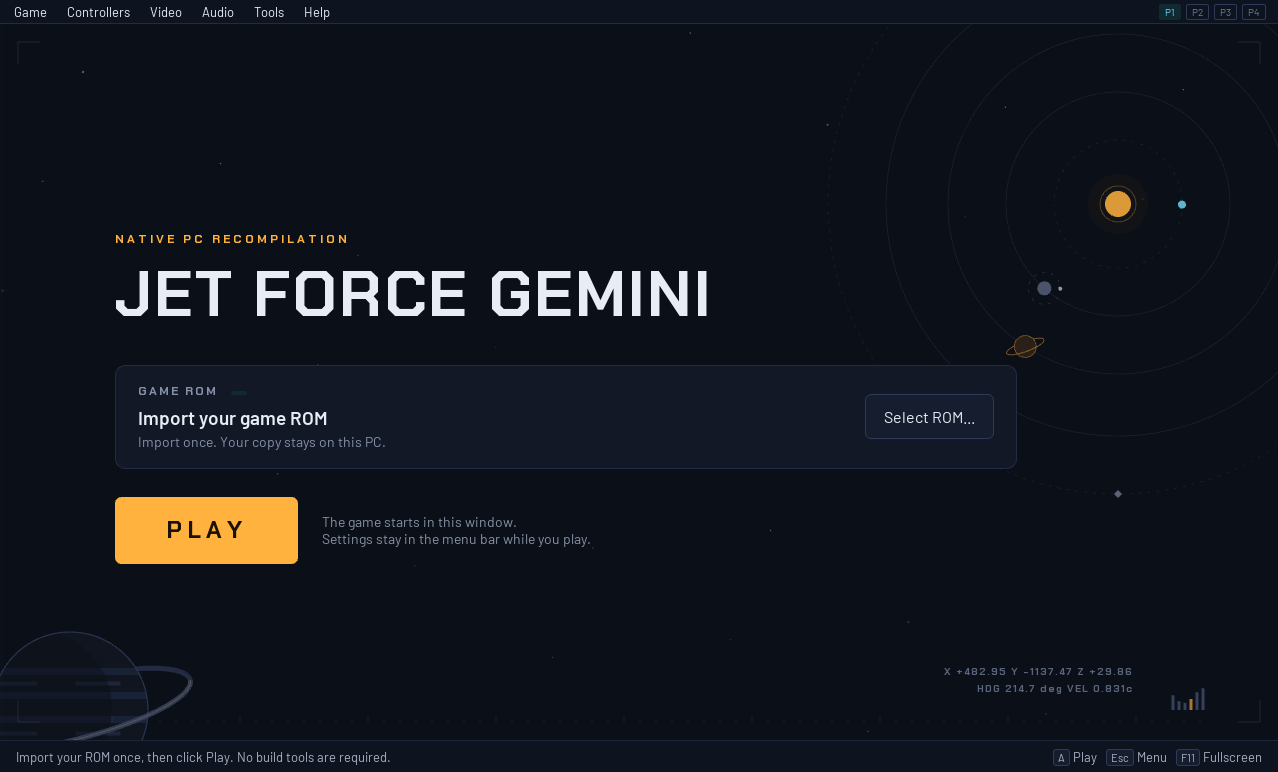
The startup screen before ROM import. Select your ROM once, then click Play; the ROM card disappears after a successful import.
The installation approach is inspired by the Zelda64Recomp team and Zelda64Recomp's plug-and-play distribution model. Credit to that project for this setup experience; this is an independent implementation, with no endorsement or affiliation implied.
We do not ship game assets or ROMs. The release includes the compiled game program and runtime libraries. Textures, models, audio, and other game data are read from your locally imported ROM, which is never uploaded. Original game content remains the property of its respective owners.
The v1.4.0 update adds native cutscene skipping, Modern controls for all four players, Floyd flight controls, and fixes for camera resets, boss aiming, rain, weapon reticles and paused inventory grants. It also improves Quarry's day/night fog transitions, cinematic camera cuts and helper visibility, and launcher feedback. Adjustable motion blur, live fog strength and portable storage remain available. See the changelog and final-review record.
For a portable installation, open Game > Settings > Change directory and choose a folder inside the game folder. The launcher copies existing saves, settings and imported ROM data, preserving files already at the destination, then restarts. Move the complete game folder, including your selected data folder and storage-location.txt, to keep that installation self-contained.
What works
- The entire campaign, original local multiplayer, and optional content.
- Native rendering and audio, with saving and loading.
- A ready-to-play Windows x64 bundle with one-time ROM import.
- Configurable controllers, keyboard and mouse, and four original controller ports.
- Optional live map and live inventory tracking in a custom companion interface.
- A unified launcher with settings available while you play.
A major quality-of-life upgrade: modern dual-stick and mouse controls
The controller and keyboard/mouse overhaul brings a much more comfortable PC play experience. Modern Controls adds action-based bindings, mouse look and dual-stick control, so movement, camera, aiming and weapons can be set up around the way you play.
- Mouse and keyboard aiming is supported: move the mouse to look around and aim, hold right-click to aim, and left-click to shoot with the default bindings. WASD handles movement and strafing; the mouse wheel switches weapons. Keys, five mouse buttons and both wheel directions can be rebound.
- Modern dual-stick controls are supported: move and strafe with the left stick; look around and aim with the right stick. Xbox/XInput and compatible SDL gamepads have device-aware layouts, including Xbox and PlayStation button symbols.
- Aim your way: separate camera, aiming and sniper-scope sensitivity, X/Y inversion, controller deadzones and response curves. Move and strafe while aiming, and bind sniper magnification separately.
- A visual controls editor: see your bindings on controller diagrams or a keyboard/mouse layout; select an input, assign an action, and keep settings in your profile. Reconnecting a device preserves its saved bindings.
- Mouse menu navigation: point and click on supported title, save-selection and main pause-menu targets. Keyboard/controller navigation covers the other pages.
- Keep the original feel when you want it: switch back to Controller Mapping with Normal/Expert presets. Both layouts retain their bindings.
Open Controllers, choose P1-P4, assign a device, and select Modern Controls. Each player keeps independent bindings and camera settings; Original mapping remains available for every port. XInput rumble is available; native SDL/DualSense rumble, gyro and adaptive triggers remain future work.
v1.4.0 controls: native boss aiming limits, crouch/prone side rolls, optional Roll Left/Right bindings, and camera retention through ledges, landings, swimming and focus changes. Modern gameplay remains experimental while camera, pointer coverage and physical-device feel are refined. See the controls guide and validation notes.
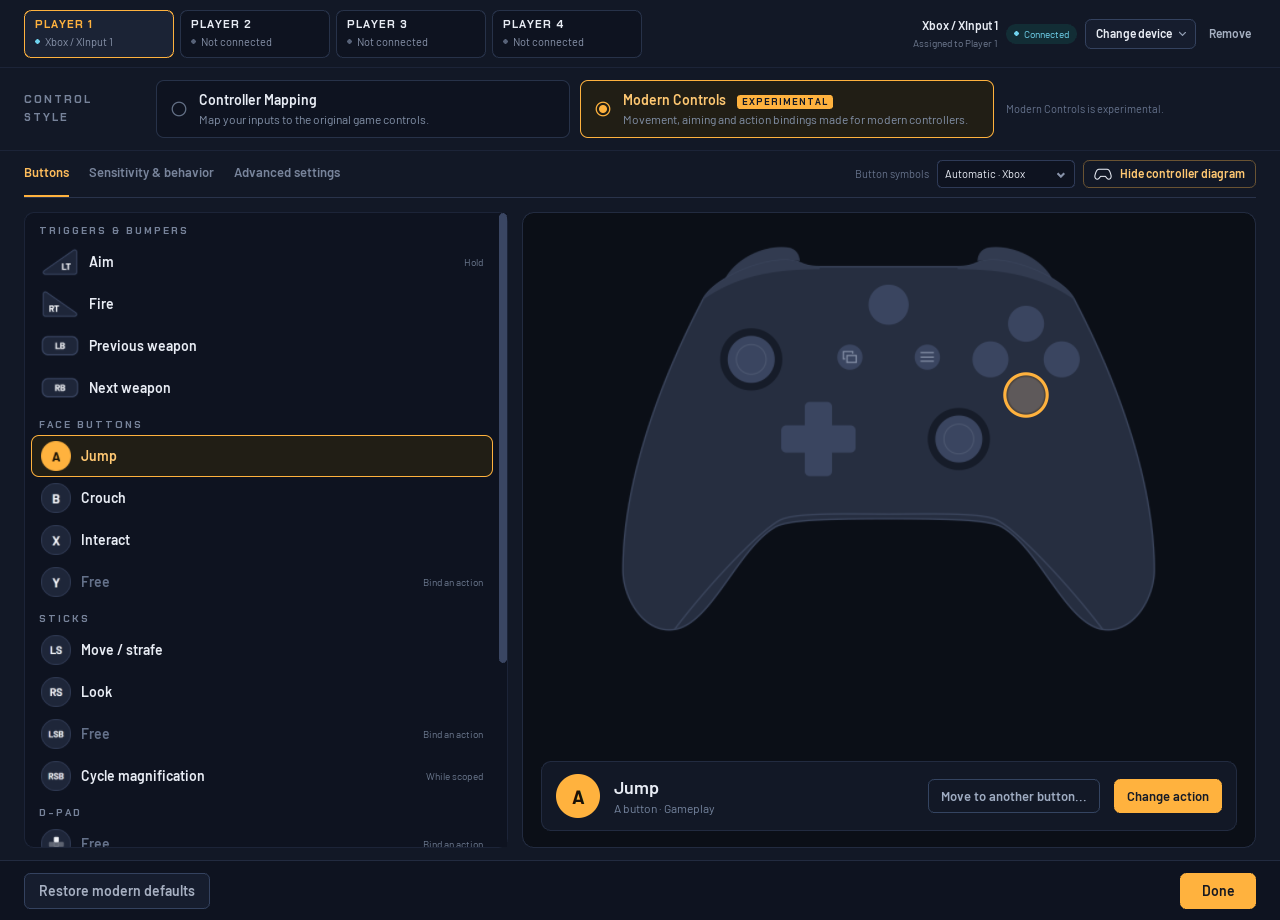
Xbox controller diagram: select a button to see its action and change its binding.
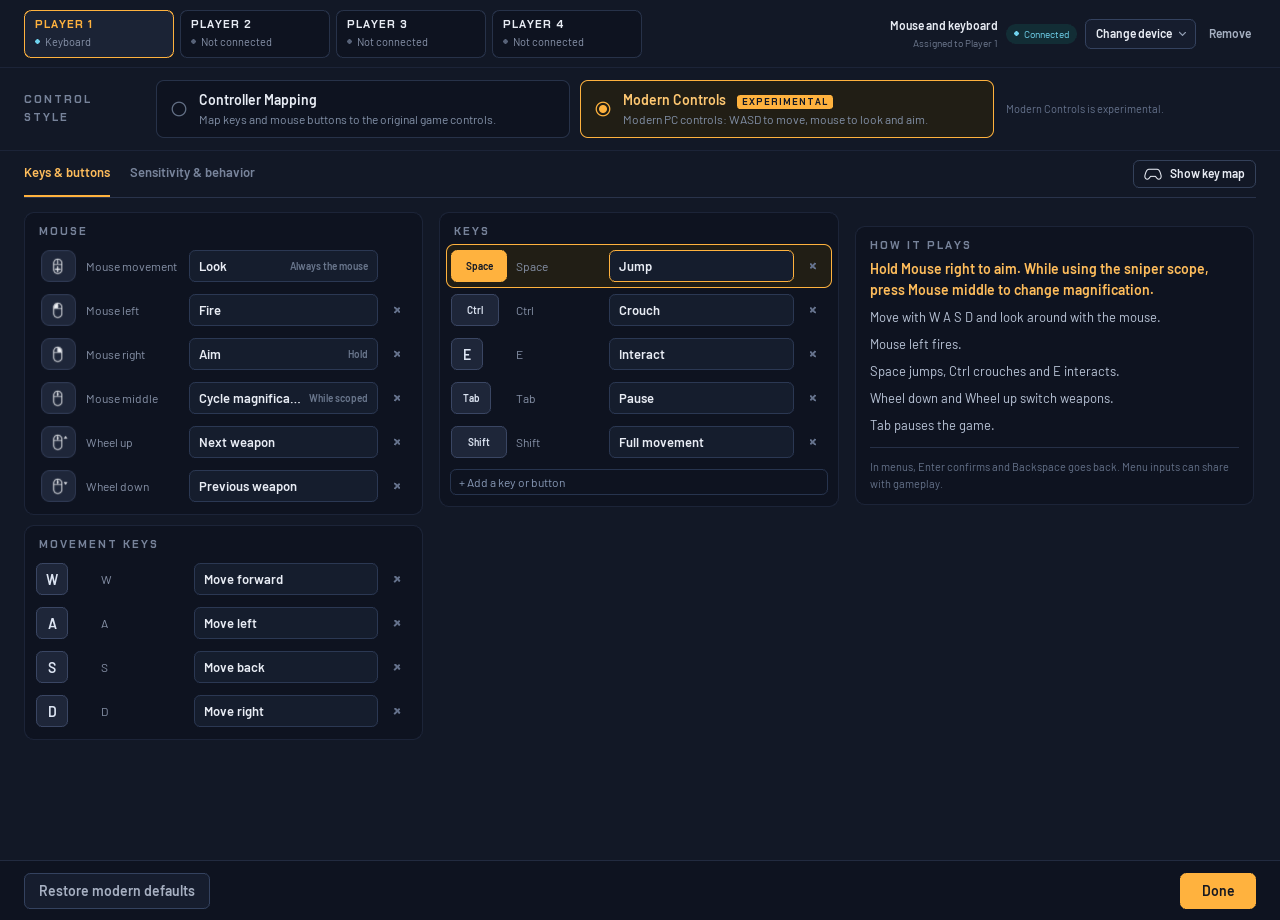
Keyboard and mouse: the Keys & buttons view keeps mouse, movement and action bindings together.
Floyd
Modern controls now route Floyd's fire and flight inputs correctly. In missions, mouse movement steers; W supplies thrust, S brakes, and A/D strafe with default bindings. Left-click fires. For controllers, Advanced > Invert Floyd flight steering defaults to the original aircraft direction and is independent of normal look inversion. Co-op Floyd joins through the assigned player's Start or Pause action. Native mission entry requirements, including Mizar tokens, apply.
Cutscene skipping
During a supported cinematic, press A, B or Start to reveal the in-game prompt, then hold A for one second to skip. The native blue-A prompt fills a white progress ring; releasing early cancels the hold. Modern bindings use the actions mapped to those native buttons.
Reviewed sequences complete their required progression and transitions. Unsupported or context-dependent scripts retain normal playback. The private scene selector is a development review tool and is not part of the release.
High-refresh rendering
Open Video > Video settings for VSync, a Custom FPS target or Unlimited. Rendering interpolates between game updates without speeding up gameplay. The Rendering tab includes Off / Reduced / Original motion blur (Reduced by default). Enhancements includes 0–100% fog strength, which applies live. Frame-rate changes apply the next time the game starts. High-refresh presentation and Modern Controls remain opt-in; see qualification and limits.
Launcher update notifications
The current launcher source checks for a newer stable release in the background at startup and shows Update available on the home screen. Use Help > Check for updates… whenever you want to check manually. The result shows your installed version and the latest stable release, with a button to open its download page. Offline checks never prevent playing.
The checker reads public GitHub release metadata without sending your ROM, saves or settings. Downloads and installation remain your choice.
Playtesting notes
The campaign verification run used optional infinite-health and enemy auto-kill testing mods, plus a testing save with all Tribals unlocked. Original-console accuracy remains under validation, and playtesting continues across more PCs, controllers, and gameplay. See the runtime fix log and project status for details.
Live map and inventory
Optional companion tools provide a custom interface for exploring the game and tracking your progress:
- Live map: see your position, room exits, items, NPCs, enemies, Tribals, and doors. Select an object to inspect its requirements and rewards; zoom, pan, or fit the map to the current room.
- Live inventory: track weapons, keys, quest items, and shared ship parts. View Juno, Vela, or Lupus, or follow the active character automatically.
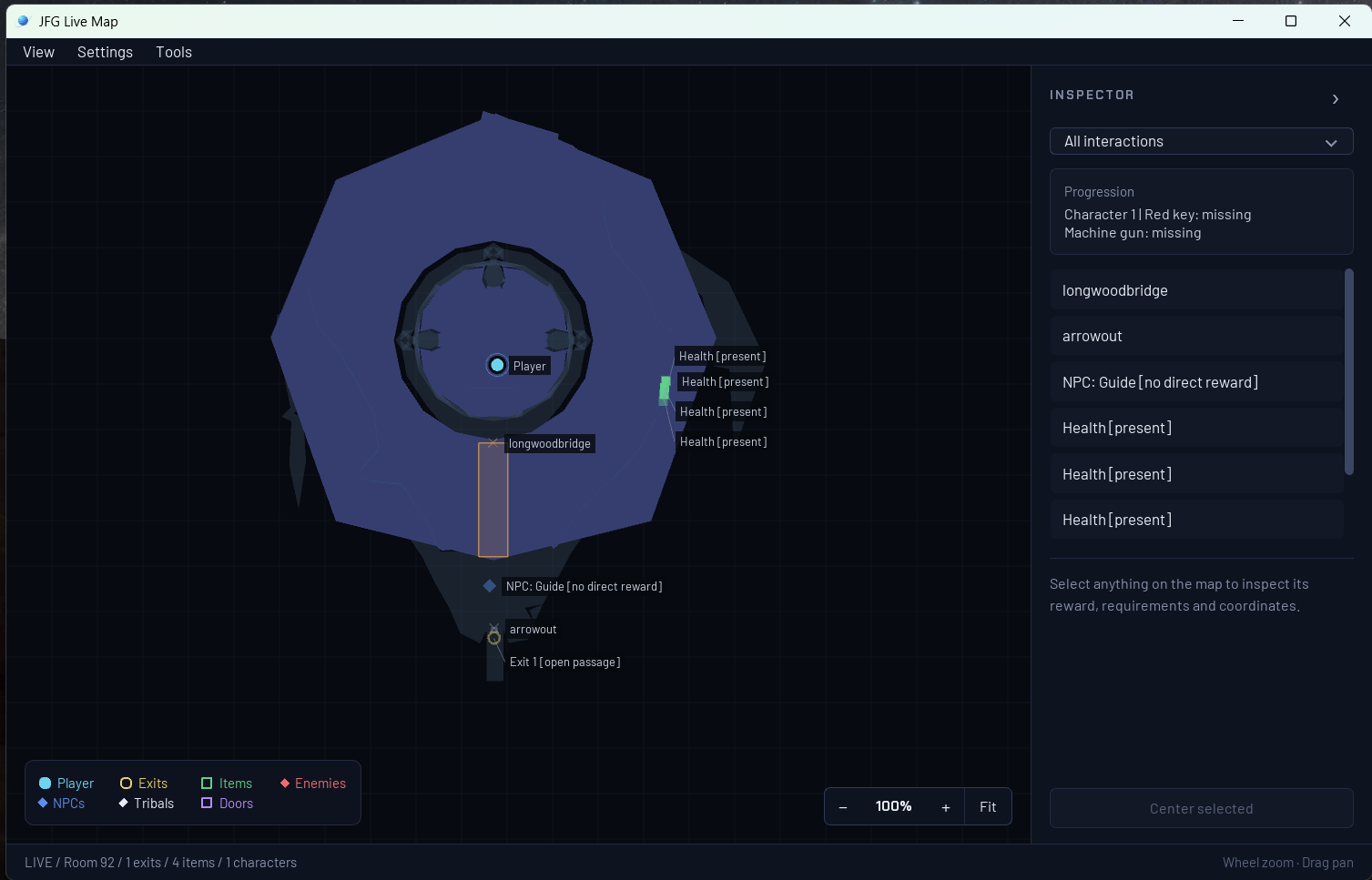
Live map in the custom companion interface.
The inventory's game icons are extracted locally from each player's own ROM; those artwork files are not bundled with the project or launcher. The interface is custom project code. Game content remains the property of its respective owners.
Open Live map > Settings > Mods for exit warps, infinite health, instant enemy defeats, Give weapons, and Unlock Floyd. Weapon grants apply while the Mods window is open and show Given only after runtime confirmation. They affect the current character and refill ammunition once. Unlocking Floyd takes effect on entering another room. Save normally to retain inventory/unlocks.
See the launcher and live tools guide for details.
Getting started
Start with the getting started guide for requirements,
downloads, and setup. You need a supported US big-endian .z64 ROM;
the project does not provide ROMs or game assets.
The released bundle is ready to play after ROM import. Developers can still build from source; the guide explains both paths. Older v1.0 setup issues are documented in known issues.
Help by playtesting
Play normally and report problems: crashes, freezes, progression blockers, incorrect controls, graphics or audio, and save/load failures. Check known issues first and attach the launcher's support ZIP when available. Successful sessions do not need a report.
See playtesting and reporting. If you want to contribute code, CONTRIBUTING.md explains the pull request workflow.
Thank you to everyone sharing bug reports, requests and playtest results. Your feedback and testing have made this project better. See community credits.
Compatibility still under review
Steam Deck/Proton startup has a Windows-tested launcher fallback, but no Steam Deck result is available yet. Intermittent mouse input (#32), accumulating audio delay (#35), and reporter-specific Ally X performance still need affected-user evidence or retesting. These are not claimed as resolved by v1.4.0. See known issues.
Future additions
The complete v1 game is here. Future work focuses on additional PC enhancements:
- Ultrawide support: wider aspect ratios with correct gameplay presentation, menus, and HUD layout.
- Broader high-refresh qualification: refine pacing and interpolation across additional scenes, hardware and output rates.
- Mod support: documented interfaces and tools for community modifications.
- Controller extras: native SDL/DualSense rumble, gyro aiming and adaptive triggers.
- Further polish: performance fixes, camera refinement, remaining mouse-menu targets, and better crash and freeze diagnostics.
Compatibility and stability come first. These are development goals; release dates have not been set.
Build and development status
- Build status and CI runs
- Project status
- Build the playable game from your ROM
- Build and test the project source
- Documentation index and project roadmap
CI checks source, tools, and tests without a ROM. A passing build does not establish that every level or gameplay feature works.
License
Original project code and documentation use the MIT License. Dependencies retain their third-party notices. Jet Force Gemini game content and trademarks belong to their respective owners.