MissyHUD (PSP plugin)
PlayStation Portable
OrigenUnknown
TecnologíaHerramienta de Desarrollo / Utilidad de Compilación
Disponible paraWindows, Linux
Ver proyecto oficialSobre el proyecto
Herramienta y utilidad indexada en PortsNative para configuración, descompilación o soporte técnico en plataformas modernas.
Información oficial del proyecto
missyhud.prx
Long time ago, when I was a little kid, I used to play a lot of games on my PSP. In my time at the university I abandoned it in my office drawer. Years later, as part of the Glorious PC Gaming Master Race, a HUD is something always necessary for me. Not long ago, my PSP was reborn from the ashes, and I haven't found a plugin that meets my metric needs. Here it is.
missyhud.prx is a plugin to display a simple HUD.
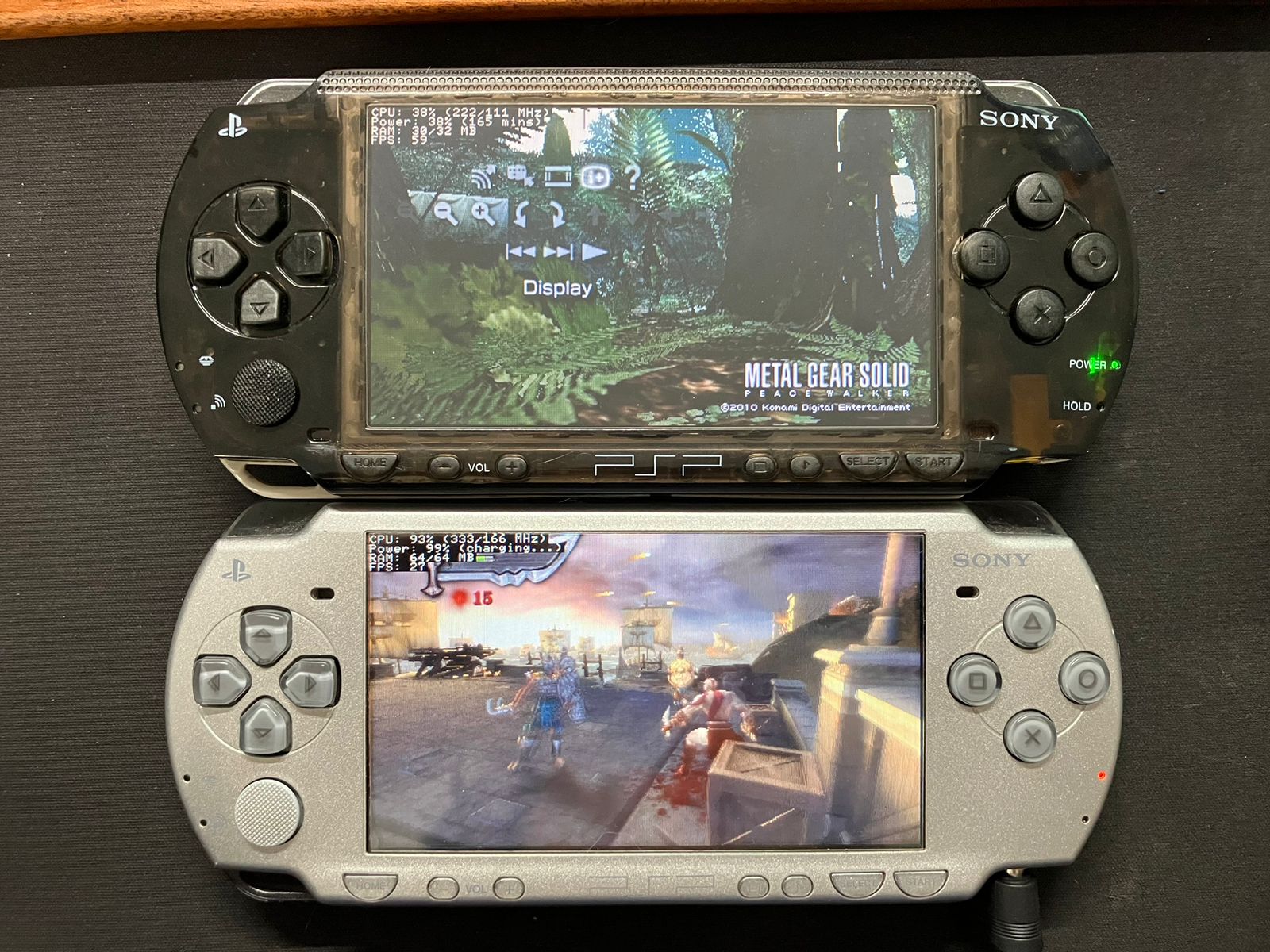
Features
[!NOTE] Unmarked are W.I.P features.
- Stupidly simple black UI (yes, the best one)
- Cycle position (START + Analog left/right)
- UI customization (pinned position, per-indicator toggles)
- Color customization
- Compatible with VSH, GAME and POPS
- RAM usage indicator
- Power percentage indicator
- Duration minutes
- Charging detection
- No battery detection
- CPU indicators
- CPU Usage
- CPU clock speed
- BUS clock speed
- FPS indicator
- Exact count from buffer flips
- Estimate from GE display lists for games that never flip (i.e. GTA: LCS)
- Support for POPS (PSX eboots)
- Key combination to turn on and off (Hold L + R + Start for 1 second)
Installation
- Download the latest release
missyhud.prxfrom Assets - Copy
missyhud.prxtoms0:/seplugins/for PSP 1000, 2000, 3000 and Streetef0:/seplugins/for PSP Go
- Add the plugin to your VSH, GAME and/or POPS environments
SEPLUGINS.TXTin ARK systems- PSP 1000, 2000, 3000 and Street
game, ms0:/seplugins/missyhud.prx, on vsh, ms0:/seplugins/missyhud.prx, on pops, ms0:/seplugins/missyhud.prx, on- PSP Go
game, ef0:/seplugins/missyhud.prx, on vsh, ef0:/seplugins/missyhud.prx, on pops, ef0:/seplugins/missyhud.prx, ongame.txt,vsh.txtand/orpops.txtin Non-ARK systems- PSP 1000, 2000, 3000 and Street
ms0:/seplugins/missyhud.prx 1- PSP Go
ef0:/seplugins/missyhud.prx 1
- Restart your device and enjoy your HUD!
Configuration
Everything works without a config file. To change something, copy
missyhud.config.sample to
ms0:/seplugins/missyhud.config, or ef0:/seplugins/ on a PSP Go, and edit it.
FG_COLOR=0xFFFFFF
BG_COLOR=0x000000
CPU_INDICATORS=1
POWER_INDICATORS=1
RAM_INDICATORS=1
FPS_INDICATOR=1
#POS_X=0
#POS_Y=0
Colours are 0xRRGGBB. Setting an indicator to 0 hides it and the rows below
close up. POS_X and POS_Y are character cells, 7 pixels across and 8 down;
setting either pins the HUD there and turns off cycling with START + Analog.
Every line is optional, and a line that cannot be read is skipped rather than discarding the rest of the file. The config is read about a second after boot, because the memory stick is not mounted before that.
Usage
Once the plugin is activated, the HUD will automatically appear in the left corner of the screen. To hide it, hold L + R + Start for 1 second. To show it again, repeat the same.
The FPS indicator says where its number came from:
FPS: 60, counted from buffer flips, which is one call per frameFPS: 30 (ge), estimated from GE display list submissionsFPS: n/a (find), the system does not export what the hooks need
Known issues and doubts
- According to the PSPSDK documentation,
sceKernelTotalFreeMemSizereturns a different value thanpspSdkTotalFreeUserMemSize - Some games never change the scanout address, so there are no buffer flips to count. GTA: LCS is one of them. The FPS then comes from counting GE display list submissions and marks itself
(ge). Most engines submit one list per frame, so the two usually agree, but a game that renders in several passes per frame reads high. Follow-up on this issue is ongoing. - In those same games the HUD is drawn into the buffer already on screen rather than the one about to be flipped, so it can flicker.
Why missy?
Missy is the name of my cat.