PS Vita USB Audio MIDI (plugin)
PlayStation Vita
OrigenUnknown
TecnologíaHerramienta de Desarrollo / Utilidad de Compilación
Disponible paraWindows, Linux
Ver proyecto oficialSobre el proyecto
PlayStation Vita, también conocida como PS Vita, es la tercera y última videoconsola portátil creada por Sony Computer Entertainment, es la sucesora de PlayStation Portable y esta es la primera consola de Sony en ser diseñada por Mark Cerny en reemplazo de Ken Kutaragi, además es parte de la familia PlayStation de videoconsolas. Fue presentada el 27 de enero de 2011 y puesta a la venta el día 17 de diciembre del mismo año en Japón. La llegada a los países de Europa y América fue el 22 de febrero de 2012. Inicialmente, estaba destinada a competir directamente con la consola de Nintendo 3DS.
Información oficial del proyecto
psvita-usb-audio-midi
An experimental taiHEN kernel plugin that exposes a PlayStation Vita as a class-compliant USB MIDI and USB Audio device.
Download the latest psvita_usb_audio_midi.skprx from GitHub
Releases.
[!CAUTION] This is experimental kernel software that requires manual installation. Read the installation and safety sections before using it. Installation and use are entirely at your own risk.
The USB device provides:
- MIDI clock, Start, Continue, and Stop in both directions
- ten-channel, 48 kHz S16 audio from the Vita to the host
- stereo, 48 kHz S16 audio from the host to the Vita
The audio channels sent by the Vita are master L/R followed by eight track channels. The host sees the device as PS Vita USB.
The plugin does not replace MTP at boot. It registers its USB driver and waits for an application to acquire a process-owned lease. Releasing the lease, closing the application, or killing its process restores the USB state captured before takeover.
Built for DS-8
This plugin was created for DS-8 Drumstream, the PS Vita drum synth, sampler, and performance groovebox from Intermynd Instruments. DS-8 uses it for MIDI clock and transport, ten-channel audio capture, and stereo audio playback over one USB connection.
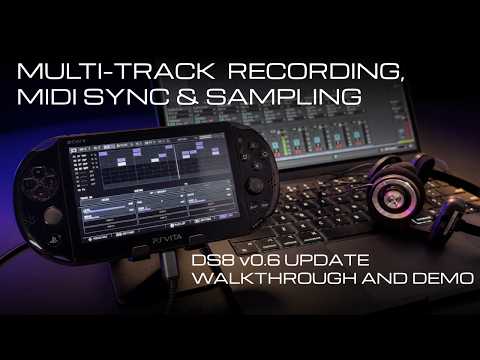
Learn more about DS-8 or download it from Itch.io.
DS-8 compatibility
Use the plugin release that matches your DS-8 version:
| Plugin version | DS-8 version | Notes |
|---|---|---|
v0.2 | v0.7.x | Current release |
v0.1.1 | v0.6.x | Recommended for DS-8 0.6 |
v0.1 | Early v0.6.x releases | Superseded by v0.1.1 |
Plugin v0.2 uses a newer API and is not compatible with DS-8 v0.6.x.
Links
Motivation
The PS Vita still has a lot to offer music software. It is portable, self-contained, and combines physical controls, touch input, a good display, and capable audio hardware in one device. Software such as DS-8 can give it a new life as a focused instrument rather than only a handheld console.
We built this plugin because DS-8 needed dependable USB audio and MIDI. Releasing it under the MIT License is our donation to the PS Vita community: other developers should not have to solve the USB device stack again just to build an instrument, effect, recorder, or controller.
We encourage other app makers to use it and build more audio software for the Vita. If this plugin helps your project, please link back to psvita-usb-audio-midi or credit the plugin and Intermynd Instruments.
Build
VitaSDK and CMake 3.16 or newer are required.
make test
make test-asan
make vita
If VitaSDK is not installed at $HOME/vitasdk, pass its location explicitly:
make vita VITASDK=/path/to/vitasdk
The Vita build writes these files to build/vita/:
psvita_usb_audio_midi.skprx— kernel pluginpsvita_usb_audio_midi_client.suprx— user-mode API bridgeaudio-midi-scope.vpk— optional diagnostic application- client and kernel stub libraries for application builds
Install
Installation requires a homebrew-enabled Vita with taiHEN and
VitaShell. If you are new to
Vita homebrew, start with the Vita Hacks Guide.
Its VitaShell transfer walkthrough
shows how to copy files by USB or FTP and install a VPK. The
StorageMgr guide also shows a typical
manual kernel-plugin and config.txt workflow. Use those pages for the general
VitaShell process, then follow the plugin-specific paths below.
-
Copy
psvita_usb_audio_midi.skprxtour0:tai/. -
Add the following line beneath the existing
*KERNELsection inur0:tai/config.txt:ur0:tai/psvita_usb_audio_midi.skprx -
Reboot the Vita.
Applications normally bundle psvita_usb_audio_midi_client.suprx themselves. The
optional audio-midi-scope.vpk can be installed to check acquisition, MIDI traffic,
audio streaming, and restoration before integrating the API into another app.
To install it manually, copy the VPK to ux0:data/, select it in VitaShell, and
press X to confirm installation.
To uninstall, remove the plugin line from config.txt and reboot.
Use from another application
The kernel plugin is installed once by the user. Applications bundle the
user-mode client bridge and use the public API in
include/psvita_usb_audio_midi.h. Do not edit
config.txt or install the kernel plugin silently from an application.
For a VitaSDK CMake project:
- Add
include/to the application's include path. - Compile
src/client/loader.cinto the application. - Link
libpsvita_usb_audio_midi_client_stub_weak.a. - Package
psvita_usb_audio_midi_client.suprxin the VPK aspsvita_usb_audio_midi_client.suprx.
The weak stub library lets the application start when the bridge or kernel
plugin is absent. Do not call any other plugin API after
psvitaUsbAudioMidiClientLoad() fails.
set(PSVITA_USB_AUDIO_MIDI_DIR "/path/to/psvita-usb-audio-midi")
set(PSVITA_USB_AUDIO_MIDI_BUILD
    "${PSVITA_USB_AUDIO_MIDI_DIR}/build/vita")

target_sources(my_app PRIVATE
    "${PSVITA_USB_AUDIO_MIDI_DIR}/src/client/loader.c")
target_include_directories(my_app PRIVATE
    "${PSVITA_USB_AUDIO_MIDI_DIR}/include")
target_link_directories(my_app PRIVATE
    "${PSVITA_USB_AUDIO_MIDI_BUILD}")
target_link_libraries(my_app PRIVATE
    psvita_usb_audio_midi_client_stub_weak)

vita_create_vpk(my_app.vpk MYAPP0001 my_app.self
    FILE "${PSVITA_USB_AUDIO_MIDI_BUILD}/psvita_usb_audio_midi_client.suprx"
         psvita_usb_audio_midi_client.suprx)
Load the bridge, verify that the API matches, then acquire the shared MIDI/audio lease:
#include "psvita_usb_audio_midi.h"

int usb_start(void)
{
    int result = psvitaUsbAudioMidiClientLoad(
        "app0:psvita_usb_audio_midi_client.suprx");
    if (result < 0)
        return result;
    if (psvitaUsbAudioMidiGetApiVersion() !=
        (int)PSVITA_USB_AUDIO_MIDI_API_VERSION)
        return PSVITA_USB_AUDIO_MIDI_ERROR_VERSION;

    return psvitaUsbAudioMidiAcquire(PSVITA_USB_AUDIO_MIDI_ACQUIRE_REPLACE_MTP);
}

int usb_stop(void)
{
    psvitaUsbAudioSetOutputEnabled(0);
    psvitaUsbAudioSetInputEnabled(0);
    return psvitaUsbAudioMidiRelease();
}
Only one process can own the lease. Acquisition temporarily replaces MTP, so
show PSVITA_USB_AUDIO_MIDI_ERROR_BUSY,
PSVITA_USB_AUDIO_MIDI_ERROR_USB_STATE, and
PSVITA_USB_AUDIO_MIDI_ERROR_CONFLICT to the user rather than retrying
indefinitely. Always release explicitly when leaving USB mode.
MIDI clients use psvitaUsbMidiReadWait() and psvitaUsbMidiWrite(). Audio
clients independently enable Vita-to-host output with
psvitaUsbAudioSetOutputEnabled(1) and host-to-Vita input with
psvitaUsbAudioSetInputEnabled(1). Output clients send exactly ten channels of
48 kHz S16 audio with psvitaUsbAudioWriteMulti(); input clients receive stereo
host audio with psvitaUsbAudioInputRead(). The older
psvitaUsbAudioSetEnabled() call remains as a compatibility shortcut that
changes both directions. See the protocol notes and
audio notes for event formats, channel order, buffering, and
status records.
Performance expectations
USB audio latency and streaming performance are decent, but not exceptional. More testing across Vita models, computers, operating systems, and DAWs is needed, and there is room for further improvement. DS-8 was built primarily to record its master and individual track outputs into a DAW; low-latency, real-time USB audio monitoring was not the main priority.
USB MIDI clock and transport have been stable in our testing, with little observed jitter. Results may still vary with the host, application, USB setup, and system load. Measurements and detailed hardware reports are welcome.
Safety and compatibility
This is kernel code and remains experimental. It does not write to
config.txt, flash, idstorage, or partitions, and it does not use firmware
offsets or hooks. USB takeover happens only after an application explicitly
requests it.
Installing and using any kernel plugin carries risk. We test this plugin on our own hardware and believe it is safe when the documented procedure is followed correctly. Even so, Intermynd Instruments and the contributors accept no responsibility for data loss, instability, software or hardware damage, an unbootable or bricked Vita, or any other problem resulting from its installation or use. You use it entirely at your own risk.
Do not run it alongside vita-udcd-uvc, vitastick, or another plugin or
application that owns the Vita USB device controller. Turn off VitaShell USB
mode before acquiring the device.
If a plugin conflict prevents a normal boot, hold L while booting to skip
plugin loading, remove the line from config.txt, and reboot.
The current USB descriptor uses Sony VID 0x054c with experimental PID
0x1338. That PID is not assigned to this project. Vita 1000 and 2000 are the
initial targets; PSTV support is provisional.
See the protocol notes, audio implementation notes, and hardware test checklist for integration and release details.
Issues, discussions, and contributions
Please use GitHub Issues to report problems. Include the Vita model and firmware, host operating system, DAW or application, plugin build, reproduction steps, and any relevant logs or measurements.
Ideas, test results, and focused contributions are welcome, but this project has a deliberately narrow scope. Before starting work or opening a pull request, please discuss the change in an issue or on the Intermynd Instruments Discord and wait for agreement. Large, unsolicited, out-of-scope, or unnecessary refactoring pull requests may be closed without review, and prior discussion does not guarantee that a contribution will be accepted. Read CONTRIBUTING.md before preparing a change. Participation is covered by the project Code of Conduct.
Do not disclose suspected vulnerabilities in a public issue. Follow the security policy for private reporting. General help and project discussion routes are listed in SUPPORT.md.
Acknowledgements
This project was developed with reference to:
- xerpi/vita-udcd-uvc, for practical SceUdcd driver and transfer patterns
- xerpi/vitastick, for the Vita USB device plugin/application model
- VitaSDK/vita-headers, especially the SceUdcd API and descriptor definitions
Thanks to the authors and the wider Vita homebrew community for documenting this hardware. The two xerpi projects are credited as design references; their source is not included here.
AI-assisted coding tools were used during development and review. All changes were reviewed and tested by the project maintainer.
License
MIT. See LICENSE and THIRD_PARTY_NOTICES.md.