
Doom / Doom II · PrBoom-Plus RT
Doom / Doom II
OrigenMS-DOS
TecnologíaPort Nativo C/C++ (Reimplementación de Motor)
Disponible paraLinux
Ver proyecto oficialSobre el proyecto
Doom II: Hell on Earth es un videojuego de disparos en primera persona desarrollado por ID Software. Fue lanzado para MS-DOS en 1994 y Macintosh 1995. A diferencia del Doom original, que inicialmente solo estaba disponible a través de shareware y pedidos por correo, Doom II se vendió en las tiendas.
Información oficial del proyecto
PrBoom: Ray Traced
Real-time path tracing support for the PrBoom sourceport.
This repository contains detailed build instructions and the source code changes necessary to make this source port build and run on Linux, with AMD cards, on recent Mesa versions (newer than 23.0.4) without crashes.
For modding instructions check the original README file in the prboom2 directory. The license (GPLv2) is also in that directory, as well as at the bottom of this README.
Why?
I've always wanted to try out prboom-plus-rt (as well as its sister project vkquake-rt), but the scarce resources about building it from source and the fact that it requires an older version of Mesa to avoid amdgpu system crashes sort of gatekept me from it. There is an issue on the main repository about getting it to work on Linux, a fork made by the author of the issue and a gist with a Bash script for building it from source, all of which have useful information, but I never got it to work. So I took it upon myself to do something about it.
Hilariously enough, the main roadblock which was the amdgpu system crash was fixed with a few single-line edits to some files in RayTracedGL1. The rest was pretty straighforward. I haven't noticed any game-breaking issues so I decided to make my changes available to the public.
Why not open a PR?
- The main repository is pretty much dead (last commit to
masterwas in April 2022). There is a more recenttransitionbranch with commits as recent as August 2023, but IDK if it's complete and I wouldn't know how to get that working on Linux w/ Mesa. My knowledge of the code in themasterbranch is already limited as is. - The original developer (sultim-t) hasn't been active on Github for a while, as he's now working at NVIDIA, so he wouldn't have the time to review and merge any PRs, especially for unmaintained projects like this one.
Installation
Download the latest release tarball from the releases page and extract it.
If you want to just run it as is, either copy a valid DOOM.WAD file to the extracted directory or use -iwad to point to wherever your DOOM.WAD file is located.
If you want to install it system-wide, copy your DOOM.WAD file to the extracted directory, then run sudo ./install.sh from the extracted directory.
It installs to /usr by default, and the binary as well as the launcher script will be in /usr/bin. After installing, run prboom-rt-launcher to start the game, or run it from your start menu. You need fzf for the launcher script to work.
Build
See BUILDING.md.
A couple of notes
Doom II
prboom-plus-rt was made with Doom I in mind, therefore you need a few modifications to the ovrd/ folder to make it work with Doom II.
This is meant to be done before you install the game system-wide, since the modifications apply retroactively to Doom I and change the way it looks with ray tracing, which isn't ideal.
The launcher uses separate ovrd folders per game, derived from the IWAD filename. You'll need both doom/ovrd/ and doom2/ovrd/.
-
Set up the Doom I ovrd first by moving the base
ovrd/folder into adoom/subdirectory on the unpacked tarball directory:mkdir doom mv ovrd doom/ovrd -
Download the Doom II RT lights addon from ModDB.
-
Create
doom2/ovrd/, then copy your baseovrd/folder into it and merge the addon's files:mkdir doom2 cp -r doom/ovrd doom2/ovrd # then extract and merge the addon's ovrd/ into doom2/ovrd/ # to make sure there are no conflicts, delete the doom1 map_metainfo file rm doom2/ovrd/map_metainfo_doom1.txt -
Copy DOOM.WAD and DOOM2.WAD to the unpacked tarball directory.
-
Run the
install.shscript and accept the prompt to copy both folders to the install directory (in/usr/share/prboom-rt/). If you accepted the prompt to copy the IWAD files as well it will place both IWAD files in the same directory. If not, you can always copy them manually.
The launcher script (prboom-rt-launcher) will detect which IWAD you selected and automatically use the matching game folder and its map_metainfo file.
It should look like this:
/usr/share/prboom-rt/
├── doom/
│   └── ovrd/                # Doom I (base ovrd)
├── doom2/
│   └── ovrd/                # Doom II (base ovrd + addon merged)
├── DOOM.WAD
├── DOOM2.WAD
└── ...
NVIDIA/AMD cards with ray tracing support
If your GPU is an AMD RDNA2/Navi 2x/"Big Navi" (RX 6000) or newer, it should Just Work™, assuming you are using RADV. I don't know about AMDVLK. Any information on this would be appreciated.
If your GPU is an NVIDIA RTX card and you're using the proprietary driver (you should) on version 510.60.02 or newer, it should Just Work™ as well. The open-source NVK driver does not support ray tracing at the moment.
AMD cards without ray tracing (RX 5000 and below)
If your GPU is pre-Polaris GCN (HD 7000 through R9 Fury), Polaris/GCN4 (RX 400/500), Vega/GCN5 (RX Vega 56/64/Radeon VII etc) or RDNA1/Navi 1x (RX 5000) and your driver is RADV (Mesa), you can use the RADV_EXPERIMENTAL=emulate_rt environment variable to force emulated ray tracing.
I have done all my testing on an RX 5500 XT 8GB and can confirm that it works. I'm not 100% sure it works on anything older than Polaris but if it does it would probably run like shit (with the possible exception of the R9 Fury). I personally wouldn't recommend doing this on anything weaker than an RX 580 or an RX 5700 XT.
If you opt for the system-wide install as opposed to running from the build directory, you don't need to do this: a detect-rt.sh script will be installed in /usr/share/prboom-rt/ (or wherever you installed it to) and the launcher runs that script to set the environment variable before launching the game. You will see this message:
Detected pre-RT AMD GPU. Enabling emulated ray tracing...
Performance tips
Maximize your FPS with this one simple trick:
VSync: No
Render size: 320x200
FSR/DLSS: Off

Light GI bounces: 1
Bloom: Disabled
CRT interlacing: On
You may want to disable fullscreen because of some Vulkan swapchain/present mode fuckery I have not been able to figure out. If fullscreen works and your game isn't locked to 60 FPS, keep it that way. Also open your config file (prboom-plus.cfg) and make sure that uncapped_framerate is set to 1.
With this I got a whopping 448 FPS! Obviously it looks horrible but this is all for the purposes of maximizing FPS. Considering that the original game also ran at 320x200 it's not too bad.
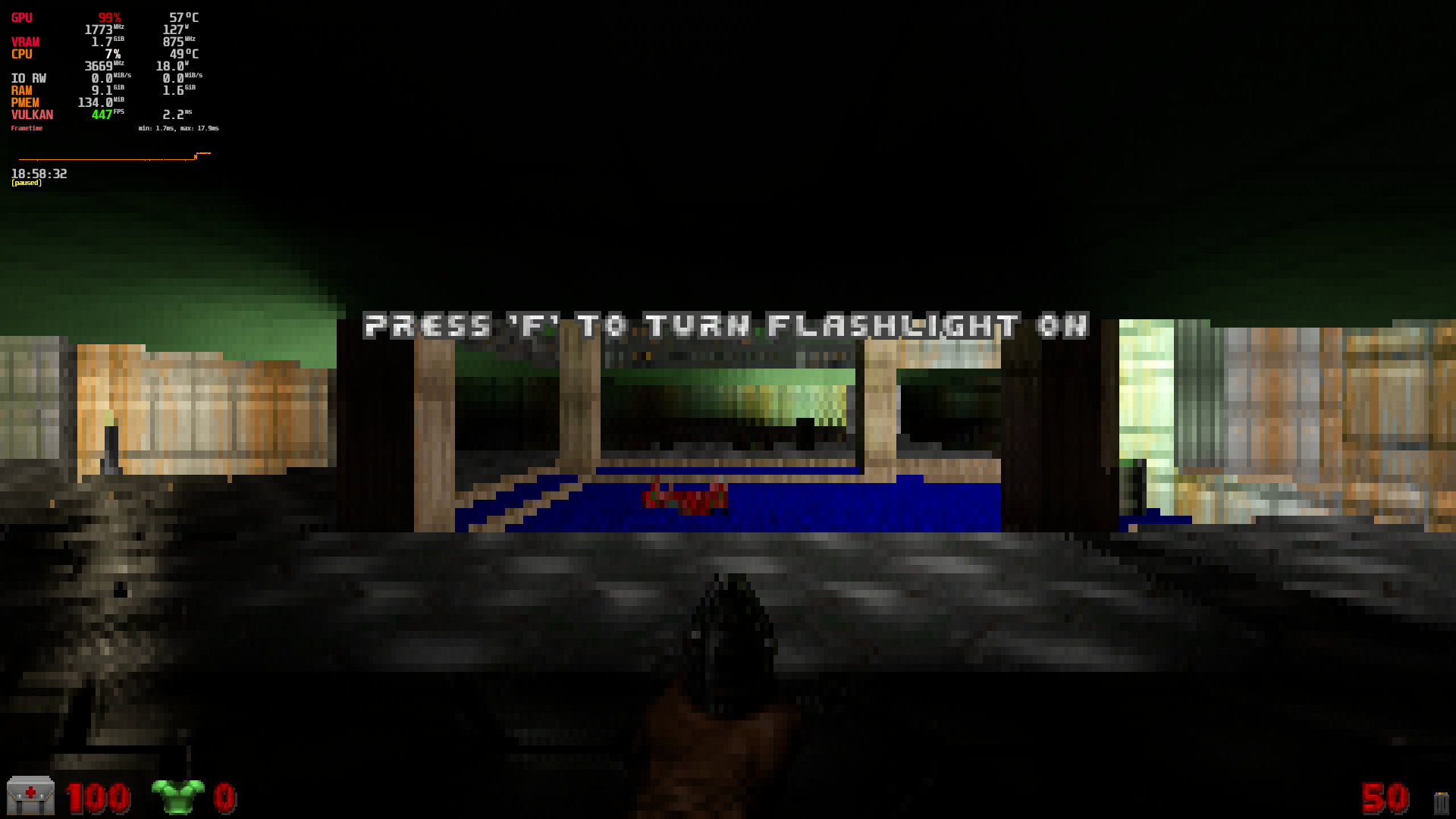
Some things to note:
- If you're on NVIDIA, DLSS won't be available since this whole source port was made with Windows in mind. Worth trying compiling RTGL1 with
RG_USE_NVIDIA_DLSSanyway (follow the instructions in BUILDING.md for that). But at this point you may as well just download the official release from sultim-t's repository and run it with Wine since it's less complicated (and, unlike AMD, it should Just Work™). - FSR should be available out of the box but it may yield worse performance than just using the render size option (it certainly did for me). You can't use the CRT shader with FSR either because it depends on the render scale option so they cancel eachother out.
- The CRT shader used in the 320x200 CRT mode is made by sultim-t and adapted from the libretro glsl-shaders. It's quite demanding (I noticed 56% higher GPU usage with it enabled) and makes everything look very dark but it lends itself to the horror vibe Doom has at times. It also makes the 320x200 resolution look good enough for gameplay on a 1080p monitor.
- CRT interlacing blends 75% of the previous frame with 25% of the current frame on even scanlines, and the reverse (25% previous / 75% current) on odd scanlines, for a ~2x performance boost. But each line effectively updates at half the rate, so if your game is running at 60 FPS it'll look like it's running at 30 FPS when it is not. I recommend enabling it only if you get more than 120 FPS with it disabled so you don't sacrifice the smoothness of 60+ FPS. If you are using the CRT shader, however, I recommend enabling it anyway since it offsets the shader's GPU load and might give you better FPS.
Licenses & credits
- PrBoom-Plus is licensed under GPLv2 (see
COPYINGin theprboom2directory). - RayTracedGL1 (the Vulkan ray tracing library), its shaders, and the ovrd assets included in this repository are MIT licensed:
MIT License

Copyright (c) 2020 Sultim Tsyrendashiev

Permission is hereby granted, free of charge, to any person obtaining a copy
of this software and associated documentation files (the "Software"), to deal
in the Software without restriction, including without limitation the rights
to use, copy, modify, merge, publish, distribute, sublicense, and/or sell
copies of the Software, and to permit persons to whom the Software is
furnished to do so, subject to the following conditions:

The above copyright notice and this permission notice shall be included in all
copies or substantial portions of the Software.

THE SOFTWARE IS PROVIDED "AS IS", WITHOUT WARRANTY OF ANY KIND, EXPRESS OR
IMPLIED, INCLUDING BUT NOT LIMITED TO THE WARRANTIES OF MERCHANTABILITY,
FITNESS FOR A PARTICULAR PURPOSE AND NONINFRINGEMENT. IN NO EVENT SHALL THE
AUTHORS OR COPYRIGHT HOLDERS BE LIABLE FOR ANY CLAIM, DAMAGES OR OTHER
LIABILITY, WHETHER IN AN ACTION OF CONTRACT, TORT OR OTHERWISE, ARISING FROM,
OUT OF OR IN CONNECTION WITH THE SOFTWARE OR THE USE OR OTHER DEALINGS IN THE
SOFTWARE.
- The CRT shaders are adapted from the libretro glsl-shaders collection; the adaptation in RTGL1 is MIT licensed by Sultim Tsyrendashiev.
- The Doom II RT lights addon from ModDB is the work of its respective author and may have its own terms, see the ModDB page for details.
- All of the resources I referenced to get it working on Linux are cited at the top of the README.