
Twilight Princess HD (macOS)
The Legend of Zelda: Twilight Princess HD
OrigenWii U
TecnologíaPort Nativo C/C++ (Reimplementación de Motor)
Disponible paramacOS
Ver proyecto oficialSobre el proyecto
The Legend of Zelda: Twilight Princess HD es un videojuego de acción y aventura publicado por Nintendo en 2016.
Información oficial del proyecto
Twilight Princess HD: Recompiled
A static recompilation of The Legend of Zelda: Twilight Princess HD (Wii U, USA disc, Rev 2) into a
native macOS app for Apple Silicon. The game's PowerPC code (code/Zelda.rpx) is translated to C ahead
of time, the Cafe OS libraries it imports are reimplemented natively, and its GX2 graphics are drawn
with Metal. There is no emulator at run time.
It is a fork of ZeldaWWHDRecomp (Wind Waker HD), whose recompiler, Cafe OS layer, Metal renderer, setup and settings overlay it reuses. It is an unofficial fan project, not affiliated with or endorsed by Nintendo. It is a work in progress; see the issues for what works and what is open.
Credits for the original project and everything this builds on: CREDITS.md.
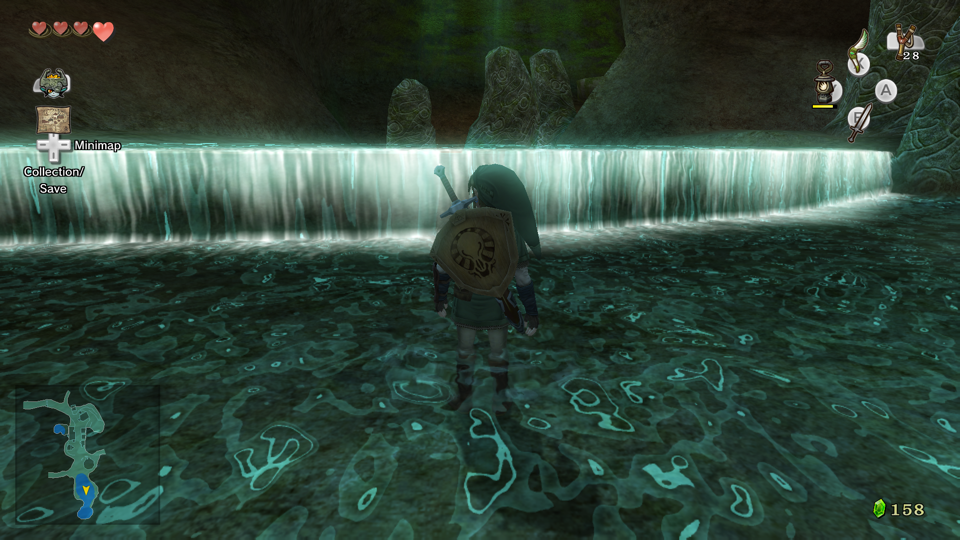 | 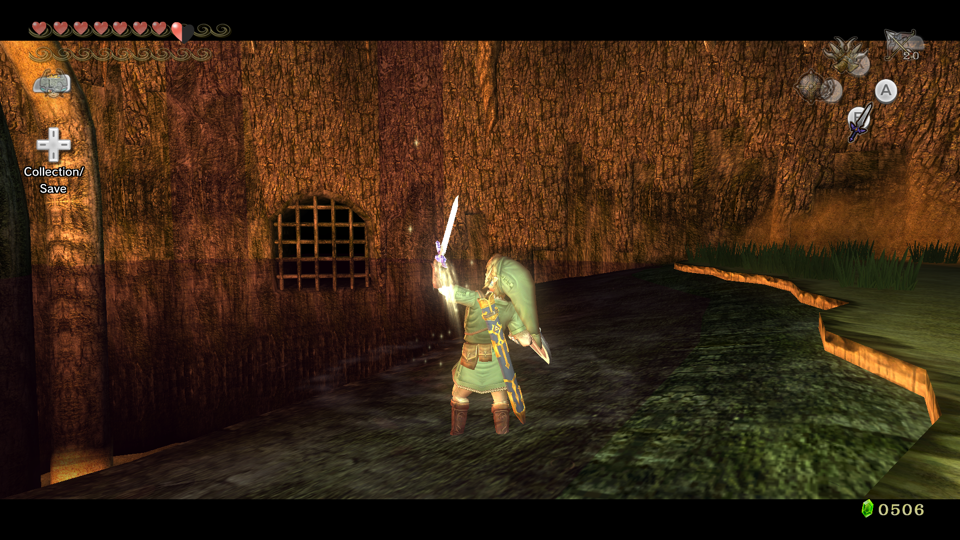 |
Screenshots from the game running in this port; the game and its artwork belong to Nintendo.
You need your own copy
This repository contains no game code, no game assets and no keys. You need your own, legally obtained copy of the game, dumped from your own Wii U disc and console. Everything game-specific (the extracted files, the generated C code, shader caches, save states) is made locally from your dump and must not be shared.
Supported: the USA disc, title 00050000-1019E500, version 81 (Rev 2). Other regions, the update and
DLC are not; the code is tied to that one Zelda.rpx (SHA-256
28922198517578c9261ac0b0b04a586252033d3bbcf7980b79e37638775b12a9).
Status
Work in progress. The game boots through the logos to the title screen, a new file can be started (name entry, horse name, the opening at the spring) and Ordon Village can be walked around with the keyboard. Every one of the 78 stages on the disc loads, draws and keeps running when warped to. Graphics, the HUD and sound work. A real controller has not been tested yet.
Requirements
- A Mac with Apple Silicon, macOS 14 or newer. Metal only: there are no Windows, Linux or Android builds.
- Xcode or Apple's Command Line Tools (
xcode-select --install), CMake 3.20 or newer. - Python 3;
tools/wudextract.pyalso needspycryptodome(pip3 install pycryptodome). - From your own console and disc: a disc image (
.wuxor.wud), its disc key (16 bytes, in a.keyfile with the image's name next to it) and the Wii U common key (inWIIU_COMMON_KEYas 32 hex digits, or acommon.keyfile next to the image). The setup app (below) also takes a Cemu archive (.wua) or an already extracted game folder (code,content,meta), which need no keys.
Build from source
# 1. extract the game into game/ (game.wux, game.key next to it, and the common key)
python3 tools/wudextract.py game.wux extract game
shasum -a 256 game/code/Zelda.rpx      # must match the SHA-256 above

# 2. translate Zelda.rpx to C (writes build/gen; stays on your machine)
python3 tools/recomp/recomp.py game/code/Zelda.rpx build/gen

# 3. build (Metal only)
cmake -S . -B build/cmake -DWWHD_RENDERER=METAL
make -C build/cmake -j$(sysctl -n hw.ncpu) wwhd

# 4. play, from the repository root
./build/cmake/wwhd
wwhd reads the game from game/ and writes saves to save/ in the current directory
(--game DIR and --save DIR change them). It stops at start if game/code/Zelda.rpx does not match
the translated code. The executable and the WWHD_* environment variables keep the upstream names.
To check that the runtime builds without the game, use placeholder code:
python3 tools/recomp/stubgen.py build/gen-stub, then
cmake -S . -B build/cmake-stub -DWWHD_RENDERER=METAL -DGEN_DIR=$PWD/build/gen-stub && make -C build/cmake-stub wwhd.
The result cannot run the game.
Install with the setup app
No builds are published. To get the setup app, package the runtime yourself; the package is built against placeholder code, so it contains no game code:
python3 tools/recomp/stubgen.py build/gen-stub
cmake -S . -B build/rel -G Ninja -DCMAKE_BUILD_TYPE=Release -DWWHD_RENDERER=METAL \
  -DCMAKE_OSX_DEPLOYMENT_TARGET=14.0 -DGEN_DIR=$PWD/build/gen-stub -DWWHD_SETUP_GUI=ON -DWWHD_BUNDLED_ZSTD=ON
cmake --build build/rel
python3 tools/release/package.py --build build/rel --platform macos-arm64 --version 0.1.0 \
  --out build/dist --toolchain xcode-clt --setup-gui build/rel/wwhd-setup
python3 tools/release/guard.py build/dist/*.zip    # checks for game code, game files and keys
This needs Ninja (brew install ninja) and downloads the pinned SDL3 and zstd sources. It writes a
portable folder and a zip to build/dist/. In that folder, start Twilight Princess HD. The first
start asks for your disc image and keys, a Cemu archive or an extracted game folder, checks that it is
title 00050000-1019E500 version 81 with the expected Zelda.rpx, extracts a disc image or archive into
the folder (about 4.3 GB; an extracted folder is used where it is), translates the code to C,
compiles it with Apple's Command Line Tools (it offers Apple's installer if they are missing) and
links it with the prebuilt runtime. Keys are never stored or logged. Later starts launch the game
directly; hold Shift while starting it to repair or change the game.
Everything stays in the folder's data/: the built game, the extracted game files, saves
(data/save), settings, save states and the shader cache (data/user) and crash logs
(data/captures). The same setup runs in Terminal with tools/Setup in Terminal.command. Details:
tools/installer/README.md.
Playing
Two windows open: the TV and the GamePad screen. Click or drag on the GamePad picture to touch it. Closing the TV window (or Cmd+W, Cmd+Q) quits; closing the GamePad window only hides it.
Keyboard
| Keyboard | Wii U GamePad |
|---|---|
| W A S D | left stick |
| arrow keys | right stick (camera) |
| K or Space | A |
| J | B |
| L | X |
| I | Y |
| Q / E | L / R |
| Left Shift | ZL |
| C | ZR |
| Return / Tab | + / - |
| H | Home |
| 1 2 3 4 | D-pad up / down / left / right |
| X / V | left / right stick click |
Everything can be remapped in the settings overlay's Controls tab or in Input > Controls...,
saved to ~/Library/Application Support/TPHD/controls.json. Game controllers are read too, with
buttons mapped by position (the bottom face button is the Wii U's B). Keyboard and controllers act
as the Wii U GamePad or as a Pro Controller (Input menu or Controls tab).
App shortcuts in the game window:
| Key | Does |
|---|---|
| F1 (Fn+F1 on most Mac keyboards) or Cmd+, | settings overlay |
| Shift+F1 to Shift+F5 | save state to slot 1 to 5 |
| F2 to F5 | load slot 2 to 5 (slot 1 loads from the overlay's Saves tab) |
| 6 | 60 fps on / off |
| R | next internal resolution |
| N | 16x anisotropic filtering |
| 8 | edge smoothing (FXAA) |
| Cmd+F | full screen |
| Cmd+G | show / hide the GamePad screen |
| ⌘P or F12 | capture a frame for debugging (to captures/) |
| 9 | record 3 s of sound activity for debugging (to captures/) |
Settings overlay
F1 opens an in-game menu over the picture; on a controller hold Select / Minus for half a second or press Home. Mouse, keyboard and controller work in it; L / R switch tabs, and Esc, F1 or B close it. The game keeps running but gets no input while it is open. The macOS menu bar (Graphics, Input, Display, Save States) has most of the same options.
- Saves: the five save state slots.
- Graphics: frame rate, internal resolution, aspect ratio, 16x anisotropic filtering, FXAA, texture sharpness, bloom, the HUD, distant fog, a performance overlay.
- Display: full screen, picture scaling (smooth, sharp, integer) and the GamePad screen.
- Mods: mod packages and profiles.
- Controls: GamePad or Pro Controller, remapping on a drawing of the controller or as a list, stick dead zone, inverted camera up/down, Tap amiibo.
- Language / About: the text language.
Features
Frame rate. 30 fps as on the Wii U, or 60, 120 or 240 fps by frame interpolation: the game logic
keeps its 30 steps a second, and 1, 3 or 7 frames in between are drawn with the camera, every 3D
model, the particles and the 2D (the HUD's and menus' movements and fades) blended. The rate is capped to the
display's refresh rate, which the Graphics tab shows. WWHD_INTERP=1 and
WWHD_INTERP_FPS=60|120|240 set it for one start.
Aspect ratio. 16:9 (original), match the window, 16:10, 21:9 or 32:9, through the game's own wide
screen layout: wider screens show more to the sides, text keeps its shape and the HUD keeps its 16:9
distance from the edges. Menus, messages and the title are drawn at 16:9 in the middle, with black beside
full-screen menus such as Collection, the map and the save prompt. The GamePad picture is unchanged.
WWHD_ASPECT=window|16:10|21:9|32:9.
Internal resolution. 1x (1920x1080, as on the Wii U), 1.33x (2560x1440), 1.5x (2880x1620) or 2x (3840x2160), widened to the aspect ratio (21:9 at 1x is 2520x1080). Measured at 60 fps on a MacBook Air (M4, fanless): 1x holds 60 at 16:9, 21:9 and 32:9; 1.5x falls to 35-55 as it warms up; 2x to about 30-38.
Bloom and HUD. Bloom (the glow around bright areas, strongest in the Twilight) at its original
strength, reduced to half, or off; and the HUD (hearts, rupees, buttons, map icon) shown or hidden, for
screenshots. Menus and messages always show. WWHD_BLOOM=reduced|off, WWHD_HUD=0.
Distant fog. The haze that turns far land toward the sky's color, at its original strength, halved,
or off (as Cemu's TP HD "Distant Fog" pack, which changes the same value). WWHD_FOG=reduced|off.
Texture sharpness. Original, Sharper or Sharpest: textures seen at a distance or at an angle use
finer detail (a level-of-detail bias of -0.5 or -1, the play settings of Cemu's TP HD pack). Sharpest
can shimmer in motion. Metal only. WWHD_SHARPNESS=sharper|sharpest.
Graphics choices are remembered between starts (defaults delete tphd resets them); an environment
variable overrides the saved value for that start only.
Languages. The disc carries the text in nine variants: English (North America), English
(Europe), French (North America), French (Europe), Spanish (Latin America), Spanish (Europe),
German, Italian and Japanese. Choose one in Language / About; it applies at the next start. For one
start: WWHD_LANGUAGE=<code> (0 Japanese, 1 English, 2 French, 3 German, 4 Italian, 5 Spanish) with
WWHD_LANGUAGE_REGION=us|eu|jp.
Saves. Saving in the game (Collection, then Save Game) writes one file per Quest Log to
save/user/, ZTP00.dat for the first, with COMMON.dat next to them (data/save/user/ in a packaged
folder). A save from Cemu or a Wii U (mlc01/usr/save/00050000/1019e500/user/80000001/) is imported by the
setup: hold Shift while starting the game, then Import a save from Cemu or a Wii U (it offers Cemu's save
when Cemu has one in its default folder), or tools/Setup in Terminal.command --import-save FOLDER. A save
already there is moved to save/user.backup-<time> first. Copying the files into save/user/ by hand works
too.
Save states. Five slots (keys above, the Saves tab or the Save States menu). A state is the
whole running game, about 190 MB, restored exactly. It contains game code and data: never share it.
States live in ~/Library/Application Support/TPHD/states (WWHD_STATE_DIR changes it) and are
tied to the game file they were made with.
amiibo. Virtual figures, no reader or figure files: Input > Tap amiibo (or Tap amiibo... in the
Controls tab) puts Wolf Link, Link, Zelda or Ganondorf on the GamePad's reader until the game reads it.
On the Collection screen, once the game enables amiibo in Faron Woods, Link refills arrows, Zelda
refills hearts, Ganondorf offers to double the damage you take and Wolf Link opens the Cave of Shadows;
on the Quest Log screen Wolf Link stores a Quest Log for quick start, which touching it on the title
screen starts. Wolf Link's data is kept in ~/Library/Application Support/TPHD/amiibo/.
WWHD_AMIIBO=<figure>@<frame> taps one for tests.
GamePad screen. A separate window, picture-in-picture in a corner of the TV window (corner, size
and opacity selectable), automatic picture-in-picture (shown for a few seconds when the GamePad
picture changes a lot), off, or the GamePad picture alone in the TV window. Window positions, full
screen and these choices are kept in ~/Library/Application Support/TPHD/display.plist.
Mods. The Mods tab installs mod packages from a folder or ZIP, and Cemu graphic packs made for
TP HD (USA), with profiles. Content mods replace files of the game's content/ folder by their path
(such as res/Msgus/bmgres.arc). Twilight Princess HD has no built-in mods yet, and no package has
been tried with it.
Testing aids. WWHD_WARP=<frame>:<stage>,<point>,<room>,<layer> warps to any place of the
developer map select, and more warps can follow, separated by ; (tools/warplist.py lists the
1,987 places; Ordon Village on day 1 is F_SP103,1,0,6). WWHD_STATE_SAVE_AT=<frame>:<slot> takes a save state at a frame. Scripted routes
with screenshots: tools/audit/run_route.sh.
Shader head start. The first time the game meets a shader it translates and compiles it. A head start
translates the shaders your play has met so far at the next start instead, from the game's own
content/Shaders.pack.gz and a template of the states they were drawn with, recorded from your shader cache.
Both are made on your machine and must not be shared; the setup app does not make them. In a source checkout,
after playing for a while:
python3 tools/shaderprep.py template ~/Library/Caches/tphd/shaders.bin   # -> game/shadercache/template.bin
python3 tools/shaderprep.py build                                          # -> game/shadercache/headstart.bin
--merge game/shadercache/template.bin adds a later session to the template, and ./build/cmake/wwhd --warm-shaders compiles everything once to fill the macOS shader cache. The game loads
game/shadercache/headstart.bin by itself (WWHD_HEADSTART=<file> or 0 changes or disables it).
Settings, controls, mod packages and save states are kept in ~/Library/Application Support/TPHD,
the shader cache in ~/Library/Caches/tphd (both in data/user in a packaged folder). Crashes write
captures/crash-<time>.log.
Known limitations
- macOS on Apple Silicon only (Metal). The Vulkan renderer and the SDL3 host, kept for possible Windows
and Linux builds, run Twilight Princess HD on a Mac through MoltenVK (
docs/vulkan.md); no Windows or Linux build has been made. - Not yet checked: a real controller, playing whole dungeons and bosses (the disc's QA saves load and play
from every part of the story:
tools/audit/qasaves.sh). - Frame interpolation blends the camera, models (with their texture and color animation), particles, the 2D's movements and fades, and the screen fades; screen effects and 2D color and texture animations move at 30 Hz, and true 60 fps logic is not available.
- At 32:9 the field map's province view doesn't highlight the region under the cursor.
- amiibo: the Cave of Shadows has been entered with Wolf Link but not played through.
- Warping straight into the Temple of Time's Darknut room (D_MN06B) crashes the GamePad dungeon map; reached through the temple, as in play, it works.
Credits
- ZeldaWWHDRecomp and its contributors: the recompiler, the Cafe OS layer, the GX2-on-Metal renderer, the setup and the settings overlay this port is built on.
- Cemu (MPL-2.0): the vendored GPU address library and
shader decompiler and some reference structures (
runtime/third_party/cemu);tools/wudextract.pyand parts of the OS layer are ported from or follow Cemu, as noted in those files. - zeldaret/tp: the Twilight Princess decompilation, the source of the function names and structure layouts the hooks use.
- Vendored: metal-cpp (Apache-2.0),
{fmt} (MIT), Dear ImGui (MIT)
and xxHash (BSD-2-Clause), each with its license in
runtime/third_party/. The.wuareader is written from the format of ZArchive by Exzap; zstd (BSD-3-Clause) decompresses it, and the setup app uses SDL3.
License
The code of this project is licensed under the Mozilla Public License 2.0 (see LICENSE), as
ZeldaWWHDRecomp is. Vendored third-party code keeps its own license. "The Legend of Zelda",
"Twilight Princess" and "Wii U" are trademarks of Nintendo, used here only to describe what this
software works with; the game itself is Nintendo's property and is not included.
More projects
- Wind Waker HD: native port + mods: spooky sea events, Tetra's ship, online co-op
- Ocarina of Time: Recompiled: native port with mods (unofficial fork)
- Fixframe: live render debugger for emulators and ports