
Wipeout XL (NJH-1001)
Wipeout XL
OrigenPlayStation
TecnologíaRecompilación Estática (C/C++ nativo)
Disponible paraWindows
Ver proyecto oficialSobre el proyecto
Wipeout XL es un videojuego de carreras publicado por Psygnosis para PlayStation, lanzado en 1996.
2 versiones de Wipeout XL
Estás viendo: Wipeout XL (NJH-1001)
Información oficial del proyecto
Wipeout XL Recompiled — Wipeout2K97XL
An unofficial PSXRecomp compatibility project for Wipeout XL (USA), SCUS-94351. Windows 10/11 x64, plus Linux x64 and macOS Intel/Apple Silicon setup kits. OpenBIOS and SDL3. The prior Linux release was tested on Steam Deck by the project owner. This version's new smoothing and macOS gameplay remain unverified there.
Download setup kits · Report a problem
Download and setup
All platform downloads are on the same release page. Each ZIP is a setup kit: game code is generated on your machine. Supply your legally obtained USA Redump-style CUE and all 12 BIN tracks. Other regions and revisions are not supported.
| Download | Platform | Verification |
|---|---|---|
wipeoutxl-0.2.0-windows-x64.zip | Windows 10/11, Intel/AMD x64 | User-tested racing and controllers |
wipeoutxl-0.2.0-linux-x64.zip | Linux x64, built on Ubuntu 22.04 | Native CI checks; prior release owner-tested on Steam Deck |
wipeoutxl-0.2.0-macos-x64.zip | macOS 15, Intel | Build and launcher tested; gameplay unverified |
wipeoutxl-0.2.0-macos-arm64.zip | macOS 15, Apple Silicon | Build and launcher tested; gameplay unverified |
Every download has a SHA-256 checksum. Steam Deck users should use the Linux x64 ZIP. The prior release was tested on Steam Deck by the owner. Dedicated Steam Deck AppImages have been withdrawn. See the Steam Deck and Steam Controller guide and native setup instructions.
- Extract the entire setup ZIP into a writable folder.
- Install Python 3.11 or newer. Allow disk space for your disc and a local build.
- Run
Wipeout2K97XL.exeon Windows or./Wipeout2K97XLon Linux/macOS, keep OpenBIOS selected and select your CUE. - Choose Generate & rebuild. The wizard can obtain its supported CMake, Ninja and Clang toolchain; game code is generated and compiled locally.
- Reopen the setup executable after compilation. It forwards to the local playable build. Keep the kit together and back up your saves before updates.
No disc images, extracted game executable, generated game code, retail BIOS, memory cards, captures or analysis databases are distributed. Windows setup binaries are unsigned. Linux and macOS downloads are included alongside Windows; The prior Linux release is owner-tested on Steam Deck; this update and other Linux configurations and macOS gameplay remain unverified. See native platform status and setup.
Supported data track
- Boot executable:
SCUS_943.51 - Track 01 size:
86045568bytes - MD5:
bee4ab5e4835235ccf6f16bc8caea5e6 - SHA-1:
5694008c30fa9896d17afdd6281e4bebb9f63953
Controls
Connect a controller before launching; Player 1 automatically selects a recognized gamepad. Select Keyboard in the launcher to use keyboard controls. The emulated pad is locked to NeGcon mode. Xbox and the wired PowerA Advantage Switch 2 controller have been physically tested. Other Switch, PS4 and PS5 models use SDL3 mappings but have not been physically tested here. Steam Deck and Steam Controller (2026) use Steam Input gamepad emulation with this same NeGcon preset. The Linux kit is owner-reported working on Deck; the 2026 wireless controller remains physically unverified.
The NeGcon enhanced dual sticks mod starts with this customizable preset:
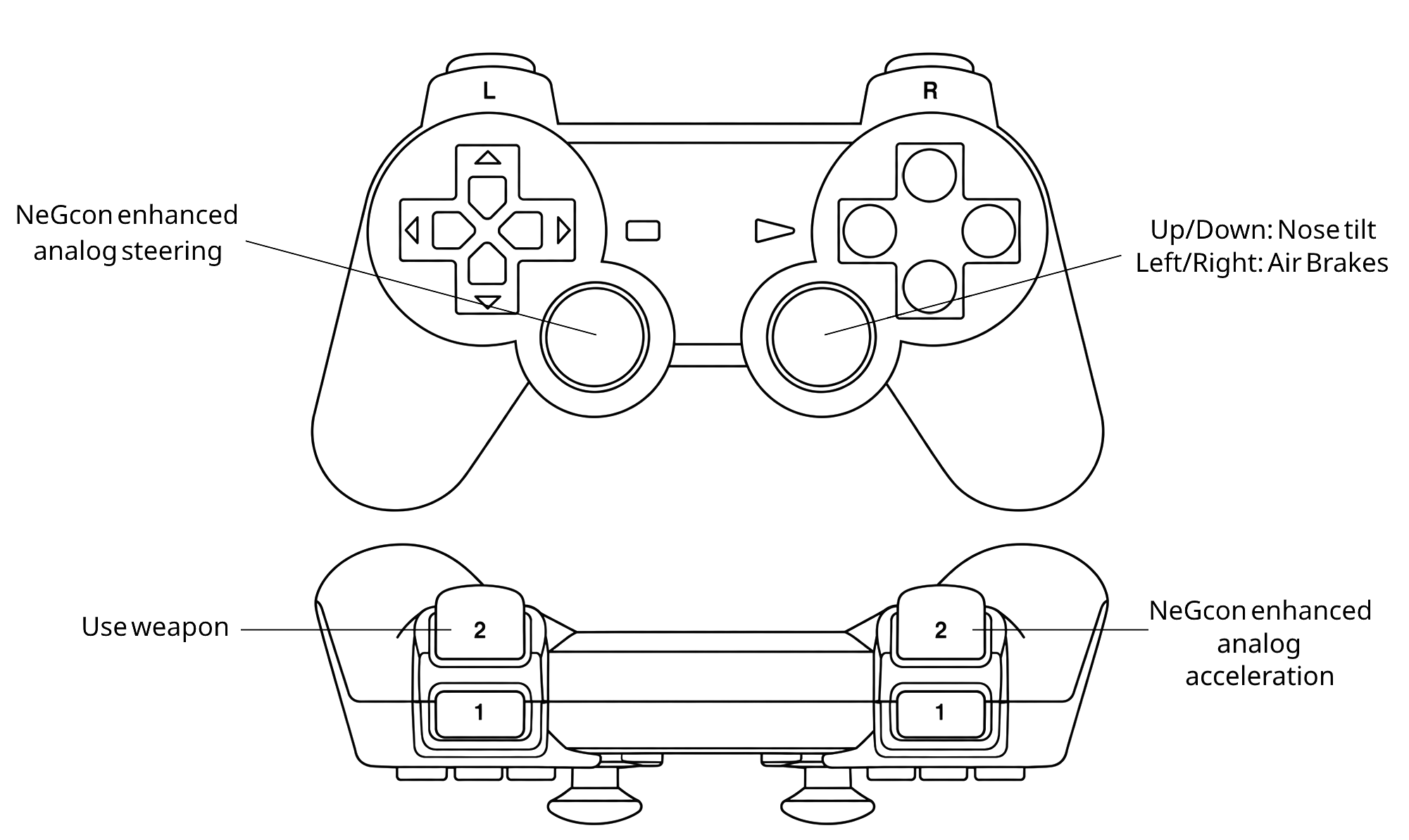
Open the full-size controller diagram.
| Input | Action |
|---|---|
| Left stick horizontal | Analog steering |
| Right stick vertical | Pitch |
| Right stick left / right | Right / left air-brake (reversed) |
| L1 / R1 or LB / RB | Left / right air-brake |
| Right trigger | Analog acceleration, when hardware supports it |
| Bottom face button | Full acceleration / menu select |
| Left trigger or left face button | Fire equipped weapon |
| Right face button | Discard weapon (NeGcon A) |
| Top face button | Change view / menu back (NeGcon B) |
| D-pad | Menu navigation and original directional controls |
| Start / Plus / Options / Menu | Start / pause |
Open Mods before launching to change stick assignments, brake direction,
brake buttons, trigger assignments and face-button acceleration. Select
Recommended dual sticks to restore the preset's behavior, or Custom to
use your saved individual choices. Use input.ini bindings or disabling this
mod returns to the editable input file. Right-stick steering and braking can
share an axis; disable stick brakes if that is unwanted. Pitch and air-brakes
are digital, matching the game's decoded inputs; steering and throttle are analog.
Changes apply on the next launch. Keyboard and other button bindings remain
editable in keybinds.ini and input.ini; rebuilds preserve existing files.
Keyboard: WASD/arrows for directions, Space/X for acceleration, Q/E for left/right air-brakes, Enter for Start and Backspace for Select. See controller details for other button assignments.
Display mods
-
Smooth rendering: optional 60, 90 or 120 fps intermediate 3D rendering in races and menu previews. Original simulation, handling and audio keep their original cadence. OpenGL required; choose the rate under Mods. Adds visual delay; actual output depends on GPU and display refresh.
-
16:9 Widescreen: wider 3D view with centered menus and extended loading backgrounds. OpenGL required. In its Race HUD layout dropdown, choose Widescreen edges to move the timer and lap-times panel left, position/lap right, and speed, energy and music crawl right. Original centered HUD restores the stock layout.
-
Extended Draw Distance: extends road, scenery and billboard visibility.
-
Extended Enemy Ship Distance: extends ship meshes and exhaust; enable Extended Draw Distance as well.
-
CRT Display: JVC and Sony Trinitron inspired effects. These approximate the appearance of MiSTer presets; they are not exact FPGA filter ports.
Visual mods are off by default and can be enabled on the Mods page. The default renderer is OpenGL with 4x internal resolution and 4:3 presentation. Extended Draw Distance and Extended Enemy Ship Distance are regular optional features, accepted through user race testing. Netplay is not enabled.
Verification and reporting
See VERIFICATION.md for tested behavior and remaining release gates. Report OS, CPU/GPU, controller and connection, renderer, enabled mods and reproduction steps. Do not upload copyrighted game data or private captures.
See PUBLICATION.md for package boundaries and THIRD_PARTY.md for component licenses. The setup kit contains the modified framework sources used by its local build. No game-project license is asserted here; dependencies retain their respective licenses.
This project is not affiliated with Sony, Psygnosis or the game's rights holders.
Building from repository source
git clone --recurse-submodules https://github.com/NJH-1001/Wipeout2K97XL.git
cd Wipeout2K97XL
git -C psxrecomp apply ../patches/psxrecomp.patch
python psxrecomp/psxrecomp_cli.py generate --project-root . --config game.toml --disc "/path/to/Wipeout XL (USA).cue"
python psxrecomp/psxrecomp_cli.py rebuild --project-root . --config game.toml --build-dir build-release --target psx-runtime --exe-basename Wipeout2K97XL --no-pgo
Release kits already contain the patched framework; do not apply the patch again.
Dependency maintenance
See the 2026-10-19 dependency review for current upstream versions, patch compatibility and the migration requirements. The shipped framework/UI pins retain the tested Wipeout integrations.