
GoldenEye 007 (goldeneye-metal)
GoldenEye 007
TecnologíaPort Nativo C/C++ (Reimplementación de Motor)
Disponible paraWindows, macOS
Ver proyecto oficialSobre el proyecto
GoldenEye 007 es un videojuego de disparos en primera persona desarrollado por Eurocom y distribuido por Activision y MGM Interactive. Es el remake del videojuego del mismo nombre desarrollado por Rare y publicado por Nintendo en 1997 para la consola Nintendo 64 y una reinterpretación de la película de James Bond de 1995, GoldenEye.
10 versiones de GoldenEye 007
Estás viendo: GoldenEye 007 (goldeneye-metal)
GoldenEye 007 (goldeneye-metal)github.com/ysrdevs/goldeneye-metalGoldenEye 007github.com/chrissotraidis/goldenpadgoldeneye pc port offers (dolent)github.com/dolent/goldeneye-pc-port-offersGoldenEye 007 (kholdfuzion)github.com/kholdfuzion/GoldenRecompGoldenEye 007 (n64decomp)github.com/n64decomp/007GoldenEye 007 (XBLA remaster, PC)github.com/CaiusCodes/GoldenEye-007-XBLA-PC-RecompGoldenEye 007 (XBLA Remaster)github.com/Fable2Recomp/beanRecompGoldenEye 007 Recompiledgithub.com/cblock85/GoldenEye64RecompGoldenEye Recompgithub.com/SunJaycy/GoldenEye-RecompProject Midas (GoldenEye 007)github.com/murkantor/Project-MidasInformación oficial del proyecto
GoldenEye Metal
Play GoldenEye 007 on your Mac, with native Apple Silicon code and Metal rendering. Use keyboard and mouse or a modern controller, switch between original and remastered graphics, and play local split-screen with up to four players.
Download v0.5.1 for macOS (.dmg) · Release notes · Watch gameplay · Discord
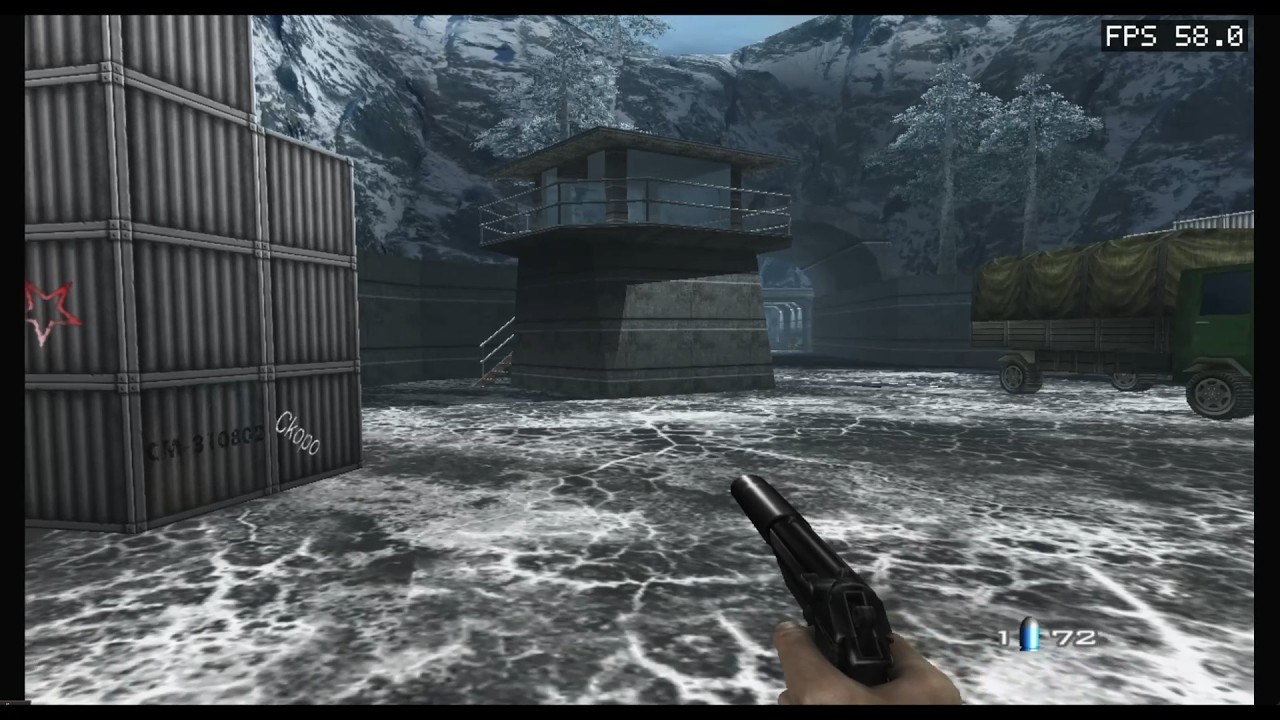
GoldenEye Metal is playable today. Development continues on performance, rendering accuracy and compatibility across more Macs and missions.
Play on macOS
You need:
- an Apple Silicon Mac;
- macOS 14 or newer; and
- a compatible game backup that you are legally authorized to use.
To start playing:
- Download the DMG.
- Open it and drag GoldenEye Metal.app into Applications.
- Launch the app. On first use, select your compatible local game backup and wait for the one-time import.
- Choose Play GoldenEye. Future launches open the same launcher with your private local copy ready.
The first-run launcher accepts:
- the compatible original game-backup ZIP;
- the Xbox LIVE/STFS package stored inside that backup; or
- an extracted folder containing
default.xex,files/,music.xwb, andsfx.xwb.
The launcher verifies the supported game revision before importing it. Your files stay on your Mac: the app does not include, download, or upload game data. You can choose a different source from the launcher later.
If a game session does not close cleanly, the launcher offers Start in Safe Mode for one run or Play Normally. You can also choose Export Diagnostic Bundle… and send the resulting ZIP with a report; by default it excludes game data, saves, cache, settings, and GPU captures. If you explicitly select Include GPU capture, the ZIP includes one frame trace that may contain game memory, so share it only when you intend to.
Choose Manage Saves… to create a portable .gesave backup, restore a backup, or reset local
progress. Restore and reset preserve the previous data so the action can be undone immediately.
The release is Developer ID signed, Apple-notarized, and stapled. See the player guide for detailed controls, controller setup, import behavior, and troubleshooting.
Controls
| Action | Keyboard and mouse |
|---|---|
| Move | WASD |
| Look | Mouse |
| Fire | Left click |
| Aim | Right click |
| A / confirm | Space |
| B / back | Shift |
| Start | Return |
| D-pad | Arrow keys |
| Original / remastered graphics | F |
| Host settings / release cursor | Escape |
| Quit | Command-Q |
Modern controllers work over USB or Bluetooth, including DualShock 4, DualSense, Xbox One, and Xbox Series X|S controllers. Controllers can be connected or removed while the game is running, and keyboard/mouse can remain active at the same time. The Controls page includes Modern, Classic, and Southpaw layouts plus per-button remapping.
What this project is
GoldenEye Metal is not a traditional full-system emulator. The game code is recompiled ahead of time for ARM64, while a compatibility runtime provides the Xbox 360 APIs and GPU behavior the game expects.
The graphics path consumes the game's real command stream and shaders, translates the shaders, and renders the result directly through Metal:
game commands -> Xenos shader translation -> Metal rendering -> game resolve -> presentation
There is no Vulkan or MoltenVK graphics path in the macOS release. The repository contains the runtime, recompilation toolchain, Metal backend, native launcher, and game integration source.
Features
Working today:
- single-player campaign gameplay and two- to four-player local split-screen;
- original and remastered graphics switching during play;
- native keyboard/mouse input, stable P1–P4 gamepad ports, presets, and remapping;
- a local game-data importer, crash-aware Safe Mode, save management, true local-mission pause, and diagnostic export;
- live performance presets, MetalFX/Sharp output scaling, filtering, FXAA and colour controls;
- optional FPS or detailed performance overlays and a diagnostics-ready 60-second report;
- a guarded Testing page with 14 runtime cheats and Unlock Next Level / Unlock All Levels;
- clean macOS window/menu quitting.
Metal renders the game internally at its native 1280x720. Bilinear, Sharp, and MetalFX Spatial can scale that image to the window or Retina display, but they do not increase the game's internal rendering resolution.
The latest recorded development-build tests averaged 59.85 FPS across two Dam runs on an M3 Ultra. Performance varies by Mac, settings and scene; this is not a locked-60-FPS promise. Broader campaign, multiplayer and hardware testing continues alongside rendering improvements.
For implementation details, evidence, milestones, known gaps, and the exact next priorities, read the native Metal technical status.
| Platform | Status |
|---|---|
| Apple Silicon macOS | Playable — native ARM64 + Metal, campaign gameplay and local split-screen |
| Windows and Linux | Backend code exists, but this project's current changes are not verified there |
Build and contribute
Source builds require an Apple Silicon Mac, current Xcode Command Line Tools, CMake, Git, and a
compatible local default.xex that you are authorized to use. Game data and generated game code
are intentionally excluded from Git.
- Development guide — configure, build, code generation, tests, manual runs, input diagnostics, and Metal profiling
- macOS distribution — app packaging, Developer ID signing, notarization, ZIP, and DMG creation
- Contributing guide — development expectations and pull requests
- Technical status — architecture, proof, milestones, blockers, and roadmap
Developers with a completed local source build can also double-click Launch GoldenEye.command to run the build-tree version with Metal and native input selected automatically.
Game data, licensing, and trademarks
This repository does not include the original XEX, generated recompiled C++, audio banks, captures, or extracted game assets. Do not commit or request downloads for those files. Each user is responsible for supplying compatible files they are legally authorized to use.
This is a multi-license source tree. See LICENSE, THIRD_PARTY_NOTICES.md, and the license files inside vendored and submodule directories.
This project is unofficial and is not affiliated with or endorsed by any game publisher, console manufacturer, or trademark owner. Product names are used only to identify compatibility targets. No trademark or game-content rights are granted by this repository.