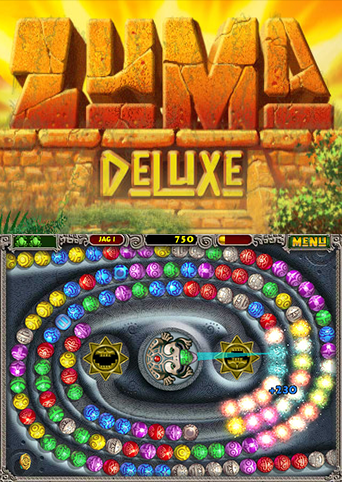
Zuma Deluxe (Portable)
Zuma Deluxe
OrigenWindows
TecnologíaPort Nativo C/C++ (Reimplementación de Motor)
Disponible paraAndroid, Windows, Linux
Ver proyecto oficialSobre el proyecto
Zuma Deluxe es un videojuego de puzles publicado por PopCap Games, Inc. en 2006.
4 versiones de Zuma Deluxe
Estás viendo: Zuma Deluxe (Portable)
Información oficial del proyecto
Zuma Deluxe Portable





A source port of Zuma Deluxe to Android, Windows, Linux and the browser, built on the open SDL2-based PopCap-style framework from PvZ-Portable. The engine is reimplemented; the game data is not included — you supply it from your own legally purchased copy. Point the app at your Zuma Deluxe folder once and play.
Status: Android (arm64) and Windows/Linux desktop builds are playable end to end. The Android build has no music yet (see Known limitations).
Contents
- Download and play
- Your game files
- Build your own APK from your Steam copy
- Build for desktop
- Command-line options
- Save data
- Troubleshooting
- Known limitations
- Credits and license
Download and play (no build)
Grab everything from the Releases page.
| Platform | File | Notes |
|---|---|---|
| Android 7.0+ (arm64) | zuma-portable-android-arm64-v8a.apk | Install, then import your game files |
| Windows x64 | zuma-portable-windows-msvc-x64-static.exe | Self-contained, no DLLs needed |
| Windows x86 | zuma-portable-windows-msvc-x86-static.exe | For 32-bit Windows |
| Linux x64 | zuma-portable-linux-static-x86_64 | Static binary, chmod +x and run |
| Arch Linux | zuma-portable-archlinux-x86_64 | Also on the AUR as zuma-portable |
| WebAssembly | zuma-portable-wasm.zip | Self-host only, see below |
Android in four steps
- Copy the APK to your phone and install it. Android will ask you to allow installs from your browser or file manager — that is expected for apps distributed outside Play.
- Launch Zuma Deluxe. The import screen opens automatically because no game data is present yet.
- Tap Select ZIP File (or Select Resource Folder) and pick your game data — see Your game files for exactly what goes in the ZIP.
- When the status line turns into Game resources found, tap Start Game.
Long-press the app icon later to reach Manage Data, where you can re-import resources or move saves on and off the device.
Windows / Linux in three steps
- Put the executable in a folder of its own.
- Copy the six game folders (
properties,images,sounds,levels,music,fonts) next to it. - Run it. The game looks for resources beside the executable, so it can be launched from any working directory.
WebAssembly (self-hosted)
The WASM build is in the release ZIP. Browsers refuse to load it from file://, so serve it
over HTTP from the extracted folder:
python3 -m http.server 8000
# then open http://localhost:8000/zuma-portable.html
Load your game data through the page's ZIP/folder picker. Everything stays in the browser; nothing is uploaded. Saves live in IndexedDB.
Your game files
Zuma Deluxe ships loose files, not a single archive. A Steam install
(steamapps/common/Zuma Deluxe/) contains:
Zuma Deluxe/
├── properties/     resources.xml, partner.xml, partner.xml.sig   (required)
├── images/         sprite sheets and backgrounds                 (required)
├── sounds/         sound effects                                 (required)
├── levels/         levels.xml + one folder per level             (required)
├── music/          Zuma.mo3                                      (desktop only)
├── fonts/          bitmap fonts                                  (required)
└── Zuma.exe, bass.dll, readme.html, ...                          (not needed)
The app treats properties/resources.xml as the marker that a folder is a valid game root.
If that file is missing, the import is refused.
To make the ZIP for the Android import: select the six folders above and compress them.
Either shape works — the folders at the top of the ZIP, or one wrapper folder
(Zuma Deluxe/properties/...). The importer strips a single wrapper directory automatically.
Expect roughly 25 MB.
You can also open the game folder from Steam: right-click Zuma Deluxe in your library, then Manage → Browse local files.
Build your own APK from your Steam copy
Everything below produces an installable APK. The game data still gets imported on the phone afterwards — it is never baked into the APK, so the APK stays under 10 MB and the build output stays legal to redistribute.
0. What you need
- JDK 17 or newer — Temurin or Android Studio's bundled JDK.
- Android SDK with these SDK Manager packages:
- Android SDK Platform 36
- Android SDK Build-Tools 35.0.0 (or newer)
- NDK (Side by side) 27.2.12479018
- CMake 3.22.1
- Disk: about 4 GB free for the toolchain and build tree.
- Time: the first build pulls and compiles SDL2, libpng and libjpeg-turbo (roughly 5-10 minutes); later builds reuse the cache.
Android Studio installs all four SDK pieces in one pass: Settings → Languages & Frameworks → Android SDK → SDK Tools, tick Show Package Details, then select the exact versions above.
1. Point the build at your SDK
export ANDROID_HOME="$HOME/Android/Sdk"          # Linux
export ANDROID_HOME="$HOME/Library/Android/sdk"  # macOS
export ANDROID_HOME="$LOCALAPPDATA/Android/Sdk"  # Windows (git-bash)
On Windows, run everything below from Git Bash (installed with Git for Windows). The script hands native paths to CMake, Ninja and Gradle, so there is no path juggling.
2. Get the source
git clone https://github.com/abduznik/ZumaPortable.git
cd ZumaPortable
3. Build the APK
scripts/build-android-apk.sh
That is the whole build. It prints each stage as it goes and finishes with:
== Done
  APK: /path/to/ZumaPortable/dist/zuma-portable-android-arm64-v8a.apk
Useful variations:
scripts/build-android-apk.sh arm64-v8a --release   # release build (debug key unless a keystore is configured)
scripts/build-android-apk.sh armeabi-v7a           # 32-bit ARM device
scripts/build-android-apk.sh x86_64                # emulator or x86 tablet
4. Install and import
adb install -r dist/zuma-portable-android-arm64-v8a.apk
No cable? Copy the APK to the phone, tap it, allow the install, then follow Android in four steps.
What the script actually does
Read this if you need to build by hand or reproduce it in CI.
- Fetches SDL2
2.32.10intosdl2-src/— its Java side (SDLActivity) is compiled into the APK and its native library is packaged with it. - Builds libpng, libjpeg-turbo and SDL2 for the target ABI into
android-deps/<abi>/with the NDK toolchain. - Configures the project for Android and builds
libmain.so. - Copies
libmain.soplus the SDL2, PNG and JPEG shared libraries intoandroid/app/src/main/jniLibs/<abi>/and strips them. - Runs
./gradlew assembleDebug -PusePrebuiltLibs=trueand copies the APK todist/.
The manual equivalent, once the SDK, NDK and sdl2-src/ exist:
export ZUMA_ANDROID_DEPS="$PWD/android-deps/arm64-v8a"
cmake -G Ninja -B build-android-arm64-v8a \
  -DCMAKE_TOOLCHAIN_FILE="$ANDROID_NDK_HOME/build/cmake/android.toolchain.cmake" \
  -DANDROID_ABI=arm64-v8a -DANDROID_PLATFORM=android-24 \
  -DCMAKE_BUILD_TYPE=Release
cmake --build build-android-arm64-v8a

mkdir -p android/app/src/main/jniLibs/arm64-v8a
cp build-android-arm64-v8a/libmain.so android/app/src/main/jniLibs/arm64-v8a/
cd android && ./gradlew assembleDebug -PusePrebuiltLibs=true
CI (.github/workflows/ci.yml) builds the same libraries with vcpkg's arm64-android
triplet instead of step 2; the Gradle invocation is identical.
Build for desktop
Desktop builds link libopenmpt, so music plays. Install the dependencies, then:
cmake -G Ninja -B build -DCMAKE_BUILD_TYPE=Release
cmake --build build
The binary is build/zuma-portable (build/zuma-portable.exe on Windows).
Dependencies
| Platform | Command |
|---|---|
| Arch / CachyOS | sudo pacman -S --needed base-devel cmake libjpeg-turbo libopenmpt libpng ninja sdl2-compat |
| Debian / Ubuntu | sudo apt install cmake ninja-build libjpeg-dev libopenmpt-dev libpng-dev libsdl2-dev |
| Windows (MSYS2 UCRT64) | pacman -S --needed base-devel mingw-w64-ucrt-x86_64-cmake mingw-w64-ucrt-x86_64-gcc mingw-w64-ucrt-x86_64-libjpeg-turbo mingw-w64-ucrt-x86_64-libopenmpt mingw-w64-ucrt-x86_64-libpng mingw-w64-ucrt-x86_64-ninja mingw-w64-ucrt-x86_64-SDL2 |
| macOS | Not supported yet — the build fails inside the OGG decoder (stb_vorbis). |
Windows with MSVC uses vcpkg manifest mode (vcpkg.json); that is how the release binaries
are produced:
cmake -G Ninja -B build -DCMAKE_BUILD_TYPE=Release -DCONSOLE=OFF `
  -DCMAKE_TOOLCHAIN_FILE="$env:VCPKG_ROOT/scripts/buildsystems/vcpkg.cmake" `
  -DVCPKG_TARGET_TRIPLET=x64-windows-static
cmake --build build
Build options
| Option | Default | Effect |
|---|---|---|
CMAKE_BUILD_TYPE | — | Use Release for anything but debugging |
CONSOLE | OFF (on for Debug) | Keep a console window on Windows |
PVZ_DEBUG | OFF (on for Debug) | Cheat keys and debug overlays |
DO_FIX_BUGS | OFF | Community fixes that change original behaviour |
BUILD_STATIC | OFF | Static linking for MinGW and glibc builds |
LOW_MEMORY | OFF | Trim caches on memory-constrained targets |
Command-line options
| Flag | Meaning |
|---|---|
-resdir <path> | Where to find properties/, images/, sounds/, levels/, music/, fonts/ |
-savedir <path> | Where to write settings, saves and caches |
-record [<path>] | Record the session to a .dmo demo file |
-play [<path>] | Replay a recording deterministically |
Save data
- Android:
Android/data/io.github.abduznik.zuma/files/userdata/. Use Manage Data → Export Save Data to get a ZIP and Import Save ZIP/Folder to restore it. Saves move between the phone and a desktop build of this port. - Desktop: in the per-user application data directory (
userdata/inside it), or wherever-savedirpoints.
The original users.dat / user1.dat profile format is read as-is, so a profile copied from
the Windows release can be dropped straight in.
Troubleshooting
"Game resources not found" after importing.
The ZIP or folder did not contain properties/resources.xml. Zip the six folders themselves
rather than the files inside them, and do not import only images/.
App installs but closes immediately.
Open zuma-diag.txt in your Downloads folder — the app mirrors its native log there and
records the resource directory up to the crash. Attach it to an issue.
No music on Android. Expected in the current build: the MO3 soundtrack needs libopenmpt, which is not built for Android yet. Desktop builds have music.
Controls feel off. Touch is mapped to a mouse pointer and the canvas keeps the original 4:3 layout. It plays, but it is not a touch-first redesign.
Gradle fails with "SDK location not found".
ANDROID_HOME is unset or wrong. The build script writes android/local.properties for you,
so re-running it is usually enough.
Gradle cannot find the NDK.
The project pins NDK 27.2.12479018. Install exactly that version, or point
ANDROID_NDK_HOME at a compatible one.
Known limitations
- Android: arm64-v8a is the only prebuilt ABI; other ABIs build from source. No music.
- macOS: build currently broken, so no release artifact.
- iOS / iPadOS, Nintendo Switch: not maintained targets for this port.
- Web: builds, but there is no hosted demo — self-host the WASM ZIP.
- Game assets are never redistributed; every platform asks for your own copy.
Credits and license
This port stands on PvZ-Portable by Zhou Qiankang (wszqkzqk), which provides the SexyAppFramework reimplementation this project builds on, plus SDL2, SDL-Mixer-X, libopenmpt, libpng and libjpeg-turbo.
- Code: GNU Lesser General Public License v3.0 or later (
LICENSE,COPYING). - Game: Zuma Deluxe is © PopCap Games / Electronic Arts and is a trademark of PopCap Games. This project is not affiliated with, authorised or endorsed by them, ships no game assets, and exists for cross-platform porting research. Buy the game.
- Portions of
src/SexyAppFrameworkdescend from the PopCap Games Framework, © 2005-2009 PopCap Games, Inc., used under its permissive license.