
Alabaster Dawn (Android)
Alabaster Dawn
OriginWindows
TechnologyNative C/C++ port (engine reimplementation)
Available forAndroid
View official projectAbout the project
Alabaster Dawn es un videojuego de rol publicado por Radical Fish Games en 2026.
Official project information
<a id="readme-top"></a>
<!-- PROJECT SHIELDS -->


<details> <summary>Table of Contents</summary> <ol> <li> <a href="#about-the-project">About The Project</a> <ul> <li><a href="#game-support">Game support</a></li> <li><a href="#how-it-works">How it works</a></li> <li><a href="#the-controller-fix">The controller fix</a></li> <li><a href="#built-with">Built With</a></li> </ul> </li> <li> <a href="#getting-started">Getting Started</a> <ul> <li><a href="#prerequisites">Prerequisites</a></li> <li><a href="#building">Building</a></li> <li><a href="#installing">Installing</a></li> </ul> </li> <li> <a href="#usage">Usage</a> <ul> <li><a href="#the-entry-screen">The entry screen</a></li> <li><a href="#game-files-and-saves">Game files and saves</a></li> <li><a href="#crosscode-mods-and-the-spanish-translation">CrossCode mods and the Spanish translation</a></li> <li><a href="#language">Language</a></li> <li><a href="#input">Input</a></li> <li><a href="#the-side-menu">The side menu</a></li> <li><a href="#diagnostics">Diagnostics</a></li> </ul> </li> <li><a href="#repository-layout">Repository layout</a></li> <li><a href="#roadmap">Roadmap</a></li> <li><a href="#ai-usage">AI usage</a></li> <li><a href="#contributing">Contributing</a></li> <li><a href="#license">License</a></li> <li><a href="#acknowledgments">Acknowledgments</a></li> </ol> </details>
<!-- ABOUT THE PROJECT -->
About The Project
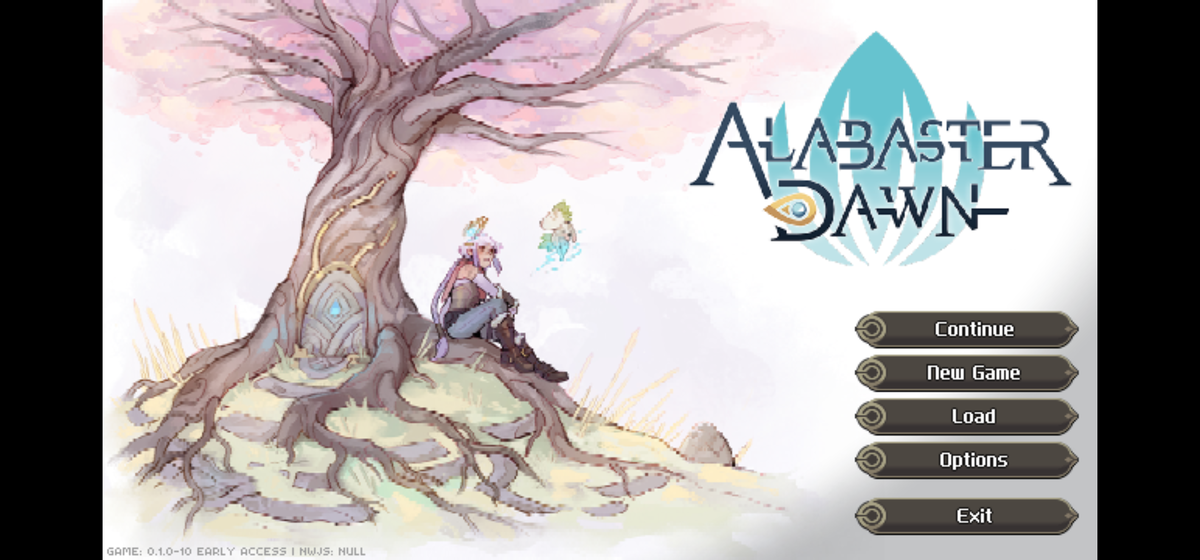
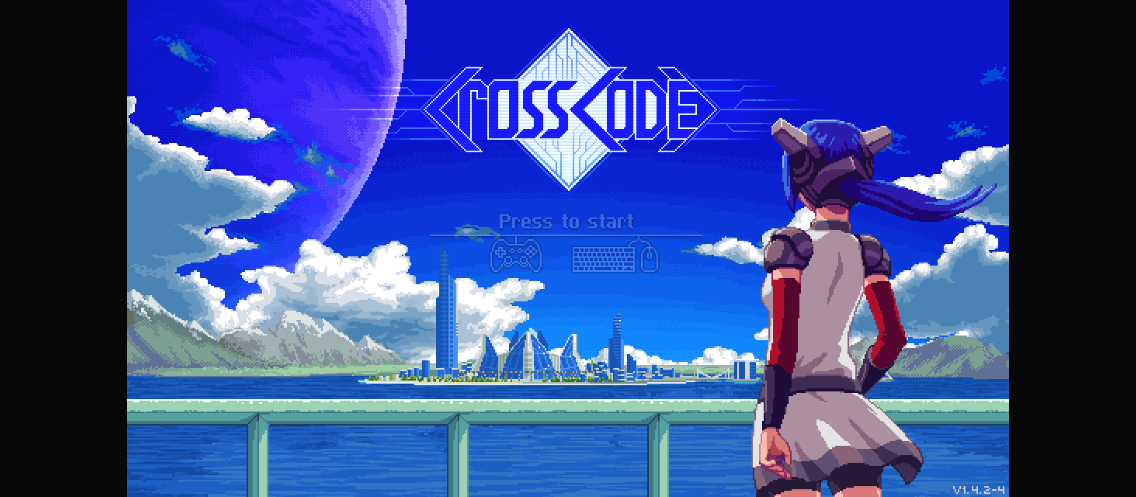
| Alabaster Dawn, running under the port | CrossCode, booting under the port |
|---|---|
 |  |
This repository is an Android WebView host for the NW.js games of Radical Fish Games, plus a desktop controller fix for the same games' PC builds. The port reads the game files from a folder you pick with the Storage Access Framework, injects a per-game compatibility shim at document start, and serves the tree to the page from the APK — the game's files are never edited. Each game gets its own saves folder, in a layout a desktop install can read; until one is picked, saves are kept inside the app and carried into the folder once it is.
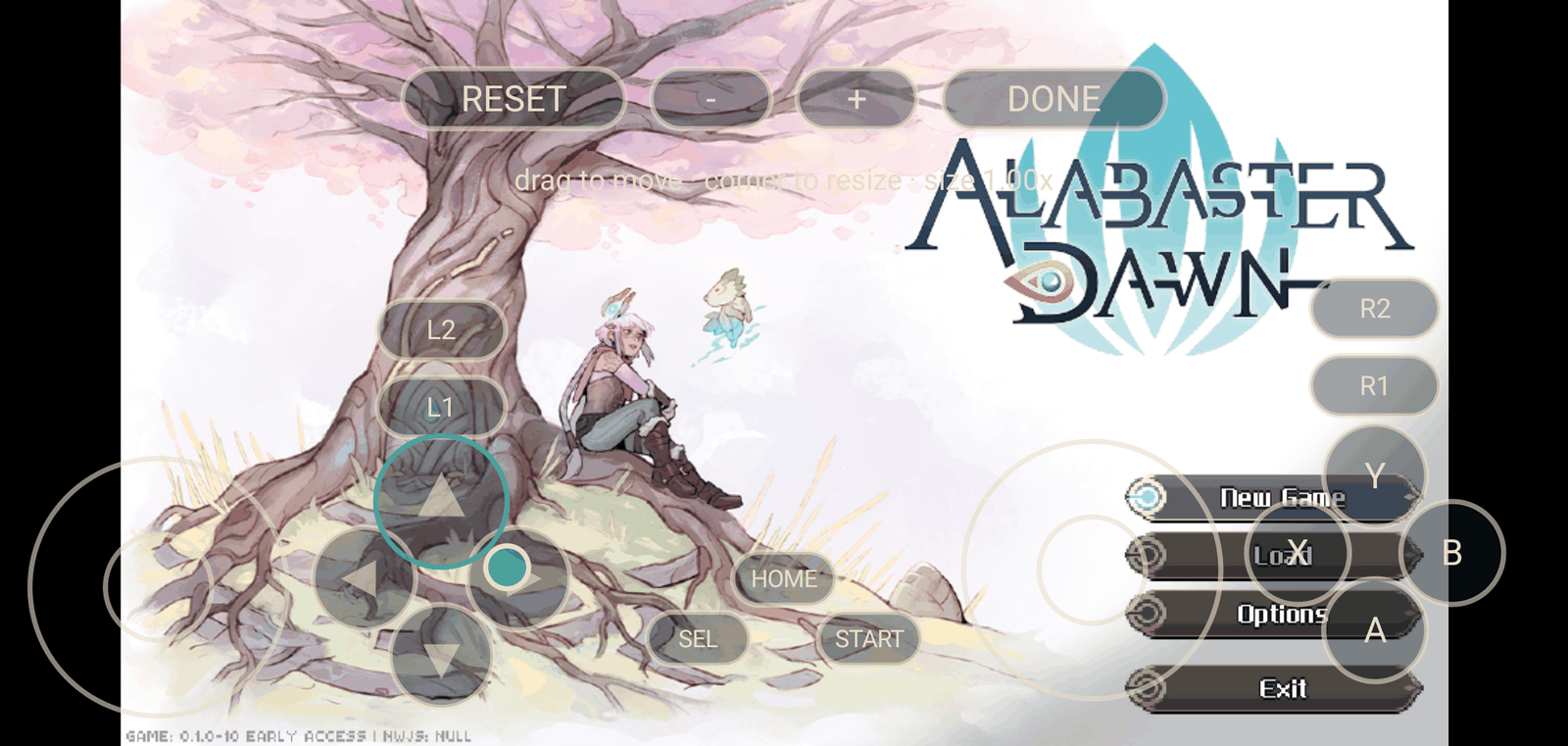
The port's own chrome is shared by both games: an on-screen pad with a layout editor, native gamepad
support, mouse and keyboard passthrough, a side menu, and a diagnostics record built for the failure
mode this kind of port actually meets — a device nobody here owns. What differs per game is one data
table (GameProfile) and one shim script each.
Game support
| Game | Engine | Status |
|---|---|---|
| Alabaster Dawn (Early Access) | terra engine, terra/index.html | Boot to title screen and gameplay verified end-to-end on Samsung Galaxy S22 Ultra (Android 16), Galaxy Z Fold 7 (Android 17) and an Android 14 emulator — controller, on-screen pad, saves Default → Backups → Backups2, options, exit. The full detail is in docs/alabaster-dawn-port.md. |
CrossCode 1.0.0 (v1.4.2-4) | Cubic Impact 0.5, assets/node-webkit.html | Boots to its title screen with cc-shim.js: ig.platform == Desktop, ig.engineName == "Cubic Impact (0.5)", canvas 1136x640, 0 page exceptions, extensions list empty — verified in a desktop Chromium harness on 2026-10-04 (tools/game-harness.py; the screenshot above is that run), and on a phone on 2026-10-04 (Galaxy Z Fold 7, Android 17): title screen at 60 fps, window=475x751@2.625, game build v1.4.2-4, and the engine wrote Default/cc.save into the picked saves folder (screenshot). Audio, in-game pad mapping, the heavier scenes' GPU cost and the save round-trip back to a desktop are still open — see the Roadmap. |
Saves: Alabaster Dawn's Steam layout (Saves/Default/…, Saves/Backups…) is written into the picked
saves folder exactly as the desktop build writes it, so a Saves/ folder can be copied in and back
out. CrossCode builds its own save paths from nw.gui.App.dataPath (the port makes that /saves), so
its save files land in the same picked folder; its options and a fallback save copy live in the
WebView's localStorage.
The app keeps its original applicationId (io.github.moronigranja.alabasterdawn) and signing key,
so installs of the earlier Alabaster-Dawn-only releases keep updating in place; only the display name
is neutral now that the same app runs two games.
How it works
- One host, one profile per game.
GameProfileholds everything game-specific: the engine's page root and entry page, which shim the page gets, where the game's own version is written, and whether the host's engine rewrites apply. The profile is detected from the picked folder — the entry page is the fingerprint — so switching games is switching folders, and nothing is stored. - One card per game, one saves folder each. The entry screen shows both games at once — each as a
row card with its own title art, its name, the folders it is using, a play badge and a ⋮ menu —
and checks at startup that those folders are still there: a stored SAF grant outlives the folder it
points at, so a moved or deleted one is marked (dimmed card,
(missing), a tap re-opens the picker) instead of being silently claimed. The saves key is per game, so the log file, the pad layout and the game's own saves follow whichever game is being started. - Two shims, deliberately. Alabaster Dawn runs the
terraengine and CrossCode runs Cubic Impact 0.5; they need opposite platform answers (window.processmust stay undefined for the former to take its browser path, and must be an object for the latter to take its desktop path). Each shim is self-contained rather than sharing a core: the two engines are the only two Radical Fish NW.js games, and the device-proven Alabaster shim is left alone. - The shim is the Node/NW.js surface. It implements
require("fs"/"path"/"vm"/"os"),require("nw.gui")(CrossCode) or thenw.*namespace (Alabaster Dawn),process, and the greenworks stubs, withfsbacked synchronously by the app's@JavascriptInterfacebridge (PortBridge): the picked game tree read-only, the picked saves folder read-write. - One standard pad. The Kotlin side reads the physical controller from
InputDeviceand emits a real W3C standard-layout gamepad; the on-screen pad and a hardware controller feed the same state, so the engine sees exactly one pad. - The port's own chrome is localised. Every string the port shows lives in Android string resources, with Spanish and Brazilian Portuguese beside the English; the phone's own language selects it, nothing to set. The diagnostics record and the config keys stay English so a report reads the same for everyone.
- CrossCode mods live beside the game, not in it. An installed loader and its mods sit in one
game-root tree in the app's own storage; a card's ⋮ can download the community Spanish pack, or
install any
.ccmodyou picked, switch it off, or remove it. Your copy of the game is never written to. - One permission, and only for a download. Both folders come from the system document picker, and
the manifest's single
INTERNETpermission exists so the optional CrossCode translation pack can be fetched; nothing else is sent or downloaded, and the rest works offline.
The controller fix
fix/ repairs how the PC builds decode gamepads on Linux and inside Wine containers
(GameNative / Winlator / Proton) — the "controller does nothing" bug. It is independent of the
Android port and patches a copy inside your own installation, and it can revert itself. See
docs/alabaster-dawn-port.md and the fix/ sources.
Built With
— the host:
PortActivity, the SAF tree index and bridge, the on-screen pad, the side menu, diagnostics.—
WebViewAssetLoaderand document-start scripts.— the build.
- Plain JavaScript shims (
android/app/src/main/assets/ada-shim.js,cc-shim.js) — no bundler, no shared build step: the file you read in the repo is the file the WebView runs.
<!-- GETTING STARTED -->
Getting Started
Prerequisites
- Android SDK with platform 36 (
local.properties'sdk.dir, orANDROID_HOME). - JDK 17+ (the build targets Java 17; JDK 21 works).
- A legitimately purchased copy of the game whose files you want to run. Nothing game-related is in this repository or in the APK.
Building
cd android
./gradlew :app:assembleDebug     # debug APK at app/build/outputs/apk/debug/
./gradlew :app:testDebugUnitTest # JVM unit tests
node tools/test-shim-diagnostics.mjs   # the shim's own smoke tests
A release build is unsigned unless android/keystore.properties exists; signing is a local, manual
publishing step (android/tools/release.sh), never a repository secret.
Installing
adb install -r android/app/build/outputs/apk/debug/app-debug.apk
Usage
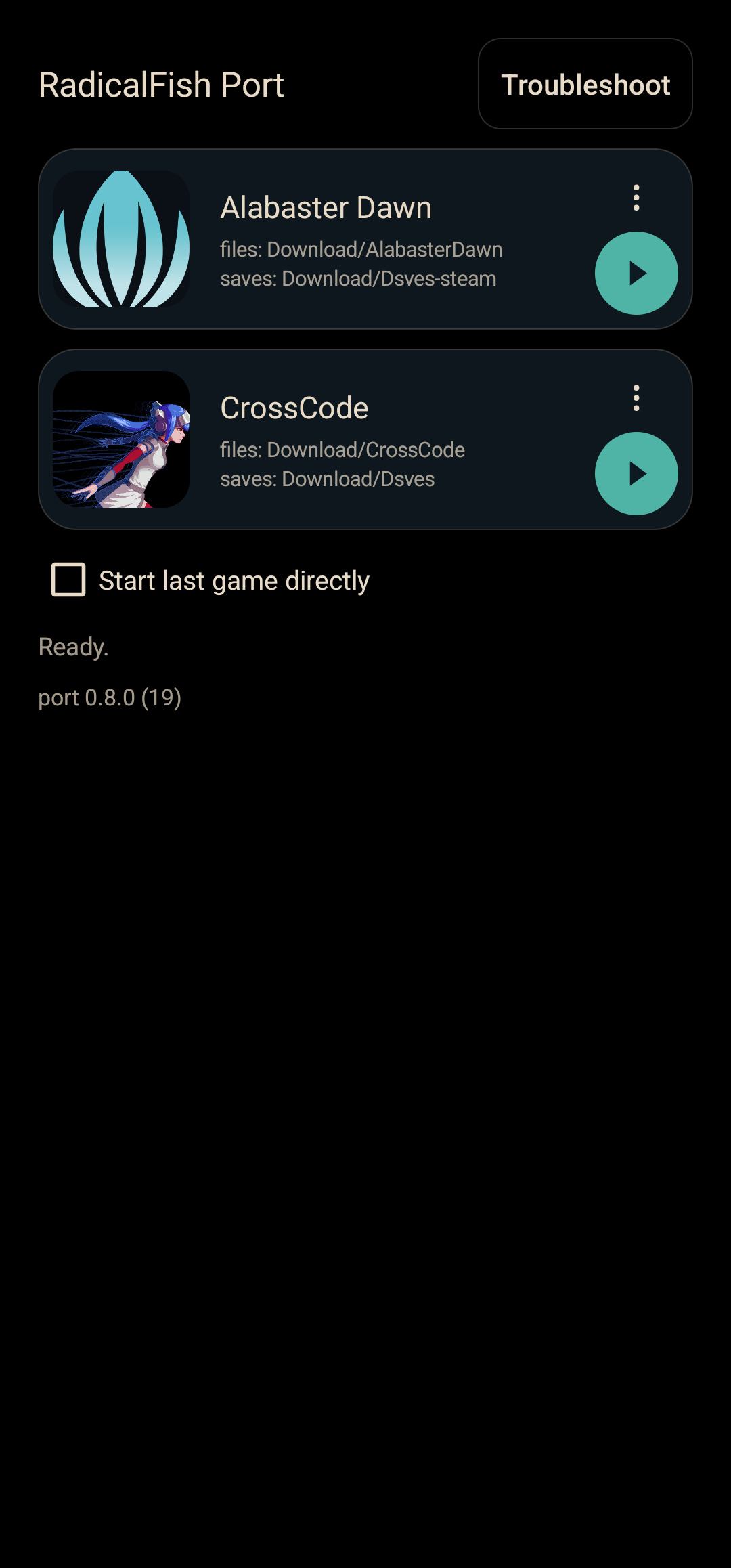
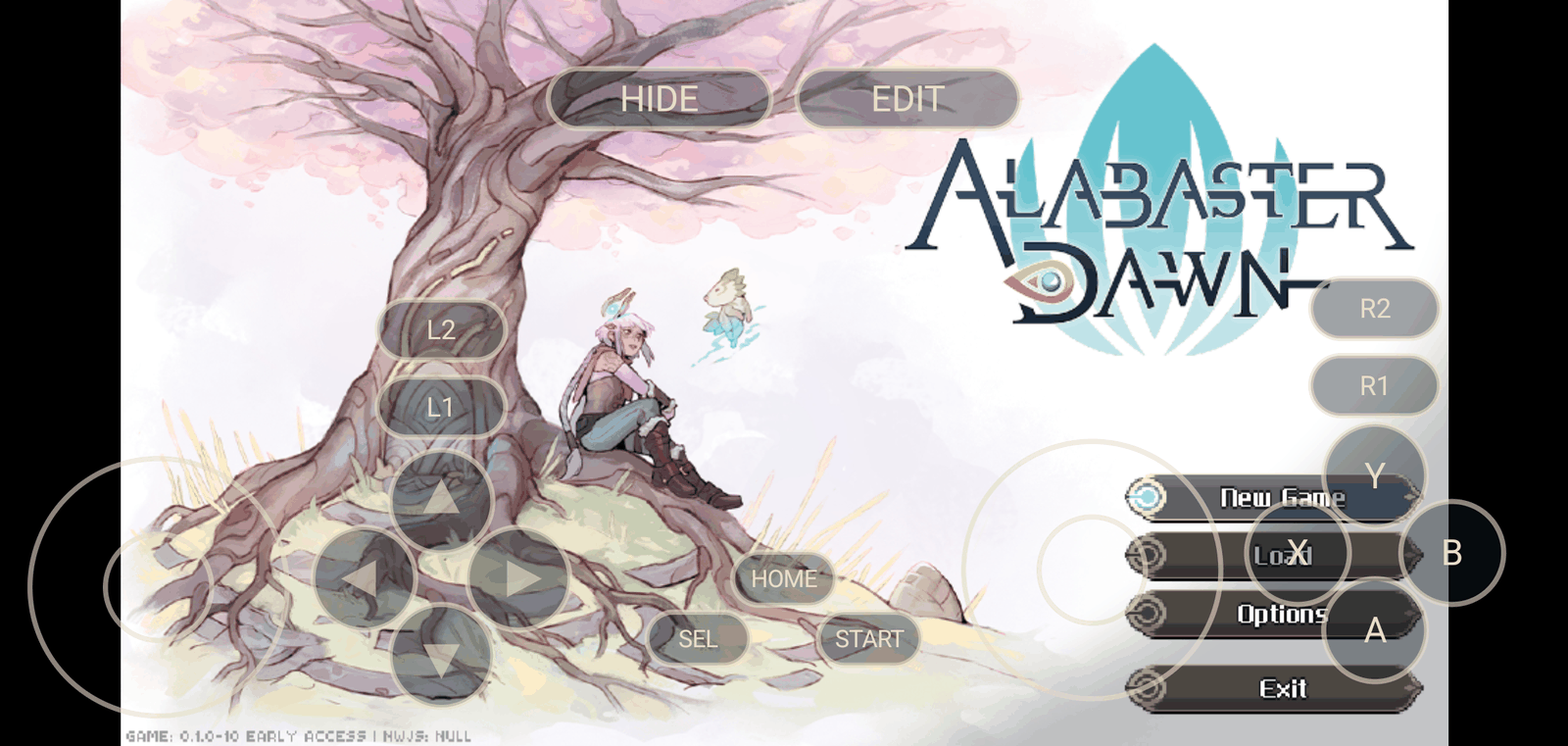
| Entry screen | Running | On-screen pad | Pad layout editor | Side menu | Diagnostics |
|---|---|---|---|---|---|
 | |  |  |  |  |
The entry screen
One screen holds both games, each as a row card: the game's own title art in a square tile
(read from your copy at runtime, never bundled), its name at a fixed size, and a dim line naming the
folders in use — the game folder and that game's saves folder, as paths under the storage root
(Download/…). A round play badge and a ⋮ menu sit at the card's end, and one tap anywhere
on the card starts that game. A game with no folder yet shows an Add <game> button in place of
its card.
The card's ⋮ points it at that game's install folder or saves folder, opens Help: what to copy (the folder to take from the computer, where the desktop build keeps its saves, and the save file names to search for), and can Create a home-screen link, which asks the launcher to pin an icon that opens the port straight into that game. Holding the app icon on the launcher lists both games the same way (the static Alabaster Dawn / CrossCode shortcuts). The CrossCode card's ⋮ also carries Add/Remove Spanish translation and Mods… — see CrossCode mods and the Spanish translation.
Picking a folder is how the screen learns which game it is — the entry page is the fingerprint — so point each game at its folder once and both are one tap away after that. Picking the wrong card's folder says which game it actually is and files it under that game's card. Each game keeps its own saves folder (the log file, the pad layout and the game's own saves all follow the game being started). Under the cards, Start last game directly skips this screen entirely — it is never built, so it cannot flash on the way past — and goes straight into the last game played. The walk of a game's folder (a few seconds for the shipped games) is kept between launches, keyed to the folder and the game's own version file, so a second start goes in at once; a game update, a moved or re-picked folder rebuilds it. Troubleshoot and the port version stay on this screen, because it is the screen every report is taken from.
A stored grant outlives the folder it points at, so the port checks on startup that each folder is
still there. A game whose folder has been moved or deleted is shown dimmed with (missing) next
to its path, the status line names it, and tapping the card re-opens the picker instead of starting a
game that is not there; a saves folder that has gone is marked the same way and the port falls back to
app storage for that session.
Game files and saves
The port runs each game's own web application from a folder you pick; it indexes that folder read-only
and never writes to it. You need only the game's web-app directory — Alabaster Dawn's terra/,
CrossCode's assets/. Everything else in a Steam install (nw_*.pak, lib/, locales/, the
executable, SwiftShader) is the desktop NW.js runtime, which the phone supplies; copy the game
directory alone and the transfer is a fraction of the download.
Where the game is on your PC. On Steam, right-click the game → Manage → Browse local files;
that opens steamapps/common/<game> — under C:\Program Files (x86)\Steam\ on Windows (or wherever
the library is), and under ~/.steam/steam/ (also ~/.local/share/Steam/) on Linux and the Steam
Deck. Copy the game directory to the phone, then point the card's ⋮ → Select game folder at
the folder that holds it — the entry page inside terra//assets/ is how the port knows which game
it is:
Download/                          on the phone
└── AlabasterDawn/                 ← pick this (the card's game folder)
    └── terra/                     the whole game: copy this from the PC
        ├── index.html
        ├── dist/bundle.js
        └── data/ media/ …
Download/
└── CrossCode/                     ← pick this
    └── assets/                    the whole game: copy this from the PC
        ├── node-webkit.html
        ├── js/game.compiled.js
        └── data/ media/ impact/ game/ …
Where the saves are on your PC. Copy the save folder — or just its contents — into the saves folder you picked (a card's ⋮ → Select save folder), and the game will offer Continue:
-
Alabaster Dawn —
%LOCALAPPDATA%\Alabaster Dawn\Saveson Windows,~/.config/Alabaster Dawn/Saveson Linux and the Steam Deck (Save_ID_auto.save,System.save). Copy theSavesfolder itself, or its contents; both are read:Download/ └── AdaSaves/ ← pick this (the card's saves folder) ├── Saves/ the desktop "Saves" folder, copied whole… │ ├── Default/Save_ID_0000.save │ ├── Backups/ │ └── Backups2/ … Download/ └── AdaSaves/ ← pick this ├── Default/Save_ID_0000.save …or the "Saves" folder's contents, dropped straight in ├── Backups/ └── Backups2/ -
CrossCode —
%LOCALAPPDATA%\CrossCodeon Windows (it also looks inside itsUser Data\Default),~/.config/CrossCode/Defaulton Linux and the Steam Deck (cc.save). That desktop path is NW.js's Chromium profile directory, so it also holds browser junk — copy the save files, or theDefaultfolder itself:Download/ └── CcSaves/ ← pick this (the card's saves folder) ├── cc.save the save file, straight from the profile directory… ├── cc.save.backup └── cc.save.backup2 … Download/ └── CcSaves/ ← pick this └── Default/ …or the "Default" folder, copied whole └── cc.saveCopied flat, Alabaster Dawn's saves are the desktop
Savesfolder's contents (Default/,Backups/at the top) and CrossCode's are its save files (cc.save*at the top). In both shapes the port serves the game's ownSaves/…/Default/…paths at the picked root, so a save round-trips between phone and desktop with no renaming. The port also keeps its ownpad-layout.jsonand its diagnostics log at the root of that folder.
The same paths are in the app: a card's ⋮ → Help: what to copy prints the game directory, the desktop save locations and the save file names for that game, in case a path has moved.
Until a saves folder is picked, saves go to app-private storage (the side menu says so, and it is not exportable). Picking a folder carries those saves into it — a file is copied when the folder does not have it or the app's copy is newer, and nothing is deleted — so progress made before a folder was chosen is not left behind. Two user folders are never merged automatically: re-pointing a card at a different folder uses that folder as it is.
CrossCode mods and the Spanish translation
CrossCode is the one engine here with a mod ecosystem, CCLoader, and the port hosts it. The CrossCode card's ⋮ carries two items beyond the folder choices and the shortcut:
- Add Spanish translation (~2.4 MB) downloads the community
CrossCode-Esp pack (v1.1.0 — the CCLoader loader plus the
CrossCode-EspandLocalize-memods), checks it against a pinned SHA-256, installs it into app storage and boots CrossCode through CCLoader with the game's language set to Spanish. The item then reads Remove Spanish translation. The pack is community work by tralph3 and contributors, CC BY 4.0, credited in the card's Help; it is not in the APK and your game folder is never read for it. - Mods… opens a dialog of what is installed — each mod's title and version, an on/off switch and Remove — above the CCLoader version, or a plain note that no loader is installed. Add mod (.ccmod) opens the system file picker and installs what you picked the same way the translation pack is installed: a single mod manifest at the archive root lands as one mod, a bare CCLoader build lands as the loader, and a pack's own shape lands as it is; a wrapper directory is stripped, an unknown shape is refused with a message. The Spanish pack brings its own CCLoader, so adding a mod to it needs no separate loader step.
Everything lands in one tree inside the app's own storage — ccloader/ for the loader,
assets/mods/<id>/ for each enabled mod, disabled/<id>/ for one switched off — and never in the game
folder you picked, which the port only ever reads. There is no index file to go stale: the dialog
re-reads the disk after every action. The port keeps no backup of installed mods, so keep the .ccmod
files you install. One gap, stated plainly: a mod that CCLoader itself will refuse still installs, and
the reason appears in CCLoader's own console rather than as an install-time warning.
Language
The port's own text — the entry screen, the side menu, the diagnostics panel, the mods dialog and the status messages — follows the phone's language: English, Spanish or Brazilian Portuguese, with any other language falling back to English. There is nothing to set inside the app. The games' own text is untouched: CrossCode's Spanish comes from the translation pack above or from its own Options, Alabaster Dawn's from its own Options. The diagnostics record stays in English on purpose, so a report reads the same whoever sends it. Both translations were written for this port; corrections from native speakers are welcome.
Input
- Controller — any Android-visible pad; the port decodes it to a W3C standard gamepad.
- On-screen pad — both sticks, d-pad, A/B/X/Y, L1/R1, L2/R2, Select/Start/HOME, with a toggle
pill and an
EDITmode (drag to move, corner handle to resize,-/+,RESET,UNDO,DONE). While a controller, mouse or keyboard is in use the whole overlay hides and returns after a minute of quiet (a switch in the side menu). A Dynamic sticks switch (on by default) makes each stick start where its half is touched — the ring and knob appear under the thumb and vanish when it lifts; off restores the fixed rings. - Mouse and keyboard — a mouse click falls through the pad to the WebView, and a keyboard plays
the game: WASD/arrows, Enter, Escape, Space, Tab, modifiers and F1–F12 are dispatched to the page
with a real DOM
code/keywhere Android delivers no scan code — plus the legacykeyCode/which, which Impact-era engines (CrossCode's) index their bindings by.
The side menu
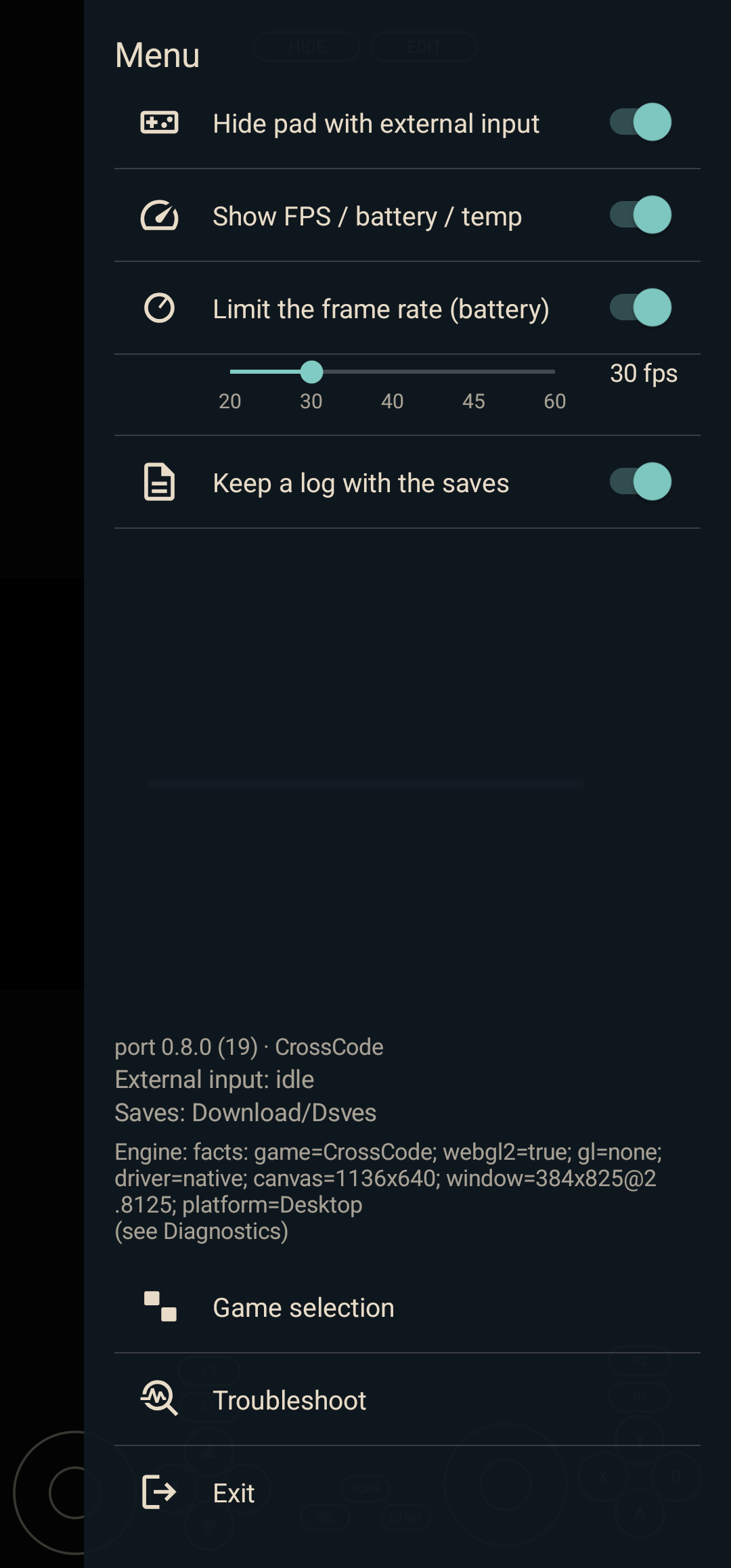
Back opens a panel over the running game: hide-with-external-input, a frame-rate cap with its rate slider (20/30/40/45/60 fps), a picture-position choice (Top/Centre/Bottom — both engines move the canvas's layout box, which their own mouse maps follow), an FPS/battery/temperature readout, the saves-folder log switch, the version and status lines, Game selection and Exit. Game selection tears the running game down and returns to the two-card entry screen with the process alive; Exit ends the app process, so the next launch is clean. All of it lives in the app's prefs.
Diagnostics
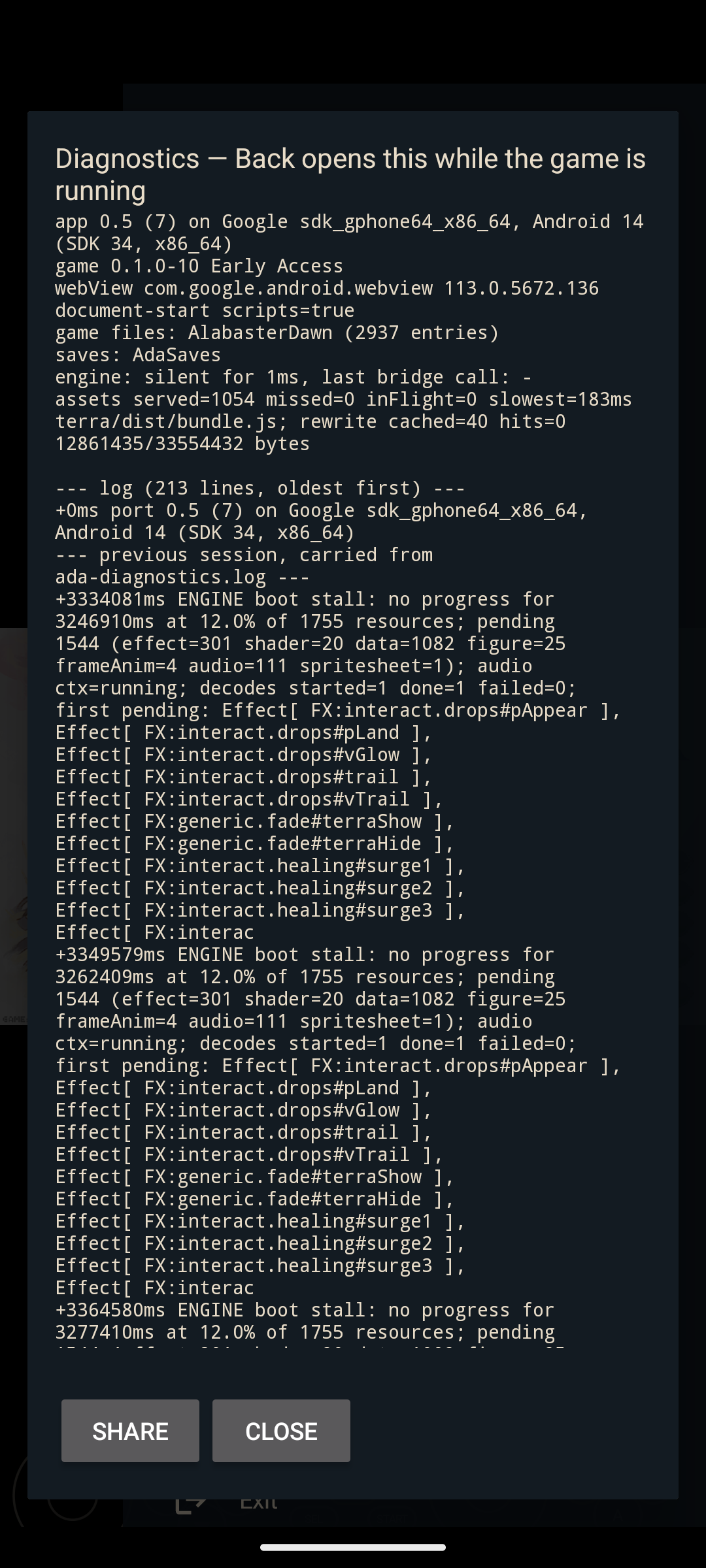
Troubleshoot opens the record: device, port version, the game's own build version (Alabaster Dawn's
changelog and bundle, CrossCode's changelog), WebView and GL backend, folder and asset counters, the
app's log, and the engine's own console errors. A boot that stops is reported by name (the resources
still pending, grouped by kind), the record is carried across a restart, and it can be shared as text
or kept as ada-diagnostics.log in the saves folder.
When a record is not enough, the page's own debugger can be attached to a released build — which is what named CrossCode's stalled loader (FINDINGS §23):
adb shell settings put global rfport_webview_debug 1     # off again with: settings delete global …
adb forward tcp:9222 localabstract:webview_devtools_remote_$(adb shell pidof io.github.moronigranja.alabasterdawn)
# now chrome://inspect, or any CDP client: Runtime.exceptionThrown / Log.entryAdded / a console
Repository layout
android/                        the app
  app/src/main/java/…/alabasterdawn/
    GameProfile.kt              what differs per game (the whole seam)
    PortActivity.kt             the WebView host, SAF pickers, input, side menu
    ModLibrary.kt               CrossCode's loader + mods in app storage (install/enable/remove)
    GameAssetHandler.kt         serves the picked tree under /game/ (+ the engine rewrites)
    PortBridge.kt, FsBridge.kt  the @JavascriptInterface surface the shims call
    Shader*.kt                  Alabaster Dawn's `terra` shader fixes (inert for CrossCode)
  app/src/main/assets/
    ada-shim.js                 the Alabaster Dawn shim
    cc-shim.js                  the CrossCode shim
  tools/                        shim smoke tests, the locale parity check and the release script
fix/                            the desktop controller fix (Linux / Wine containers)
tools/                          the desktop harness and probes used to measure the games
  game-harness.py               boots a game in headless Chromium with a shim at document start
  design/                       renders the port's own icons, palette and screen mock-ups to PNG
    preview.py                  reads the shipped vectors, PortStyle palette and dp constants
FINDINGS.md                     the research record (§13 is the CrossCode probe)
ON_SCREEN_GAMEPAD_PLAN.md       the on-screen pad design
CONTRIBUTING.md                 how to build/test, and the AI-disclosure rule for commits
AGENTS.md                       the same rules, for AI coding agents working in the repo
docs/alabaster-dawn-port.md     the Alabaster Dawn port and controller-fix documentation
Roadmap
Shipped in v0.9.0:
- The port's own UI localised: English, Spanish and Brazilian Portuguese, chosen by the phone's
language, with the three string files held to one key list and one placeholder arity by
android/tools/check-locales.mjs - Spanish for CrossCode in one tap: the community CrossCode-Esp pack (CC BY 4.0, nothing
bundled) downloaded, SHA-256-checked and installed into app storage, and booted through CCLoader
with
ig.currentLang = es_ES— verified on a Galaxy Z Fold 7, and removable again - A CCLoader mod library for CrossCode: a card's Mods… installs any
.ccmod/.zip, switches a mod off and on, or removes it, with the loader's version shown; everything lives beside the game in app storage, never in the picked folder
Shipped in v0.8.0:
- Per-game profile seam; Alabaster Dawn's behaviour unchanged
- CrossCode shim: boot to its title screen — in a desktop harness, and on a phone (Galaxy Z Fold 7,
60 fps at 1136×640,
docs/crosscode-phone.png); the legacykeyCodedrives its keyboard - Entry screen: a card per game (title art, name, both folder paths, play badge, ⋮), a saves folder each, folders that have been moved or deleted marked, and Game selection in the side menu to come back to it without ending the process
- Card ⋮: Help: what to copy and Create a home-screen link; the static launcher shortcuts for both games; the folder index kept between launches
- Saves that travel both ways: each game's desktop layout read whether the save folder was copied
whole or flat (
SaveLayout), and written back out unrenamed - The picture-position control (Top/Centre/Bottom) for both engines; dynamic sticks on the on-screen pad; the circuit-fish launcher mark, fit to the adaptive-icon safe circle
Open:
- CrossCode play on a phone: the heavier scenes' GPU cost at 1136×640, audio, the pad mapping in-game, fullscreen/scale — the boot and the saves are verified, the game itself is not
- CrossCode save round-trip: a save made on the phone, taken to a desktop install and back
- Dynamic sticks on real hardware (unit-tested; the fixed pad is the device-proven one)
- A mod compatibility gate: a mod CCLoader will refuse is refused at install time with a reason, instead of installing and being dropped at boot; and a mod catalogue (CCModDB browse and download by id)
- Extract a shared shim core if a third game ever appears
See the open issues for the full list of proposed features and known issues.
<p align="right">(<a href="#readme-top">back to top</a>)</p>AI usage
This project is maintained by a developer, and most of its code was written by an AI assistant, chiefly DeepSeek V4.1 Flash, served through OpenRouter and driven by the oh-my-pi agentic coding harness. What the human does: sets the direction, makes the design calls, runs the port on real devices, reviews every change, and owns the result. What the AI does: writes the Kotlin, the shims, the tests, and most of this documentation.
Said plainly because it is easy to check and worth knowing. The interesting part of this repository is
not who typed the code — it is what was measured. The failure modes it documents (a mediump sentinel
that made water invisible on every device, the NW.js surface CrossCode's engine expects, a launcher
mask that cropped its own icon) were found on hardware and are recorded with the evidence in
FINDINGS.md.
Every commit is authored and signed off by a human, and no AI is ever credited as a co-author or as a
sign-off; the copyright and the MIT licence stay human. AI-assisted commits carry an Assisted-by:
trailer naming the harness and the model — the convention the Linux kernel, Fedora and others settled
on — from 2026-10-04. The history before that date was written the same way but carries no trailer;
it is not retroactively marked, because backfilling it would rewrite published commits and the v0.8.0
tag. That is also why review is welcome — see CONTRIBUTING.md.
Contributing
Issues and pull requests are welcome. Hardware reports are the most valuable contribution there is:
this port's hard bugs have all been found on devices the maintainer does not own, and the diagnostics
panel exists so that a screenshot of it is a complete report. CONTRIBUTING.md has
the build/test commands and the AI-disclosure rule for commits.
- Fork the project
- Create your branch (
git checkout -b feature/AmazingFeature) - Commit your changes (
git commit -m 'Add some AmazingFeature') - Push (
git push origin feature/AmazingFeature) - Open a pull request
License
Distributed under the MIT License. See LICENSE for the terms, and NOTICE.md
for the game and third-party attribution the released APK carries.
The games are not part of this project: Alabaster Dawn and CrossCode — their artwork, audio, text, data, code and engines — are © Radical Fish Games. This is an unofficial, non-commercial interoperability project, not affiliated with, sponsored by, or endorsed by Radical Fish Games.
<p align="right">(<a href="#readme-top">back to top</a>)</p>Acknowledgments
- Radical Fish Games — for the games, and for shipping them as ordinary web applications, which is the only reason any of this is possible.
- CrossAndroid — prior art for running CrossCode on Android; that project declares no license, so no code was taken from it.
- CCLoader — the CrossCode mod loader the port hosts. It is downloaded to the device on request (as part of the Spanish pack, or as a build you pick), not bundled, and no code from it is in this project.
- CrossCode-Esp by tralph3 and contributors — the community Spanish translation the card's ⋮ downloads, CC BY 4.0, credited in the card's Help. It is downloaded to the device on request and is not in the APK.
- Best-README-Template — the structure of this document.
- AndroidX WebKit and Material Symbols — the libraries and the menu icons.
<!-- MARKDOWN LINKS & IMAGES -->