
Caesar II (Native)
Caesar II
OriginMS-DOS
TechnologyNative C/C++ port (engine reimplementation)
Available forWindows, Linux, macOS, Web
View official projectAbout the project
Caesar II es un videojuego, dentro del género de la construcción de ciudades. Está contextualizado en la antigua Roma, cuando el imperio romano se extiende más allá de Italia. Fue lanzado en 1995, desarrollado y diseñado por Impressions Games y distribuido por Sierra On-Line.
Official project information
Caesar II
Caesar II (1995) running natively on Linux, Windows, macOS and in a browser. There is no DOSBox and no emulator underneath: the game's own code was recovered from the original executable and made to build for current systems.

Playing with the game's German text. English and French are built in as well.
 |  |
| The province map | The same game in a browser |
Play it in three steps
- Get the game. Caesar II is sold DRM-free on GOG for a few euros. An original CD, a disc image or an old installation works just as well. The port never ships game data.
- Get the port. Open the browser
version, which needs
no installation, or download for your system from the releases
page:
.AppImageor.flatpakfor Linux,.zipfor Windows (unzip anywhere and runcaesar2.exe),.dmgfor macOS. - Point it at your copy and press Play. A small launcher opens first. Give it your disc, image or game folder; it imports the data once and remembers where it came from.
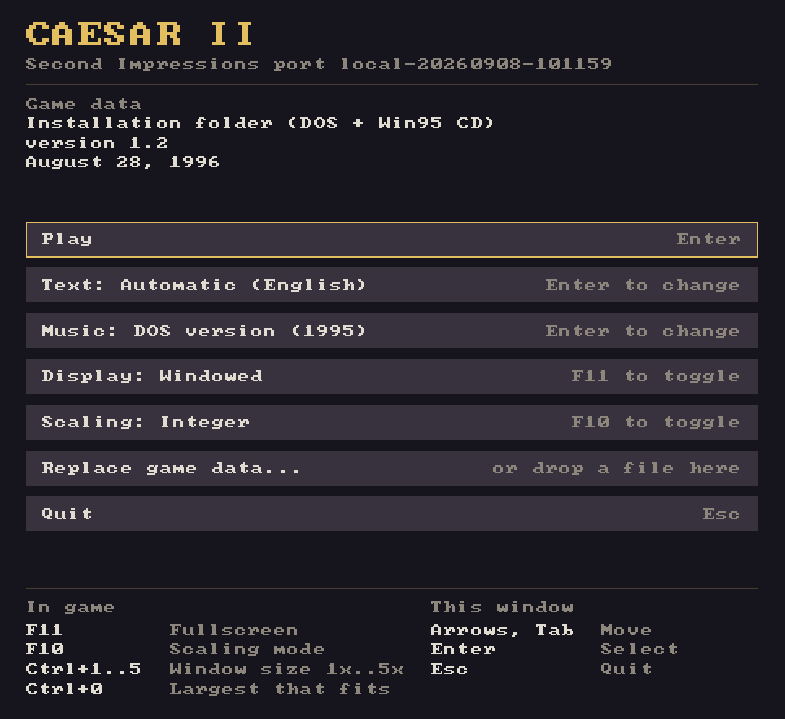
What you get
The engine is the original one, so the game plays as it did in 1995, down to its balance and its quirks, and save files from the original load. Around it, this port provides:
- a resizable window, fullscreen, sharp integer scaling and screenshots, with nothing to configure in a text file;
- the same game in a browser, built from the same code, with your game data kept in the browser's storage on your own machine;
- English, German and French text, chosen in the launcher, while speech and
pictures come from your game data. Translations are ordinary gettext files
under
po/; see docs/game-text.md if you want to add one; - both soundtracks. The 1995 DOS music plays through a reimplementation of the Sound Blaster's OPL3 chip and follows your city's mood; the discs from August 1996 onwards also carry the recorded 1996 Windows soundtrack, which is different music.
Where your copy can come from
Any of these works, natively or in the browser. The importer looks inside and works out what it has:
- an installed game folder, whether GOG's or an old DOS or Windows
installation (pick any file inside it, for example
C2.ENG); for GOG's DOS release the importer automatically uses its completegame.gogCD image, - the original CD-ROM in a drive, which the launcher lists when one is inserted,
- a disc image:
.iso, or.binwith or without its.cue, also inside a.zip, - a
.zipof an installed folder, - a
.c2assetspack, which can carry several languages of speech in one file (tools/c2-assets.py build, see docs/localization.md).
Disc images and archives are imported once and reused on later starts. Saves, screenshots and settings live in the same place:
| Linux | ~/.local/share/second-impressions/caesar2 |
| Linux, Flatpak | ~/.var/app/io.github.second_impressions.caesar2/data/second-impressions/caesar2 |
| Windows | %APPDATA%\second-impressions\caesar2 |
| macOS | ~/Library/Application Support/second-impressions/caesar2 |
| Browser | the browser's own storage for the page |
The original installer copied only part of the game to the hard disk, so an
installation folder without XMI/ and RAW/ has no music or speech. The
launcher and the web page say so when they see it; use the disc or an image of
it to get everything. GOG installations are complete: their game.gog file
is the original CD image, and the importer reads it automatically.
Keys and options
Hotkeys, mouse and menus inside the game are the original's, so its manual still applies. The port adds these:
| Key | Action |
|---|---|
| F11 | fullscreen |
| F10 | integer / fractional scaling |
| Ctrl+1 … Ctrl+5 | window at exactly 1x … 5x |
| Ctrl+0 | window at the largest multiple that fits the screen |
| Mouse wheel | zoom (the game's own +/-) |
| Alt+1 … Alt+8 | screenshot shot1.png … shot8.png into the user-data directory |
The game is 640x480. The window opens at the largest whole multiple that fits your desktop and can be resized freely. Integer scaling, the default, keeps square pixels and leaves a border until the next multiple fits; fractional scaling fills the window instead. Both settings are remembered.
On the command line, caesar2 [SOURCE] starts with a given game-data source.
The other options are --fullscreen, --fractional-scaling,
--skip-launcher, --mouse-lock (confine the pointer to the game area),
--user-data-dir PATH, --language TAG (en, de, fr), --music dos|windows, --asset-profile NAME (speech in a multi-profile pack) and
--version.
Something wrong?
Open an issue. The form asks for the few things that make a report usable.
How this works
The engine was not rewritten. It was recovered as C source in the
Caesar II reconstruction,
whose build reproduces the 1995 executable byte for byte. This repository
continues that source onto SDL3: the DOS and Windows calls the game made are
replaced one function at a time, the game's own logic is left alone, and each
deliberate difference is a named flag in include/c2_target.h.
The music, the movies and the file formats needed code of their own, written for this port: an XMIDI sequencer with an OPL3 synthesizer, Smacker video playback and the game-data importer. They are described under docs/.
Building
nix develop            # or install the dependencies below yourself
cmake --preset linux-release
cmake --build --preset linux-release
./build/port/linux-release/caesar2
Every library comes from the build host. CMake locates them, nothing is fetched or bundled, and there are no git submodules, so a release tarball builds as it is:
| Library | Needed for | Required |
|---|---|---|
| SDL3 ≥ 3.4 | window, input, audio, filesystem | yes |
| zlib | Deflate in the ZIP importer | yes |
| libbacktrace | source lines in crash reports (-DPORT_WITH_LIBBACKTRACE=AUTO|ON|OFF) | no |
| Unity | the C test suite (BUILD_TESTING) | tests only |
Two decoders that no distribution packages are carried as plain files with their provenance in third_party/README.md: libsmacker (Smacker video) and Nuked OPL3 (the FM chip). Packagers should declare them as bundled.
cmake --install lays out the binary, desktop entry, AppStream metainfo, icon
and licenses under the usual GNUInstallDirs, honouring DESTDIR:
cmake -S . -B build -DCMAKE_BUILD_TYPE=Release -DPORT_WITH_LIBBACKTRACE=ON
cmake --build build
DESTDIR=/tmp/stage cmake --install build --prefix /usr
The windows-msvc-* presets take their libraries from the vcpkg manifest
(vcpkg.json), and the web build is described in
docs/webassembly.md. Every configuration, releases
included, carries debug information. A release build reports its version as
1.0.2; other builds name their origin and commit, such as main-a630e29c.
Developing
Recovered engine C stays in src/, CPU-only translations of recovered
assembly in src/asm/, backend-neutral shims in src/platform/common/, and
host backends in src/platform/<backend>/. Target differences go through
include/c2_target.h (PORT_PLATFORM, PORT_FIX_*, PORT_FEAT_*) rather
than raw compiler macros. The original's behaviour, bugs included, is the
default, and every deviation is a named, documented flag.
- docs/testing.md: smoke tests that play the game through the real input path, the sanitizer presets, crash reports
- docs/platform-boundary.md: the audited function, subsystem and assembly boundary
- docs/engine-scheduling.md: worker thread, frame publication, input and browser scheduling
- docs/timing.md: the original timing mechanisms and their portable counterparts
- docs/media-implementation.md: PCM, Smacker and the XMIDI/OPL3 music stack, and the two soundtracks
- docs/game-data-sources-plan.md, docs/native-data-paths.md, docs/user-data.md: data import, caching, user files
- docs/game-text.md: the compiled-in text and its gettext files, and docs/localization.md for speech and packs
- docs/releasing.md: how a release is cut and what it contains
- docs/legacy-abi.md and docs/recovered-source-delta-audit.md: compiler semantics the recovered code relies on, and every port edit to a recovered file
- docs/reconstruction-tooling.md: the byte-exact DOS reconstruction tooling still carried here
Byte equality is not a requirement in this repository, but keep inherited files structurally close to the reconstruction so its advances stay easy to cherry-pick. Changes are not forwarded back.
License
Except for third-party components carrying their own notices, this project is
licensed under the GNU Affero General Public License, version 3 or
later (AGPL-3.0-or-later). It is distributed without warranty.
This license declaration applies to contributions that project contributors are entitled to license. It does not grant rights to original Caesar II game assets or other third-party material. Game assets are not distributed by this project and must be supplied by users from copies they are authorized to use. Third-party components retain the licenses recorded in their own license and notice files.