
Command & Conquer: Red Alert (Android)
Command & Conquer: Red Alert
OriginWindows
TechnologyNative C/C++ port (engine reimplementation)
Available forAndroid, Linux, macOS
View official projectAbout the project
Command & Conquer Red Alert es un videojuego de estrategia en tiempo real de la serie Command & Conquer creado por Westwood Studios en 1996. Los eventos de Red Alert tienen lugar en una realidad alternativa en la cual las fuerzas aliadas se enfrentan a las fuerzas de la Unión Soviética en una encarnizada contienda militar por el control del continente europeo. Inicialmente sólo estaba en versión para PC, y subsiguientemente para PlayStation.
2 versions of Command & Conquer: Red Alert
You're viewing: Command & Conquer: Red Alert (Android)
Official project information
ra-port
Native macOS, Linux, Android, and iOS source port of Command & Conquer: Red Alert.








ra-port lets you play Red Alert (1996) on modern platforms. It currently runs as native macOS and Linux executables, a local Android debug APK, and an iOS debug app, with SDL2 providing the platform layer.
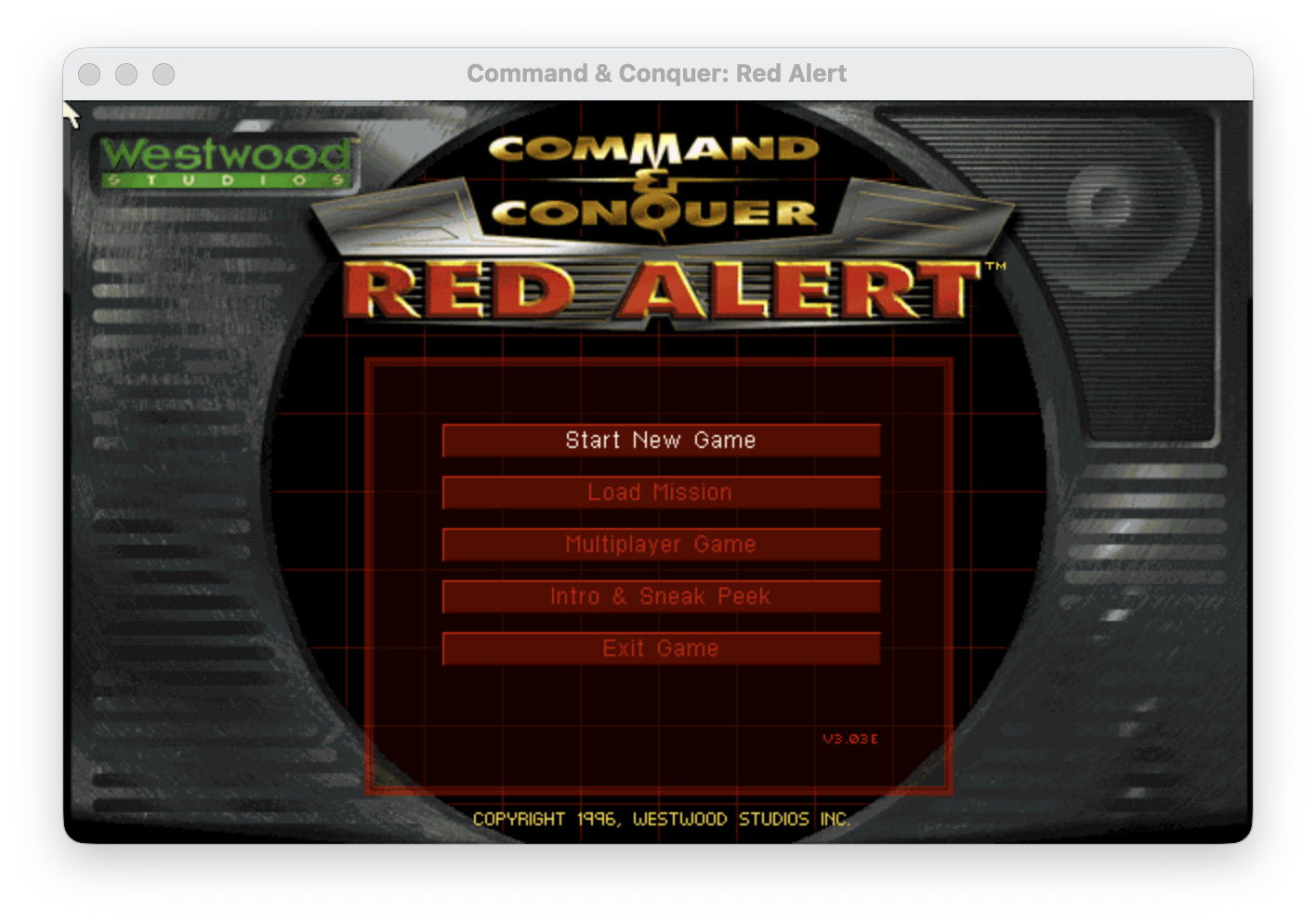
The repository contains only source code and build tooling. No game assets are included in the repository. To play, provide legally obtained Red Alert assets from your own discs, mounted images, or local backups.
Why This Exists
Red Alert was released for a very different desktop world. This project keeps the original code recognizable while supporting macOS, Linux, Android, and iOS.
This is an unofficial source port based on the source code Electronic Arts released under GPLv3 with additional terms: https://github.com/electronicarts/CnC_Red_Alert.
Current Status
| Status | Feature | Notes |
|---|---|---|
| :white_check_mark: | macOS on Apple Silicon | Builds and runs with CMake/Ninja. |
| :white_check_mark: | Linux on Ubuntu | Builds and runs as a native SDL2 desktop executable. |
| :white_check_mark: | Android debug APK | Builds a local landscape APK for arm64-v8a devices and emulators. |
| :white_check_mark: | iOS debug app | Builds a landscape simulator/device app with CMake/Xcode. |
| :white_check_mark: | Campaign | Allied and Soviet campaigns are fully working. |
| :white_check_mark: | Skirmish | Local skirmish is fully working. |
| :white_check_mark: | Videos | Videos are playing with sound. |
| :white_check_mark: | Controls and audio | macOS keyboard/mouse plus Android and iOS touch/audio work. |
| :x: | Online/network multiplayer | Not wired up yet. |
| :x: | Launcher/setup tools | Not ported. |
| :x: | Expansion packs | Not a focus yet. |
| :x: | .app bundle | Not packaged yet; the build creates a normal macOS executable. |
| :x: | Android release build | Only local debug APKs are supported right now. |
| :x: | iOS release build | Only local debug simulator/device builds are supported right now. |
Quick Start
Install the macOS build tools:
brew install cmake ninja pkg-config sdl2
xcode-select --install
Build the port:
cmake -S . -B build -G Ninja
cmake --build build --target redalert_mac -j 8
On Ubuntu, install the Linux build tools and build the port:
sudo apt-get update
sudo apt-get install -y build-essential cmake ninja-build pkg-config libsdl2-dev
cmake -S . -B build-linux -G Ninja
cmake --build build-linux --target redalert_linux -j 8
Prepare local game data:
scripts/prepare_assets_from_local.sh \
  --allies /path/to/allies-disc \
  --soviet /path/to/soviet-disc
Run:
scripts/run_mac_dev.sh --no-build
On Ubuntu, run:
scripts/run_linux_dev.sh --no-build
To build and run the Android debug APK, install the Android prerequisites listed below, keep the same prepared local game data under assets/redalert, then run:
scripts/build_android_debug.sh
scripts/run_android_debug.sh --no-build
To build and run the iOS simulator debug app, install full Xcode, keep the same prepared local game data under assets/redalert, then run:
scripts/build_ios_debug.sh
scripts/run_ios_simulator.sh --no-build
Game Data
The repository contains only source code and build tooling. It does not contain game data, movies, music, disc images, archives, installers, generated palettes, or packaged executables.
The asset preparation script copies from local paths that you provide:
assets/redalert/alliesassets/redalert/soviet
Those directories are ignored by git. They should contain original disc-root style files such as INSTALL/REDALERT.INI and the base-game .MIX files.
The Android and iOS debug builds use the same ignored assets/redalert tree. Gradle copies those local files into generated Android debug assets, and the iOS CMake target copies them into the debug app bundle. They are not checked in and they are not used for release packaging.
Build From Source
Configure and build on macOS:
cmake -S . -B build -G Ninja
cmake --build build --target redalert_mac -j 8
If you do not have Ninja installed, omit -G Ninja and CMake will choose the default generator.
The build currently creates a raw macOS executable:
build/redalert_mac
It is not packaged as a .app bundle yet.
Linux Desktop
Install Ubuntu build dependencies:
sudo apt-get update
sudo apt-get install -y build-essential cmake ninja-build pkg-config libsdl2-dev
Configure and build:
cmake -S . -B build-linux -G Ninja
cmake --build build-linux --target redalert_linux -j 8
Run from the repository root:
scripts/run_linux_dev.sh
For headless smoke validation, install Xvfb and ImageMagick, then capture the title/menu:
sudo apt-get install -y xvfb imagemagick
scripts/smoke_linux_menu.sh --seconds 20
Run
The normal development run command builds if needed, verifies local assets, codesigns the executable, and launches from the repository root:
scripts/run_mac_dev.sh
Useful variants:
scripts/run_mac_dev.sh --no-build
scripts/run_mac_dev.sh --prepare-only
The Linux run helper follows the same flow without codesigning:
scripts/run_linux_dev.sh
scripts/run_linux_dev.sh --no-build
scripts/run_linux_dev.sh --prepare-only
You can also run the built executable directly after codesigning:
codesign --force --sign - build/redalert_mac
./build/redalert_mac
Runtime files such as SAVEGAME.*, OPTIONS.INI, ASSERT.TXT, screenshots, logs, and generated palette caches are ignored by git.
Android Debug APK
Android CI builds an arm64 debug APK with only a placeholder INI file. The ra-port-android-build-check artifact verifies compilation and packaging; playing requires a local build with your own game data.
The Android target is for local development and testing only. It builds an arm64-v8a debug APK, locks the activity to landscape, uses touch-native input, and extracts the bundled debug assets into app storage on first launch.
Install Android tooling:
- JDK 17
- Gradle compatible with Android Gradle Plugin 9.2.0
- Android SDK Platform 36
- Android SDK Build Tools
- Android NDK
28.2.13676358 - Android CMake package
- Android platform-tools for
adb
Android Studio is the easiest way to install the SDK, NDK, CMake, emulator, and platform-tools. On Homebrew-based macOS setups, the helper scripts auto-detect common openjdk@17 and Android SDK locations when JAVA_HOME, ANDROID_HOME, or ANDROID_SDK_ROOT are not already set.
Build the debug APK:
scripts/build_android_debug.sh
The first build downloads SDL2 sources into ignored local storage under android/third_party/. The APK is written to:
android/app/build/outputs/apk/debug/app-debug.apk
Install and launch on a connected device or emulator:
scripts/run_android_debug.sh --no-build
If an emulator is low on space and in-place install fails, uninstall the old debug app first:
scripts/run_android_debug.sh --no-build --fresh-install
--fresh-install removes existing app data, including extracted assets and saves.
Build, install, launch, and tail Android logs:
scripts/run_android_debug.sh --logcat
Useful direct commands:
adb install -r android/app/build/outputs/apk/debug/app-debug.apk
adb shell am start -n com.raport.redalert/.RedAlertActivity
The debug APK intentionally includes your local ignored game data so the app can run on the device without external storage setup. Do not distribute that APK.
iOS Debug App
The iOS target is for local development and testing only. It builds a landscape app for the iOS simulator by default, or for a signed arm64 device build when you provide an Apple development team.
Install iOS tooling:
- Full Xcode, not only Command Line Tools
- CMake
- Local Red Alert assets prepared under
assets/redalert
Build the simulator app:
scripts/build_ios_debug.sh
The first build downloads SDL2 sources into ignored local storage under ios/third_party/. The app is written under:
ios/build-simulator/Debug-iphonesimulator/redalert_ios.app
Install and launch on the booted iOS simulator:
scripts/run_ios_simulator.sh --no-build
Build a signed device app for iPhone or iPad:
RA_IOS_DEVELOPMENT_TEAM=TEAMID scripts/build_ios_debug.sh --device
The default bundle identifier, com.raport.redalert, can only be registered by one Apple team. If signing reports that it is not available, pass your own:
RA_IOS_DEVELOPMENT_TEAM=TEAMID scripts/build_ios_debug.sh --device -- -DRA95_IOS_BUNDLE_ID=com.example.redalert
The debug iOS app intentionally includes your local ignored game data. On first launch it copies that bundled data into app-writable storage before starting the game, so saves and options can be written inside the iOS sandbox. Do not distribute that app bundle.
Fullscreen
Start fullscreen:
RA_FULLSCREEN=1 scripts/run_mac_dev.sh
Toggle fullscreen while running:
Command+Return on macOS
Alt+Return on Linux
Touch Controls
On Android and iOS:
| Gesture | Action |
|---|---|
| Tap | Left click |
| Drag | Left-button drag, e.g. a selection box |
| Long press or quick two-finger tap | Right click, e.g. deselect units |
| Two-finger drag | Scroll the map, or move the magnified view when zoomed in |
| Pinch | Magnify the screen, up to 3x |
| Quick two-finger double tap | Show the whole screen again |
| Tap during a movie | Skip the movie |
Tests
Run the source-level tests and script checks:
tests/run_script_tests.sh
Validate a fresh checkout with a full build first:
cmake -S . -B build -G Ninja
cmake --build build --target redalert_mac -j 8
tests/run_script_tests.sh
On Linux:
cmake -S . -B build-linux -G Ninja
cmake --build build-linux --target redalert_linux -j 8
tests/run_script_tests.sh
Project Layout
| Path | Purpose |
|---|---|
CODE/ | Main Red Alert game code |
PORT/MAC/ | Shared desktop runtime, compatibility shims, SDL2 integration |
PORT/ANDROID/ | Android entrypoint and platform-specific resource setup |
PORT/IOS/ | iOS entrypoint and writable sandbox resource setup |
android/ | Gradle Android app that builds the debug APK |
ios/ | CMake/Xcode iOS app target |
WIN32LIB/, WINVQ/ | Legacy support libraries used by the port |
scripts/ | Asset preparation, run helpers, smoke capture, Linux include overlay generation |
tests/ | Focused source-level and shim tests |
docs/images/ | README images only, not game data |
Contributing
The port is intentionally conservative: keep original source layout and behavior recognizable, and prefer small platform-specific support files over broad rewrites. Good next areas are macOS .app packaging, Linux packaging, Android/iOS release packaging, physical device validation, Intel macOS validation, save/load hardening, expansion support, CI coverage, and mobile input/UI polish.
Network and online multiplayer are out of scope for the current milestone.
License And Notice
The source code is distributed under GPLv3 with additional terms. See LICENSE.md.
This is an unofficial modified source port. It is not affiliated with, endorsed by, sponsored by, or supported by Electronic Arts or any other rights holder. See NOTICE.md.