
Final Fantasy Crystal Chronicles Decompilation
Final Fantasy Crystal Chronicles
OriginGameCube
TechnologyDecompilation and reconstruction in C/C++
Available forWindows, Linux, macOS
View official projectAbout the project
Final Fantasy Crystal Chronicles es un videojuego de rol de acción desarrollado por Squaresoft y publicado por Nintendo para Nintendo GameCube, siendo el primer y único videojuego de la serie Final Fantasy publicado para dicho sistema. Square Enix trabajó en tres secuelas de este título ambientadas en el mismo universo:Final Fantasy Crystal Chronicles: Ring of Fates, para Nintendo DS. Final Fantasy Crystal Chronicles: The Crystal Bearers, para Wii. Final Fantasy Crystal Chronicles: The Little King and the Promised Land, para Wii.
Official project information
Final Fantasy Crystal Chronicles Decompilation


This is the decompilation for Final Fantasy Crystal Chronicles for the Nintendo GameCube.
There are 3 versions of this game: JP, EN, and PAL (EU).
Fortunately, the EN build contains a debug symbol file, and the PAL version contains a release symbol file (although for a different build). These have greatly simplified the decompilation process for FFCC. These symbols allowed us to recover exact function and class names, as well as all parameters to each function, and class hierarchies.
⚠️ Assets are not bundled with this repository. You must obtain these on your own. ⚠️
Contribution Guide
Beginners Contribution Guide
The most direct way to contribute with minimal setup is to pick any non-perfect section from the decomp tracker, then improve overall progress (code match, data match, or linkage).
Refer to the sections on building and diffing. Once set up, modify .cpp/.h files and, when needed, configure.py flags to improve output.
Small regressions can be acceptable when outweighed by larger gains in another category (for example, a minor code-byte loss with substantial data or linkage progress).
If progress appears stuck at 0% for a unit/function, check linkage and declarations first. Common symptoms include unexpected Metrowerks mangled names, improper linkage (using extern "C" when uneeded, or missing it when needed), or missing special pragmas. That said, bias towards simplicity unless proven otherwise is necessary.
Avoid leaving hardcoded offset-based member access (for example (this + 0x28)) in final contributions. Prefer proper types and named data members, even if the offset form currently matches.
Advanced Contribution Guide
For experienced reverse-engineers, there are still quite a few harder tasks remaining.
Regional builds
See regional compiler baselines for the game compiler choices, comparative evidence, and the Japanese patched-compiler provenance.
Regional progress: PAL, USA, Japan.
PAL, USA and Japan build from shared source with separate retail inputs, symbol configs, output directories and matching claims. PAL remains the primary target with the most mature matching and linkage. USA and Japan have partial recovered configs and retain retail objects for unproven units. A passing retail checksum with those fallbacks does not mean that the region is fully decompiled.
Changes to shared source or build tooling must compile all configured source and verify the GameCube executable and both GBA images for all three regions. See the GBA guide and CI documentation.
Dependencies
Windows
On Windows, it's highly recommended to use native tooling. WSL or msys2 are not required.
When running under WSL, objdiff is unable to get filesystem notifications for automatic rebuilds.
- Install Python and add it to
%PATH%.- Also available from the Windows Store.
- Download ninja and add it to
%PATH%.- Quick install via pip:
pip install ninja
- Quick install via pip:
macOS
-
Install ninja:
brew install ninja
wibo, a minimal 32-bit Windows binary wrapper, will be automatically downloaded and used.
Linux
- Install ninja.
wibo, a minimal 32-bit Windows binary wrapper, will be automatically downloaded and used.
Building
-
Clone the repository:
git clone https://github.com/zcanann/FFCC-Decomp.git -
Supply the retail inputs for each region you want to build:
Region Version Disc image under orig/<version>/PAL (default) GCCP01FFCC_PAL.isoUSA GCCE01FFCC_USA.gcmJapan GCCJGCFFCC_JP.isoThe GameCube build can also read disc formats supported by decomp-toolkit, including RVZ. The GBA extractor reads the ISO/GCM files named above. For an extracted-only build, supply
orig/<version>/sys/main.doland bothorig/<version>/gba/ffcc_cli.binandorig/<version>/gba/mgr00.bin. Existing extracted GBA inputs are used without modifying them. Each region's inputs are checked against its own expected hashes. -
Install the GBA dependencies and pinned compilers described in gba/README.md. They are required to include GBA source in validation and progress.
-
Configure and build the selected region, for example PAL:
python configure.py --version GCCP01
ninja all_source progress build/GCCP01/report.json
Use
GCCE01orGCCJGCin both commands for another region. Outputs are kept underbuild/<version>/; the rootbuild.ninjaandobjdiff.jsondescribe the most recently configured region. Use separate worktrees for simultaneous regional builds. The compiler tools are shared across regions.all_sourcecompiles configured source, including GameCube units not yet mapped into the selected region's splits.progressverifies the linked GameCube executable and both GBA images, then generates the report. Shared changes require all three regional builds: three DOL and six GBA checksum checks, plus source compilation. Match and linkage claims remain independent for each region.
Diffing
Once the initial build succeeds, an objdiff.json should exist in the project root.
Download the latest release from encounter/objdiff. Under project settings, set Project directory. The configuration should be loaded automatically.
Select an object from the left sidebar to begin diffing. Changes to the project will rebuild automatically: changes to source files, headers, configure.py, splits.txt or symbols.txt.
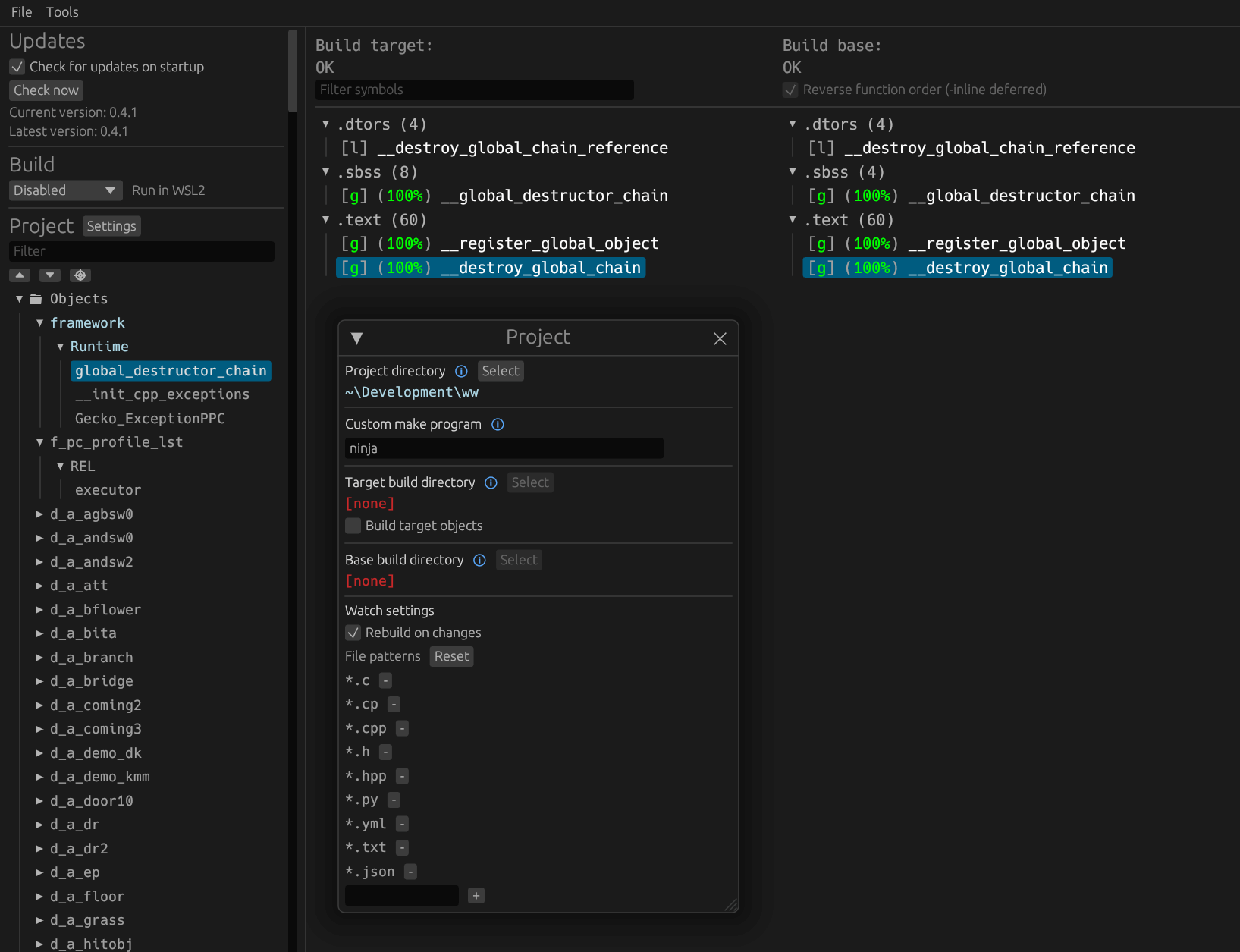
Finding function-order candidates
After building, scan existing game objects for function-order differences:
python tools/mine_function_order.py --limit 20 --json build/function_order_candidates.json
python tools/mine_function_order.py --unit main/p_light --details
The report compares retail split objects with compiled objects, computes a minimal set of function moves, and prioritizes small candidates without missing functions or size differences. It reads existing builds and does not edit sources. --diff-json can analyze a saved objdiff diff.
Moves describe compiled order: deferred compilation can reverse source order. Generated special members are flagged for review; constant-pool layout requires separate investigation. These are candidates, not guaranteed byte gains. After changing a candidate, rebuild and compare the whole unit with objdiff before committing.
Recovering regional GameCube code splits
After compiling a region's source, audit a complete code-only object against its retail DOL:
python tools/recover_code_splits.py --dol orig/GCCE01/sys/main.dol --symbols config/GCCE01/symbols.txt --object base/PPCArch.c=build/GCCE01/src/base/PPCArch.o --allow-relocations
The default accepts relocation-free objects. --allow-relocations also replays
PowerPC ADDR16_LO, ADDR16_HI, ADDR16_HA and REL24 relocations using local
definitions or existing regional symbols. Every relocated byte must agree at a
unique aligned placement; unknown targets, unsupported relocations, conflicting
ownership and omitted data/BSS/COMMON are rejected. Repeat --object to audit a
batch and use --output to save its JSON evidence.
Objects containing both .text and .init, such as mem.c, are audited as one
unit. Each complete section must have a unique placement, the placements must
not overlap, and all sections must pass before the tool proposes a unit split.
Multi-section results include a sections array; single-section output remains
unchanged. Data, BSS and COMMON storage still require separate verification.
The tool only proposes split and symbol entries. Check MAP ownership, rebuild, compare the full unit with objdiff and verify regional image checksums before marking it complete. GBA recovery uses its own relocation audit.
For batches containing retained function subsets, initialized data or BSS, use the regional compiled-object solver. It tests PAL retain hints independently against each retail image, propagates relocation constraints and separates byte proofs from unresolved ownership hypotheses.