NotDec
a webassembly wasm decompiler and Static Analysis Framework based on llvm IR. (Work In Progress)
OriginGitHub decompilation
TechnologyDevelopment tool / build utility
Available forWindows, Linux, Web
View official projectAbout the project
Tool and utility indexed on PortsNative for configuration, decompilation, or execution support on modern platforms.
Official project information
NotDec: WebAssembly Decompiler and Static Analysis Framework
NotDec is
- A project that aims to demystify the internal of decompiler.
- A webassembly decompiler that can experiment with new decompiler techniques.
- Variable Recovery
- Structual Analysis
We are still actively experimenting with and improving the type recovery algorithms (on another branch). We will be back soon with a much better and more efficient type recovery algorithm!
Keywords: Reverse LLVM, LLVM C Backend / llvm-cbe.
Development - Linux
Based on Ubuntu 22.04
- Clone this repo, use recursive clone
git clone --recursive - Install dependencies
- Use
aptsudo apt install wabt python-is-python3 clang-14 cmake zlib1g-dev g++ ninja-build libboost-all-dev - Install
wasi-sdkto/optwget https://github.com/WebAssembly/wasi-sdk/releases/download/wasi-sdk-20/wasi-sdk-20.0-linux.tar.gz -P /tmp sudo tar xf /tmp/wasi-sdk-20.0-linux.tar.gz -C /opt
- Use
- clone this repo
- Install LLVM 14
- Execute
scripts/build-debug-llvm.shto download and build LLVM. You may encounter errors about no memory during linking, just decrease the parallel number to 1.
- Execute
- cmake build, but use clang as the compiler.
cmake -DCMAKE_EXPORT_COMPILE_COMMANDS:BOOL=TRUE -DCMAKE_C_COMPILER:FILEPATH=/usr/bin/clang-14 -DCMAKE_CXX_COMPILER:FILEPATH=/usr/bin/clang++-14 -DCMAKE_EXE_LINKER_FLAGS=-fuse-ld=lld --no-warn-unused-cli -S . -B ./build -G Ninja
cmake --build ./build --target all --
Notice
- It is recommended to set
--tr-level=3and provide environment variablesNOTDEC_DISABLE_INTERPROC=1(disable inter-procedural type recovery) andNOTDEC_SAT_DISABLE=1(disable complex type propagation) to reduce the time spent on type analysis. - Setting the environment variables
NOTDEC_DEBUG_DIR=debug_dirandNOTDEC_TYPE_RECOVERY_DEBUG_DIR=debug_dirwill print detailed intermediate results of type recovery todebug_dir/, facilitating debugging of the type recovery algorithm. - The robustness of the backend in generating C code may be insufficient; encountering complex statements may still cause errors or generate syntax errors.
中文
NotDec: 反编译器原理分析
本项目旨在:
- 学习现有反编译器的原理,系统地总结现有反编译器的工作,算法
- 选择合适的算法,尝试实现自己的反编译器
开发环境 - Linux
基于Ubuntu 22.04系统
- 安装依赖项
- 使用
apt包管理器sudo apt install wabt python-is-python3 clang-14 cmake zlib1g-dev g++ ninja-build libboost-all-dev - 将
wasi-sdk安装至/opt目录wget https://github.com/WebAssembly/wasi-sdk/releases/download/wasi-sdk-20/wasi-sdk-20.0-linux.tar.gz -P /tmp sudo tar xf /tmp/wasi-sdk-20.0-linux.tar.gz -C /opt
- 使用
- 克隆此代码仓库
- 安装 LLVM 14
- 执行
scripts/build-debug-llvm.sh以下载并构建 LLVM。链接过程中可能出现内存不足的错误,只需将并行编译数降至 1 即可。
- 执行
- 使用 CMake 进行构建(需指定 clang 作为编译器)
cmake -DCMAKE_EXPORT_COMPILE_COMMANDS:BOOL=TRUE -DCMAKE_C_COMPILER:FILEPATH=/usr/bin/clang-14 -DCMAKE_CXX_COMPILER:FILEPATH=/usr/bin/clang++-14 -DCMAKE_EXE_LINKER_FLAGS=-fuse-ld=lld --no-warn-unused-cli -S . -B ./build -G Ninja
Notice
- 推荐设置
--tr-level=3,并提供环境变量NOTDEC_DISABLE_INTERPROC=1(禁用跨函数的类型恢复)和NOTDEC_SAT_DISABLE=1(禁用复杂的类型传播),减少类型分析耗时。 - 设置环境变量
NOTDEC_DEBUG_DIR=debug_dir和NOTDEC_TYPE_RECOVERY_DEBUG_DIR=debug_dir会将类型恢复的详细中间结果打印到debug_dir/里,方便debug类型恢复算法。 - 后端生成C代码的鲁棒性可能不足,遇到复杂的语句可能依然会报错或产生语法错误。
资料收集
-
LLVM IR基础:主要理解各种语言特性对应的是什么样的LLVM IR代码。同时理解带alloca的半SSA形式,即alloca里的变量是非SSA,外面的是SSA。
- llvm-tutor
- ollvm源码
-
SSA与编译优化基础
- 《Engineering a compiler》 上来先看9.3章 关于SSA的实验
- mem2reg 实验指导 · GitBook (buaa-se-compiling.github.io)
- Lv9+.4. SSA 形式 - 北京大学编译实践课程在线文档 | 北大编译实践在线文档 (pku-minic.github.io)
其他不错的资料:
-
反编译
- 详见文档站
资料
反编译阶段
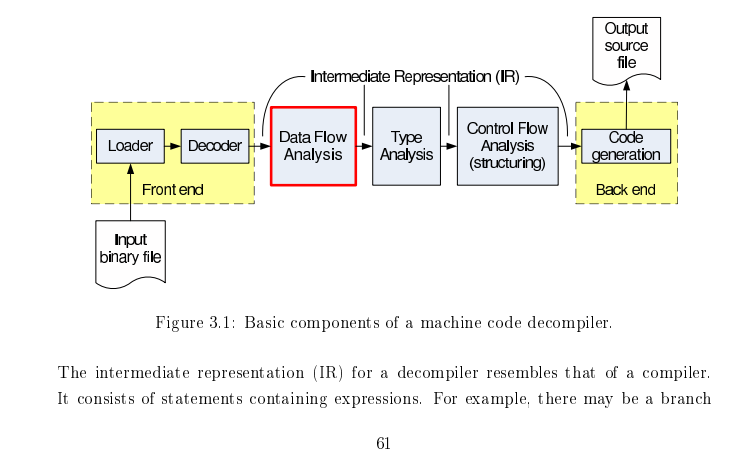
图片来自Static Single Assignment for Decompilation
反编译中的关键算法: Type Recovery(通过指令约束推导类型) Structual Analysis(恢复控制流)
- 前端:将字节码转为LLVM IR
- 中端:优化与分析
- 分析函数参数、分析callee saved register (wasm可以跳过这个阶段)
- SSA构建:使得前端可以有些冗余的alloca,由SSA构建来将相关alloca消除。 (编译原理相关)
- GVNGCM:Global Value Numbering and Global Code Motion 优化算法,有强大的优化能力,有助于反混淆等。(编译原理相关)
- 内存分析:将各种通过内存访问的变量显式地恢复出来。可能要用到指针分析算法,类型恢复等。关键词:Memory SSA。
- 后端:高层控制流恢复,将字节码转为AST,打印为高级语言的形式。
项目架构与工具
由于基于LLVM IR,因此语言采用C++。
开发环境:VSCode + CMake。将Wabt,LLVM等作为CMake的外部依赖。
由于对LLVM的调试需求越来越多,项目转为使用本地源码编译的LLVM(RelWithDebInfo或Debug build)
代码调试
使用vscode的CodeLLDB插件。代码补全使用clangd插件。根据提示禁用Intellisense,然后根据插件提示确认下载clangd。
提交代码前
- 写好commit message,简要概况所有的修改。
- 检查添加的代码的注释和文档是否充足。
TODO
-
反编译器自身:能够对“内存”中的变量也构建SSA进行优化。
-
最终的结果能够很好地重编译。
-
反编译器实现过程尽量记录完善的文档,未来考虑整理扩写为系列教程。
-
将wasm lift到LLVM IR
- 支持将wasm内存直接映射到某个基地址,从而直接支持运行,以及memory grow相关指令。
- 支持DWARF调试信息,从而映射回原wat,wasm
-
设计一个映射,将lift之后的IR反向转回wasm