
Valkyria Revolution · valkyria-revolution-ps4rt
Valkyria Revolution
OriginPlayStation 4
TechnologyNative C/C++ port (engine reimplementation)
Available forLinux
View official projectAbout the project
Port experimental PS4RT para Linux.
Official project information
Valkyria Revolution — PS4RT for PC Linux Port
An experimental, game-specific Linux compatibility runtime for Valkyria Revolution (PlayStation 4, CUSA06810), currently tested on Fedora 44, x86-64.
PS4RT prepares and runs the game's original x86-64 code on a Linux host, supplies compatibility implementations of the PS4 services it needs, and uses a Vulkan graphics renderer derived from shadPS4. This is not a general-purpose PS4 emulator, a native recreation of the game, or a replacement for owning the game.
No game files, firmware, or decryption tools are supplied. You must provide your own extracted, plaintext CUSA06810 game folder. The launcher does not download games, decrypt encrypted packages, or connect to PSN. This project is not affiliated with Sega, Sony, or AMD.
Download and play (no compiling required)
Want to play? Download the prebuilt Linux release. No compilation, Podman, or separate FFmpeg/SDL3 installation required.
- Download: Open the latest GitHub release and download
valkyria-revolution-linux-x86_64-d29d542.tar.gz. The separately namedvalkyria-revolution-source-d29d542.tar.gzarchive is for developers. v1.2 supersedes v1.1; earlier versions remain available for rollback. - Prepare your own game: Supply an extracted, plaintext
CUSA06810folder withsce_sys/param.sfo,eboot.bin, required modules and game data. Point to theCUSA06810folder itself, not a PKG, the parent directory or the executable. - Extract the player archive with your file manager, then open a terminal inside its extracted folder. On the first launch, supply your extracted game path:
bash Play-Game.sh --game "/path/to/CUSA06810"
On later launches, the validated game folder is remembered, so run bash Play-Game.sh without an argument. Explicit --game always takes priority and updates the remembered location.
the shortcut command Play-Valkyria.sh from previous versions remains as a compatibility alias for existing shortcuts.
That's it. There is no LD_LIBRARY_PATH setup, and no need to compile the game.
Leave the extracted release folder together. Your game extraction is read
rather than overwritten; the first launch creates local working data. Quote
game paths containing spaces. If no valid game folder has been supplied or
remembered, the launcher prints an example --game command and exits. No
graphical folder picker or Tkinter installation is needed.
Graphics are controlled in-game. Press Insert, or hold L2 and click R3. The illustrated wine-red overlay offers Windowed / Borderless / Fullscreen, 1080p / 1440p / 4K, Off / FSR 3.1 / FSR 4 v07 (when supported), sharpening and anisotropic filtering. D-pad navigates, Cross confirms and Circle cancels. No FSR or resolution arguments are required to launch. Only anisotropic filtering needs a game restart; display mode, output resolution, FSR and sharpening apply live.
Prebuilt requirements: Linux x86-64 with glibc 2.35 or later, Python 3,
a Vulkan loader, a working Vulkan driver and compatible system display/audio
libraries. The release includes twelve audited application shared libraries
under lib/, including SDL3, FFmpeg 8.0.3, fmt, xxHash, Zydis, zlib,
libstdc++, and libgcc_s. The graphics driver, Vulkan loader, glibc and
remaining system integration libraries are not bundled. No separate
installation of the twelve included libraries or LD_LIBRARY_PATH setup
is required. The portable rebuild and extracted release archive were
gameplay-tested on Fedora; other distributions, including SteamOS, remain
unverified. glibc compatibility alone does not guarantee every distro works.
See Running on Linux for controls and game-file setup; the archive never includes the PS4 game or firmware.
Architecture support: The prebuilt runtime targets native x86-64 (AMD64) CPUs only. ARM64 devices, including Snapdragon-based handhelds using FEX or Box64, are unsupported and untested. An x86-to-ARM translation layer might launch the program, but stable gameplay is not guaranteed, even on an otherwise compatible Linux distribution.
Current status
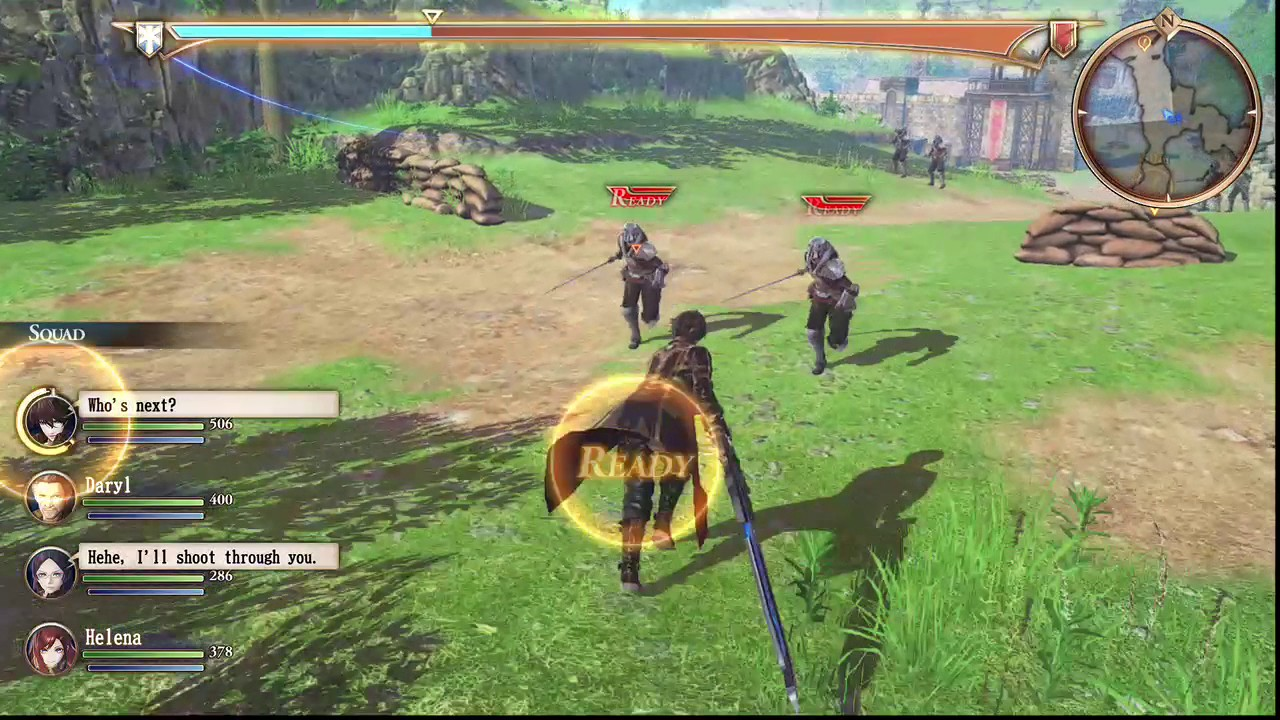
Experimental, playable in the tested opening sections; not a verified full playthrough. Tested on Fedora 44 with an AMD Ryzen 7 9700X CPU and NVIDIA GeForce RTX 3080 Ti GPU: introduction, cinematics, subtitles, audio, controller input, menus, early combat, first boss, initial save/load, and 4K output with FSR 4 v07. The newer portable release pipeline also passed boot/gameplay and overlay smoke testing on an AMD-based Fedora system. Other Linux distributions remain unverified.
- SDL-compatible gamepads, including DualSense and XInput, plus keyboard controls.
- Output at 1080p, 1440p, or 4K; FSR 3.1, optional FSR 4 v07, and sharpening.
- Anti-aliasing (AA) is provided by FSR 3.1 or FSR 4 v07 reconstruction. At 1080p, the FSR quality preset is Native AA.
- Anisotropic filtering (AF) is separate from AA: select Game default, 2×, 4×, 8×, or 16× to improve texture detail at an angle. AF changes apply after restarting the game. Sharpening is a separate image adjustment.
- In-game PS4RT graphics menu: press Insert, or hold L2 + R3 click. Navigate with the D-pad, confirm with Cross, and go back with Circle.
- Restart Game in the graphics menu asks for confirmation before restarting. Save progress first; restarting does not create a game save.
- Exit Game in the graphics menu asks for confirmation, then exits to the Linux desktop using the normal window-close path. Save in-game progress first; this does not trigger a game save.
- The game renders internally at 1920×1080. Higher output resolutions are reconstructed, not native 4K rendering. At 1080p FSR uses Native AA; 1440p uses a custom 1.33× ratio; 4K uses Performance scaling.
- Original frame-rate behavior is retained. No 60 FPS patch or frame generation.
- PSN features are unavailable; tested online menu actions returned without a crash.
FSR 3.1 is built in and is the fresh-configuration default. The FSR 4 v07
shader/model assets and their MIT notice are included in fsr4_shaders/; hashes
and provenance are recorded in packaging/fsr4-v07-assets.json. FSR 4 requires
compatible Vulkan GPU features and otherwise falls back to FSR 3.1. This is
not FSR 4.1.1.
Build from source (developers only)
Downloaded the prebuilt Linux release? Skip this section. The commands below are only for contributors who want to compile PS4RT.
Install a C/C++ toolchain, CMake, Ninja, pkg-config, Python 3, and development packages for Vulkan, SDL3, FFmpeg, fmt, Boost, xxhash, robin-map, Vulkan Memory Allocator, Zydis, glslang, and X11. Third-party sources needed by the build are vendored in this repository.
From the source checkout's root, the traditional native source build is:
PS4RT_LTO=OFF bash build.sh --test
python3 scripts/valkyria_launch.py --game /path/to/your/CUSA06810
For the tested portable release builder, use the Ubuntu 22.04 / GCC 14 Podman toolchain instead. It produces a glibc 2.35-compatible, relocatable runtime without changing game source files or the user's private saves. See portable build instructions for the image recipes, audit, and packaging commands. Players do not need Podman.
Keyboard and controller remapping
Default keyboard controls include WASD (left stick), arrow keys (right
stick), Space (Cross), Left Shift (Circle), E (Square), Q
(Triangle), and I/J/K/L (D-pad). You can remap PS4 buttons at launch
using PS4RT_KEY_MAP without changing source code or recompiling:
PS4RT_KEY_MAP="cross=Q,triangle=Space" \
  python3 scripts/valkyria_launch.py --game /path/to/your/CUSA06810
For the prebuilt archive, use the same variable before
bash Play-Game.sh --game /path/to/your/CUSA06810.
PS4RT_PAD_MAP similarly remaps gamepad buttons. These are launch-time
environment variables, not keys in valkyria.ini; there is currently no
in-game key-binding editor. Default mappings and keyboard stick axes are
defined in src/runtime_pad.c. Button maps do not
remap the analog stick axes or PS4RT menu shortcut.
See Running on Linux for the full default keyboard layout, remapping syntax, and controls. For system dependencies, packaging, and known limitations, see Linux distribution guide.
Saves and private files
A source checkout stores generated game code, settings, saves, and GPU caches
under out/valkyria/. The packaged launcher uses
${XDG_DATA_HOME:-~/.local/share}/valkyria-revolution/ by default.
Pass --data-dir /your/private/path to use a different directory.
Never publish these data directories: generated executables and linked code still contain proprietary game material. No such content belongs in the repository or release archives.
Credits, origins, and license
This Valkyria-specific project is adapted open-source compatibility software, not a clean-room implementation. Its runtime builds on work from:
- FelipePrado0/gow3_pc, the God of War III compatibility-runtime project from which this port was adapted.
- deadinside28/bloodborne_pc and Supermedo/bloodborne_pc, earlier Bloodborne PC runtime and launcher lineage.
- shadPS4 and related Vulkan renderer contributors.
Development also used REA: Reverse Engineer Anything and Ghidra as reverse-engineering analysis tools, not as embedded runtime code.
See Upstream credits and notices for additional contributors, source provenance, and third-party licenses. Original authors' copyright and license notices remain in the source tree. The project's runtime source is distributed under GPL-2.0-or-later; vendored components retain their respective terms. A separate project name and fresh Git history do not change those obligations.