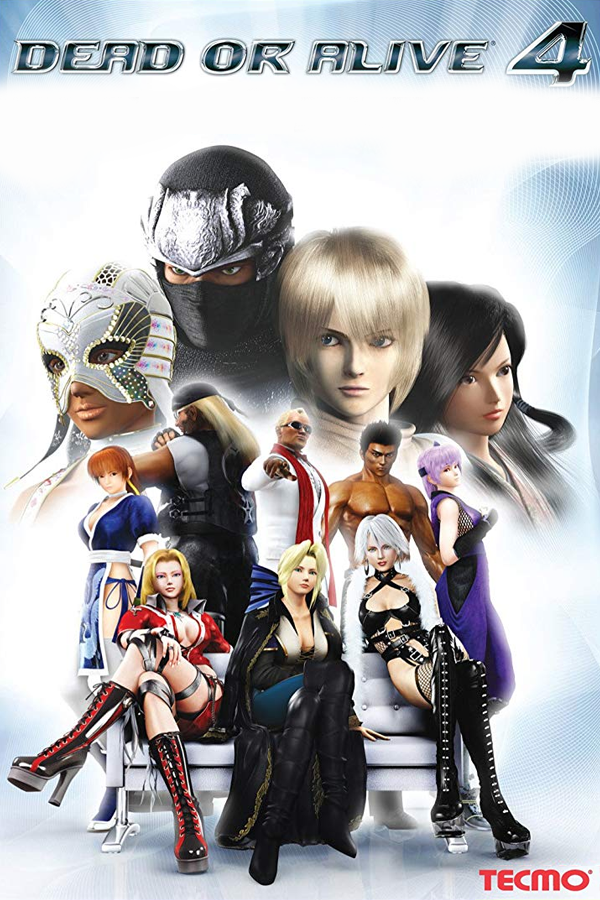
Dead or Alive 4 · Recomp Suite
Dead or Alive 4
OriginXbox 360
TechnologyStatic recompilation (native C/C++)
Available forWindows
View official projectAbout the project
Recompilación ReXGlue con Direct3D 12; beta de Xbox 360 a Windows. Arranque al selector de modos documentado; jugabilidad completa sin verificar.
Official project information
Dead or Alive 4 Recomp
<img width="2081" height="709" alt="github-banner" src="https://github.com/user-attachments/assets/e24568a6-ed53-4df5-9988-0495ca7531d8" /> <p align="center"> <a href="https://patreon.com/c/redC0rvus"><img alt="Support on Patreon" src="https://img.shields.io/badge/Patreon-support-F96854?logo=patreon&logoColor=white"></a> <a href="https://www.paypal.com/donate/?hosted_button_id=KCQYET5HGZGNQ"><img alt="Donate with PayPal" src="https://img.shields.io/badge/PayPal-donate-00457C?logo=paypal&logoColor=white"></a> </p>Play Dead or Alive 4 natively on Windows, from your own Xbox 360 disc. The game's code is statically recompiled from the disc's default.xex with the ReXGlue SDK and rendered with Direct3D 12, at up to 4K.
Bring your own disc. This repository contains no game code or data. You need your own disc image of Dead or Alive 4 (title ID 544307D1); everything is built on your machine.
Prerequisites
- Windows 10 or 11, 64-bit, with a Direct3D 12 GPU
- About 15 GB free disk space
- Git, to clone this repository
setup.bat installs everything else it needs with winget, the first time: PowerShell 7 and the build tools below (Windows may ask for permission; Visual Studio Build Tools alone is a few GB). To install them by hand instead:
| Tool | Install with winget |
|---|---|
| Visual Studio 2022 Build Tools, C++ workload | winget install Microsoft.VisualStudio.2022.BuildTools --override "--quiet --wait --add Microsoft.VisualStudio.Workload.VCTools --includeRecommended" |
| LLVM / Clang (tested with 23) | winget install LLVM.LLVM |
| CMake 3.25+ | winget install Kitware.CMake |
| Ninja | winget install Ninja-build.Ninja |
| Python 3.8+ | winget install Python.Python.3.12 |
| Git | winget install Git.Git |
| PowerShell 7 | winget install Microsoft.PowerShell |
Setup
- Clone this repository:
git clone https://github.com/redC0rvus/doa4-recomp-suite.git - Put your disc image (
.iso, any file name) in thegame isofolder. If there are several, setup asks which one to use. - Double-click
setup.bat.
It checks your tools, extracts the disc image and verifies default.xex, downloads the ReXGlue SDK at the tested version, applies this project's SDK patches (patches/sdk/), builds the SDK and the game into the Dead or Alive 4 folder, and then starts the game. The first build takes about 10-30 minutes. Running setup.bat again skips the steps that are already done. After a successful setup you can delete the .iso from game iso (the extracted copy is kept).
Play
Setup puts the finished game in its own folder, Dead or Alive 4, inside the repository folder. Double-click Dead or Alive 4.exe in it. The first launch opens the settings; Save & Play starts the game, and after that it starts directly. Pin it to Start or make a desktop shortcut if you like.
The Dead or Alive 4 folder runs on its own: move it anywhere you like (another drive, C:\Games, ...). It holds the launcher and settings exes, the game in bin\, and the game files in game\. Inside the repository folder, game\ costs no extra disk space (its files are hard links to original rom\extracted), and it keeps them if you delete the repository folder. Saves are in Documents\doa4, so moving the folder doesn't affect them.
Settings (Dead or Alive 4 Settings.exe)
Saved to doa4.toml in the Dead or Alive 4 folder; changes apply at the next launch.
- Resolution: 720p (native), 1440p or 4K internal rendering. The default is the largest that fits your tallest monitor.
- Fullscreen
- Gamertag: your in-game name (up to 15 characters).
- Mute
- Skip the Team Ninja intro movie (on by default)
Any game flag can also be given on the command line, and wins over doa4.toml: & ".\Dead or Alive 4.exe" --resolution_scale=1.
Controls
Xbox and other gamepads work out of the box, and the keyboard works at the same time as player 1:
| Pad | Keyboard |
|---|---|
| Start | Enter |
| A / B | Space or ; / Backspace or ' |
| X / Y | L / P |
| Left stick | WASD |
| Right stick | Arrow keys |
| D-pad | Shift + arrow keys |
| Back | Z or Tab |
Troubleshooting
Still missing after install: ...orwinget is not available: install those tools by hand (Prerequisites table), then runsetup.batagain.default.xex SHA-256 is ..., expected ...: that disc image is a different game or release, or has a title update applied; setup removes what it extracted, so run it again and pick the right image. Only the release this project was built for is supported, because the recompiled code must match that exact executable.WARNING: clang N; this suite was tested with LLVM 23: usually fine. If the build fails, install LLVM 23.SDK snapshot SHA-256 mismatch: the download was corrupted; run setup again.doa4.toml is invalid (line N: ...): the game starts with default settings; fix them inDead or Alive 4 Settings.exe.No disc image foundorNo disc image picked: put your Dead or Alive 4.isoin thegame isofolder (or type a number from the list), then runsetup.batagain.The game is not built yet: double-clicksetup.bat(Setup) and check that it ends withBUILD_OK.SETUP FAILED: the line above it says why; fix that and double-clicksetup.batagain.- The game crashes: it writes a folder
crashes\<timestamp>\(log, stack, last frame) in theDead or Alive 4folder. Attach that folder to your bug report. - Bug report checklist: the
crashes\<timestamp>folder if there is one, a screenshot (pwsh tools/shot.ps1prints its path while the game runs), and the result ofpwsh tools/smoke.ps1with the game closed (it boots to the mode-select screen and prints PASS or what failed).
Rebuilding
After pulling a new version, double-click setup.bat again. It updates the Dead or Alive 4 folder in the repository folder and keeps your settings. If you moved the folder, update it in place with pwsh tools/package.ps1 -Dest "D:\Games\Dead or Alive 4" (your folder's path), or copy the new bin\ and the two exes over the moved folder.
License
BSD-3-Clause (LICENSE). Third-party components and their licenses: THIRD_PARTY_NOTICES.md. Dead or Alive is a trademark of Koei Tecmo; this project is not affiliated with or endorsed by Koei Tecmo or Microsoft.