
GZSelaco (Android)
Selaco
TechnologyNative C/C++ port (engine reimplementation)
Available forAndroid, macOS
View official projectAbout the project
Selaco es un videojuego de disparos en 2024.
Official project information
Selaco for Android and macOS
An unofficial port of Selaco to Android and macOS, built on the Selaco engine (itself a GZDoom fork).
Tested on an AYN Thor (Snapdragon 8 Gen 2, Android 13) and on Apple Silicon Macs.
You need to own Selaco. No game data is included — you bring your own
Selaco.ipk3 from your Steam install.
Install on Android
Obtainium installs the APK from this repo's releases and updates it when a new one comes out. Or do step 1 by hand; the rest is the same either way.
-
Download
Selaco-android-<version>.apkfrom Releases and install it. -
Find
Selaco.ipk3in your Steam folder:steamapps/common/Selaco/Selaco.ipk3(~1.2 GB) -
Copy it to
Internal storage/Selaco/on your device — the folder your file manager shows as "Internal storage", i.e./sdcard/Selaco/. USB, an SD card or a download on the device all work. -
Launch Selaco. It asks for file access — tap Allow access to manage all files, then reopen it.
This is what lets the game read the
Selaco.ipk3you just copied, since it sits outside the app's own private folder, and it lets your savegames live inSelaco/savegames/where they survive uninstalling or updating the app. Android has no narrower permission that covers this: the media-only permission cannot read an.ipk3, and anything the app can reach without asking is deleted along with the app. -
Pick your device in the first-run dialog: AYN Thor, AYN Odin 2, AYN Odin, or one of the two Steam Deck presets. That one choice sets your graphics preset, the handheld UI and control defaults, and — on the Thor — turns the second screen on.
You can change device later in Options → Handhelds → Reset Device Choice, which restarts the game and asks again.
Requirements: Vulkan 1.1+ (there is no OpenGL fallback) and a gamepad — touch controls are not implemented, so a device with no physical buttons cannot play.
The second screen (AYN Thor)
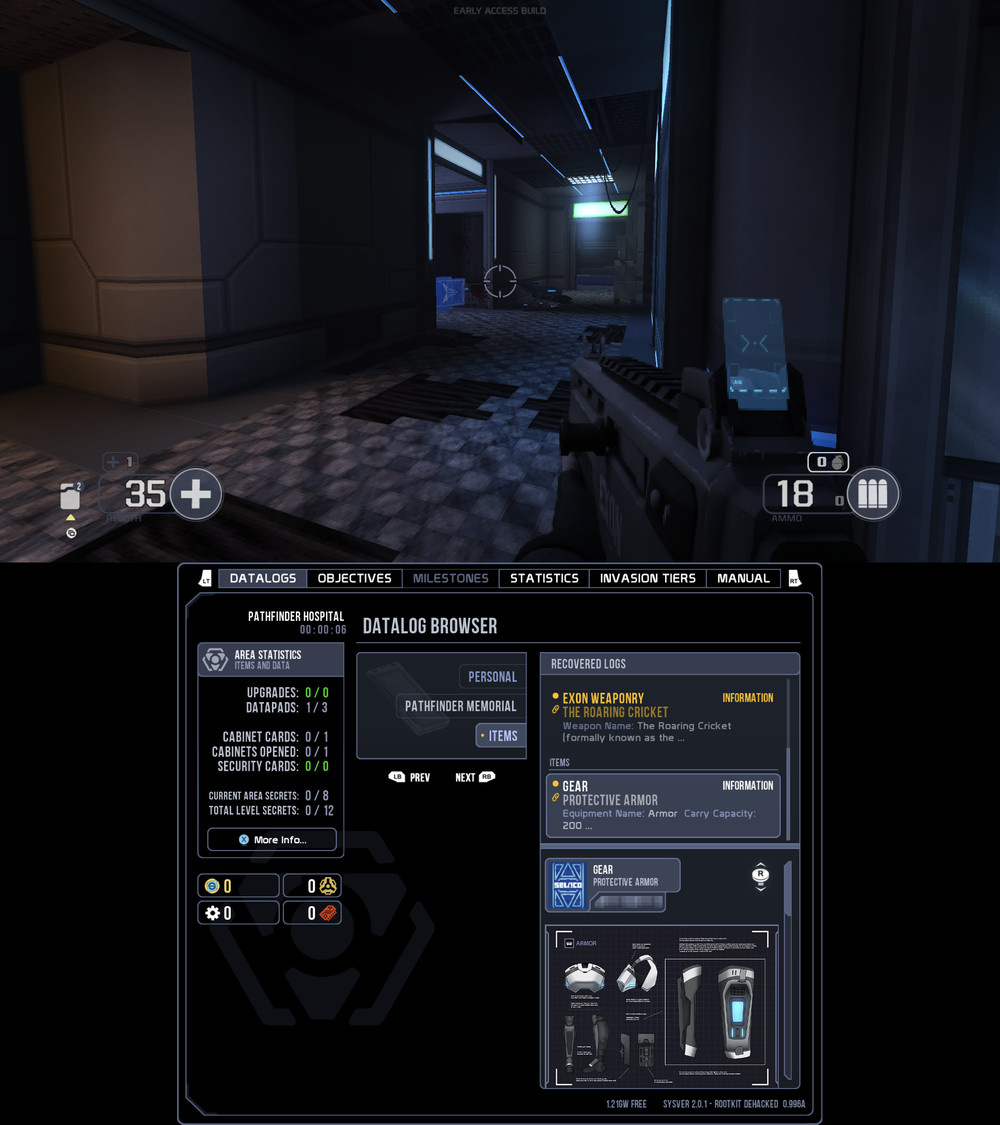
Open your PDA with the codex button and the bottom screen becomes the live codex, gamepad-driven; close it and it goes back to the standby codex, which keeps the tab you were last on and refreshes when you find a secret or hit a milestone.
Two settings in Options → Handhelds:
| setting | what it does |
|---|---|
| Second Screen | turns the lower panel on or off entirely |
| Second Screen Size | how large the codex is drawn, 1.00–2.00. Default 1.75 |
Sizes above about 1.8 start cutting the tab strip off at both ends, because the codex is laid out for a 1920-wide screen and the panel is 1240 wide.
Other handhelds
AYN Odin 2 gets the Thor's settings without the second screen. AYN Odin (first generation) gets a lighter graphics preset, since it is the weakest of the three.
Neither has been tested on hardware — only the Thor has. The profiles are a considered
starting point, not a verified one, and if a device picks the wrong preset the fix is a text
file rather than a code change: see profiles/README.md, which
documents every setting and how to add a device. Pull requests adding or retuning one are
welcome.
Updating: install the new APK over the old one — that keeps your settings and key
bindings, which live in the app's private storage and are the one thing an uninstall does
destroy. Your savegames are safer: they live in Internal storage/Selaco/savegames/
alongside the Selaco.ipk3, so they survive uninstalling, reinstalling, or clearing the
app's storage.
Install on macOS
Apple Silicon (arm64), macOS 11+. There is no pre-built download — you compile it:
./macos/build-deps.sh     # dependencies
./macos/build-macos.sh    # the engine
./macos/package-macos.sh  # -> build-macos-arm64/Selaco.app
Put Selaco.ipk3 in gamedata/full/ and run ./macos/run-macos.sh. Mouse, keyboard
and Xbox controllers all work.
Reporting a problem
If it crashes, just relaunch and keep playing — crash details are saved automatically and each crash is appended to the same file, so nothing is lost.
Send us Internal storage/Selaco/selaco-ea-crash.log — the same folder as your
game data. Note roughly when it happened and what you were doing; timestamps in the
file are UTC.
If it feels choppy, open the console (~ on a keyboard, or the on-screen keyboard)
and type:
fpsdips
That prints how many frames ran below 26 fps while you played, and the worst one.
fpsdips reset starts the count over. Include that with any performance report, along
with your graphics preset.
Optional: a faster graphics driver (Turnip)
Adreno devices can use Mesa's open-source Turnip driver instead of Qualcomm's. On the Thor it measured about 8% faster with no loss of image quality.
- Download a Turnip build for your device (MrPurple's and stevenmx's both work).
- Extract the driver and rename it to
vulkan.so. - Put it in
Internal storage/Selaco/, next to your game data.
It is picked up automatically on the next launch. To go back, delete vulkan.so.
Experimental. This is an unofficial driver. If a level fails to load or the game crashes, delete
vulkan.soand it reverts to the system driver.
Known gaps
- No touch controls. A gamepad is required on Android.
- Vulkan only — no OpenGL fallback.
- Only the AYN Thor has been tested. The Odin 2, Odin and Steam Deck profiles are reasoned from Selaco's own presets but have never run on that hardware. In particular the single-screen path — everything the Thor never exercises, because it always has a second display — is unverified.
- No pre-built macOS release. Build it yourself.
- Heavy combat can still dip below 30 fps on the Thor.
For developers
Build instructions, the Android storage and permission model, the second screen's
design, performance measurements and the patches carried against upstream are in
TECHNICAL.md. CLAUDE.md covers the traps that bite
while working in the tree. Device profiles live in profiles/ and are
plain text — profiles/README.md documents every key. Graphics
profiles used for testing are in android/configs/.
License and credits
GPL v3, inherited from GZDoom.
- GZDoom — © 1998-2023 ZDoom + GZDoom teams and contributors
- Doom source — © 1997 id Software, Raven Software and contributors
- Selaco and the Selaco engine — Altered Orbit Studios / TheCockatrice
Selaco is a commercial game and is not distributed here.