
Killzone Shadow Fall (PC)
Killzone Shadow Fall
OriginPlayStation 4
TechnologyNative C/C++ port (engine reimplementation)
Available forWindows
View official projectAbout the project
Killzone: Shadow Fall es un videojuego de acción en primera persona, desarrollado por Guerrilla Games y publicado por Sony Computer Entertainment, es un título exclusivo de PlayStation 4. Es el sexto juego en toda la serie Killzone y el cuarto para consolas domésticas.
Official project information
🎮 Interested in my work? Check out my portfolio → lesca-191204.github.io<br> ¿Te interesa mi trabajo? Mirá mi portfolio.
Killzone Shadow Fall for PC
English | Español



💬 We have a Discord! The community server is the place to report problems, tell us what you'd like to see next, and hear first about new ports and how to support them. 👉 discord.gg/UYFcV5rbDw
❤️ The ports are and will stay free. If you want to help, a PayPal donation is welcome but completely optional.
Native Windows port of Killzone Shadow Fall (PS4). The game's code runs directly on your CPU; graphics are translated to Vulkan in real time. Public beta: the whole campaign is playable, and it keeps improving with every report.
🆕 0.8.0: 🌐 multiplayer is back (beta): play with your friends over Radmin VPN, without the official servers · 🧭 new Multiplayer page in the launcher · 🏅 everything unlocked in multiplayer.
<p align="center"><img src="docs/images/launcher.png" alt="The launcher" width="820"></p>⚠️ No game files are included. You need your own dumped copy of the game, version 01.81: CUSA00190 (the tested one) or another region (see Game versions). This project is not affiliated with Sony Interactive Entertainment or Guerrilla Games. Killzone is a trademark of Sony Interactive Entertainment.
📥 Download and play
- Download the latest zip from Releases and unzip it anywhere (outside "Program Files").
- Open Killzone Shadow Fall.exe, choose your dump's folder (the one holding
eboot.bin). - Press PLAY. The launcher updates itself when a new version comes out, keeping your saves.
| Minimum / recommended | |
|---|---|
| 🪟 System | Windows 10 (1903+) or 11, 64-bit |
| 🎮 GPU | Vulkan 1.3 · 4-6 GB VRAM for 1080p-1440p, 8 GB for 1800p and 4K |
| 🧠 RAM | 16 GB |
| ✅ Tested on | Ryzen 7 5700 + RTX 2060 Super (8 GB): playable from start to finish |
Not tested yet on AMD GPUs or Intel CPUs: reports are very welcome.
🎮 Controls
🦉 The OWL drone on keyboard and mouse: hold Delete and move the mouse. That is your finger on the PS4 touchpad: swipe to choose the OWL's command, just like on the controller. The game also reminds you for a few seconds when it starts.
Keyboard and mouse (shooter-style defaults; change any key in the launcher → Controls):
| Action | Key | Action | Key | |
|---|---|---|---|---|
| Move | W A S D | Camera | Mouse (direct, 1:1) | |
| Fire (R2) | Left click | Aim (L2) | Right click | |
| Jump / ✕ | Space | ○ (crouch) | C | |
| □ (reload / use) | R | △ (weapon) | Q | |
| L1 / R1 | 1 / 3 | Sprint (L3) | Left Shift | |
| Melee (R3) | F | D-pad | Arrow keys | |
| Options (pause) | Enter | Touchpad click ← / → | Tab / Backspace | |
| 🦉 OWL (touchpad) | Hold Delete + mouse | Free the cursor | Left Alt |
Controller: Xbox, DualShock 4, DualSense and any SDL-compatible pad, with remappable buttons, stick dead zone, vibration and controller speaker volume.
Shortcuts while playing:
| Shortcut | What it does |
|---|---|
| Insert · R3 + L2 | Opens the in-game menu (all the settings below) |
| Hold Share / View / Select (~1 s) | Quick menu: Resume · Settings · Exit game (controller only) |
| Esc · Circle / B | Closes the menu |
| L1 / R1 · Q / E | Switch menu tabs |
| F12 | Screenshot (user\ps4\screenshots) |
| F9 · F10 | Free camera on / off · back to the player (Cheats) |
| Alt + F4 | Closes the game |
✨ Features
🎯 Direct mouse aim (1:1)
The mouse turns the camera directly: no emulated stick, no dead zone, no response curve and no speed cap. In practice it plays almost exactly like a PC shooter.
- Sensitivity: about 1 is recommended (higher values turn very fast).
- Fast turns (x1 to x12, x6 by default): while the mouse moves, the game's turn speed limit is raised so a quick 90° or 180° flick isn't held back. A controller keeps the game's own feel.
- Invert Y axis.
- ℹ️ By the game's design, the camera turns at a different speed when you walk than when you sprint, so walking without sprinting can still feel a little different. Sprinting and aiming behave like a true 1:1 mouse.
- Change all of it in the launcher (Controls) or live in the in-game menu (Controls tab).
🔭 Field of view (FOV)
A FOV slider from 80% to 200% of the original (100% = as on PS4). Set it in the launcher (Game tab) or change it live while playing in the in-game menu (Controls tab): the view widens at once. Aiming zoom scales in the same proportion.
| FOV 100% (PS4) | FOV 150% |
|---|---|
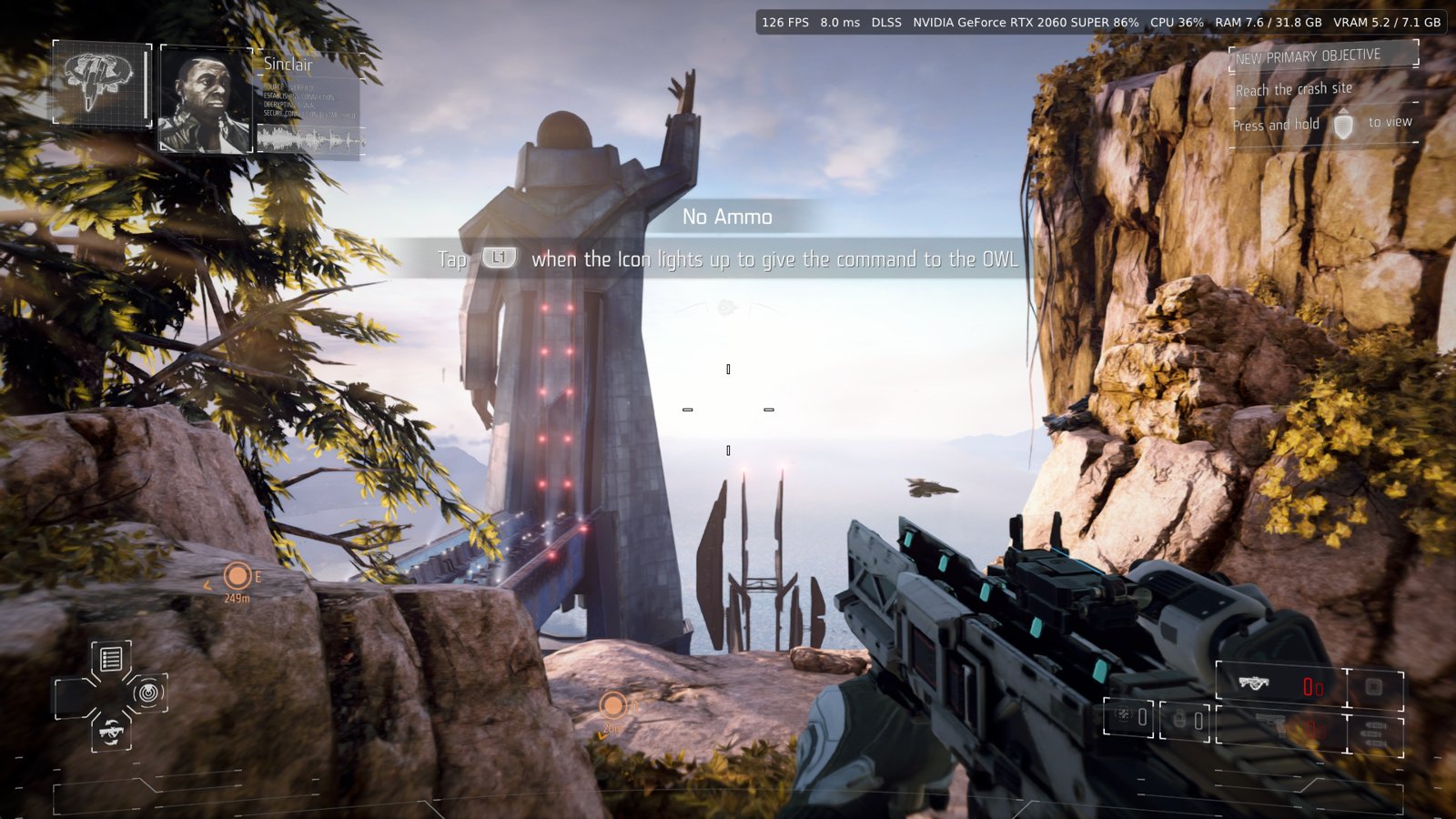 | 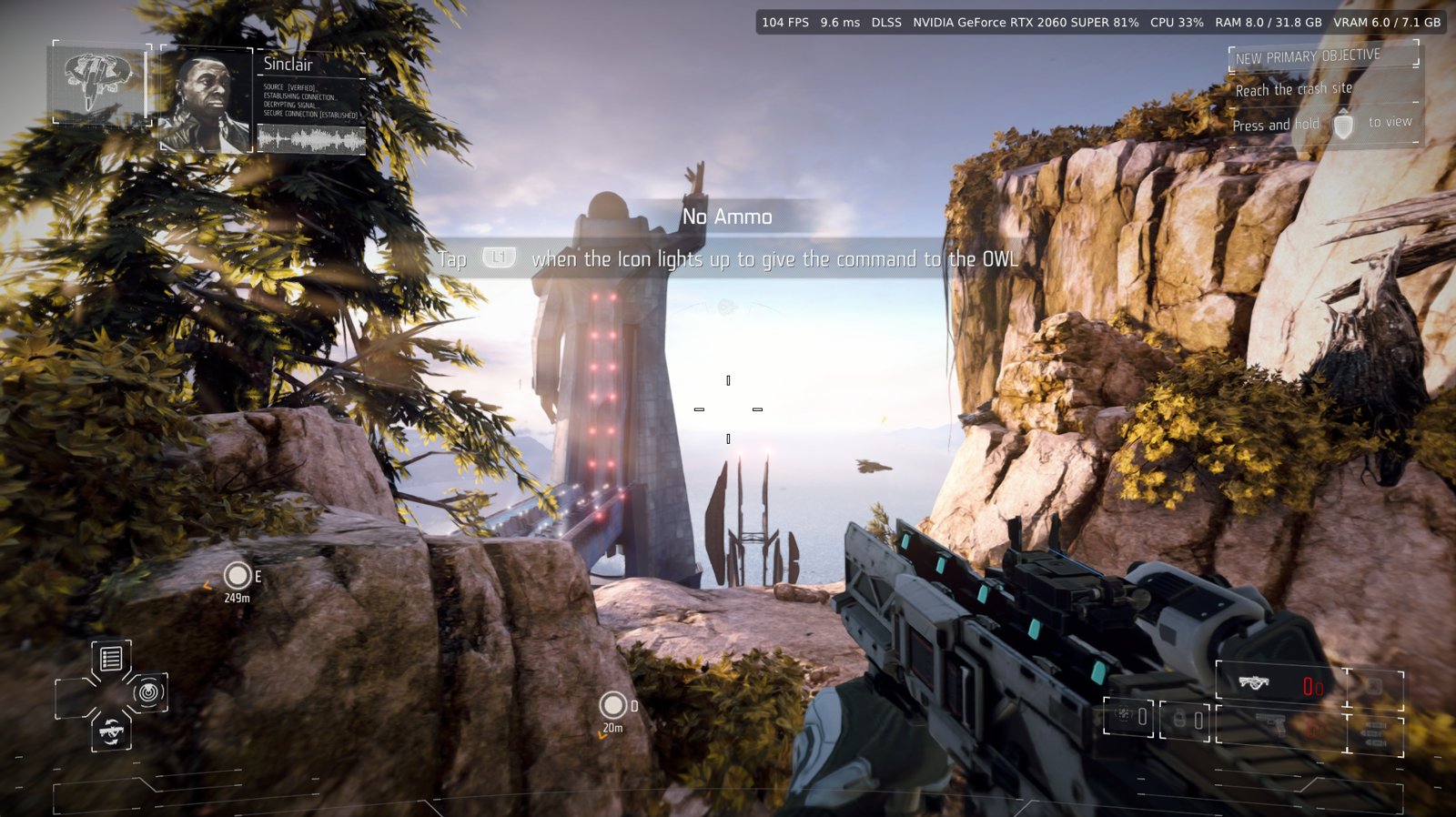 |
⚙️ In-game menu (overlay)
Press Insert (or R3 + L2) at any time. Almost every launcher option is now here, and most apply at once, without closing the game. Settings are saved automatically and the launcher shows the same values.
<p align="center"><img src="docs/images/ingame-menu-controls.png" alt="In-game menu, Controls tab" width="560"></p>| Tab | Option | When it applies |
|---|---|---|
| 🎮 Controls | Mouse sensitivity, fast turns, invert Y | ⚡ Live |
| Field of view (FOV) | ⚡ Live | |
| Vibration, stick dead zone, controller speaker | ⚡ Live | |
| Hold Share for the quick menu, tips at startup | ⚡ Live | |
| Camera shake (explosions, hits) | ⚡ Live | |
| Button prompts: automatic / keyboard and mouse / PS4 / Xbox | 🔄 Restart | |
| 🖼️ Image | Display mode (window / borderless / fullscreen), VSync | ⚡ Live |
| FSR 1 upscaling, sharpening (RCAS) and its strength | ⚡ Live | |
| Upscaler FSR 3.1 / FSR 4 / DLSS (when the game started with one) | ⚡ Live | |
| Upscaling quality (Quality, Balanced, Performance, Ultra performance) | ⚡ Live · 🔄 restart from / to Native | |
| Frame generation Off / FSR 3.1 / DLSS | ⚡ Live · 🔄 restart to turn it on from Off | |
| Texture sharpness (LOD bias, -2 to +2) | ⚡ Live | |
| Anisotropic filtering | 🔄 Restart | |
| Effects: motion blur, depth of field, bloom, film grain | 🔄 Restart | |
| 🚀 Performance | Frame rate limit, frames queued, background shader compiling | ⚡ Live |
| GPU readback options (the 0.2.5 performance options) | 🔄 Restart | |
| 📊 Overlay | FPS, frame time, upscaler, GPU, CPU, RAM, VRAM · size, corner, opacity | ⚡ Live |
| 🎮 Cheats | God mode, infinite ammo, no reload, unlimited sprint, Tactical Echo, all chapters, free camera | ⚡ Live |
- 🔄 Apply and restart: options marked restart show a button that closes the game and the launcher starts it again by itself with the new settings (unsaved progress since your last checkpoint is lost).
- 🚪 Exit game: a button in the menu and in the quick menu closes the game cleanly; no keyboard needed when you play from the couch or through Steam.
- ℹ️ The in-game menu is in English for now.
🚀 Performance
- 0.3.0: the threads that feed the GPU and stream the levels run at a higher Windows priority, and on CPUs with 8 threads or fewer the GPU command thread too: smoother frame pacing on weaker CPUs when other programs compete for them.
- 0.2.5: Advanced → Performance keeps the GPU busy instead of waiting (about +40-50% FPS in heavy scenes in our tests). If you get a crash or a graphics error, turn those two options off (one at a time) and tell us.
🖥️ Resolution, upscaling and frame generation
- Above 1080p with AMD FSR 3.1, AMD FSR 4 or NVIDIA DLSS (1440p, 1800p, 4K): the game renders at 1080p and the upscaler takes it to your resolution; HUD, menus and videos are drawn sharp at full size.
- Sharp and stable: sub-pixel jitter and the game's own per-pixel motion vectors, so the weapon, moving objects and the camera are tracked correctly.
- Frame generation: AMD FSR 3.1 on any GPU, NVIDIA DLSS on GeForce RTX 40/50 (up to 4x on RTX 50). Almost twice the frames on screen with sharp HUD and text.
- Classic method (a game resolution patch) still under Advanced.
✨ AMD FSR 4
AMD's AI upscaler: a sharper and more stable image than FSR 3.1, at a slightly higher GPU cost.
- Launcher → Graphics → Upscaling → Method → AMD FSR 4 (best quality).
- In the FSR 4 files row press Download (once, about 30 MB, ~1 minute) until it says Installed.
- Press PLAY. In game, Insert → Image → Upscaler switches between FSR 3.1 / FSR 4 / DLSS.
| 🎮 Cards | Vulkan 1.3 with 8-bit integers: GeForce RTX 20 or newer, Radeon RX 6000 / 7000 / 9000, Intel Arc |
| 🔁 Fallback | Without the files or on another card, the game uses FSR 3.1 |
| 📦 Files | From FireBurn/Q2RTX, built from AMD's FidelityFX code (MIT). The zip already ships our optimized passes |
⏳ When you enter a level or reload a checkpoint, FSR 4 can freeze the game for 3-4 seconds the first time while it prepares its AI model. It isn't a crash: wait and it continues.
🎚️ Upscaling quality modes
Launcher → Graphics → FSR / DLSS quality. The 3D scene is drawn smaller and FSR 3.1 or DLSS rebuild it up to your output resolution. HUD, menus and videos stay sharp at full size.
| Mode | Scene at 1080p output | 1440p | 1800p | 4K |
|---|---|---|---|---|
| ⭐ Native (best quality) | 1080p | 1080p | 1080p | 1080p |
| Quality | 720p | 960p | 1080p | 1080p |
| Balanced | 630p | 836p | 1044p | 1080p |
| Performance | 540p | 720p | 900p | 1080p |
| Ultra performance | 360p | 480p | 600p | 720p |
| ✅ Use it when | ❌ It won't help when |
|---|---|
| Your graphics card is the limit: modest GPU, or 1440p / 1800p / 4K with the GPU near 100% | Your processor is the limit (low FPS while the GPU is under 100%): fewer pixels don't help the CPU |
| You want more FPS and accept a slightly softer image | Your GPU already holds the FPS you want: Native looks best |
It needs FSR 3.1, FSR 4 or DLSS as the method (Graphics → Upscaling) or frame generation on. 🎚️ Change it in game with Insert → Image → Upscaling quality: between the reduced modes it applies ⚡ live; from or to Native use Apply and restart. The menu shows the sizes in use ("WxH scene, WxH output").
🖥️ Ultrawide 21:9 and 32:9 (beta)
Launcher → Graphics → Display → Ultrawide (beta): 2560 × 1080, 3440 × 1440, 3840 × 1600 (21:9) and 5120 × 1440 (32:9).
- 🔭 Hor+: the picture fills the screen and you see more at the sides, nothing stretched.
- 🎯 HUD, menus and videos stay in the middle at 16:9.
- ⚙️ Uses FSR / DLSS (it replaces the render resolution); applied when the game starts.
- ⚠️ Beta: some 3D HUD markers (objectives) can look slightly shifted, and the sides may show the last frame during videos.
🧩 Shader cache and precompiling
The game's shaders are compiled by your PC the first time each area needs them, which is why a new zone can stutter or an effect can show up late. Every compiled shader is saved in the cache: once you've played an area, it is ready and loads fast the next time.
| Where | Option | What it does |
|---|---|---|
| 🧰 Launcher → Advanced | Precompile shaders at startup (on by default) | Before the game opens, prepares every shader already in your cache on all your cores. The start takes longer (the first time with a big cache, more) and uses more memory meanwhile. |
| 🎮 In game → Performance | Compile new shaders in the background | Live. Fewer stutters in new areas; an object or effect may appear a moment later. |
- 💡 It helps most on PCs with a not-so-fast CPU: the work is done once at startup instead of while you play, so there are far fewer hitches.
- ⏳ The first time can take a while and areas you never played still compile as you reach them; after that starts are quick. The more you play, the better it gets.
🎬 Screen effects
Turn off motion blur, depth of field, bloom and film grain (Launcher → Graphics → Effects, or Insert → Image): they apply when the game starts (use Apply and restart in the menu). Camera shake (explosions, hits) switches live in Insert → Controls. Weapon recoil stays.
⌨️ Keyboard, mouse and Xbox button icons
The game's prompts can show your keys (or the mouse button) or Xbox buttons instead of PS4 buttons: automatic (default: the last device used, and Xbox icons for any controller that isn't a PlayStation one), keyboard and mouse, PS4 or Xbox. Set it in the launcher (Controls) or Insert → Controls → Button prompts. 🔄 The game uses the option it was opened with: restart to change it. Sticks and the touchpad keep their PS4 icons.
🏔️ Detail distance (LOD)
How far characters and objects keep their detailed models, from 50% to 300% (100% = as on PS4). Higher: less pop-in in the distance, more GPU and CPU work. Lower: more FPS. Set it in the launcher (Graphics → Image) or change it live in Insert → Image → Level of detail.
🎮 Cheats, debug and free camera
Launcher → Cheats · in game: Insert → Cheats (applied at once)
| Cheat | What it does |
|---|---|
| 🛡️ God mode | You take no damage, with no red screen, hit markers or shake |
| 🔫 Infinite ammo | Reserve ammo and grenades are never used up |
| ♻️ No reload | The magazine never empties |
| 🏃 Unlimited sprint | Stamina refills while you sprint |
| 🦉 Continuous Tactical Echo | The OWL scan keeps pulsing (use it once after each load) |
| 🔓 Unlock all chapters (debug) | Every chapter in Chapter Select; your saved progress doesn't change |
Cheats only affect the player. Unlock all chapters uses the debug settings the developers left in the game.
🎥 Free camera
| Keyboard and mouse | Controller | |
|---|---|---|
| On / off · back to the player | F9 · F10 | Insert → Cheats → Free camera |
| Move · down / up | W A S D · Q / E | Left stick · L1 / R1 |
| Look | Mouse or arrow keys | Right stick |
| Faster / slower | Shift / Ctrl | R2 / L2 |
The player stands still while the camera flies. 📸 Great for screenshots (F12).
🌐 Multiplayer (beta)
Launcher → Multiplayer (BETA) (also a tab in the classic launcher)
Play with your friends without the official servers: one PC creates a room, the others join it over a virtual LAN. Install Radmin VPN (free) on every PC and join the same Radmin network; the page shows "Radmin VPN connected" when it's ready.
- Host: nickname → Create room → send the others the room code and the connection
file (Save connection file…,
Host-connection.zip, no secrets in it). Allow the firewall on private networks if Windows asks. - Others: nickname → choose the connection file → type the code → Join.
- Everyone: Play in the room (multiplayer). In the game one player creates the Warzone (Multiplayer → Create your Warzone), the others join it (Browse Warzones).
💾 Two PLAY buttons, two saves. PLAY opens the campaign with your save. PLAY IN THE ROOM uses a save of its own and starts at the main menu without campaign progress: your campaign was not touched. In multiplayer everything is unlocked (max rank, weapons, abilities, challenges), the game renders at full resolution (DLSS / FSR as anti-aliasing; the reduced-resolution quality modes are campaign-only for now), and the new profile takes the language chosen in Advanced → Game. The host's launcher must stay open while you play.
Based on Marakesch's private multiplayer prototype (see Credits).
🧰 Launcher
New in 0.5.0: a launcher redesigned from scratch, with every option clearer.
| 🧭 Side menu | Home · Graphics · Controls (Keyboard and mouse / Controller) · Cheats · Advanced |
| 🗂️ Cards by topic | Display, Upscaling (method, FSR 4, quality, frame generation), Image quality, Effects… each option explained |
| 🎨 Two themes | Vektan (cyan) or Helghast (orange) |
| ❤️ Support | PayPal and Ports Discord buttons at the top |
Everything as before: English and Spanish · dump check · automatic updates · display mode, window size, resolution, ultrawide, upscaler (FSR 4 download included) and its quality mode, frame generation, frame rate limit (30, 60, experimental 144 / 240 / unlimited), VSync, anisotropic filtering, texture sharpness, FSR 1, screen effects, shader precompile, button icons, cheats · keyboard, mouse and controller mapping · FOV · quick links to saves, screenshots and logs.
🛟 If the new launcher doesn't open or looks wrong, open
Classic launcher.bat(next toKillzone Shadow Fall.exe): the previous launcher, same options, saves and settings. The new one needs Microsoft Edge WebView2 (included in Windows 10/11); without it the classic one opens by itself.
🗂️ Game versions
| Release | Region | Status |
|---|---|---|
| CUSA00190 | USA | ✅ Tested (the port's reference) |
| CUSA00191 | Latin America | ⚠️ Not tested, may work |
| CUSA00002 | Europe | ⚠️ Not tested, may work (choose your copy's language in Launcher → Advanced → Game) |
| CUSA00085 | Japan | ⚠️ Not tested; Japanese texts may look wrong or be missing |
- Version 01.81 is required in every region (base game or its update).
- Saves are shared between regions: switching keeps them. No folder renaming or
param.sfoedits.
🐧 Linux and Steam Deck (Proton, not tested by us)
- Add Killzone Shadow Fall.exe to Steam as a non-Steam game.
- Properties → Compatibility: force Proton Experimental or GE-Proton.
- Start it from Steam, choose your dump's folder and press PLAY.
Reports (distro or Steam Deck, Proton version, GPU) are welcome on Discord or in issues. A native Linux version (AppImage) will come once the game is fully stable.
⚠️ Known issues
- Performance options (0.2.5): they give about 40-50% more FPS, but if the game closes or something looks wrong, turn off Advanced → Performance and try again before reporting.
- Mouse: walking without sprinting turns at the game's own (slower) speed; see Direct mouse aim.
- First play: some effects can show up a few frames late while their shader compiles; see Shader cache.
- FSR 4: a 3-4 second freeze the first time you enter a level or reload a checkpoint (it prepares its AI model), and a short pause when you change the quality mode live with it.
- Ultrawide (beta): some 3D HUD markers can look slightly shifted; video sides may show the last frame.
- Above 60 FPS (experimental): turn VSync off on a 60 Hz monitor.
- The shader cache can take several GB ("Clear cache" in the launcher).
- Multiplayer (beta): tested between game copies on one PC; matches with many PCs not tested yet. Don't switch teams mid-match.
🗺️ Roadmap
✅ Done in 0.8.0: 🌐 multiplayer (beta) over Radmin VPN · 🧭 Multiplayer page in both launchers. 0.7.0: 🛡️ god mode without hit effects · 🚀 faster GPU threads · 🌍 game language · ⌨️ remappable movement and swipes · ⏱️ live FPS limit and pacing · 🛠️ 25 issues fixed.
🔜 Coming next: the port is nearly complete in features, so the focus now is
- 🌐 Multiplayer: fixes from your reports; 📦 DLC map packs (#4 / #15).
- 🐞 Stability and crashes, above all on Intel Arc and AMD graphics.
- 🧩 Compatibility with other regions and dumps, and the remaining issues.
- 🌍 More languages in the launcher.
- Something new only if it's important (tell us on Discord).
Later
- In-game menu in Spanish.
- Native Linux version (AppImage), with Steam Deck in mind, once the game is fully stable.
🐞 Reporting bugs
Tell us on Discord or open an issue with what
happened, where (chapter), your GPU, CPU and driver, and attach that session's folder from
user\logs\ (launcher Logs button). Crash or graphics error? First try with
Advanced → Performance turned off and say whether it still happens.
🛠️ Building from source
As in the gow3_pc base (instructions): MSYS2 CLANG64,
bash build.sh, then bash packaging/windows/package_kzsf.sh for the zip (first,
packaging/windows/make_kzsf_icon.py <your dump>/sce_sys/icon0.png launcher/kzsf.ico). For DLSS,
build the bridge first with Visual Studio 2022 and the NVIDIA DLSS SDK:
DLSS_SDK_ROOT=<checkout> bash packaging/windows/build_dlss_kzsf.sh.
Español



💬 ¡Tenemos Discord! El servidor de la comunidad es el lugar para reportar problemas, contarnos qué te gustaría que agreguemos y enterarte antes que nadie de los nuevos ports y de cómo apoyarlos. 👉 discord.gg/UYFcV5rbDw
❤️ Los ports son y seguirán siendo gratuitos. Si querés ayudar, una donación por PayPal se agradece, pero es totalmente opcional.
Port nativo para Windows de Killzone Shadow Fall (PS4). El código del juego corre directamente en tu CPU; los gráficos se traducen a Vulkan en tiempo real. Beta pública: se puede jugar la campaña completa, y mejora con cada reporte.
🆕 0.8.0: 🌐 vuelve el multijugador (beta): jugá con tus amigos por Radmin VPN, sin los servidores oficiales · 🧭 página nueva Multijugador en el launcher · 🏅 todo desbloqueado en multijugador.
<p align="center"><img src="docs/images/launcher.png" alt="El launcher" width="820"></p>⚠️ No incluye archivos del juego. Necesitás tu propia copia dumpeada del juego, versión 01.81: CUSA00190 (la probada) u otra región (ver Versiones del juego). Este proyecto no está afiliado a Sony Interactive Entertainment ni a Guerrilla Games. Killzone es una marca de Sony Interactive Entertainment.
📥 Descargar y jugar
- Bajá el zip de la última versión en Releases y descomprimilo donde quieras (fuera de "Archivos de programa").
- Abrí Killzone Shadow Fall.exe y elegí la carpeta de tu dump (la que tiene
eboot.bin). - Dale a JUGAR. El launcher se actualiza solo cuando sale una versión nueva, conservando tus partidas.
| Mínimo / recomendado | |
|---|---|
| 🪟 Sistema | Windows 10 (1903+) u 11 de 64 bits |
| 🎮 GPU | Vulkan 1.3 · 4-6 GB de VRAM para 1080p-1440p, 8 GB para 1800p y 4K |
| 🧠 RAM | 16 GB |
| ✅ Probado en | Ryzen 7 5700 + RTX 2060 Super (8 GB): se juega completo de principio a fin |
Todavía no fue probado en gráficas AMD ni en procesadores Intel: los reportes se agradecen mucho.
🎮 Controles
🦉 El dron OWL con teclado y mouse: mantené Suprimir (Delete) y mové el mouse. Es tu dedo sobre el touchpad de PS4: deslizá para elegir la orden del OWL, igual que con el mando. El juego también te lo recuerda unos segundos al empezar.
Teclado y mouse (por defecto estilo shooter; cambiá cualquier tecla en el launcher → Controles):
| Acción | Tecla | Acción | Tecla | |
|---|---|---|---|---|
| Moverse | W A S D | Cámara | Mouse (directo, 1:1) | |
| Disparar (R2) | Click izquierdo | Apuntar (L2) | Click derecho | |
| Saltar / ✕ | Espacio | ○ (agacharse) | C | |
| □ (recargar / usar) | R | △ (arma) | Q | |
| L1 / R1 | 1 / 3 | Correr (L3) | Shift izquierdo | |
| Cuerpo a cuerpo (R3) | F | Cruceta | Flechas | |
| Options (pausa) | Enter | Click del touchpad ← / → | Tab / Retroceso | |
| 🦉 OWL (touchpad) | Mantener Suprimir + mouse | Liberar el cursor | Alt izquierdo |
Mando: Xbox, DualShock 4, DualSense y cualquier mando compatible con SDL, con botones remapeables, zona muerta de sticks, vibración y volumen del altavoz del mando.
Atajos mientras jugás:
| Atajo | Qué hace |
|---|---|
| Insert · R3 + L2 | Abre el menú dentro del juego (todas las opciones de abajo) |
| Mantener Share / View / Select (~1 s) | Menú rápido: Continuar · Ajustes · Salir del juego (solo mando) |
| Esc · Círculo / B | Cierra el menú |
| L1 / R1 · Q / E | Cambia de pestaña en el menú |
| F12 | Captura de pantalla (user\ps4\screenshots) |
| F9 · F10 | Cámara libre sí / no · volver al jugador (Trucos) |
| Alt + F4 | Cierra el juego |
✨ Funciones
🎯 Mouse directo (1:1)
El mouse gira la cámara directamente: sin stick emulado, sin zona muerta, sin curva de respuesta y sin tope de velocidad. En la práctica se juega casi igual que un shooter de PC.
- Sensibilidad: se recomienda alrededor de 1 (valores altos giran muy rápido).
- Giros rápidos (x1 a x12, x6 por defecto): mientras movés el mouse, se sube el límite de velocidad de giro del juego para que un 90° o 180° rápido no se frene. Con mando se mantiene la sensación original del juego.
- Invertir eje Y.
- ℹ️ Por diseño del juego, la cámara gira a otra velocidad cuando caminás que cuando corrés, así que caminar sin esprintar todavía puede sentirse un poco distinto. Corriendo y apuntando se comporta como un mouse 1:1 de verdad.
- Todo se cambia en el launcher (Controles) o en vivo en el menú dentro del juego (pestaña Controls).
🔭 Campo de visión (FOV)
Un slider de FOV de 80% a 200% del original (100% = como en PS4). Se ajusta en el launcher (pestaña Juego) o en vivo mientras jugás en el menú dentro del juego (pestaña Controls): la vista se abre al instante. El zoom al apuntar se escala en la misma proporción.
| FOV 100% (PS4) | FOV 150% |
|---|---|
| |
⚙️ Menú dentro del juego (overlay)
Apretá Insert (o R3 + L2) cuando quieras. Ahí está casi todo lo del launcher, y la mayoría se aplica al instante, sin cerrar el juego. Se guarda solo, y el launcher muestra los mismos valores.
<p align="center"><img src="docs/images/ingame-menu-controls.png" alt="Menú dentro del juego, pestaña Controls" width="560"></p>| Pestaña | Opción | Cuándo se aplica |
|---|---|---|
| 🎮 Controls | Sensibilidad del mouse, giros rápidos, invertir Y | ⚡ En vivo |
| Campo de visión (FOV) | ⚡ En vivo | |
| Vibración, zona muerta de sticks, altavoz del mando | ⚡ En vivo | |
| Mantener Share para el menú rápido, consejos al iniciar | ⚡ En vivo | |
| Temblor de cámara (explosiones, impactos) | ⚡ En vivo | |
| Íconos de botones: automático / teclado y mouse / PS4 / Xbox | 🔄 Reinicio | |
| 🖼️ Image | Modo de pantalla (ventana / sin bordes / completa), VSync | ⚡ En vivo |
| Reescalado FSR 1, nitidez (RCAS) y su intensidad | ⚡ En vivo | |
| Reescalador FSR 3.1 / FSR 4 / DLSS (si el juego arrancó con uno) | ⚡ En vivo | |
| Calidad del reescalado (Calidad, Equilibrado, Rendimiento, Ultra rendimiento) | ⚡ En vivo · 🔄 reinicio desde / hacia Nativa | |
| Generación de frames Apagada / FSR 3.1 / DLSS | ⚡ En vivo · 🔄 reinicio para encenderla desde apagada | |
| Nitidez de texturas (LOD bias, de -2 a +2) | ⚡ En vivo | |
| Filtrado anisotrópico | 🔄 Reinicio | |
| Efectos: desenfoque de movimiento, profundidad de campo, bloom, grano | 🔄 Reinicio | |
| 🚀 Performance | Límite de FPS, cuadros en cola, compilación de shaders en segundo plano | ⚡ En vivo |
| Opciones de lectura de GPU (las de rendimiento de la 0.2.5) | 🔄 Reinicio | |
| 📊 Overlay | FPS, frametime, reescalador, GPU, CPU, RAM, VRAM · tamaño, esquina, opacidad | ⚡ En vivo |
| 🎮 Cheats | Modo dios, munición infinita, sin recarga, sprint ilimitado, eco táctico, todos los capítulos, cámara libre | ⚡ En vivo |
- 🔄 Aplicar y reiniciar: las opciones de reinicio muestran un botón que cierra el juego, y el launcher lo vuelve a abrir solo con lo nuevo (se pierde lo no guardado desde el último punto de control).
- 🚪 Salir del juego: un botón en el menú y en el menú rápido cierra el juego bien; no hace falta teclado si jugás desde el sillón o por Steam.
- ℹ️ Por ahora el menú dentro del juego está en inglés.
🚀 Rendimiento
- 0.3.0: los hilos que alimentan a la GPU y cargan los niveles corren con más prioridad en Windows, y en procesadores de 8 hilos o menos también el hilo de comandos de la GPU: un ritmo de cuadros más parejo en CPUs más débiles cuando otros programas compiten por ellas.
- 0.2.5: Avanzado → Rendimiento hace que la GPU trabaje en vez de esperar (cerca de +40-50% de FPS en escenas pesadas en nuestras pruebas). Si tenés un crash o un error gráfico, desactivá esas dos opciones (de a una) y contanos.
🖥️ Resolución, reescalado y generación de frames
- Más de 1080p con AMD FSR 3.1, AMD FSR 4 o NVIDIA DLSS (1440p, 1800p, 4K): el juego renderiza en 1080p y el reescalador lo lleva a tu resolución; HUD, menús y videos se dibujan nítidos a tamaño completo.
- Nítido y estable: jitter de subpíxel y los vectores de movimiento por píxel del propio juego, así el arma, los objetos que se mueven y la cámara se siguen bien.
- Generación de frames: AMD FSR 3.1 en cualquier GPU, NVIDIA DLSS en GeForce RTX 40/50 (hasta 4x en RTX 50). Casi el doble de cuadros con HUD y textos nítidos.
- El método clásico (parche de resolución del juego) sigue en Avanzado.
✨ AMD FSR 4
El reescalador con IA de AMD: imagen más nítida y estable que FSR 3.1, con un costo de GPU algo mayor.
- Launcher → Gráficos → Escalado → Método → AMD FSR 4 (mejor calidad).
- En la fila Archivos de FSR 4 apretá Descargar (una sola vez, unos 30 MB, ~1 minuto) hasta que diga Instalados.
- Dale a JUGAR. En el juego, Insert → Image → Upscaler cambia entre FSR 3.1 / FSR 4 / DLSS.
| 🎮 Placas | Vulkan 1.3 con enteros de 8 bits: GeForce RTX 20 o más nuevas, Radeon RX 6000 / 7000 / 9000, Intel Arc |
| 🔁 Respaldo | Sin los archivos o en otra placa, el juego usa FSR 3.1 |
| 📦 Archivos | De FireBurn/Q2RTX, compilados del código FidelityFX de AMD (MIT). El zip ya trae nuestras pasadas optimizadas |
⏳ Al entrar a una partida o recargar un punto de control, FSR 4 puede congelar el juego 3-4 segundos la primera vez mientras prepara su modelo de IA. No es un crash: esperá y sigue.
🎚️ Calidades de reescalado
Launcher → Gráficos → Calidad de FSR / DLSS. La escena 3D se dibuja más chica y FSR 3.1 o DLSS la reconstruyen hasta tu resolución de salida. HUD, menús y videos siguen nítidos a tamaño completo.
| Modo | Escena con salida 1080p | 1440p | 1800p | 4K |
|---|---|---|---|---|
| ⭐ Nativa (máxima calidad) | 1080p | 1080p | 1080p | 1080p |
| Calidad | 720p | 960p | 1080p | 1080p |
| Equilibrado | 630p | 836p | 1044p | 1080p |
| Rendimiento | 540p | 720p | 900p | 1080p |
| Ultra rendimiento | 360p | 480p | 600p | 720p |
| ✅ Usalo cuando | ❌ No ayuda cuando |
|---|---|
| El límite es tu placa de video: GPU modesta, o 1440p / 1800p / 4K con la GPU cerca del 100% | El límite es tu procesador (pocos FPS con la GPU por debajo del 100%): menos píxeles no ayudan a la CPU |
| Querés más FPS y aceptás una imagen algo más suave | Tu GPU ya sostiene los FPS que querés: Nativa es la que mejor se ve |
Necesita FSR 3.1, FSR 4 o DLSS como método (Gráficos → Escalado) o la generación de frames activada. 🎚️ Cambiala dentro del juego en Insert → Image → Upscaling quality: entre los modos reducidos se aplica ⚡ en vivo; desde o hacia Nativa usá Apply and restart. El menú muestra los tamaños en uso ("WxH scene, WxH output").
🖥️ Ultrawide 21:9 y 32:9 (beta)
Launcher → Gráficos → Pantalla → Ultrawide (beta): 2560 × 1080, 3440 × 1440, 3840 × 1600 (21:9) y 5120 × 1440 (32:9).
- 🔭 Hor+: la imagen llena la pantalla y se ve más a los costados, sin estirar nada.
- 🎯 El HUD, los menús y los videos quedan en el centro en 16:9.
- ⚙️ Usa FSR / DLSS (reemplaza la resolución de render); se aplica al iniciar el juego.
- ⚠️ Beta: algunos marcadores 3D del HUD (objetivos) pueden verse un poco corridos, y durante los videos los costados pueden mostrar el último cuadro.
🧩 Caché de shaders y precompilado
Los shaders del juego los compila tu PC la primera vez que cada zona los necesita, por eso una zona nueva puede dar tirones o un efecto puede aparecer tarde. Cada shader compilado se guarda en la caché: una vez jugada una zona, queda lista y carga rápido la próxima vez.
| Dónde | Opción | Qué hace |
|---|---|---|
| 🧰 Launcher → Avanzado | Precompilar shaders al iniciar (activada por defecto) | Antes de abrir el juego prepara todos los shaders que ya están en tu caché con todos tus núcleos. El inicio tarda más (la primera vez con una caché grande, más) y usa más memoria mientras tanto. |
| 🎮 En el juego → Performance | Compile new shaders in the background | En vivo. Menos tirones en zonas nuevas; un objeto o efecto puede aparecer un momento después. |
- 💡 Ayuda sobre todo a PCs con un procesador no muy rápido: el trabajo se hace una vez al iniciar en lugar de mientras jugás, así que hay muchos menos tirones.
- ⏳ La primera vez puede tardar y las zonas que nunca jugaste se siguen compilando al llegar; después los inicios son rápidos. Cuanto más jugás, mejor queda.
🎬 Efectos de pantalla
Desactivá desenfoque de movimiento, profundidad de campo, bloom y grano (Launcher → Gráficos → Efectos, o Insert → Image): se aplican al iniciar el juego (usá Apply and restart en el menú). El temblor de cámara (explosiones, impactos) cambia en vivo en Insert → Controls. El retroceso del arma se mantiene.
⌨️ Íconos de teclado, mouse y Xbox
Los avisos del juego pueden mostrar tus teclas (o el botón del mouse) o botones de Xbox en vez de los botones de PS4: automático (por defecto: el último dispositivo usado, e íconos de Xbox con cualquier mando que no sea de PlayStation), teclado y mouse, PS4 o Xbox. Se elige en el launcher (Controles) o en Insert → Controls → Button prompts. 🔄 El juego usa la opción con la que lo abriste: reiniciá para cambiarla. Los sticks y el touchpad conservan el ícono de PS4.
🏔️ Distancia de detalle (LOD)
Hasta qué distancia personajes y objetos mantienen sus modelos detallados, de 50% a 300% (100% = como en PS4). Más alto: menos aparición repentina de detalle a lo lejos, más carga de GPU y CPU. Más bajo: más FPS. Se ajusta en el launcher (Gráficos → Imagen) o en vivo en Insert → Image → Level of detail.
🎮 Trucos, depuración y cámara libre
Launcher → Trucos · en el juego: Insert → Cheats (se aplican al instante)
| Truco | Qué hace |
|---|---|
| 🛡️ Modo dios | No recibís daño, sin pantalla roja, marcas de golpe ni sacudidas |
| 🔫 Munición infinita | La munición de reserva y las granadas no se gastan |
| ♻️ Sin recarga | El cargador nunca se vacía |
| 🏃 Sprint ilimitado | La resistencia se recarga mientras corrés |
| 🦉 Eco táctico continuo | El escaneo del OWL sigue activo (usalo una vez después de cada carga) |
| 🔓 Desbloquear todos los capítulos (depuración) | Todos en Selección de capítulo; tu progreso guardado no cambia |
Los trucos solo afectan al jugador. Desbloquear todos los capítulos usa los ajustes de depuración que los desarrolladores dejaron en el juego.
🎥 Cámara libre
| Teclado y mouse | Mando | |
|---|---|---|
| Activar / desactivar · volver al jugador | F9 · F10 | Insert → Cheats → Free camera |
| Moverse · bajar / subir | W A S D · Q / E | Stick izquierdo · L1 / R1 |
| Mirar | Mouse o flechas | Stick derecho |
| Más rápido / más lento | Shift / Ctrl | R2 / L2 |
El jugador se queda quieto mientras la cámara vuela. 📸 Ideal para capturas (F12).
🌐 Multijugador (beta)
Launcher → Multijugador (BETA) (también es una pestaña del launcher clásico)
Jugá con tus amigos sin los servidores oficiales: una PC crea una sala y las demás se unen por una red virtual. Instalá Radmin VPN (gratis) en cada PC y únanse a la misma red de Radmin; la página muestra "Radmin VPN conectado" cuando está listo.
- Host: apodo → Crear sala → pasales a los demás el código de sala y el archivo de
conexión (Guardar archivo de conexión…,
Host-connection.zip, no tiene nada secreto). Si Windows pregunta por el firewall, permitilo en redes privadas. - Los demás: apodo → elegí el archivo de conexión → poné el código → Unirse.
- Todos: Jugar en la sala (multijugador). En el juego uno crea la Warzone (Multiplayer → Create your Warzone) y los demás entran (Browse Warzones).
💾 Dos botones de JUGAR, dos partidas guardadas. JUGAR abre la campaña con tu partida. JUGAR EN LA SALA usa una partida aparte y arranca en el menú principal sin progreso de campaña: tu campaña no se tocó. En multijugador está todo desbloqueado (rango máximo, armas, habilidades, desafíos), el juego se ve a resolución completa (DLSS / FSR como anti-aliasing; los modos de calidad que bajan la resolución son solo para la campaña por ahora) y el perfil nuevo toma el idioma elegido en Avanzado → Juego. El launcher del host tiene que quedar abierto mientras juegan.
Basado en el prototipo de multijugador privado de Marakesch (ver Créditos).
🧰 Launcher
Nuevo en 0.5.0: un launcher rediseñado desde cero, con todas las opciones más claras.
| 🧭 Menú lateral | Inicio · Gráficos · Controles (Teclado y mouse / Mando) · Trucos · Avanzado |
| 🗂️ Tarjetas por tema | Pantalla, Escalado (método, FSR 4, calidad, generación de frames), Calidad de imagen, Efectos… cada opción explicada |
| 🎨 Dos temas | Vektan (cian) o Helghast (naranja) |
| ❤️ Apoyo | Botones de PayPal y Ports Discord arriba |
Todo lo de antes: inglés y español · verificación del dump · actualizaciones automáticas · modo de pantalla, tamaño de ventana, resolución, ultrawide, reescalador (con descarga de FSR 4) y su modo de calidad, generación de frames, límite de FPS (30, 60, experimentales 144 / 240 / sin límite), VSync, filtrado anisotrópico, nitidez de texturas, FSR 1, efectos de pantalla, precompilado de shaders, íconos de botones, trucos · controles de teclado, mouse y mando · FOV · accesos a partidas, capturas y logs.
🛟 Si el launcher nuevo no abre o se ve mal, abrí
Classic launcher.bat(al lado deKillzone Shadow Fall.exe): el launcher anterior, con las mismas opciones, partidas y ajustes. El nuevo necesita Microsoft Edge WebView2 (viene con Windows 10/11); si no está, se abre el clásico solo.
🗂️ Versiones del juego
| Versión | Región | Estado |
|---|---|---|
| CUSA00190 | EE. UU. | ✅ Probada (la referencia del port) |
| CUSA00191 | Latinoamérica | ⚠️ No probada, puede funcionar |
| CUSA00002 | Europa | ⚠️ No probada, puede funcionar (elegí el idioma de tu copia en Launcher → Avanzado → Juego) |
| CUSA00085 | Japón | ⚠️ No probada; los textos en japonés pueden verse mal o faltar |
- Es obligatoria la versión 01.81 en cualquier región (juego base o su actualización).
- Las partidas se comparten entre regiones. No hace falta renombrar carpetas ni editar
param.sfo.
🐧 Linux y Steam Deck (Proton, no probado por nosotros)
- Agregá Killzone Shadow Fall.exe a Steam como juego que no es de Steam.
- Propiedades → Compatibilidad: forzá Proton Experimental o GE-Proton.
- Abrilo desde Steam, elegí la carpeta de tu dump y dale a JUGAR.
Se agradecen reportes (distro o Steam Deck, versión de Proton, GPU) en el Discord o en issues. Cuando el juego esté 100% estable va a salir una versión nativa para Linux (AppImage).
⚠️ Problemas conocidos
- Opciones de rendimiento (0.2.5): dan cerca de 40-50% más de FPS, pero si el juego se cierra o algo se ve mal, desactivá Avanzado → Rendimiento y probá de nuevo antes de reportar.
- Mouse: caminando sin correr, la cámara gira a la velocidad (más lenta) del propio juego; ver Mouse directo.
- Primera partida: algunos efectos pueden aparecer unos cuadros tarde mientras se compila su shader; ver Caché de shaders.
- FSR 4: se congela 3-4 segundos la primera vez que entrás a una partida o recargás un punto de control (prepara su modelo de IA), y hace una pausa corta al cambiar el modo de calidad en vivo.
- Ultrawide (beta): algunos marcadores 3D del HUD pueden verse corridos; en los videos los costados pueden mostrar el último cuadro.
- Más de 60 FPS (experimental): con un monitor de 60 Hz desactivá VSync.
- La caché de shaders puede ocupar varios GB ("Borrar caché" en el launcher).
- Multijugador (beta): probado entre copias del juego en una PC; partidas con muchas PCs sin probar. No cambien de equipo en mitad de la partida.
🗺️ Próximamente
✅ Hecho en 0.8.0: 🌐 multijugador (beta) por Radmin VPN · 🧭 página Multijugador en los dos launchers. 0.7.0: 🛡️ modo dios sin efectos de golpe · 🚀 hilos de GPU más rápidos · 🌍 idioma del juego · ⌨️ movimiento y deslizamientos reasignables · ⏱️ límite de FPS en vivo y ritmo · 🛠️ 25 issues corregidos.
🔜 Lo que viene: el port ya está casi completo en funciones, así que ahora el foco es
- 🌐 Multijugador: correcciones de lo que reporten; 📦 packs de mapas del DLC (#4 / #15).
- 🐞 Estabilidad y crashes, sobre todo en gráficas Intel Arc y AMD.
- 🧩 Compatibilidad con otras regiones y dumps, y los issues que quedan.
- 🌍 Más idiomas en el launcher.
- Algo nuevo solo si es importante (contanos en Discord).
Más adelante
- Menú dentro del juego en español.
- Versión nativa para Linux (AppImage), pensando en Steam Deck, cuando el juego esté 100% estable.
🐞 Reportar errores
Contanos en el Discord o abrí un issue con qué
pasó, dónde (capítulo), tu GPU, CPU y driver, y adjuntá la carpeta de esa partida en user\logs\
(botón Logs del launcher). ¿Crash o error gráfico? Primero probá con Avanzado → Rendimiento
desactivado y decí si sigue pasando.
🛠️ Compilar desde el código
Igual que la base gow3_pc (instrucciones): MSYS2 CLANG64,
bash build.sh, y después bash packaging/windows/package_kzsf.sh para el zip (antes,
packaging/windows/make_kzsf_icon.py <tu dump>/sce_sys/icon0.png launcher/kzsf.ico). Para DLSS,
compilá antes el puente con Visual Studio 2022 y el SDK de NVIDIA DLSS:
DLSS_SDK_ROOT=<checkout> bash packaging/windows/build_dlss_kzsf.sh.
🙏 Credits / Créditos
- Lesca: Killzone Shadow Fall port (dynamic module loader, PS4 clock fix, tessellation and texture fixes, fonts, resolution patches, VRAM reduction, shader stutter fix, FSR/DLSS calibration, jitter and motion vectors, frame generation, direct mouse aim, live FOV, in-game menu and quick menu, FSR 4, upscaler quality modes, ultrawide, cheats and free camera, launcher).
- Felipe Prado: gow3_pc / SpartanPort, the base of this port (its README is in docs/gow3_pc).
- Supermedo and deadinside28: bloodborne_pc, the original native port technique, and uncharted_pc (mouse input layer, file read, FPU state and texture cache fixes, frame generation).
- HayatoG: iss_pc (shader permutation and cache fixes, driver pipeline cache, texture LOD bias).
- shadPS4 team: the shadPS4 video core (GPU and shader translation to Vulkan).
- clearfeather: startup crash fix for base 01.00 + update installs (file symlink stat, PR #31), the fast sharded rwlock registry (PR #96, on by default since 0.7.0), controller/audio suggestions and the controller quick menu idea (#49).
- pearlxcore: KillzoneShadowFall-PC, whose free camera math, Tactical Echo patch, effect toggles and god mode damage skip were adapted here.
- Marakesch: the KZSF private multiplayer prototype (GPL-2.0-or-later, built on this port's 0.6.0): network and PSN adapters, room server, profile service and multiplayer patches, the base of the multiplayer beta (moved to Radmin VPN and the launcher here).
- AMD FidelityFX FSR 3.1 (FSR-Vulkan), AMD FSR 4
(v07 INT8 shaders from FireBurn/Q2RTX, MIT) and NVIDIA
DLSS (DLSS SDK; NVIDIA's license is in
licenses\).
📄 License
GNU GPL v2 or later (LICENSE). Third-party components keep their own licenses.