
Pikmin 2 Decompilation
Pikmin 2
OriginGameCube
TechnologyDecompilation and reconstruction in C/C++
Available forWindows, Linux, macOS
View official projectAbout the project
Pikmin 2 (ピクミン2) es un videojuego de estrategia en tiempo real desarrollado y distribuido por Nintendo originalmente para la consola Nintendo GameCube y más tarde el 10 de junio de 2012 para Wii. El juego llegó al mercado el 29 de abril de 2004 en Japón, el 30 de agosto de 2004 en Estados Unidos y el 8 de octubre del mismo año en Europa.
Official project information
Pikmin 2




A work-in-progress decompilation of Pikmin 2.
Supported versions:
GPVE01: USA RetailGPVE01_D17: USA Demo 17GPVE01_D18: USA Demo 18GPVP01: PAL RetailGPVJ01: JPN Retail
Index
Dependencies
Windows
On Windows, it's highly recommended to use native tooling. WSL or msys2 are not required.
When running under WSL, objdiff is unable to get filesystem notifications for automatic rebuilds.
- Install Python and add it to
%PATH%.- Also available from the Windows Store.
- Download ninja and add it to
%PATH%.- Quick install via pip:
pip install ninja
- Quick install via pip:
macOS
-
Install ninja:
brew install ninja -
Install wine-crossover:
brew install --cask --no-quarantine gcenx/wine/wine-crossover
After OS upgrades, if macOS complains about Wine Crossover.app being unverified, you can unquarantine it using:
sudo xattr -rd com.apple.quarantine '/Applications/Wine Crossover.app'
Linux
- Install ninja.
- For non-x86(_64) platforms: Install wine from your package manager.
- For x86(_64), wibo, a minimal 32-bit Windows binary wrapper, will be automatically downloaded and used.
Building
-
Clone the repository:
git clone https://github.com/projectPiki/pikmin2.git -
Using Dolphin Emulator, extract your game's system data to the corresponding directory:
Release Directory Configure option US orig/GPVE01Default US demo 17 orig/GPVE01_D17--version GPVE01_D17US demo 18 orig/GPVE01_D18--version GPVE01_D18Japan orig/GPVJ01--version GPVJ01Europe / PAL orig/GPVP01--version GPVP01- Right-click the game in Dolphin's game list and select
Properties. - Go to the
Filesystemtab and right-clickDisc->Extract System Data.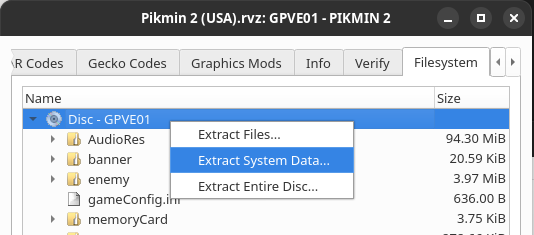
- After extraction, the following file should exist:
orig/GPVE01/sys/main.dol.
- Right-click the game in Dolphin's game list and select
-
Configure:
python configure.pySelect another release with the option above. Add
--helpto see all available options. -
Build:
ninja
The US version built with --non-matching is, to the best of our knowledge, functionally equivalent, and builds completely from the C++ source files, meaning every file can be edited for modding. All PAL, JP and US demo files are also, to the best of our knowledge, functionally equivalent.
Diffing
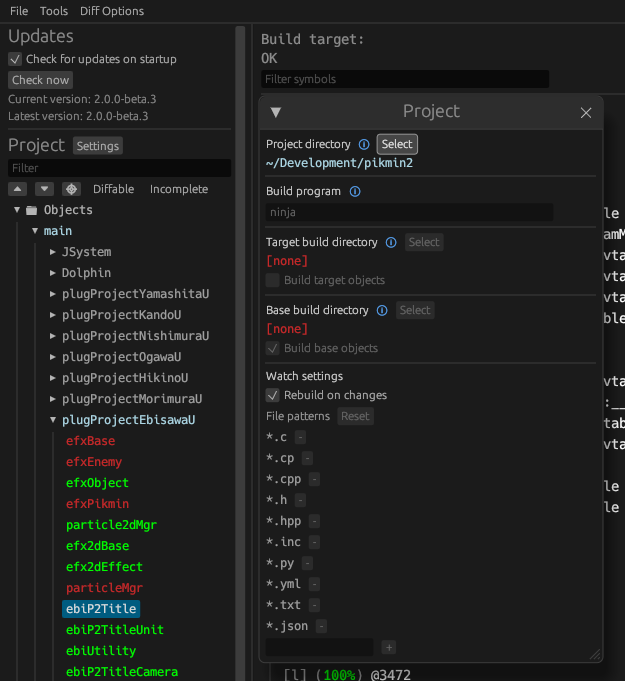
Once the initial build succeeds, an objdiff.json should exist in the project root.
Download the latest release from encounter/objdiff. Under project settings, set Project directory. The configuration should be loaded automatically.
Select an object from the left sidebar to begin diffing. Changes to the project will rebuild automatically: changes to source files, headers, configure.py, splits.txt or symbols.txt.
Modding
To enable modding, run configure.py with the --non-matching flag:
python configure.py --non-matching
This:
- Disables final hash verification.
- Builds all assembly files in
asm. - Builds all source files marked as
MatchingandEquivalentinconfigure.py.
To add new source files to the DOL:
- Uncomment the final
"lib": "moddingU"bracket inconfigure.py- change the name to whatever you like, and feel free to add more than one new lib using this as a template. - Add any new files along with their paths as
Object(Matching, folder/file.cpp)where indicated. - Within the
link_order_callbackfunction below the object configuration, uncomment and add each new file with its path withinsrc, as indicated.
Once built with ninja, the new DOL will exist at build/GPVE01/main.dol.