
Shadow of the Colossus (PC)
Shadow of the Colossus
OriginPlayStation 4
TechnologyNative C/C++ port (engine reimplementation)
Available forWindows
View official projectAbout the project
Shadow of the Colossus es un videojuego de acción-aventura desarrollado y publicado por Sony Computer Entertainment (SCEI) para PlayStation 2. El juego fue publicado en Norteamérica y Japón en octubre de 2005, y posteriormente en Europa en febrero de 2006. Fue creado por el Estudio Internacional de Producción 1 de SCEI, el mismo grupo de desarrollo responsable del éxito de culto Ico.
7 versions of Shadow of the Colossus
You're viewing: Shadow of the Colossus (PC)
Shadow of the Colossus (PC)github.com/AjncSystem/ShadowOfTheColossus-PCShadow of the Colossus (celosia)github.com/HenryKun55/celosiaShadow of the Colossus (PC, frame generation)github.com/nakaionyt/ShadowOfTheColossus-PC-FrameGenShadow of the Colossus (PS2 decomp)github.com/TheRealestNwah/sotc-decompShadow of the Colossus (PS3) PCgithub.com/sp00nznet/shadowofthecolossusShadow of the Colossus (ShadowOfTheColossus-PC)github.com/Oussama268/ShadowOfTheColossus-PCShadow of the Colossus Decompilationgithub.com/Fantaskink/SOTCOfficial project information
Shadow of the Colossus — PC native port · v0.72.1
[!CAUTION] ⚠️No game or Sony files are included.** You need your own game dump and, for sound, two modules from your own console. This project is not affiliated with Sony Interactive Entertainment or Bluepoint Games.
[!CAUTION] ⚠️ Install the game on an SSD, NVMe if you can. Every new area streams hundreds of MB of textures and models from the game folder; on a hard disk the area changes stutter far more and can freeze for seconds. Put the game dump (and, ideally, the port's folder) on an SSD.
Status: the game can be finished from start to end (v0.60.3: played through the last colossus, the ending and the credits, with high quality textures, PS4 Pro mode and 60 FPS on).
A native Windows port of the PS4 Shadow of the Colossus (Bluepoint, 2018; CUSA08809 EU 1.01 or CUSA08034 US 1.00) for Windows 10/11. The game's own x86-64 code runs directly on the PC's CPU and the PS4 GPU is translated to Vulkan. It is not a full emulator: it is a loader with the system functions the game needs, in the style of bloodborne_pc.
What's new
| Version | Improvements and fixes |
|---|---|
| 0.72.1 | Cards with less than 8 GB of video memory get a light profile automatically: Maximum textures at mip 1 (without the 3 s bank linger, with the page pool safety switch), High at mip 2 as in 0.71, video memory use capped at Default, no staging reserve in video memory. 8 GB cards and up keep everything. "Card memory" in the launcher's quick settings (Play page): Automatic (by the card), Light or Full. |
| 0.72 | Improvements the 0.71 page pool fix made safe, now on by default: fast GPU readbacks (~25% more FPS at the Shrine), sharper textures (finer mips: High mip 1, Maximum mip 0, with measured mips) and Maximum keeping texture banks 3 s, the heap guard shortcuts. New upscaler: AMD FSR 4.1 (official AMD FSR SDK 2.4, Vulkan; FSR 4.1 on Radeon RX 6000/7000/9000, FSR 3.1 on other cards; experimental). Play modes keep the grass as on PS4. Fewer stutters at area changes (staging reserve, texture copies with fewer page faults), the right video memory budget on integrated GPUs, launcher fixes. |
| 0.71 | 🔧 Critical Fixes & Performance • No More Texture Mosaics & Crashes: Fixed a critical memory bug where the game's 64 KiB page pool freed pages twice, causing textures and the heap to conflict. Tested through every Time Attack colossus on Maximum settings with zero crashes and perfect textures.• Stutter Reduction: Smoother transitions between areas thanks to optimized staging buffers and a rebuilt shader cache.• Visual Cleaning: Native motion blur is now disabled by default to fix the "shadow trail" artifact in dark areas. Optimized DLSS with Preset E and a current-frame bias for sharper imagery. Includes HUD-less frame generation by default.• Experimental HDR10: Added a new experimental HDR10 output mode for the base SDR game.🎮 All-New Custom Launcher Redesigned with a Shadow of the Colossus aesthetic (night stone, golden typography, and reactive sword-light highlights) inspired by the bloodborne_pc launcher.• Play Modes: Quick presets for Normal, Pro, Extreme (60 FPS, max textures, extended grass/shadow distance, DLSS), and Custom.• First-Time Setup Guide: A thematic 5-step hardware wizard that benchmarks your PC (CPU, GPU, RAM, Storage) and picks your ideal play mode.• Advanced Save Manager: Import/export your progress via .zip or shadPS4, with manual and automatic backups upon game close or crash.• Quality of Life: Global settings search (Ctrl+F), an interactive controller button tester, multi-monitor selection, a one-click bug report tool, and a dedicated help section. |
| 0.70 | Area changes no longer drop to near zero FPS (worst frame 534 ms → 58–75 ms, no forced loading screens; 1–6 frames are still lost per change), fix for a rare crash in the game's allocator after a load (0x49800), DLSS no longer shakes in PS4 Pro mode at 30 FPS, the HUD stays still with frame generation on FSR 1, a cheaper LOD feedback, new draw thread diagnostics. Install the game on an SSD. |
| 0.60.6-C3 | Fix for the C2 stamina bar with DLSS (wide screens, and 16:9 outside PS4 Pro mode); the 30 FPS cap holds in PS4 Pro mode too. |
| 0.60.6-C2 | Widescreen health and stamina bars fixed (21:9 / 32:9, #301), controller vibration toggle (launcher and in-game menu, #292), more FPS at the Shrine (Lucas-blip-png's barrier change), frame generation without the interface (no shaking text, experimental), DLSS Ultra Performance. |
| 0.60.6-C1 | Community release. tabnul's page allocator fix (an hour in Maximum + PS4 Pro without a crash, far less colour garbage after loads), Maximum textures in PS4 Pro mode (experimental), NVIDIA DLSS for RTX 20 and newer (tabnul; here also in PS4 Pro mode and at 4K), grass distance/height/detail live in the in-game menu (tabnul), the US release CUSA08034 (NathanMBR), fixes for weak CPUs and GTX 10xx (JihedMrouki), Oussama268's readback and bind work (new "More FPS" option), F7: 30 → 60 → unlimited, a launcher Debug page (debug menu on F6 / Start+Select, skip the logos). |
| 0.60.6 | No more rainbow garbage on textures and far fewer "closed out of nowhere" crashes (the cause: speculative GPU readbacks written over memory the game had reused, after loading a save or a new area), no more black dots on sandy ground, in-game menu cleaned up (FPS, upscaler and sharpening now change at once; Bloodborne leftovers removed), hard disk read-ahead (fewer stalls in new areas on HDDs), textures refreshed on every load, a readable session event log (user/events.log). |
| 0.60.5 | Texture quality selector: Off / High / Maximum (#235: sharp again), memory leak fixed (~60 MB/min, long-session stutter), +3% average and +12% minimum FPS (descriptor binds reused), loading after a GPU driver update: 106 s → 7 s, possible fix for white characters on AMD GCN (RX 470–590, Vega), 4-thread CPUs no longer stuck loading, a hang watchdog, short hitches no longer flash a black loading screen, code review fixes. |
| 0.60.4 | No more cyan blocks on stone or blinking flowers with high quality textures (the 0.60.3 crash protection switched the texture detail every second or two; now with hysteresis). |
| 0.60.3 | The game can be finished from start to end (played from the last colossus through the ending and credits): fix for the high quality textures crash in wide views (#186), fix for the crash on the load after the credits, +2.7% FPS at the Shrine. |
| 0.60.2 | Quick settings in the in-game menu (60 FPS, frame generation, high quality textures, far shadows, volume: apply at once and are kept), the mouse works in the menu, animated loading screen while the shaders are prepared at start. |
| 0.60.1 | In-game menu (Insert / F1 / L3+R3: FPS, GPU and VRAM, fullscreen, resolution, sharpening, mouse camera, effects), Bloodborne leftovers removed (~11,700 lines), the game exe has the SotC icon. |
| 0.60 | Textures on GTX 10xx, no title-screen hang, starts on low-memory PCs, 60 FPS through the game's own Performance mode (right physics), each copy has its own user folder, +6% FPS at the Shrine, FSR 3 without black tiles on RX 7000. |
| 0.59.1 | Far shadows no longer blink (AMD and NVIDIA; new launcher option), AMD stripes on shadows and water fixed, Intel fixes, the log shows the GPU and driver. |
| 0.59 | More FPS (Oussama268's fork: draw thread, shaders translated in parallel; bridge 30 → 37–40 FPS), fix for the ending and save-load crash (still being tested: report in the issues), F11 fullscreen, video memory use and volume options, launcher self-update, ultrawide with PS4 Pro mode, fixes for 6 GB cards and Chinese Windows. |
| 0.58.1 | High quality textures (sharp leaves and rocks; the game had not streamed its high resolution versions since 0.0.13) and the game window's own icon (or the game's, or a picture of yours). |
| 0.58 | Community release (Lucas-blip-png, Gabriell-os, Oussama268, jownatan, xeodeo, nakaionyt/y7ngboy, tabnul): fewer crashes (out of video memory, game freezing, post-colossus crash in PS4 Pro mode), +15% FPS and less video memory, AMD fixes (RDNA3/4 black tiles), 21:9/32:9 widescreen, FPS 30/60/unlimited, Xbox button icons, FSR 3 / DLSS-G frame generation (experimental), launcher in Spanish, Chinese, Korean and Russian. |
| 0.57 | AMD cards: fix for the green/pink fog and characters (AMD now uses the NVIDIA 32-lane path; diagnosis from issue #7, not yet tested on an AMD card). New launcher option to turn off direct memory access: ~10% more FPS, flatter distant water. |
| 0.56 | Open-world water with waves: lakes and rivers below the waterfalls are no longer flat as a mirror (a shader instruction, S_WQM_B64, was ignored). The upper lake ripples and reflects far away (direct memory access on by default, as in Pink-shadPS4). Distant trees without "colored garbage". |
| 0.0.13 | No more crashes: fixed the 0.0.12 crash in the intro/menu (the game asked for more textures than its pool holds). Tested ~40 min across the map with two save loads. Lake reflections over almost the whole surface, with ripples (a shader loop guard cut the reflection rays short). |
| 0.0.12 | Sharp textures back, without crashes: fixed the memory corruption that closed the game after loading a save, and texture streaming is back (much sharper rocks and walls). Water: splashes, rings and foam while swimming; the lake reflects the sky and the sun's glint; environment reflections use each probe's correct cubemap (fix from Pink-shadPS4). |
| 0.0.11 | Fixed the "colored garbage" grass texture of 0.0.10. |
Full details in the CHANGELOG (in Portuguese).
In-game menu and shortcuts
Press F1 (or Insert, or L3+R3 on the controller) while playing. The mouse is free while the menu is open; Esc or F1 closes it.
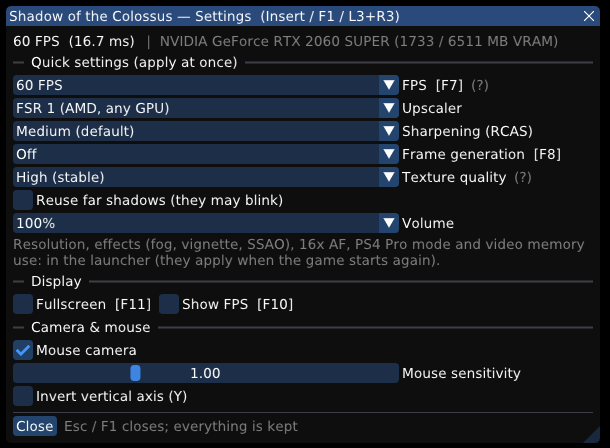
- Quick settings (apply at once): FPS (30 / 60 / unlimited), upscaler (FSR 1 / bilinear), sharpening (RCAS), frame generation, texture quality, far shadow reuse, volume. They are also saved as the launcher's choice for the next start.
- Display: fullscreen, FPS counter.
- Camera & mouse: mouse camera on/off, sensitivity, invert Y.
- The header shows FPS, frame time, the GPU and its video memory in use. Output resolution, effects (fog, vignette, SSAO), 16x AF, PS4 Pro mode and video memory use stay in the launcher (they apply when the game starts).
| Key | What it does |
|---|---|
| F1 / Insert / L3+R3 | Opens or closes the in-game menu |
| F7 | 30 FPS cap on/off (60 FPS without the cap) |
| F8 | Frame generation: off → DLSS-G → FSR 3 (when the GPU supports it) |
| F10 | Performance overlay (FPS and frame time) |
| F11 | Window / fullscreen |
Texture quality
In the launcher (Quick settings → Textures) and in the in-game menu (changes at once):
| Level | What it does | Possible problems |
|---|---|---|
| Off | The game's 256×256 versions only (the behaviour before 0.58.1). | Blurry ground, rocks and leaves. For GPUs short of video memory. |
| High (stable) — default | The game streams its high resolution textures. When the game's texture memory runs low, the textures ask for a coarser level so the game frees space before it runs out. | A little less sharp in large, wide areas (the game's texture memory is almost always full there, so it stays on the coarser level; #235). |
| Maximum (sharp) | High resolution textures always, without that protection. | It may close the game in very wide views (sword raised against the sun, the Shrine, the last colossus' area; fault 0x1a371, #186), mostly in PS4 Pro mode. Not seen in our 5–10 minute runs, but reported before. If it happens, go back to High. Uses more video memory. |
Known issues
- The first start after updating rebuilds the shaders: the first load is slow and stutters.
- Texture quality "Maximum" can close the game in very wide views (sword raised against the sun, the last colossus' area; #186). In PS4 Pro mode it is experimental since 0.60.6-C1 (with tabnul's page allocator fix): an hour without a crash in our test, but some colour garbage can still show in the 7th and 8th colossus' areas after several visits.
- Frame generation (FSR 3) with DLSS: text and HUD may shake; best left off.
- The first start after an update rebuilds the GPU driver's shader cache: about 2 minutes of loading screen, and short stalls the first time each area is visited.
- AMD GCN cards (RX 470–590, Vega, APUs on the legacy driver): characters and Agro may glow
white (#152, #158, #187). 0.60.5 adds the LDS barriers these cards were missing (PR #205), which
is the likely fix: please report whether it helps.
SOTC_AMD64_LDS=0turns it off. - 60 FPS: since 0.60 the game targets 60 FPS itself (its PS4 Pro Performance mode), which
should fix the 60 FPS physics (the 2nd colossus' wall, colossi "flying"); still being tested
there.
SOTC_MODES=af16in the extra variables goes back to the old mode. - Frame generation (experimental): the health/stamina bars may shake (
SOTC_FG_HUDLESS=1tries a HUD-less image), and it only matters at 30 FPS. - With 8 GB of video memory or less, pick a lower Video memory use level if the game runs out.
Download and use
- Download
SotC-PC.zipfrom Releases and unzip it into a folder. - Run
SotC.exe. On first start the launcher searches the PC's drives for:- the game folder (the CUSA08809 or CUSA08034 dump with
eboot.bin,sce_moduleandsce_sys); - the sound modules (
libSceNgs2.sprxandlibSceUlt.sprx) of an installed shadPS4 (user/sys_modules), which it copies to the port's data folder; - a shadPS4 save of the game, which it offers to import;
- the game's DLCs, if any (shadPS4's
addcontfolder, or a folder with one subfolder per DLC).
- the game folder (the CUSA08809 or CUSA08034 dump with
- Check the Game and saves page. The game library works like shadPS4's.
- Click PLAY.
Requirements: Windows 10/11 64-bit and a Vulkan 1.3 GPU (NVIDIA, AMD or Intel with a recent driver). No Python install needed. The game folder should be on an SSD (NVMe best): on a hard disk new areas stutter much more.
| What | Where from | What for |
|---|---|---|
| CUSA08809 (EU 1.01) or CUSA08034 (US 1.00) game dump | your PS4, through GoldHEN | the game |
decrypted libSceNgs2.sprx, libSceUlt.sprx | your PS4 (/system/common/lib/, GoldHEN FTP), or shadPS4's user/sys_modules | sound (silent without them) |
The patch modes (60 FPS, 16x filtering) apply to EU 1.01 and US 1.00 (the same executable);
other versions run at 30 FPS. Each release keeps its own saves (user/savedata/1/<title ID>),
and only DLC of the same region is used.
Launcher features
Game library and automatic search, shadPS4 save import, 720p–4K output (the game renders at
1080p, upscaled with FSR 1 + RCAS), PS4 Pro mode, 60 FPS and 16x AF modes, controller support
(DualShock 4, DualSense, Xbox) with mouse camera, key remapping, Bluepoint engine cvars, desktop
shortcut and a session log in user/last_run.log.
In 60 FPS mode the title-screen attract demo averages ~67 FPS on an RTX 2060 SUPER, with 29–34 FPS in its heaviest section. Vulkan only (no DirectX). AMD and Intel can enable the NVIDIA-only submission options under Image and FPS > GPU work submission.
Why no sound files? The two .sprx files are Sony firmware and may not be redistributed;
the launcher finds and copies yours automatically. The game closed by itself? Open an issue
with user/last_run.log.
Building
Windows with MSYS2 (CLANG64); packages:
packaging/windows/README.md. To freeze SotC.exe: a Windows
Python with PyInstaller and Pillow (WINPYTHON).
bash build.sh                              # out/bb-probe.exe
bash packaging/windows/package_sotc.sh     # dist/SotC-PC.zip
Packaging refuses any .sprx/.prx: Sony firmware never goes into the package. Test tools:
tools/. Diagnostic variables: docs/sotc/README-SotC.md.
Credits
- bloodborne_pc (Supermedo, deadinside28 and
forks): loader, native runtime and launcher. Original README: docs/bbport.
The launcher's look (
launcher/sotc_theme.py) comes from its 1.9 launcher theme, with the Cinzel and Inter fonts (SIL Open Font License). - shadPS4 and the shadPS4 SotC fork: Vulkan video core.
- Pink-shadPS4 (luizgustavs): culling cvars, BPE
heap guard, periodic submission, command recording thread, shader fixes (fetch-shader
constants,
V_ALIGNBIT,V_CVT_PK_U8_F32), dynamic T# tables (dynamic_tsharp_array_size), the LOD statistics approach and direct memory access for SotC. - Community pull requests and forks: Oussama268, Lucas-blip-png, Gabriell-os, jownatan, xeodeo, nakaionyt / y7ngboy, tabnul, EdouardSence, Einar, KingJhoss, nosekefik, raulbezerro-dev and everyone who reports issues with logs.
- 60 FPS patch: illusion (GoldHEN cheats).
License: GPL-2.0-or-later (LICENSE).