Battle for Bikini Bottom Decompilation
SpongeBob SquarePants: Battle for Bikini Bottom
OrigenGameCube
TecnologíaDescompilación y Reconstrucción en C/C++
Disponible paraWindows, Linux, macOS
Ver proyecto oficialSobre el proyecto
SpongeBob SquarePants: Battle for Bikini Bottom es un videojuego basado en la serie animada de comedia Bob Esponja. El juego ha sido lanzado para las consolas Game Boy Advance, Nintendo GameCube, Microsoft Windows, PlayStation 2 y Xbox. El jugador trata de defender a Fondo de Bikini de una invasión de Robots creados por Plankton con una máquina llamada el Duplicatotron 3000. Los personajes jugables son Bob Esponja, Patricio y Arenita. La versión de Windows cuenta con una serie de minijuegos y en gran medida difiere de las versiones de consolas.
2 versiones de SpongeBob SquarePants: Battle for Bikini Bottom
Estás viendo: Battle for Bikini Bottom Decompilation
Información oficial del proyecto
SpongeBob SquarePants: Battle for Bikini Bottom



A work-in-progress decompilation of SpongeBob SquarePants: Battle for Bikini Bottom.
The build supports these GameCube releases:
| Version | Release | Required original executable | SHA-1 |
|---|---|---|---|
GQPE78 (default) | USA | orig/GQPE78/sys/main.dol | 306526d90b48e99894c3138f5fc8f2716d9fecf6 |
GQPP78 | Europe | orig/GQPP78/sys/main.dol | 6da9022f06bfb62a203017ec38046ba2566dc0cf |
GU4Y78 | German compilation, BFBB disc | orig/GU4Y78/files/Game.dol | aeda497067bb53e4715db5b074535645a0ea9b3e |
The German compilation's sys/main.dol is its game launcher. BFBB is
files/Game.dol; the launcher and the other game are outside this project's
build and progress totals. All versions produce build/<version>/main.dol.
This repository does not contain game assets or original executables. An existing copy of the corresponding release is required.
Four PS2 releases and two Xbox releases also have verified-input CI, symbol registries, and analysis tooling. All four PS2 releases have a matching compiled xBase unit, with additional PS2 matches and an initial Xbox source comparison. CI publishes decomp.dev reports using verified code-region sizes; unresolved ranges remain unmatched. Full executable builds remain in progress. The badges above measure GameCube progress.
Dependencies
Windows
On Windows, it's highly recommended to use native tooling. WSL or msys2 are not required.
When running under WSL, objdiff is unable to get filesystem notifications for automatic rebuilds.
- Install Python and add it to
%PATH%.- Also available from the Windows Store.
- Download ninja and add it to
%PATH%.- Quick install via pip:
pip install ninja
- Quick install via pip:
macOS
-
Install ninja:
brew install ninja -
Install wine-crossover:
brew install --cask --no-quarantine gcenx/wine/wine-crossover
After OS upgrades, if macOS complains about Wine Crossover.app being unverified, you can unquarantine it using:
sudo xattr -rd com.apple.quarantine '/Applications/Wine Crossover.app'
Linux
- Install ninja.
- For non-x86(_64) platforms: Install wine from your package manager.
- For x86(_64), wibo, a minimal 32-bit Windows binary wrapper, will be automatically downloaded and used.
Building
-
Clone the repository:
git clone https://github.com/zcanann/bfbb.git -
Using Dolphin Emulator, extract the release to
orig/<version>. Only the executable listed above is required.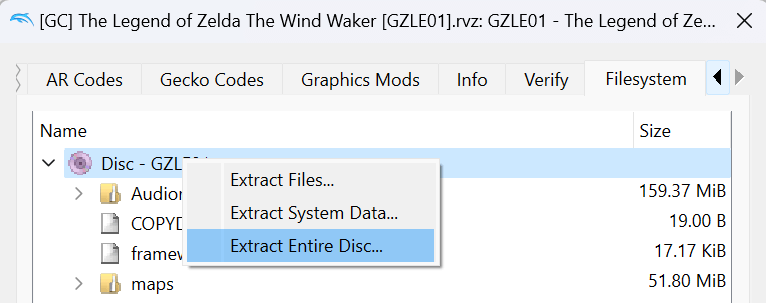
-
Configure and build the default USA release:
python configure.py ninja all_source progress -
Select Europe or the German compilation with
--version:python configure.py --version GQPP78 ninja all_source progressUse
--version GU4Y78for the German BFBB executable. Configure one version at a time; generated Ninja and objdiff configuration follow that selection, while compiled objects and reports remain in separatebuild/<version>directories.progressrequires the complete source build and an exact retail executable checksum.
CI follows the same per-version build with independent <version>_report
artifacts. The progress site includes a version selector; its root
badge API continues to report USA. Source completion is verified separately for
each version, so USA matching status is not automatically applied to PAL or the
German compilation. See regional build notes.
Visual Studio Code
If desired, use the recommended Visual Studio Code settings by renaming the .vscode.example directory to .vscode.
Diffing
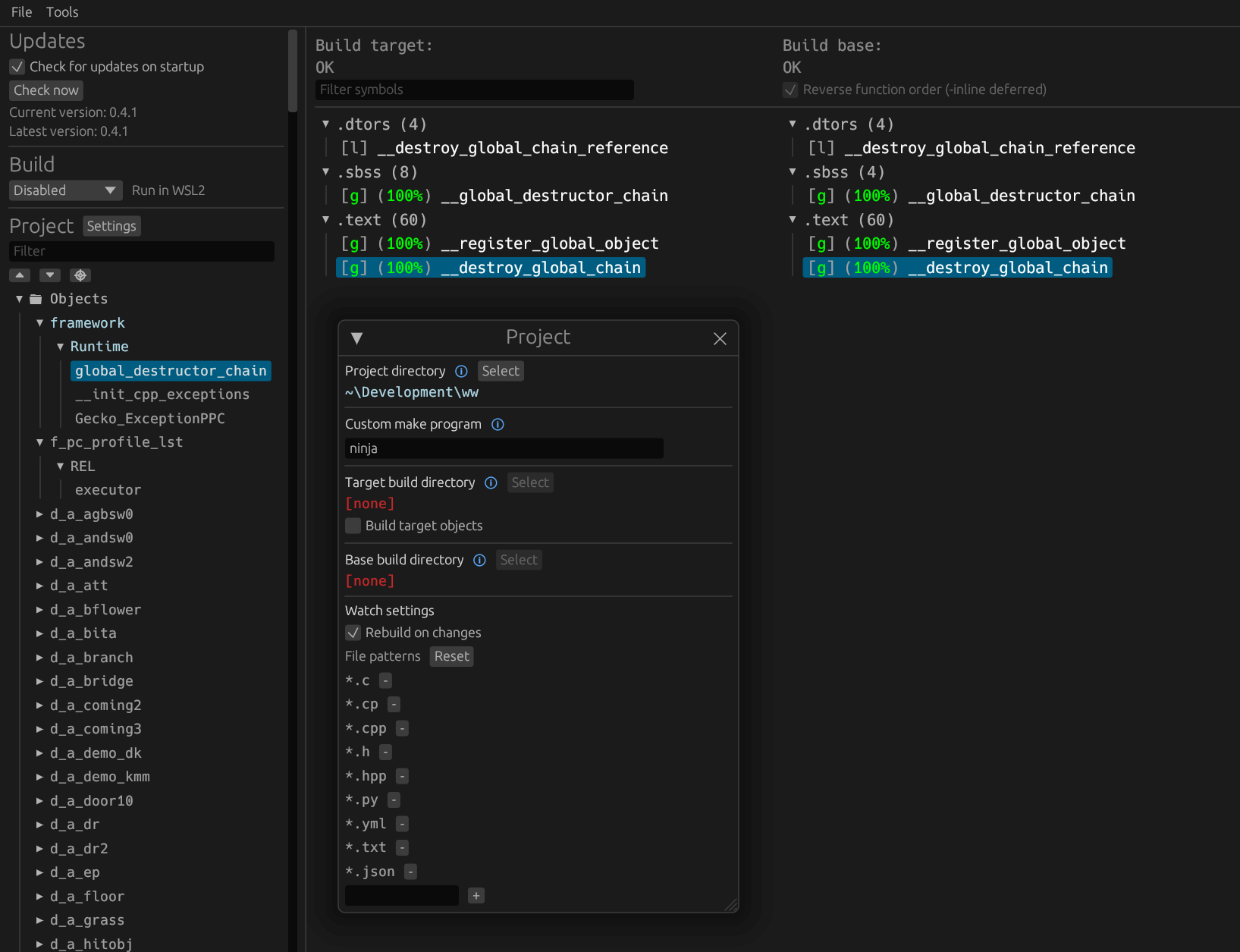
Once the initial build succeeds, an objdiff.json should exist in the project root.
Download the latest release from encounter/objdiff. Under project settings, set Project directory. The configuration should be loaded automatically.
Select an object from the left sidebar to begin diffing. Changes to the project will rebuild automatically: changes to source files, headers, configure.py, splits.txt or symbols.txt.