
Astral Chain (recomp, Windows: AstralChain-PC)
Astral Chain
OrigenNintendo Switch
TecnologíaRecompilación Estática (C/C++ nativo)
Disponible paraWindows
Ver proyecto oficialSobre el proyecto
Astral Chain es videojuego de acción-aventura desarrollado por PlatinumGames y publicado por Nintendo para la Nintendo Switch. Está dirigida por Takahisa Taura, quien anteriormente fue diseñadora de juegos para NieR: Automata, bajo la supervisión del creador de la serie Devil May Cry y Bayonetta, y diseños de personajes del artista de manga Masakazu Katsura. Fue lanzado el 30 de agosto de 2019.
2 versiones de Astral Chain
Estás viendo: Astral Chain (recomp, Windows: AstralChain-PC)
Información oficial del proyecto
Astral Chain PC
[!IMPORTANT] This project was built entirely with AI. All of the code, tooling, reverse engineering and documentation in this repository was written by an AI model (Anthropic's Claude, through Claude Code, and Codex), directed, tested and reviewed by the project's owner. It is shared as is, as a fan project. If you prefer not to use AI-written code, you are free to skip it. As with any code from the internet, you build and run it at your own discretion.
An unofficial, experimental native Windows port of Astral Chain (Nintendo Switch, PlatinumGames, 2019), made by static recompilation. The game's ARM64 code is translated to C and compiled into an ordinary Windows x64 program, and its NVN graphics calls run on Vulkan. There is no emulator or JIT.
You build it yourself from your own legally dumped game and keys. This repository contains no game code, assets,
shaders, keys or firmware, and never will. Everything the setup produces comes from your dump: do not share the
build/, game/ or userdata/ folders.
AI disclosure. Most of the code, tooling, reverse engineering and documentation here was written by Claude (Anthropic) through Claude Code, directed and tested by the repository owner. It is shared as-is as a fan project.
Status
| Tested | From the title screen through File 01 (its boss fight included) and File 02, into File 03, with the in-game camera taking photos (played by the owner) |
| Frame rate | 60 fps target, cutscenes included (Dynamic-FPS patch, game speed correct at any frame rate). RTX 4090 / Ryzen 7 7800X3D: 57-60 fps. AC_CUTSCENE_FPS=30 plays cutscenes exactly as the original does |
| Stability | Driver watchdog plus a GPU hang stop. No driver resets since 2026-10-19 across dozens of test runs |
| Saving | Works (tested in File 01) |
| Shader pauses | Shaders are compiled for your GPU before the game starts. Simulated first play of an area never recorded: 7 pauses over 50 ms, 0.49 s in total (26 and 8.0 s before 2026-10-21) |
| Controllers | Keyboard and mouse, and Xbox-style pads through XInput (every connected pad is read). Other pads (Switch Pro Controller, DualSense, DualShock 4, 8BitDo) go through SDL3: tested with a virtual SDL pad only, not yet with a real one |
| Integrated GPUs | A memory copy meant for dedicated graphics cards is off on integrated GPUs: highway chase effects at 46-56 fps instead of 5-6 on an Intel Arc laptop (Linux). Not yet tested on a Windows integrated GPU |
| Not yet tested | The rest of File 03 and everything after it |
Known issues are listed under Known issues.
What's new
Fixes marked not yet confirmed were tested in scripted runs, but not yet confirmed in play.
2026-11-04
- Controllers other than Xbox pads (issue #10): Switch Pro Controller, DualSense, DualShock 4, 8BitDo and most pads SDL knows now work, through SDL3 (setup downloads it). Buttons follow their position, as on the Switch. See Controllers under Playing. Switch 2 controllers are not supported yet. Not yet confirmed with a real non-Xbox controller (tested with a virtual SDL pad: every button, trigger and stick direction arrived).
- Every connected Xbox-style pad is read (PR #13, by lcd1232), not only the first one found: Steam Input's virtual pad, or a pad plugged in after the start, used to be ignored until a restart.
- Prepare graphics on a separate thread: hangs and crashes fixed, seen at high frame rates (with the uncapped frame rate, the title screens run at 200+ fps): the list of GPU results waiting to be copied back was changed by two threads at once, and a fence wait could end before its work reached the GPU. In tests with both settings on, 25 of 25 runs through the title screens were clean (about a third hung or crashed before). Not yet confirmed in play. The title screen still flickers in play: about every 10 s at 60 fps, nearly all the time uncapped (reported 2026-11-05); being looked into.
- Faster atomic memory operations: each one the game makes checked its memory against every mapping table; the last region that passed is now kept until a mapping changes. Street after the opening helicopter scene, uncapped (RTX 4090 / Ryzen 7 7800X3D, 3 runs each): 67.0 -> 71.4 fps; at the street's start 55.6 -> 58.5 fps, slowest 2 s 41.8 -> 44.4. Not yet confirmed in play.
- Uncapped frame rate (experimental): Settings > Game in the launcher, or the in-game menu. Gameplay is no longer held to 60 fps; cutscenes stay at 60 (their cuts are timed for it), and it stops at 450 fps, where the 60 fps patch's game timing ends. Most places are limited by the CPU: on the street after the opening helicopter scene 64-66 fps instead of 60 (RTX 4090 / Ryzen 7 7800X3D). The 60 fps patch scales game speed to the measured frame time up to 480 fps. Reported in play: it does not feel right above 60 fps, for about 10 fps more; being looked into.
- In-game settings menu: F1, or Minus and Plus together on a controller, opens it over the game, which pauses as under the Switch's HOME menu. Button icons, rumble strength, the mouse settings, fullscreen, 30 fps cutscenes and keeping the game running while minimized change at once; handheld mode, presentation mode and the separate graphics thread from the next start. Changes are saved for the launcher too. Navigate with the mouse, the arrow keys or a controller (A selects, B goes back); Esc, F1 or Minus and Plus close it. Confirmed in play: F1 opens it, the game pauses, navigation works, changes apply and the launcher shows them.
- Xbox and PlayStation button icons, and automatic icons (the new default): the game's button prompts follow what you last used, keys and mouse buttons for the keyboard, the buttons of an Xbox, PlayStation or Switch controller for a controller (by position: the right face button is Xbox B and PlayStation circle). The style can also be fixed in the menu or the launcher. Not yet confirmed in play.
- Rumble: controllers rumble when the game asks for it (it used to be dropped), through XInput for Xbox pads and SDL3 for the others. Settings > Controller > Rumble strength (0 turns it off). The game asks for weak rumble (made for the Switch's actuators); weak values are raised for PC pads' motors, as yuzu does. Stops when the window loses focus or the game closes. Confirmed in play (rumble works; an 8BitDo controller's buttons work).
- Integrated GPUs (PR #13, by lcd1232): on Intel and AMD integrated graphics, a memory copy meant for graphics
cards with their own memory is now off; on an Intel Arc laptop (Linux) the highway chase's effects went from 5-6
fps to 46-56.
LARECOMP_VK_GMEM_FAST=1turns it back on. Not yet tested on a Windows integrated GPU. Discrete GPUs are unchanged. - Occasional stop at startup (
host-shared-placeholder-reserve), seen about once in 20 starts after the controller change: Windows had placed one of the program's own thread stacks where the game then put one of its thread stacks. The game now places its memory around such allocations. Forced in a test (a large block reserved there on purpose): the game stopped without the fix and played with it.
2026-10-27
- In-game camera: the camera never locked on to anyone, so no name label appeared and photo quests (such as Lappy's) never completed. The game measures how much of a subject is visible with the GPU, and reads that count a frame later without waiting; the count always read 0. Photos are also read back from the GPU now. Confirmed in play (the owner found the last part of this fix).
2026-10-26
- Street after the opening helicopter scene: it was held at 33-53 fps on a fast PC (RTX 4090 / Ryzen 7 7800X3D, CPU-bound) by thousands of small memory-tracking queries a second. They are now grouped: average 55.6 → 58.7 fps there at 2560x1440. Not yet confirmed in play.
- Settings > Prepare graphics on a separate thread (experimental), off by default: the game's render thread no longer translates and submits each frame itself. On the same street: average 59.9 fps, the slowest 2 s about 57. Not yet confirmed in play; sound may run slightly later relative to the picture with it on.
- Brightness pumping in a dialogue after the opening street fight: the picture brightened over a few frames and snapped back. A compute shader that averages the scene's brightness read stale data (threads of a group passed a barrier early); the measured average is now steady in every frame. Not yet confirmed in play.
2026-10-25
- Mouse support. Click in the game window to give it the mouse: it turns the camera, left click attacks (ZR), right click calls the Legion (ZL), the wheel changes weapons. Hold Alt to get the cursor back. Sensitivity and invert in Settings > Mouse and keyboard.
- Keyboard and mouse button icons in the game. The button prompts show the keys and mouse buttons you set instead of the Switch buttons (Settings > Mouse and keyboard > Button icons to keep the Switch ones).
- Controls: two bindings per action (main and alternative), mouse buttons and wheel included. New defaults: Shift sprints, Space dodges, Tab is IRIS, Esc the pause menu (the old keys stay as alternatives). Keys you had changed in Controls stay on their actions; a new default that would clash with one of them is left empty.
2026-10-24
- Flickering light in the opening helicopter cutscene: the whole picture jumped between two brightnesses. The game asks for depth clamping, which was ignored, so an effect card it places right in front of the camera was cut away in some frames and drawn in others. Depth clamping is now on. On a test save, that stretch of the cutscene went from 150-200 brightness jumps per 500 frames to 1-2 (camera cuts). The cutscene now stays at the darker of the two brightnesses. Not yet confirmed in play.
- Setup after picking the wrong file: once a wrong base game or update had been picked, every retry failed with the same "belongs to program" message. Setup now extracts again for any other file, and says which file to pick.
- Experimental features on a separate branch:
upscalinghas an AMD FSR 1 upscaling option, render resolutions from 1920x1080 to 3840x2160, and ultrawide sizes (21:9 and 32:9). They are not part of this version yet; see that branch's README.
2026-10-23
- Shorter wait before the game after a play session. The game records the shader combinations it meets in play; the next Play then redid all of "Preparing shaders" and "Compiling for your GPU". Now only what was added since the last time is done. On the test PC, with about 15% new records, the wait went from about 3 s to under 1 s (the saving is larger on slower PCs). A new version still prepares everything once.
- Fullscreen (issue #5): F11 or Alt+Enter switches between a window and borderless fullscreen on the window's monitor (the display mode is not changed). Settings > Display > Start in fullscreen starts in it.
2026-10-22
- Python no longer needs to be installed (issue #3). Setup downloads its own Python 3.14 into
tools\python(pinned, checked by SHA-256), so the version installed on your PC, if any, does not matter. An existing.venvthat works is kept. - Setup from a ZIP download stopped at "unreviewed Maxwell translator identity" (issue #2): a file check depended on line endings. Fixed; confirmed by the reporter.
- Green flashes in the title movie (and noise or green in the tutorial clips): video frames were sometimes drawn before the decoded picture reached the GPU, for up to 8 frames. Textures written by the CPU are now checked every frame. In a recorded start, the title movie had about 50 green frames before and none after. Not yet confirmed in play; the tutorial clips are untested.
- Handheld mode (Settings > Display, off by default; issue #4): the game runs as on a Switch out of its dock and renders at 1280x720 instead of 1600x900 (36% fewer pixels), for GPUs that cannot hold 60 fps. The picture is scaled to the window as before. Its frame rate gain was not measured: the test PC's GPU is not the limit.
2026-10-21
- Keyboard controls can be changed: Controls in the launcher (click a key, press the new one).
- Optional BC7 texture compression (Settings, off by default), in two versions: converted on the GPU while playing, or prepared once at setup. Both save about 2.5 GB of video memory; see Texture compression for what each costs. Not yet confirmed in play.
- Launcher.
Astral Chain Launcher.exe: install, compile shaders, play without console windows, play with diagnostics and create a bug report, and settings for every option, over original key art (six backgrounds to pick from with the arrows at the top right). See Playing. - Shaders compiled for your GPU before the game starts ("Compiling for your GPU", about 10 s the first time). In-game, pipelines are linked from those compiled shaders instead of being compiled whole, and the recorded ones are built before their first draw. Most shader pauses in new areas are gone (see Status). Not yet confirmed.
- ASTC textures are decoded on the GPU instead of the CPU: no more 60-240 ms pauses when large textures load. Checked byte for byte against the CPU decoder.
- Crash at the File 01 boss (when it throws a container): the game stopped on a rumble value out of range. It now ignores such values. Not yet confirmed.
- NSP base games stopped setup at the RomFS step (issue #1). Setup now gives NSTool both the base game's and the update's title keys. Not yet confirmed by the reporter.
- A failed rebuild no longer loses the shader cache.
- Crash dumps in diagnostics mode; the watchdog script now records the game's exit code.
2026-10-20
- All of the game's shaders are translated before the first launch ("Preparing shaders").
- NVN's alpha test is emulated: defeated enemies no longer leave a dark tentacle mass. Not yet confirmed.
- Cutscene cuts keep their time at 60 fps, and sound skips gaps after a stall, so sound stays with the picture.
Not yet confirmed.
AC_CUTSCENE_FPS=30plays cutscenes at 30 fps as on the Switch. - Dragging the window by its title bar no longer freezes the game; closing hides the window at once.
- Each save is also copied to a backup folder (the newest 30 are kept).
- Textures are uploaded ahead of first use on loading screens; the pipeline cache is kept between sessions.
- Fixed wrong textures on faces and armour, and a rare crash in the GPU write-back handler.
Requirements
- Windows 10 or 11, 64-bit.
- A GPU with Vulkan 1.3. Developed on an NVIDIA RTX 4090; other GPUs are untested.
- About 35 GB free during setup. About 11 GB stays afterwards.
- An internet connection for the one-time setup. It downloads Python, Zig, glslang, NSTool and SDL3 at pinned versions, checked by SHA-256. No Python install is needed.
- Your own dump:
- the base game (title ID
01007300020FA000), as an XCI or an NSP; - the v1.0.1 update NSP. Exactly v1.0.1 is required;
- your console's
prod.keys.
- the base game (title ID
How to dump games and keys from your Switch is not covered here.
Setup
- Download this repository: Code → Download ZIP, or
git clone. Put it in a folder you own, for exampleC:\Games\AstralChain-PC. The path should be short, and not on a network drive. - Start
Astral Chain Launcher.exein that folder and press Install game. Pick, when asked:- your
prod.keys; - the base game (XCI or NSP);
- the v1.0.1 update NSP.
- your
- Wait. Setup extracts the game data, packs it into
game\romfs.bin, then translates and compiles the game and its shaders. The first time takes roughly 15-40 minutes, depending on your CPU and disk. Temporary files are removed at the end. The launcher shows the progress; Cancel stops it.
The game is installed in the launcher's folder. Once it is, Install game is greyed out.
If a step fails, fix the cause and press Install game again: finished steps are skipped.
Without the launcher, setup.cmd does the same in a console window. It also takes the files directly:
setup.cmd --keys X:\prod.keys --base X:\AstralChain.xci --update X:\AstralChain-v1.0.1.nsp.
Windows SmartScreen may warn about the launcher because it is not signed. Its source is launcher\Launcher.cs;
python launcher\build.py builds it again with the C# compiler that comes with Windows.
Playing
Start Astral Chain Launcher.exe:
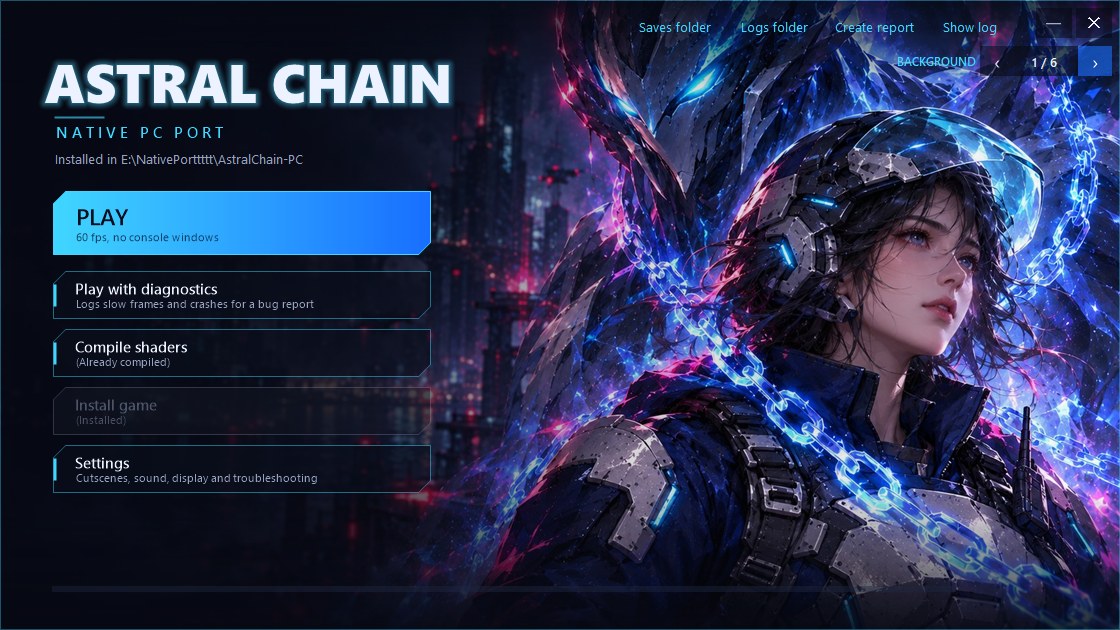
The arrows at the top right (BACKGROUND ‹ 1 / 6 ›) switch between six backgrounds; the choice is remembered.
| Button | What it does |
|---|---|
| Play | Starts the game, without console windows. After an update of this project it first rebuilds the game (about a minute) and its shaders |
| Play with diagnostics | The same, plus a log of where the time of each slow frame went and a crash dump if the game crashes. Afterwards it offers to create a report |
| Compile shaders | Prepares every shader for your GPU now. It says (Already compiled) when nothing changed, and (Needs recompiling) after an update of the game build, new recorded shader combinations, or a settings change that affects them. Play does this too when needed |
| Settings | Cutscene frame rate, pausing while minimized, save backups, sound resync, fullscreen, presentation mode, handheld mode (1280x720), texture compression (BC7, see below), shader options and troubleshooting switches. Each one is explained in the window |
| Controls | The keyboard keys for every button, stick direction and the D-pad. Click a key, then press the new one; a key already in use swaps places |
| Create report | Packs the last session's logs, the crash dump if there is one, and your Windows, CPU and GPU versions into reports\, for a bug report. No game files; your Windows user name is removed from the logs' paths |
Play Astral Chain.cmd and Play Astral Chain (diagnostics).cmd still work, with console windows.
Default keys and mouse buttons (change them with Controls; every action has a main and an alternative binding):
| Switch | What it does | Main | Alternative |
|---|---|---|---|
| ZR | Attack | Left click | C |
| ZL | Legion (summon, send, recall; hold to steer it) | Right click | Z |
| A / B / X / Y | Interact / dodge / item / switch Legion | J / K / I / U | B: Space |
| L / R | Legion action / dismiss Legion | Q / E | Mouse back / forward |
| + / - | IRIS / pause menu | Enter / Backspace | Tab / Esc |
| Left stick | Move | W A S D | |
| Right stick | Camera | Mouse (see below) and T F G H | |
| Left / right stick press | Sprint or crouch / re-centre the camera | Shift / Middle click | 1 / 2 |
| D-pad | Up and down: weapons | Arrow keys | Up and down: mouse wheel |
Mouse. Click in the game window to give it the mouse: the cursor hides and the mouse turns the camera (and steers your Legion while ZL is held). Hold Alt, or switch to another window, to get the cursor back; click again to resume. Sensitivity and invert are in Settings > Mouse and keyboard.
Button icons. By default the game's button prompts follow what you last used: your keys and mouse buttons (the main binding of each action) on the keyboard, the buttons of an Xbox, PlayStation or Switch controller on a controller. Button icons in the in-game menu or the launcher's Settings > Mouse and keyboard fixes one style.
In-game menu. F1, or Minus and Plus together on a controller (Back and Start, Share and Options), opens the settings menu over the game; the game pauses while it is open. Esc, F1 or Minus and Plus close it. Changes that need a restart say so. The menu saves to the same settings file as the launcher.
F11 or Alt+Enter: fullscreen on or off (F11 and Alt stay game keys if you assign them in Controls).
Texture compression (BC7)
For GPUs with 8 GB of video memory or less. Most of the game's textures are ASTC, which PC GPUs cannot read, so they are unpacked to 4 bytes per pixel. Settings > Texture compression (BC7) stores them as BC7 instead, a quarter of that size. Off by default. Measured on a fresh install, highway chase, 3 runs each (RTX 4090):
| Off (default) | On: converted on the GPU | On: prepared at setup (best) | |
|---|---|---|---|
| What it does | Textures unpacked as before | Each texture is converted on the GPU as it loads | Every texture is converted once, on the CPU, and stored on disk; the game loads those |
| Video memory (average / peak) | 7.2 / 8.7 GB | 4.7 / 5.2 GB | 4.7 / 5.1 GB |
| Preparation | None | None | About 12 minutes, once (at the next Play) |
| Disk space | None | None | 16 GB (build\game\cache\bc7) |
| Short pauses per run | 6-8 | 11-12: about 5 more, of 60-100 ms, while an area loads | 6-7 |
| Picture | Original | Slightly less detail on some surfaces (bumps, reflections) | Very close to the original |
Picture quality measured on 300 of the game's textures (PSNR against the original, higher is better): 46 dB average on the GPU, 51 dB prepared at setup; the GPU's worst texture was 27 dB, setup's 34 dB.
Switching to prepared at setup says when the preparation will run; switching away offers to delete the 16 GB. With less than 20 GB free, setup skips the preparation and the game converts on the GPU instead.
Controllers. Xbox pads and compatibles work through XInput. Other controllers work through SDL3: Switch Pro Controller, DualSense, DualShock 4, 8BitDo and most USB or Bluetooth pads SDL knows. The buttons follow their position, as on the Switch: the right face button is A and the bottom one B, whatever their labels. The first controller found is used; plug it in before or while the game runs. Controllers rumble when the game asks for it (Settings > Controller > Rumble strength, 0 turns it off). Not supported yet: the Switch 2 Pro Controller and Switch 2 Joy-Cons (SDL's Windows build has no driver for them). With Steam, adding the game as a non-Steam game with Steam Input on may work for those; that is untested. Not yet confirmed with a real non-Xbox controller.
The game pauses while its window is minimized, as on the Switch's home menu (Settings: Keep running while the game window is minimized). In another window, the game keeps running but takes no keyboard input.
- Saves are in
userdata\saves\(the launcher's Saves folder link). Each save is also copied next to it (the newest 30 are kept); still, back that folder up from time to time. - Logs of the last session are in
build\game\round-00\(trace.log,stderr.log). - Shaders. Before the game starts the first time, setup translates all of the game's shaders ("Preparing
shaders", about 20 s on a 16-thread CPU), then compiles them for your GPU and driver ("Compiling for your GPU"),
together with the render-state combinations recorded so far. Later launches skip both unless something changed
(a game update or a new graphics driver); new combinations recorded in play are done alone at the next launch. A combination never seen before is linked
from the compiled shaders when first drawn, without a long pause. The cache is in
build\game\cache\.
Safety
The game always runs under astral_chain\run_guarded.ps1, from the launcher too. It closes the game on the first
GPU driver error that Windows logs. The game also stops itself if the GPU stays busy for more than 1.2 s, before Windows would reset the driver.
Updating
Download the new version over the old one, or git pull. The next Play rebuilds the game once, in about a
minute. Your saves, game data and shader cache are kept.
Known issues
- Dark, shadow-like patches on scenery when fighting close to it were reported. Under investigation: a screenshot helps.
- Some short pauses remain when entering new areas: the game loading its own data, not shader compiling.
- Defeated enemies left a large dark tentacle mass for about two seconds. Cause found: the chimera blood effect dissolves through NVN's alpha test, which was not emulated. It now is (test runs of the highway chase show no mass), not yet confirmed in play.
- In-game cutscenes were reported with the sound behind the picture after camera cuts (the 60 fps mod's known limit: each cut ended up to a frame early). Cut ends now keep their time: the cutscene after the highway chase lasts 35.192 s, as at the original 30 fps (35.193 s; 35.077 s before). Sound gaps after stalls are skipped to stay in sync. Not yet confirmed fixed.
- Rarely the game closes right at startup (
STOP host-shared-placeholder-reserveintrace.log). Start it again. - Save-slot thumbnails are not captured (
nvnTextureReadTexelsis not implemented).
Reports are welcome. The easiest way: play with Play with diagnostics in the launcher until the problem
happens, then attach the zip that Create report makes. Otherwise include build\game\round-00\stderr.log and
trace.log and your GPU and driver version, but no game files.
Folder layout
| Path | What |
|---|---|
Astral Chain Launcher.exe | The launcher (source in launcher/) |
setup.cmd, Play Astral Chain.cmd | The same steps from a console window |
astral_chain/ | Translator driver, build system and Windows runtime (C) |
astral_chain/patches/ | Code patches of this project (pchtxt) |
third_party/ | Vendored sources: LASRecomp, Vulkan-Headers, VulkanMemoryAllocator, Dynamic-FPS patch |
docs/ | How it works, troubleshooting, development notes |
tools/ | (created by setup) Python, Zig, glslang, NSTool, SDL3 |
game/ | (created by setup) your extracted update code, metadata and romfs.bin |
build/ | (created by setup) the compiled game and its shader cache |
userdata/ | (created by setup) saves, account profile, setup choices, launcher settings (launcher.ini) |
reports/ | (created by the launcher) reports made with Create report |
Documentation
Legal
This is an unofficial fan project, not affiliated with or endorsed by Nintendo or PlatinumGames. Astral Chain is a trademark of Nintendo. No game code, assets, shaders, keys or firmware are distributed. Requests for them will be closed.
The original code in this repository is under the MIT License (see LICENSE). Vendored third-party components keep
their own licenses, listed in THIRD_PARTY_NOTICES.md.
Credits
- LASRecomp (MIT): the ARM64 lifter, the NVN-on-Vulkan layer and the Maxwell shader translator this port builds on.
- AstralChain-Dynamic-FPS by yogesh1239 (MIT): the 60 fps patch.
- astral-extractor by cabalex: format research.
- The launcher's backgrounds and icon (
launcher/art/,launcher/icon.ico) are original AI-generated images in the style of the game, without official artwork. The default (1-visor.jpg) was chosen by the project's owner; the other five and the icon were made with OpenAI Codex's image generation for this project. - AC-Recomp: the macOS recompilation, whose setup flow inspired this one.
- AMD FidelityFX Super Resolution 1 (MIT): the EASU and RCAS shaders of the FSR 1 path (through LASRecomp), used by the experimental upscaling option.
- NSTool, Zig,
glslang, SDL (zlib; its
SDL3.dllis downloaded by setup, for controllers), Vulkan-Headers, VulkanMemoryAllocator, Capstone, lz4.