Marvel Nemesis: Rise of the Imperfects · mnroi (Esoteric-Engineer)
Marvel Nemesis: Rise of the Imperfects
OriginGameCube
TechnologyDecompilation and reconstruction in C/C++
Available forWindows
View official projectAbout the project
Decompilación de la versión GameCube; no es un port de PC jugable.
2 versions of Marvel Nemesis: Rise of the Imperfects
You're viewing: mnroi (Esoteric-Engineer)
Official project information
Marvel Nemesis: Rise of the Imperfects




A work-in-progress decompilation of Marvel Nemesis: Rise of the Imperfects for GameCube.
This repository does not contain any game assets or assembly whatsoever. An existing copy of the game is required.
Known supported versions:
GVLE69: Rev 0 (USA)
Documentation
docs/workflow.md: the day-to-day decomp reference.docs/matching_notes.md: compiler/linker gotchas and matching techniques.docs/nonmatching.md: functions stuck asNonMatching, with what has already been tried.docs/baseline.md: why the build is configured the way it is.docs/prodg.md: the SN ProDG (GCC 2.95) compile path for game and runtime code, and how static constructors link.
Note: this project requires a local build of the decomp-toolkit fork,
Esoteric-Engineer/mnroi-decomp-toolkit, not the released dtk. See Building.
Dependencies
Windows
On Windows, it's highly recommended to use native tooling. WSL or msys2 are not required.
When running under WSL, objdiff is unable to get filesystem notifications for automatic rebuilds.
- Install Python and add it to
%PATH%.- Also available from the Windows Store.
- Download ninja and add it to
%PATH%.- Quick install via pip:
pip install ninja
- Quick install via pip:
macOS
-
Install ninja:
brew install ninja
wibo, a minimal 32-bit Windows binary wrapper, will be automatically downloaded and used.
Linux
-
Install ninja from your distribution's package manager:
sudo apt install ninja-build   # Debian/Ubuntu
sudo dnf install ninja-build   # Fedora
sudo pacman -S ninja           # Arch
Alternatively, download a binary from the ninja releases and put it on your
PATH.
wibo, a minimal 32-bit Windows binary wrapper, will be automatically downloaded and used.
Building
-
Clone the repository:
git clone https://github.com/Esoteric-Engineer/mnroi.git -
Clone and build the decomp-toolkit fork as a sibling of this repo (requires Rust). The stock released dtk will not produce a matching build (see
docs/baseline.md):git clone https://github.com/Esoteric-Engineer/mnroi-decomp-toolkit.git cd mnroi-decomp-toolkit cargo build --release cd ../mnroi mkdir -p build/tools cp ../mnroi-decomp-toolkit/target/release/dtk build/tools/dtk-devRepeat the build and copy after pulling fork changes.
-
Copy your game's disc image to
orig/GVLE69.- Supported formats: ISO (GCM), RVZ, WIA, WBFS, CISO, NFS, GCZ, TGC
- After the initial build, the disc image can be deleted to save space.
-
Configure:
python3 configure.py --dtk build/tools/dtk-devTo use a version other than
GVLE69(USA), specify it with--version.The
--dtkargument is remembered bybuild.ninja, so laterninjaruns reuse it.<br /> If you ever run a barepython3 configure.py, it falls back to stock dtk and the build stops matching. -
Build:
ninjaA successful build ends with
build/GVLE69/main.dol: OK. TheWARNlines from the split step and mwld's_SDA2_BASE_warning are expected.
Diffing
Once the initial build succeeds, an objdiff.json should exist in the project root.
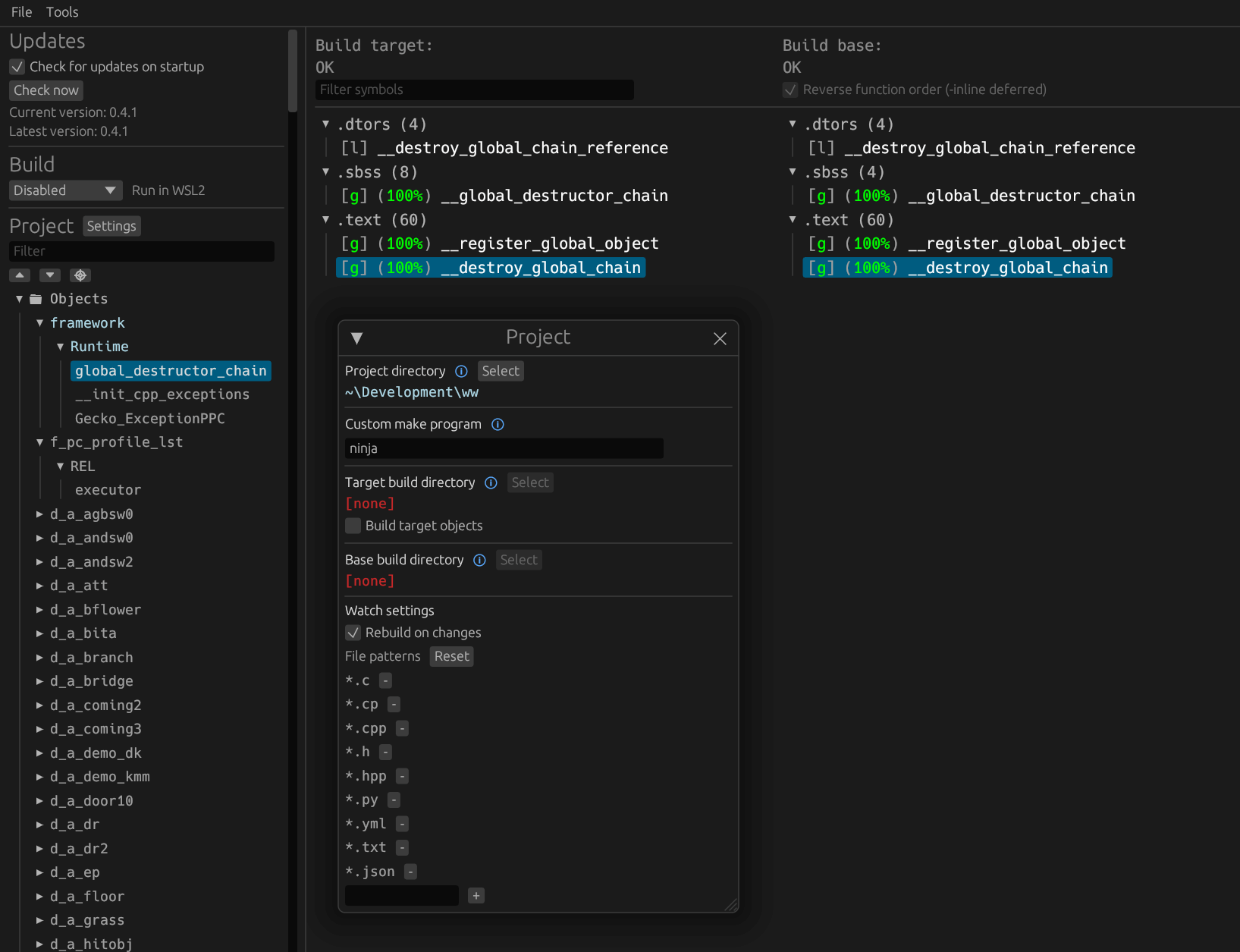
Download the latest release from encounter/objdiff. Under project settings, set Project directory. The configuration should be loaded automatically.
Select an object from the left sidebar to begin diffing. Changes to the project will rebuild automatically: changes to source files, headers, configure.py, splits.txt or symbols.txt.