
TimeSplitters: Future Perfect · timesplitters future perfect pc (TheDoffman)
TimeSplitters: Future Perfect
OriginXbox
TechnologyStatic recompilation (native C/C++)
Available forWindows, macOS
View official projectAbout the project
TimeSplitters: Future Perfect PC: proyecto comunitario para TimeSplitters: Future Perfect. Consulta las instrucciones oficiales y utiliza exclusivamente tus propios archivos del juego.
2 versions of TimeSplitters: Future Perfect
You're viewing: timesplitters future perfect pc (TheDoffman)
Official project information
<a href="https://discord.gg/hFkfcCUm56"><img align="right" src="docs/assets/discord-community.svg" alt="Join the TimeSplitters: Future Perfect Recomp Discord community" title="Join our Discord community" width="32" height="32"></a>
<div align="center"><a name="timesplitters-future-perfect"></a>
TimeSplitters: Future Perfect Recomp
Keyboard & mouse · 4K & ultrawide · Custom controls · Online multiplayer
<p> <a href="https://github.com/TheDoffman/timesplitters-future-perfect-pc/releases/latest/download/TimeSplitters-Launcher-windows-x64.zip"><img src="docs/assets/download-windows-launcher.svg" alt="Download the latest Windows launcher (x64)" width="280" height="52"></a> <a href="https://github.com/TheDoffman/timesplitters-future-perfect-pc/releases/latest/download/TimeSplitters-Launcher-macos-arm64.zip"><img src="docs/assets/download-mac-launcher.svg" alt="Download the latest Mac launcher (Apple Silicon)" width="280" height="52"></a> <a href="https://github.com/TheDoffman/timesplitters-future-perfect-pc/releases/latest/download/TimeSplitters-Launcher-linux-x64.zip"><img src="docs/assets/download-linux-launcher.svg" alt="Download the latest Linux launcher (x64)" width="280" height="52"></a> </p><sub>Direct ZIP downloads of the latest stable launcher · <a href="https://github.com/TheDoffman/timesplitters-future-perfect-pc/releases/latest">Release notes & checksums</a></sub>
Install & play · Launcher guides · Multiplayer · Build from source
<sub>Windows 10/11 x64 · Native Apple Silicon Mac · Linux x64 · Experimental port · Supported US Xbox game required</sub>
</div> <table> <tr> <td width="50%"><a href="docs/assets/gameplay-story1.jpg"><img src="docs/assets/gameplay-story1.jpg" alt="Dual-wielding weapons on an orange battlefield beneath an exploding aircraft" width="100%"></a></td> <td width="50%"><a href="docs/assets/gameplay-story2.jpg"><img src="docs/assets/gameplay-story2.jpg" alt="Fighting a burning helicopter from a moving train in story mode" width="100%"></a></td> </tr> <tr> <td width="50%"><a href="docs/assets/gameplay-arcade2.jpg"><img src="docs/assets/gameplay-arcade2.jpg" alt="Defending a cyan-lit compound alongside robots in an Arcade match" width="100%"></a></td> <td width="50%"><a href="docs/assets/gameplay-arcade1.jpg"><img src="docs/assets/gameplay-arcade1.jpg" alt="Exchanging laser fire across a neon nightclub in an Arcade match" width="100%"></a></td> </tr> </table> <p align="center"><sub>In-game screenshots as of v0.3.2</sub></p>[!IMPORTANT] You need your own supported US Xbox ISO or extracted game data. Import it through the launcher. Original game files are not included. No platform version needs an emulator.
<a name="start-playing"></a>
<img src="docs/assets/icon-play.svg" alt="" width="24" height="24"> Start playing
Windows, Mac and Linux use the same installation steps:
| Step | Installation |
|---|---|
| 01 | Download the launcher: Windows x64, Mac (Apple Silicon), or Linux x64. The download starts directly; you can also use the buttons above. |
| 02 | Extract and open. Extract the whole ZIP to a writable folder. On Windows, open TimeSplitters Launcher.exe, keeping Bin and Support with it. On Mac, open TimeSplitters Launcher.app, keeping its Support folder beside it. On Linux, preserve executable permissions and run Launch.sh or TimeSplitters.Launcher, keeping the full package together. |
| 03 | Install the game runtime. Keep Update channel → Stable, then choose Install release. The launcher downloads and verifies the latest available game build for your platform. Choose a preview only when opting into testing. |
| 04 | Import your game once. Choose Locate ISO, or Use extracted files for a folder containing default.xbe, pak and xmv. |
| 05 | Press Play Game. The launcher minimizes while the game runs and returns when you finish. |
Next time: open the launcher and choose Play Game. Installed play remains available offline. Use Check updates → Update release to install a newer game build when available. Launcher and game versions are separate.
Launcher preview
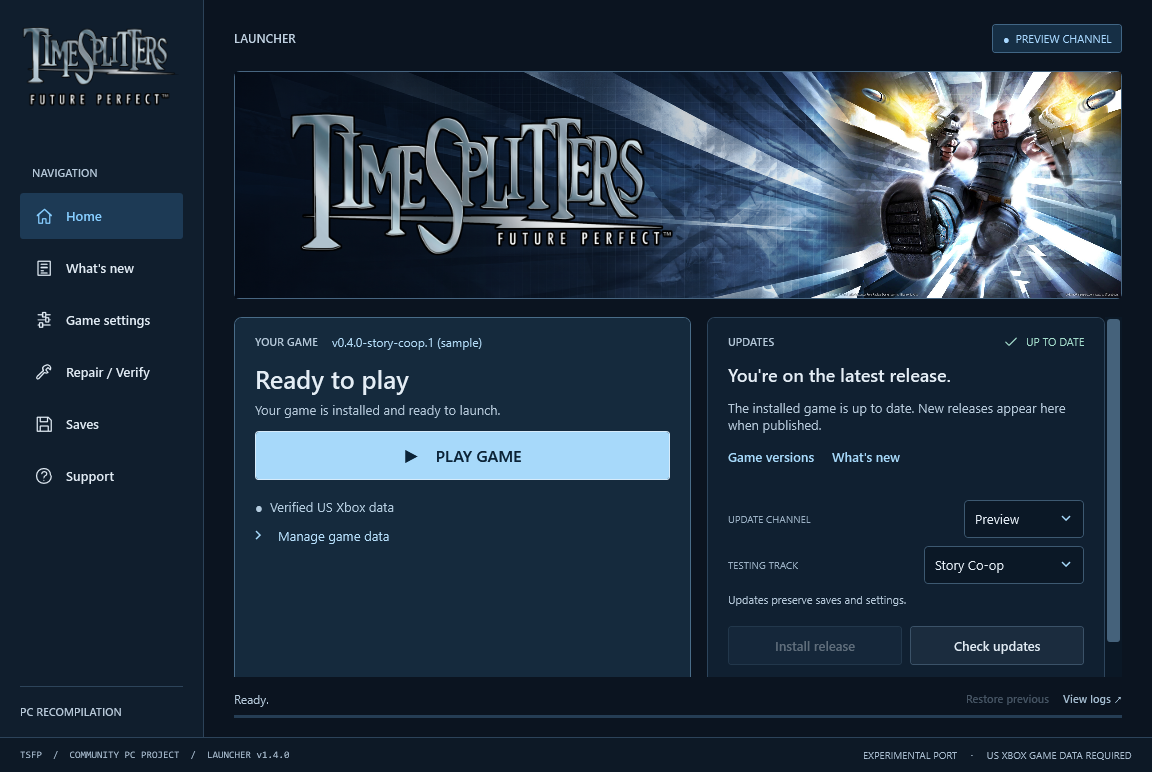
Launcher v1.4.0 interface preview with illustrative installation data. Stable is selected, matching the setup instructions above.
<details> <summary><strong>System requirements, channels and keeping your saves</strong></summary>- Windows: Windows 10/11 x64 with .NET Framework 4.8.
- Linux: x64, Ubuntu 24.04 / glibc 2.39 or newer, a desktop display and a working system Vulkan driver. Wayland needs XWayland. See the Linux launcher guide.
- Mac: Apple Silicon (M1 or newer). The launcher targets macOS 12+; the current shared Vulkan game renderer requires macOS 26+. See the Mac guide for the legacy OpenGL fallback on older systems.
- Your supported US Xbox game, title ID
45410066; exact executable hash. - Internet access for the initial runtime download; about 5 GB for the game, plus space for update staging, rollback and any optional textures.
- Stable is the default game channel. Choose Preview, then Beta or a named feature under Testing track for opt-in testing. Each track follows its own updates in launcher 1.3.0+. See release channels.
- Keep the whole installation together, especially
Data,Settings,Savesand the launcher's recovery files. Normal updates preserve existing data, settings and saves.
Published builds do not require Python, Git or developer tools. The Mac launcher includes .NET and does not need CrossOver or the .NET SDK.
</details>Platform status
This is an experimental port. Full campaign completion and complete rendering and audio fidelity remain unverified. See measured progress.
| Platform | Support and known limits |
|---|---|
| Windows 10/11 x64 | Keyboard and mouse, graphics settings and experimental Online/LAN multiplayer. See the Windows launcher guide, including startup security prompts. |
| Mac (Apple Silicon) | Native launcher and game; Intel Macs are unsupported. The app is not notarized, so startup may require the Mac installation and recovery guidance. See Mac controls and source builds and remaining Mac work. |
| Linux x64 (experimental) | Native launcher and portable SDL/Vulkan game package, validated on Ubuntu/WSL. Native desktop GPU, Wayland, controller and Steam Deck acceptance remain pending. See the Linux launcher guide and acceptance limits. |
<a name="pc-features"></a>
<img src="docs/assets/icon-settings.svg" alt="" width="24" height="24"> PC features
| Feature | Details |
|---|---|
| Keyboard and mouse | Direct aiming, customizable bindings, mouse-driven menus and input prompts that follow your controls. |
| Widescreen | 1080p, 1440p, 4K and ultrawide support, with adjustable field of view. |
| Anti-aliasing | Optional SMAA 1x High smooths jagged edges on compatible Direct3D 11/Vulkan builds. |
| High frame rate | Original 60 FPS by default; compatible game builds offer opt-in 120/180/240 FPS beta settings. |
| Launcher | Game installation, updates, repair, rollback and settings. |
| Local split-screen | Play with multiple players on the same screen using controllers. |
| Online multiplayer | Player-hosted Online and LAN matches with bot support. Windows only. |
| Extras | Optional Discord Rich Presence, FPS overlays and local crash diagnostics. |
Availability depends on your platform and installed game version. Check the launcher's Release notes, platform status and measured progress for support and known limits.
Multiplayer
Local split-screen
These instructions describe the updated local-player controls in this branch; they are not yet included in a published release.
- Connect your controllers before choosing the player count. The opening screen detects available inputs, including slots previously saved as Disabled. Choose 2, 3, or 4 Players as appropriate.
- Join at the game's profile screen. Player 1 keeps their input. On each Press START to Join panel, press Start on an unused controller. The first controller to join becomes Player 2, the next becomes Player 3, then Player 4. Connection order does not determine player order. No separate auto-join setting is required, and one controller cannot join twice.
- Select a profile for each player, then enter a mode supporting that player count. Player 1 can use keyboard/mouse or a controller; additional players need their own controllers. Two or more controller players are supported.
Let each player configure their settings
- From the main menu, open Settings.
- Change the Player row to the player whose settings you want to edit.
- That player's controller can now navigate Settings and its submenus, including Controls, and configure their options. Player 1 always retains control and can also navigate using their assigned input. Both operate the same menu; the Player row determines whose profile settings are being edited. Shared video/display options still apply to the game as a whole.
- Return to the main menu when finished. Main-menu navigation returns to Player 1.
For example, selecting Player 2 lets Player 2 adjust their controller settings while Player 1 can still help with the mouse, keyboard, or their controller.
Change which controller a player uses
Open Settings → Controls → General Controls → Local multiplayer, choose the inputs, and select Apply player devices. The rows show the actual players assigned by Start to Join, even if their controller numbers differ from their player numbers. Controller 1 means a detected device, not necessarily Player 1. You can also configure devices before launch in the launcher's settings.
- Press a button to assign lets you choose a player and identify the intended controller by pressing a button on it. Then select Apply player devices.
- Automatic replaces the old Disabled option. For a player who has already joined, it keeps their connected controller when available, or chooses an available unassigned controller. Applying it stores the resolved controller, and the row shows that controller's name/number afterward. It does not remove the player from the session.
- A change that would leave a joined player without a connected input is rejected with a message. Connect the intended controller and try Apply again; the working assignments are retained until a valid change is applied.
- If a controller disconnects, reconnect it to resume its assigned player.
Start-to-join assignments last for the session; applying manual device choices saves them. To change the number of participating players, return to the opening player-count/profile flow. Joining during an active match is not supported.
Online / LAN
Choose Online / System Link → Online to host or join a match, or System Link for LAN play. Everyone needs matching game builds and data. Online hosts need port forwarding; guests join using the host's invitation. Follow the multiplayer guide for setup, ports and bots.
Online is experimental; Story co-op is not supported yet.
Enhanced textures
The partial texture overhaul is an optional launcher download for Windows, Mac and Linux. Classic textures remain the default.
When the optional pack is available, use Game settings → Graphics & resolution → Check texture downloads, then Download / update textures. Enable and save Use enhanced textures (Beta) to use it on future launches. See the texture guide for availability, coverage and known issues.
<a name="guides--support"></a>
<img src="docs/assets/icon-support.svg" alt="" width="24" height="24"> Guides & support
All documentation · Repository layout and naming
Report a bug with your installed versions, platform and steps to reproduce. The launcher's Diagnostics page provides local reports and logs; nothing uploads automatically. Keep personal saves and game data private.
Suggest improvements in Ideas. To contribute, read the contributing guide, project rules and code of conduct. Report security vulnerabilities privately using the security policy.
Support the project
Enjoying the project? Buy me a coffee on Ko-fi to support continued work on TimeSplitters and the discoveries shared along the way. Thank you for being part of the project!
Credits & license
The project statically recompiles the Xbox executable into native code; it does not recover the original C/C++ source. The pinned runtime source is bundled with its credits and licenses, and the independent tooling replacement is in progress. See bundled runtime source for setup verification and remaining dependencies.
Original project code and documentation are licensed under GPL-3.0-only, except where stated otherwise. See LICENSE and NOTICE. When distributing GPL-covered binaries, provide corresponding source and build instructions and preserve the required notices. Upstream and third-party components retain their own licenses and credits.
This license does not cover the original TimeSplitters game or its assets. You must supply your own supported game files. Original game data, generated game code, personal settings and saves are not included in this repository.
The Linux x64 launcher uses the shared desktop interface and installs the matching Linux game package. See the Linux guide for desktop prerequisites and the experimental port's remaining validation limits.