
Midnight Club: Los Angeles Recompiled
Midnight Club: Los Angeles
OriginXbox 360
TechnologyStatic recompilation (native C/C++)
Available forWindows
View official projectAbout the project
Midnight Club: Los Angeles es un videojuego de carreras desarrollado por Rockstar San Diego y publicado por Rockstar Games. Es la cuarta entrega de la serie Midnight Club. El juego cuenta con 43 autos y 4 motocicletas. El mapa de mundo abierto de Los Ángeles es del tamaño de las tres ciudades de las entregas anteriores combinadas. Después de varios retrasos, Midnight Club: Los Angeles fue lanzado en octubre de 2008.
6 versions of Midnight Club: Los Angeles
You're viewing: Midnight Club: Los Angeles Recompiled
Midnight Club: Los Angeles Recompiledgithub.com/holdmysocks/mcla-recompMidnight Club: Los Angelesgithub.com/luisxl15/Midnight-Club-L.A-RECOMPmcla recompilation (3bdull4h2008)github.com/3bdull4h2008/mcla-recompilationMidnight Club: Los Angeles (BeemerCodes)github.com/BeemerCodes/MidnightclubLA-RecompMidnight Club: Los Angeles (iPhone/iPad)github.com/KoreanSeats1/MCLA-4iOSMidnight Club: Los Angeles (mzzvxm)github.com/mzzvxm/LARecompOfficial project information
MCLA
I am no longer maintaining this project for PC, for an updated one with a launcher see mcla-recomp by RenanQueiroz and the ORIGINAL LARecomp by MZ is becoming available soon, I highly recommend this one.
I will only update this project for PS5 improvements going forward as I do not have the time to support issues or fixes.
If you would like to try the game rewritten in Rust, I am working on that for fun at rusty-mcla with steady progress almost every day.
Static recompilation of Midnight Club: Los Angeles Complete Edition (Xbox 360, title 545407F8) to native code, for Windows, Linux and jailbroken PS5 consoles.
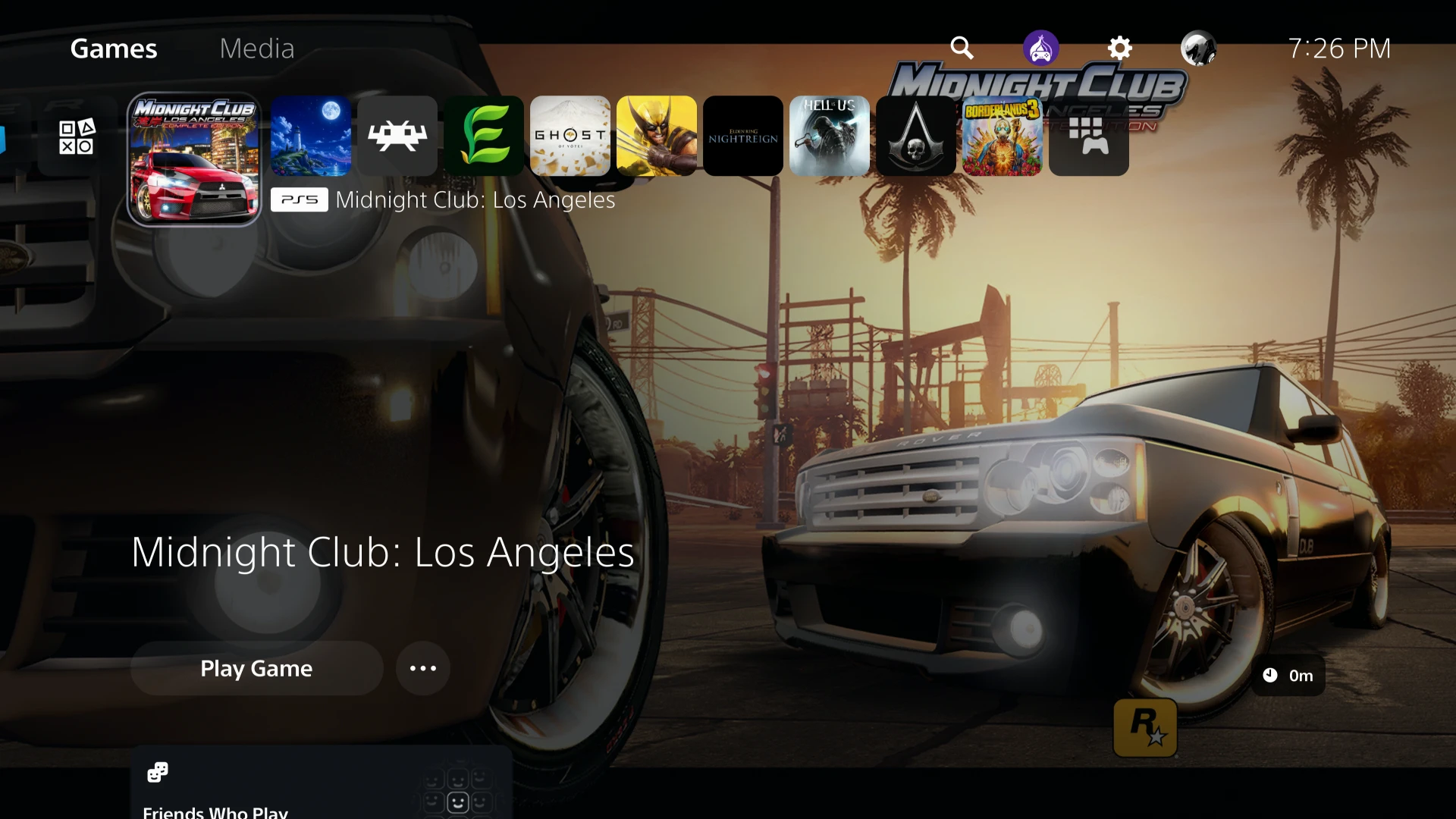
Installed on a jailbroken PS5. The tile here is one the user supplied at build time; the background is made from the art on their own disc.
This repository contains no game code, assets or keys. You supply your own legally obtained copy; a script extracts what is needed on your machine, and the recompiled code is generated locally and never committed. What you build is for you, not for sharing.
Status
| Target | State |
|---|---|
| Windows, Direct3D 12 | Plays: career, races, garage and upgrades, with audio and a controller, at 30 FPS by default. |
| Windows, Vulkan | Reaches the title screen; not tested further. |
| Linux, Vulkan | Builds and plays natively: free roam holds 30 FPS on an Intel Core Ultra 5 238V laptop (Mesa ANV). Tested by one user. |
| PS5 (jailbroken) | Plays at a steady 30 FPS on a PS5 Pro (firmware 13.42); the zoomed-out map runs at 20 to 25. Also installed from scratch and played on a PS5 Slim (firmware 12.70). |
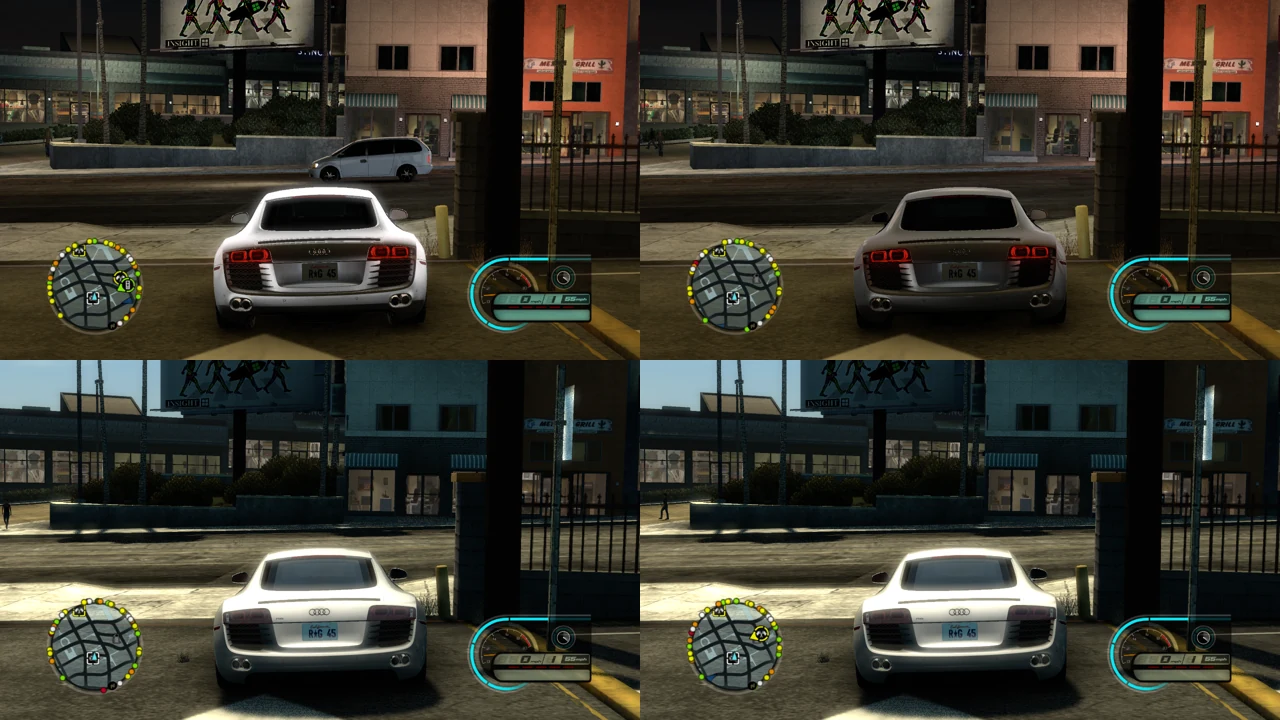
Car reflections are fixed on every renderer (cars no longer come out white with a glow at night):
Which release of the game
Only Midnight Club: Los Angeles Complete Edition, USA/Europe, for Xbox 360 (title id 545407F8), as a disc image (.iso). The fixes in config/ are addresses in that release's executable; another region or revision would need them checked again.
How it works
The game's PowerPC code is translated to C++ ahead of time by the ReXGlue SDK (BSD-3, derived from Xenia), which also provides the Xbox 360 kernel, GPU and audio reimplementation. This repository holds the project manifest, function hints, a small host application, patches to the SDK and the build scripts.
Windows
You need Windows 10 or 11 (x86-64) with a Direct3D 12 graphics card, and about 20 GB of disk. In PowerShell:
git clone https://github.com/holdmysocks/mcla-recomp.git
cd mcla-recomp
.\scripts\make_pc.ps1 -Iso C:\path\to\your.iso
The script checks for Git, CMake, Ninja, Python 3, Visual Studio Build Tools 2022 version 17.1 or newer (C++ workload), a Windows SDK newer than 10.0.19041 and the project's own Clang 20, and offers to install what is missing (answer y, or add -InstallTools); the Build Tools ask for administrator rights. It then clones and patches the ReXGlue SDK v0.10.0, builds it (the long step, once), extracts your game into game\, recompiles it and builds out\build\win-amd64-release\mcla.exe. Each step is skipped when its result is already there, so after a failure or an update you run the same command again. Logs are in out\logs.
Play: double-click the Midnight Club Los Angeles shortcut the build leaves in the repository folder, or mcla.exe itself. Keep the folder where it was built; the game data is read from game\. An Xbox or PlayStation controller works.
Options go after the program name, for example mcla.exe --fullscreen=true --mcla_fps=60 (30, 40, 45, 50, 60, 120, or 0 for uncapped). The pause menu has three extra entries: DISPLAY (frame-rate target, HUD updates, vsync, fullscreen, motion blur, depth of field), PERFORMANCE (detail options) and CONTROLS (button prompts, intro speed); changes are saved to mcla.toml next to mcla.exe. QUIT GAME, next to them, closes the game, after a career save in progress has finished.
Frames are held to the target when they are presented (--mcla_pace_at_swap=false holds them before the game's update instead, as before). Menus and pop-ups advance 30 times a second as on the console, whatever the frame rate (--mcla_ui_timing_fix=false for once per frame); the HUD 60 times a second (--mcla_ui_hud_rate: 30 as on the console, 60, 120, or 0 for every frame).
Update: git pull, then .\scripts\make_pc.ps1 again.
| If | Then |
|---|---|
The SDK build fails with 'crtversion.h' file not found | Another Clang on your path was used. Update and run make_pc.ps1 again: it now uses only its own. |
Step 1 fails after downloading Clang, with unable to run program "xz -d -qq" | Windows 10's tar.exe cannot unpack .tar.xz. Update and run make_pc.ps1 again: it now unpacks the archive with Python when tar.exe cannot. |
Installing a tool fails with No package found matching input criteria | winget's package list on your PC is out of date or broken: run winget source reset --force in an administrator PowerShell, then make_pc.ps1 again, or install that tool yourself (Python from python.org or the Microsoft Store works). |
The SDK build fails with no member named 'byteswap' in namespace 'std' | Your Visual Studio is older than 2022 version 17.1 (VS 2019, or an early 2022). Update it in the Visual Studio Installer, or install Build Tools 2022, then run make_pc.ps1 again. It now checks the version in step 1. |
The SDK build fails inside a Windows SDK header (for example xinput.h, expected function body after function declarator) after installing a new Windows SDK | The SDK's build folder still had headers from the old Windows SDK. Update and run make_pc.ps1 again: it now starts that folder again when the Windows SDK or Visual Studio changes. Or delete third_party\rexglue-sdk\out\build and run it again. |
The SDK build fails with unknown type name 'D3D12_FEATURE_DATA_D3D12_OPTIONS8' | Your newest Windows SDK is 10.0.19041 or older. Update and run make_pc.ps1 again: step 1 now installs Windows SDK 10.0.26100. Or add Windows 11 SDK to Build Tools 2022 in the Visual Studio Installer (Modify › Individual components). |
The SDK configure fails with could not open 'oldnames.lib' | Clang picked a Visual Studio without the C++ tools (for example Visual Studio 2026 installed for something else) over the one that has them. Update and run make_pc.ps1 again: it now points Clang at an install with the C++ tools. Or add Desktop development with C++ to that Visual Studio in the Visual Studio Installer. |
Step 2 fails with config.h: No such file or directory | The first download of the SDK was cut short. Update and run make_pc.ps1 again: it now repairs the download. If it still fails, delete third_party\rexglue-sdk and run it again. |
codegen failed | game\default.xex is missing or not the supported release; see the end of out\codegen.log. |
| The game closes by itself | Start it with --log_file=run.log --log_level=info and open an issue with the end of that file. |
Linux
Tested on Ubuntu 26.04. You need Clang 20 and LLD (clang-20, clang++-20, lld-20), CMake 3.25+, Ninja, Python 3, Git, a Vulkan 1.3 driver, and these packages (Debian/Ubuntu names): libgtk-3-dev libx11-xcb-dev libxss-dev libvulkan-dev libwayland-dev libwayland-bin wayland-protocols libxkbcommon-dev libdecor-0-dev libasound2-dev libpulse-dev libpipewire-0.3-dev. Linux 6.11 or newer is recommended.
git clone https://github.com/holdmysocks/mcla-recomp.git
cd mcla-recomp
git clone --recursive --branch v0.10.0 https://github.com/rexglue/rexglue-sdk.git third_party/rexglue-sdk
cd third_party/rexglue-sdk
git apply ../../patches/rexglue-v0.10.0-mcla.patch
git apply ../../patches/rexglue-minmax-blend-factor.patch
git -C thirdparty/FFmpeg apply ../../../../patches/rexglue-ffmpeg-ps5-config.patch
git apply ../../patches/rexglue-linux-procmap-query.patch
git apply ../../patches/rexglue-linux-wait-sleep.patch
git apply ../../patches/rexglue-vulkan-paint-pipeline-format.patch
CC=clang-20 CXX=clang++-20 cmake --preset linux-amd64 -DREXGLUE_USE_VULKAN=ON -DREXGLUE_ENABLE_TRACY=OFF
cmake --build out/build/linux-amd64 --config Release
cmake --install out/build/linux-amd64 --config Release
cd ../..
python3 scripts/extract_game.py /path/to/your.iso
SDK=$PWD/third_party/rexglue-sdk/out/install/linux-amd64
"$SDK/bin/rexglue" codegen mcla_manifest.toml
CC=clang-20 CXX=clang++-20 cmake --preset linux-amd64-release -DCMAKE_PREFIX_PATH="$SDK"
cmake --build --preset linux-amd64-release
./scripts/play_linux.sh
On Wayland, put vulkan_allow_present_mode_immediate = false and vulkan_allow_present_mode_mailbox = false in out/build/linux-amd64-release/mcla.toml; without them the game presents about 1,000 times a second and keeps the GPU busy.
PS5
You need a jailbroken PS5 that runs homebrew, with an FTP server payload (port 2121 by default) and a homebrew mounter that shows folders under /data/homebrew on the home screen (ShadowMountPlus was used). The build runs on Arch Linux as root: on Windows, an Arch distribution under WSL2. Allow about 30 GB of disk, 16 GB of memory, and about 45 minutes the first time.
On Windows, in PowerShell as administrator:
wsl --install --no-distribution
wsl --update
wsl --install -d archlinux
wsl -d archlinux -u root
Then, in that Linux shell (your Windows drives are under /mnt, so C:\Games\mcla.iso is /mnt/c/Games/mcla.iso):
pacman -Sy --noconfirm git
cd /root
git clone https://github.com/holdmysocks/mcla-recomp.git
cd mcla-recomp
bash ps5/make_ps5.sh --iso /mnt/c/path/to/your.iso --console 192.168.1.50
Use your console's address, and start the FTP payload first. Without --console it only builds and prints what to copy where. Keep the repository under /root, not /mnt/c. The script installs its packages, builds the PS5 toolchain and Vulkan driver (mihawk-99/PS5_Vulkan), patches and builds the SDK, extracts and recompiles your game, packages the title and uploads it. Each step is skipped when its result exists, so you run the same command again after a failure or an update (git pull first). Logs are in /root/mcla/logs.
After the upload, let the mounter pick up /data/homebrew/PPSA99779; "Midnight Club: Los Angeles" appears on the home screen. On the console, /data/mcla/game holds the game data, /data/mcla/mcla.toml the settings and /data/mcla/mcla-play.log the log of the last start.
DualSense haptics and adaptive triggers (optional). The game's rumble works on a DualSense out of the box. For haptics from the game's sound and the car (road, gear changes, crashes, nitro) and throttle and brake resistance on R2 and L2, add mcla_pad_haptics = true and mcla_adaptive_triggers = true to /data/mcla/mcla.toml. Tuning options are listed in ps5/game/ps5_haptics.h and ps5/game/ps5_triggers.h.
Your own tile and theme (optional). No artwork or music ships here. --tile IMAGE takes any common image (for example the official cover art); --theme FILE.at9 takes an ATRAC9 file. For a theme, turn the audio down first (ffmpeg -i in.m4a -af loudnorm=I=-28:TP=-2 -ar 48000 -ac 2 quiet.wav), then convert it with AT9-AT3 Converter (AT9, PS4, bitrate 72). The console keeps a title's tile and sound from when it was first registered.
| If | Then |
|---|---|
this script needs Arch Linux | Install Arch under WSL2 as above. |
SDK patch does not apply | Remove /root/mcla/rexglue-sdk and run again. |
no FTP server at ... | Start the FTP payload; check the address and --ftp-port. |
| A bar with frame rate and temperatures over the game | That is your homebrew enabler's overlay (with OnionHEN, [overlay] enabled=false in /data/OnionHEN/config.ini). |
| The game stops or closes | Fetch /data/mcla/mcla-play.log over FTP before starting it again and open an issue with it, your console model and firmware. |
If you hand this to an AI agent: it needs your disc image's path and the console's address from you, must not look for or download a disc image, and writes to the console only with --console.
Missed functions
If the game stops with Call to invalid or unregistered function at guest address ..., the recompiler missed a function that is only reached through a pointer. Please open an issue with that line; the fix is one entry in config/runtime_discovered.toml.
Credits
- ReXGlue SDK by Tom Clay and contributors; Xenia by Ben Vanik and contributors.
- LARecomp by mzzvxm and contributors, whose fixes several parts of this project are ported from.
- PS5_Vulkan by mihawk-99 (GPL-3): the RADV port and toolchain the PS5 version is built on.
- XenonRecomp by hedge-dev, on which ReXGlue's analysis builds.
- The Linux build by @MoonFuji.
- RecompiledHaloReach and ForzaHorizon1-ReImagined by Dyotson (MIT): the achievement pop-ups shown without repainting the window all the time (
src/achievement_toast.h, with the licence notice).
Licence
GPL-3.0-or-later; see LICENSE. Midnight Club is a trademark of Take-Two Interactive. This project is not affiliated with or endorsed by Rockstar Games or Take-Two.