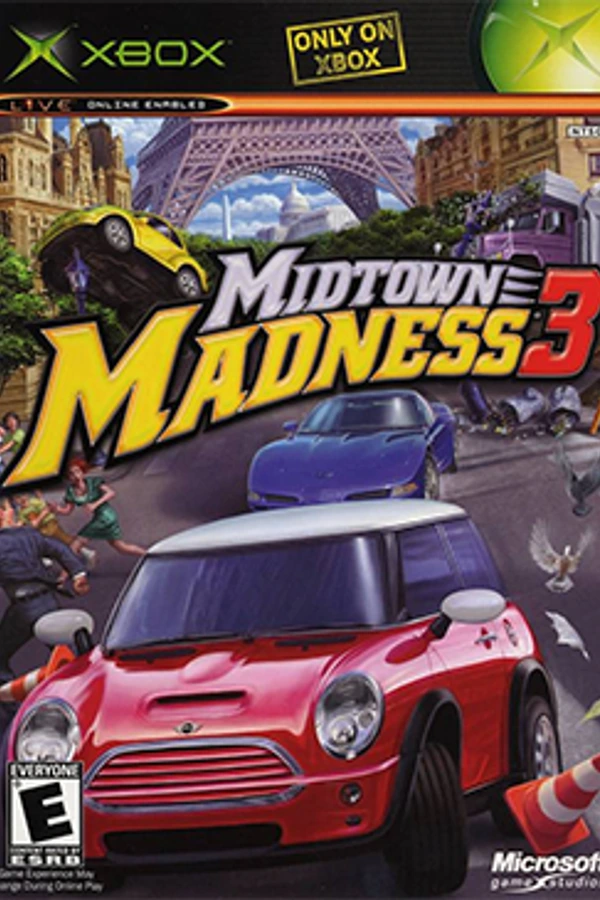
Midtown Madness 3 (PC Native)
Midtown Madness 3
OriginXbox
TechnologyNative C/C++ port (engine reimplementation)
Available forWindows
View official projectAbout the project
Midtown Madness 3 es un videojuego para Xbox, publicado en 2003. Es parte de la serie de videojuegos Midtown Madness. Por primera vez en la serie, el juego fue exclusivo de Xbox, con una versión de Windows rumoreada para un lanzamiento posterior, pero fue desechada en última instancia.
2 versions of Midtown Madness 3
You're viewing: Midtown Madness 3 (PC Native)
Official project information
Midtown Madness 3 recompilation
Play the Xbox racing game Midtown Madness 3 natively on your Windows PC (or on Linux and the Steam Deck through Proton): your screen's resolution and widescreen, up to 120 fps, controller or keyboard, two-player split screen, and optional mods. You need your own copy of the Xbox game.
Download MM3-Setup.exe (under Assets on the latest release).
Install and play
- Run MM3-Setup.exe. Windows may say "Windows protected your PC" because the file is not code-signed: choose More info, then Run anyway.
- Pick your game image: a disc image of your own Midtown Madness 3 Xbox disc (
.isoor.xiso). The Europe/Australia and USA releases both work. See Ownership, disc images and DLC for where to get one. Setup looks for it by itself in your Downloads, Desktop and Documents folders and fills it in; it tells you in plain words if a file is not the game, is another release, or is incomplete, and shows how much disk space the install needs before you press Install. - Choose options (you can change them later by running Setup again):
- Add extra cars: nine community cars (see credits).
- Add game improvements (on by default): sharper image defaults. Untick it to start with the plain Xbox picture settings.
- Official DLC (optional): point Setup at the DLC ZIP or folder (download link below) if you are entitled to use it. It adds 14 cars and 40 Blitz and Checkpoint races.
- Click Install, then Play now. Later, start the game from the Midtown Madness 3 shortcut on your Desktop or in the Start menu (Setup adds them unless you untick the box), or with Play Midtown Madness 3.cmd in the install folder. Cancel install stops safely; the next Install continues where it left off. If something goes wrong, Copy details and Report a problem on GitHub show up under the progress bar. Uninstall... (shown when Setup finds an install in the folder) removes the game program and shortcuts and keeps your saved games unless you also ask to delete them. Already installed? Run the new Setup next to (or pointing at) your install folder and press Update this install: it needs no disc image and no DLC pack. It reuses the game files and DLC you already have, refreshes the game program, extra cars and shortcuts, and keeps your saved games and settings. Setup first checks that the game files are complete; if something is missing or damaged it says what and asks for the image to repair it.
- Updates: click Check for updates at the bottom left of Setup. If a newer release
is published, Setup downloads it (checking it against the release's checksum), replaces
itself and restarts. Then press Update this install to put the new game program in your
existing install; no image is needed, your saves and DLC stay, and the extra cars and
improvements boxes start as you left them. (Setup 2.1 and later have the button; with an older Setup,
download the latest release by hand once.) The game's own launcher window, the one you
see before the game starts, has the same Check for updates button: it downloads the
new Setup (checked the same way) into an
updatesfolder in the install, closes, and opens that Setup for your install folder, ready for you to press Update this install. The launcher also has a Quick preset (Low power, Balanced, Quality) on the Settings tab that fills in resolution, anti-aliasing, filtering, distances and the FPS limit in one step, a Folders and logs button (game, logs and settings folders, and a copy of the version and folder paths for a bug report, without your Windows user name), and it says so, instead of starting a game that cannot run, when files of the game are missing: run Setup again with your image to put them back.
You need Windows 10 or 11 (64-bit), a Direct3D 11 graphics card and about 6 GB of free disk space, or Linux / Steam Deck with Proton or Wine (Linux and Steam Deck). The first start shows the intro movies for about 3½ minutes; the game has not frozen.
Look and gameplay
The launcher opens before the game. Its two mods tabs each start with a choice:
- Visual + audio mods: the Original look (the Xbox visuals, camera, menus and HUD) or the Improved look (default), with the visual mods below, most with their own switch. Nothing on this tab changes the gameplay.
- Gameplay mods: Xbox gameplay (default) plays exactly as the Xbox game: its physics and damage, its cars for you and the opponents, its races and unlocks, its race arrow and minimap. Modded gameplay adds the gameplay mods below, each with its own switch.
Every choice includes widescreen, anti-aliasing and sharper textures, the accurate Xbox sound processor, controller vibration, keyboard controls, System Link and many fixes. These include working post-race menus, console-accurate car damage at 60 fps, visible rain, and Spanish voices in Spanish.
Mods:
| Visual + audio (Improved look) | Gameplay (Modded gameplay) |
|---|---|
| Longer view distance | 20 extra circuit races (Washington DC and Paris) |
| Car headlight beams and glowing tail lights | Extra cars, editable in Car Workshop |
| Better street lamps that light more of the street, tunnels included | Circuit opponents in DLC and extra cars |
| Better night lighting: lights add up and fade as real light does, and lit cars keep their colour | Trees fall over when hit |
| Lamp flares hidden behind buildings | Slipstream drafting (off by default) |
| Names, pictures and loading-screen route maps for the DLC races | Rollover assist (off by default) |
| In-game Graphics Settings menu | Route line on the map, race arrow hidden |
| Exhaust smoke from each car's own pipes (off by default) | Improved minimap, which shows more of the map at speed |
| Quit in the main menu, minimap compass pins hidden | Opponents drive your car (off by default) |
| Softer car paint reflections | Car damage and time limits, from no damage to 3x and from half to 3x the time (Xbox values by default) |
| Photo mode: F2 holds the race and flies the camera, F3 saves a picture, F4 hides the HUD | Your car's damage, on top of car damage: invulnerable to 3x (Xbox by default) |
| Opponents' difficulty 0 to 9 (5 = Xbox by default) | |
| Free camera on a key of your choice (on with Modded gameplay) | |
| Unlock all vehicles, developer tools (off by default) |
Graphics settings
| Setting | Where | Original look | Improved look |
|---|---|---|---|
| Window size, fullscreen, screen, aspect ratio | Launcher Settings | Yes | Yes |
| Maximum FPS (1-120: 120 is the game engine's limit, its car physics runs 120 steps a second), VSync (off shows each frame at once; the picture may tear), FPS in the title | Launcher Settings | Yes | Yes |
| Internal resolution, anti-aliasing, texture filtering | Launcher Settings | Yes | Yes |
| Object detail and building view distance | Launcher Settings | Xbox distances | 1x to 4x |
| Minimap style | Launcher Settings | Xbox minimap | Xbox, or improved with Modded gameplay |
| Widescreen HUD, smooth skyline, depth fog, field of view | Launcher Visual + audio mods | Yes | Yes |
| Lighting and the other visual mods | Launcher Visual + audio mods | Off | Each on or off |
| Night brightness | Launcher Visual + audio mods and F10 | Xbox night | Darker to brighter, with Better night lighting |
While playing:
-
F10 opens the settings window with either look. Changes that need a restart say so. Settings the launcher fixes for this run (for example the Xbox view distance in the Original look) are greyed out, with the reason.
-
With the Improved look, Graphics Settings is also in the main menu (between Options and Profiles) and in the pause menu, so you can change them with the controller.
-
F11 or Alt+Enter switches fullscreen on and off.
-
With Modded gameplay and Free camera ticked (Gameplay mods tab, where you can also pick its key), F8 in a race frees the camera: W/A/S/D or the left stick fly, Q/E or the triggers go down and up, the arrow keys, the right stick or the mouse with its right button held look around, Shift/RB is faster and Ctrl/LB slower. Your car gets no input while the camera flies, and the camera stays within 400 m of it (the city only loads around your car). F8 again goes back to the game's camera.
-
Photo mode (Gameplay mods tab, Photo mode, on by default, with either gameplay): F2 in a race holds the whole race still, with no menu (cars, traffic, police and the race clock stop; the game's own pause, Start, is unchanged), and the camera comes loose so you can frame a shot:
- W/A/S/D move, Q/E go down and up.
- The mouse looks around, no button needed; the arrow keys turn too.
- Shift moves faster, Ctrl slower.
- On a controller: the left stick moves, the right stick looks, the triggers go down and up, RB/LB faster and slower, A takes the picture, X hides the HUD, Y lets the race run again.
F3 saves a picture of the window as a PNG in Pictures\Midtown Madness 3 (the folder in
MM3_PHOTO_DIRif set), at the window's size; a Windows chime confirms it. F4 hides the race HUD (minimap, speedometer, name tags and the checkpoint arrow) for a clean picture and shows it again; it comes back by itself when the race ends. Menus are never hidden. F2 again puts the camera back on your car and the race goes on. The game gets no input while the race is held, and the camera stays within 400 m of your car. Sounds keep playing, and F2 does nothing with System Link on.MM3_PAUSE_KEY,MM3_PHOTO_KEYandMM3_HUD_KEY(Windows virtual-key numbers) change the keys. -
Opponents' difficulty (Gameplay mods tab) sets how hard race opponents drive: 5 is the Xbox game; above 5 they accelerate harder, brake later and harder, take corners a little faster and stop holding back in the early races; below 5 they are slower.
Extra cars and Car Workshop
Setup's Add extra cars adds nine community cars (see the credits). With Modded gameplay they appear in the car list after the original and DLC cars. To hide them, untick Extra installed cars on the launcher's Gameplay mods tab. Xbox gameplay always leaves them out, and opponents in the original races always drive Xbox cars.
Car Workshop lets you change them: name, menu ratings, top speed and acceleration, weight, grip, gears, speedometer, paint and body.
- Install Python 3 (keep the default options).
- Download this project (Code > Download ZIP at the top of this page) and unzip it.
- Close the game. In the unzipped folder, run
tools\car-mods\editor.cmd --game-dir "<install folder>\game_files", for example--game-dir "C:\Games\Midtown Madness 3\game_files". - Pick a car under Added. Hover over any value for a tip. Compare with shows another car's values beside yours, and one click copies a value.
- Click Save & Apply, then start the game to try your car.
The full guide is in tools/car-mods/README.md.
Controls
- Controller: Xbox and PlayStation (DualSense) controllers work, with vibration. Up to four players.
- Keyboard:
- Driving: arrows drive, Space is the handbrake, C changes the camera.
- Menus: Z confirms, X or Escape goes back, Enter pauses.
- Hold Ctrl to enlarge the map.
- Two players (split screen): in the launcher's Controls tab choose what Player 1 and
Player 2 play with: a controller, Keyboard (arrows) or Keyboard 2 (WASD). Two players
can share one keyboard with no key in common:
- Player 1, right half: arrows drive, Right Ctrl = A / handbrake, Right Shift = camera, / = back, Enter = pause.
- Player 2, left half: W A S D drive, Space = A / handbrake, Left Shift = camera, Q = back, Tab = pause.
- Change bindings in the launcher's Controls tab (Keyboard 2 has its own lists).
- Graphics: see Graphics settings.
Multiplayer (System Link)
Every player needs the same version and their own game files.
- In the launcher's Settings, tick Enable System Link.
- Enter the other PCs as Peers (for example
192.168.1.51:3075). - In the game, choose Multiplayer > System Link.
Players on different networks can join through a private VPN. Allow the game's UDP port (3075) through Windows Firewall. The full guide, for the internet and up to eight players, is in docs/MULTIPLAYER.md.
Linux and Steam Deck
The game is a Windows program; it runs on Linux and the Steam Deck through Proton 8 or newer
(Proton Experimental recommended) or a recent Wine. Install it with the same tool you play it
with, then start mm3_recomp.exe from the install folder:
- Steam (also Steam Deck): in Steam, Add a Non-Steam Game and pick
MM3-Setup.exe; in its Properties > Compatibility, tick Force the use of a specific Steam Play compatibility tool and choose Proton Experimental. Run it to install. Then addmm3_recomp.exefrom the install folder the same way (same Proton) and play that one. Controllers work through Steam Input. - Lutris, Bottles or Heroic: add a Windows game with a Wine-GE or Proton-GE runner, run
MM3-Setup.exein it to install, then point the game's executable atmm3_recomp.exein the install folder. - Plain Wine:
wine MM3-Setup.exe, then in the install foldersh "Play Midtown Madness 3 (Linux).sh"(Setup writes it;WINE=/path/to/winepicks another Wine).
The game brings its graphics shaders with it, so it does not depend on Wine's shader compiler (that
gave a white screen with sound before 2.3). The launcher, settings, saves and logs work the same as
on Windows (logs in the install folder). Proton 7 and older are not supported.
Problems?
- Which version do I have? The launcher's title shows it, and Setup shows its own version next to Check for updates. Update to the latest release first.
- A race doesn't finish: in circuit races, checkpoints count only in order. If you miss one, the game tells you which, and you need to go back for it.
- A save from a real Xbox says it is damaged: run
python tools\saves\resign_save.py <its UDATA folder> <new folder>, then copy the new4d53002afolder intogame_files\UDATA. - No police ever appear in Cruise (cops set above None): the game folder may be missing
a disc file. The log says so in a line like
[MM3_POLICE] ... the model file Cars\washingtonpolice_lod1\body.cmp is NOT in this game folder. Run Setup again with your disc image: it puts back only the files that are missing (or empty) and leaves everything else, saves and DLC included, as it is. - Something else: the game writes
logs\last-run.login the install folder. Open an issue and attach it.
Your saves are kept when you run Setup again. To uninstall, delete the install folder.
Official known issues
These come from the original Xbox game. They are kept so the game plays and sounds as it does on the Xbox.
- Paris police radio speaks Italian when the game is in Spanish: the Spanish disc has no recording of the Paris police radio and plays the Italian one instead. Every other language has its own, and no Spanish recording exists.
Support me
If you enjoy this project, you can support me on Revolut: revolut.me/lakshyasingh
Extra car credits
The nine extra cars were made by members of the Midtown Madness modding community and converted for Midtown Madness 3 by this project's tools. Thank you to every author.
| Car | Converted for Midtown Madness 2 by | Original model | Download page |
|---|---|---|---|
| Panoz GTR-1 | Aaro4130 | ISI (original rFactor model); skins by Thunder-ice and Alexi99 | Panoz GTR-1 |
| McLaren F1 GTR (1995) | Tsutarja495 | Firemint (Real Racing 2 model and textures) | 1995 McLaren F1 GTR |
| Ferrari F2007 (Formula 1) | Kunal (Kunal2045) | Image Space Incorporated (original rFactor model); tested by Franch88, Riva and Sajmon14 | Ferrari F2007 F1 |
| Ford GT (2017) | mm2mm1fan | Firemonkeys (Real Racing 3 model), extracted by Eclipse 72rus | 2017 Ford GT |
| McLaren Senna (2019) | Tsutarja495 | Firemonkeys (Real Racing 3 model and textures) | McLaren Senna 2-Pack |
| McLaren Senna GTR (2020) | Tsutarja495 | Firemonkeys (Real Racing 3 model and textures) | McLaren Senna 2-Pack |
| Ferrari FXX K (2015) | Matyii (Matyasd at MMArchive) | Firemonkeys Studios (Real Racing 3 model) | 2015 Ferrari FXX K |
| Koenigsegg Regera (2015) | Matyii (Matyasd at MMArchive) | Firemonkeys Studios (Real Racing 3 model) | 2015 Koenigsegg Regera |
| Lamborghini Aventador LP700-4 | BUGATTIMAN253MPH | Firemonkeys (Real Racing 3 body); wheels, brake discs and calipers by Gameloft (GT Racing 2) | Lamborghini Aventador LP700-4 |
Several authors ask that their cars are not modified or reposted without permission. Each
pack's original readme is saved next to the game in Extra cars - credits.txt.
Ownership, disc images and DLC
You need a legal copy of Midtown Madness 3: you must own the original Xbox game, and use
only DLC you are entitled to. The best way is to make the disc image from your own disc,
where your local law allows it. Setup does not include or download the game or its DLC.
A PC DVD drive cannot read Xbox discs: copy the disc with a modded original Xbox (an FTP or
file-manager dashboard such as XBMC4Xbox or UnleashX) or a drive with Kreon firmware, then
make the image with extract-xiso -c <copied folder> MidtownMadness3.iso. Setup's
Make an image... button shows the same steps.
These are the game image and DLC Setup was tested with. Download them only if you own a legal copy of the game and your local law allows it:
- Game image (Europe/Australia, in English, French, German, Spanish and Italian): Internet Archive (open Download options on the page).
- Official DLC (four car packs with 14 cars, two race packs with 40 Blitz and Checkpoint races): MidtownMadness3DLC.zip from Digiex (about the pack). The same pack is also on Xbox-Scene. Select the ZIP in Setup; do not run the Xbox installer inside it.
A link being online does not give you the right to use it. The full notes are in DEVELOPERS.md.
Also from the shared mm3-recomp port
This version carries Matt Graham's current mm3-recomp work too. Where both ports changed the same thing, the behaviour above is the default. Added:
- Renderer and platforms: an SDL3 GPU renderer (Vulkan or Direct3D 12) next to Direct3D 11,
with the Linux build scripts:
python scripts/setup.py --renderer SDL3_GPU, or thescripts/build_gui.pybuilder. - Mods: keyboard driving, menu mouse, lamp flare depth, skip intro movies, console-rate
simulation, the collision cell guard and developer tools. Each has a
MM3_MOD_*switch listed in src/mods/mods.c. Its RmlUi launcher with the Mods tab stays available: start the game withMM3_RMLUI_LAUNCHER=1. - Debug tools: an in-game ImGui interface and a teleport pipe, described in docs/IMGUI_DEBUG_TOOLS.md and docs/DEBUG_TELEPORT.md.
- Multiplayer: Xbox Live names are routed to Insignia; sign-in is not verified yet.
The code is GPL-3.0-only and THIRD_PARTY.md lists what it builds on.
Credits and developers
Built on mm3-recomp by Matt Graham (MattSG) and the xboxrecomp toolkit. Maintained by lakshya16157.
Building from source, tools and technical notes are in DEVELOPERS.md.