
Pokémon Platinum Recompiled
Pokémon Platinum
OriginNintendo DS
TechnologyStatic recompilation (native C/C++)
Available forWindows
View official projectAbout the project
Pokémon Platinum Version, conocido en Japón como Pocket Monsters Platina es un videojuego de rol perteneciente a la serie de videojuegos Pokémon. Se puede considerar como un remake de los juegos Pokémon Diamante y Perla, tal y como lo fue Pokémon Yellow para las versiones Rojo y Azul; Pokémon Cristal para las versiones Oro y Plata; y Pokémon Esmeralda para las versiones Rubí y Zafiro. Fue lanzado al mercado el 13 de septiembre de 2008 en Japón.
3 versions of Pokémon Platinum
You're viewing: Pokémon Platinum Recompiled
Official project information
Pokémon Platinum PC Port
This is an experimental PC port of Pokemon Platinum based on the pret decompilation project. It is powered by the libntr suite, a collection of libraries that replace the NitroSDK to allow for easy porting of Nintendo DS titles.
Feel free to join us on Discord for discussion or support.
It should be possible to play the game from start to finish, but there could be crashes and graphical bugs.
Generative AI/LLM shortcuts were not used in the creation of this project and the libntr libraries. Pull requests or code suggestions using AI will be rejected.
Project goals:
- Create a native port of pokeplatinum for 64-bit PC platforms
-
- Long term: Create native ports for homebrew on various game consoles
- Facilitate modding by allowing both a PC port and DS ROM to be compiled and debugged from the same source tree
- Support all WiFi and multiplayer features
Setup Guide
To run the pre-built binaries found in the releases tab, you MUST dump and provide your own US ROM of Pokémon Platinum (CPUE01). On first launch, you will be prompted to select your .nds ROM file as seen in the images below:
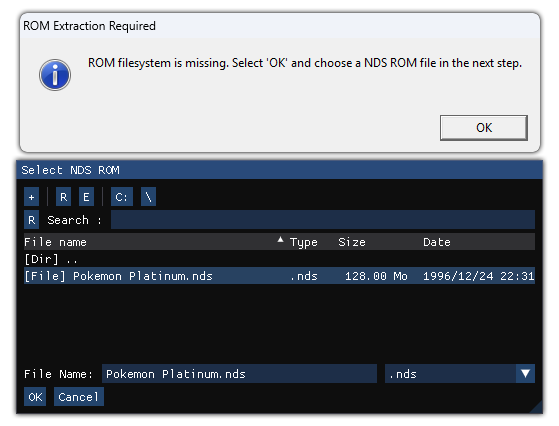
- After this has been completed once, you can launch the game simply by running main.exe.
- Access in-game settings and debug tools by pressing the grave accent/tilde key
Playing in other languages
Currently, this project only supports the USA version of the game, however, it is possible to change the language of the majority of the in-game text by replacing some files. Once a ROM has been loaded, its contents will be extracted in the same directory as main.exe. Replace the following files with copies from another language:
- msgdata/msg.narc
- msgdata/pl_msg.narc
- msgdata/scenario/scr_msg.narc
Forking Guidelines
You are welcome to create forks of this project, but do not publish any releases containing the compiled assets alongside PC port binaries.
If you publish releases, you are responsible for also complying with the MIT license on libntr by including the copyright and disclaimer.
cybervisi0n is not affiliated with any forks of this project.
Building on Linux
Dockerized build (Recommended)
This only requires Docker to be installed and setup on your system. The drun.sh script is used to build the docker image and run build commands in it. Build with:
- ./drun.sh make linux
The container image will automatically be built the first time this script is run.
Non-container build
Required Packages (arch linux):
- nasm
- enet
- arm-none-eabi-gcc (required by the base pret project)
- ninja
- flex
- bison
To build:
- make linux
Alternatively:
- meson setup build
- cd build
- meson configure -Dbuild_target=linux
- meson compile
You can also build a ROM from the same source tree, just run:
- make
Building on Windows
From a freshly cloned repo, run the "Install_MSys2.ps1" script in powershell. This will create a portable MSys2 build environment with all dependencies installed in the repo. This only has to be done once per repo.
To build, run "Launch_MSys2.ps1" and it will launch a MSys2 bash shell. From here, run "make win64" to build.
NX Build Target (working, but poor performance)
This build target requires DevKitA64, this is already installed in the build container.
- ./drun.sh make nx
Notes
Target executable will be in ./build_(platform) directory. ROM will be built in /build directory
firmware.bin does not contain any real DS firmware, it only contains an offset address and enough space to keep the WiFi config.
You can update your SDKs using "meson subprojects update"
Tracy Profiling
To enable, run ./meson.sh configure -Dtracy_enable=true {build_folder} from the repo root. This works on Win64, Linux, and NX build targets.