
Super Metroid (Dual Screen)
Super Metroid
OriginSuper Nintendo
TechnologyStatic recompilation (native C/C++)
Available forAndroid
View official projectAbout the project
Super Metroid (también conocido como 'Metroid 3') es un juego de acción y aventuras desarrollado y publicado por Nintendo para la Super Nintendo Entertainment System en 1994. Es la tercera entrega de la serie Metroid, siguiendo los eventos del juego de Game Boy, Metroid II: Return of Samus (1991). Los jugadores controlan a la cazarrecompensas Samus Aran, que viaja al planeta Zebes para recuperar una criatura Metroid infantil robada por el líder de los Piratas Espaciales, Ridley.
5 versions of Super Metroid
You're viewing: Super Metroid (Dual Screen)
Super Metroid (Dual Screen)github.com/Raekwon1603/super_metroid-androidSuper Metroid Launcher (RadzPrower)github.com/RadzPrower/Super-Metroid-LauncherSuper Metroid (DS)github.com/linuxkafe/SuperMetroidDSSuper Metroid (sm-3ds)github.com/CharlesAverill/sm-3dsSuperMetroidRecompgithub.com/mstan/SuperMetroidRecompOfficial project information
Super Metroid Android SNES emulator (with dual-screen support)
⚠️ This project has moved ⚠️
I'm no longer developing this repo. Go here instead:
👉 Raekwon1603/RetroArch (branch metroidarch-dual-screen) 👈
It's a dual-screen fork of RetroArch itself, not a custom emulator core. It runs on RetroArch and bsnes-hd, so it doesn't have the crashes and emulation bugs that come with a homegrown SNES core (see Known issues below), and it adds real widescreen rendering too, which this repo never had.
This repo is staying up and the old build still works, but it's not where I'm putting any more work in.
An Android SNES emulator for Super Metroid, with a second-screen mod for dual-display handhelds like the AYN Thor. While you play on the main screen, the second panel shows a live map, your equipment, and your ammo, so you don't have to pause and dig through menus to check where you are or what you're carrying.
You need your own legally-dumped Super Metroid (Japan, USA) (En,Ja) ROM to
run this - see Legal below.
This is built on top of snesrev/sm, a C decompilation of Super Metroid, which bundles both a from-scratch reimplementation of the game's logic in C and a byte-accurate 65816 CPU + SPC-700 APU emulator core (normally used only to verify the decompile matches real hardware, frame by frame). Gameplay here runs on that second part - the real emulator core, executing the actual ROM's original machine code - not on the decompiled C logic. That switch was made after finding a real mistranslation bug in the decompile that only manifested on Android's arm64 target (never on desktop/x86_64, and never on real hardware), causing a softlock in a specific room. Running on the real emulator core sidesteps that whole class of bug, at the cost of losing the one gameplay tweak (see below) that was implemented as a decompiled-C hook rather than a RAM-level edit.
This follows the same idea as samyost1/zelda3-android's
dual-screen mod for snesrev/zelda3, adapted for Super Metroid's own map and
item system.
| Main screen | Main screen, HUD hidden |
|---|---|
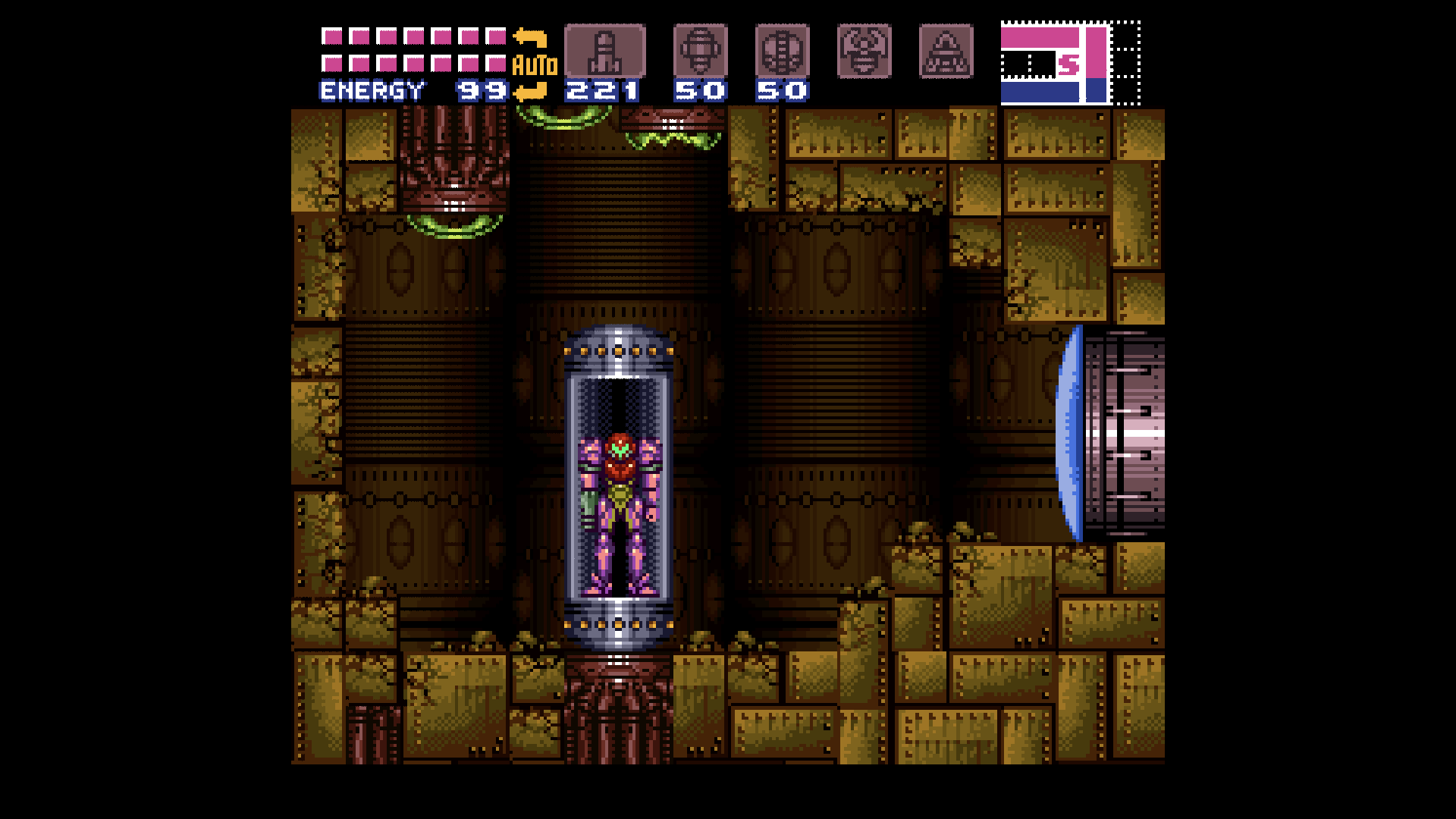 | 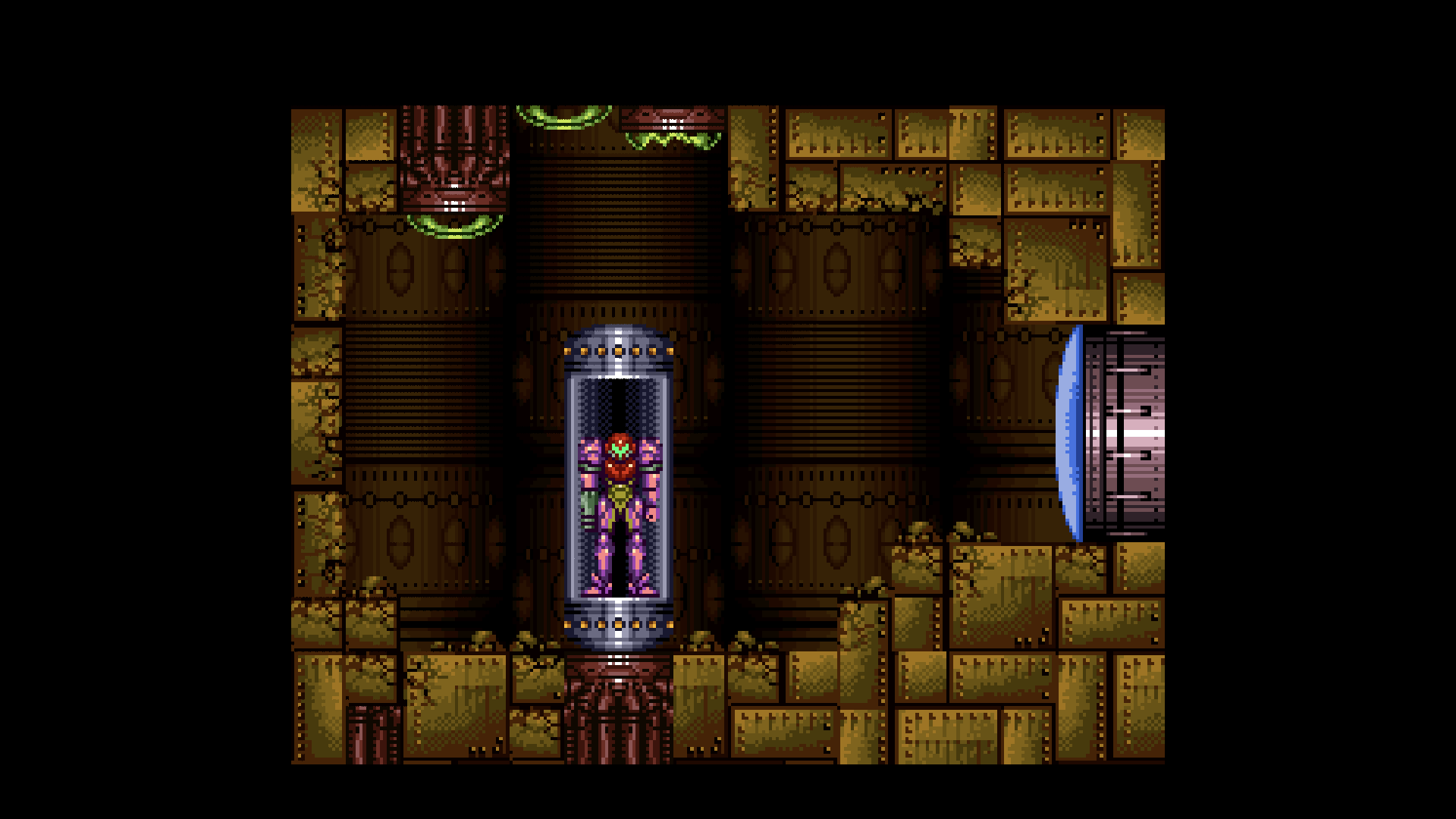 |
The main screen's HUD (health/ammo readout, top-left) can be toggled off entirely from the second screen's Setup tab, for a cleaner view of pure gameplay - everything it shows is already on the second screen's own live HP/ammo strip (see below). Compare the two shots above: same room, HUD on the left, hidden on the right.
| Second screen: HP + ammo on the map | Second screen: single room, with a marker |
|---|---|
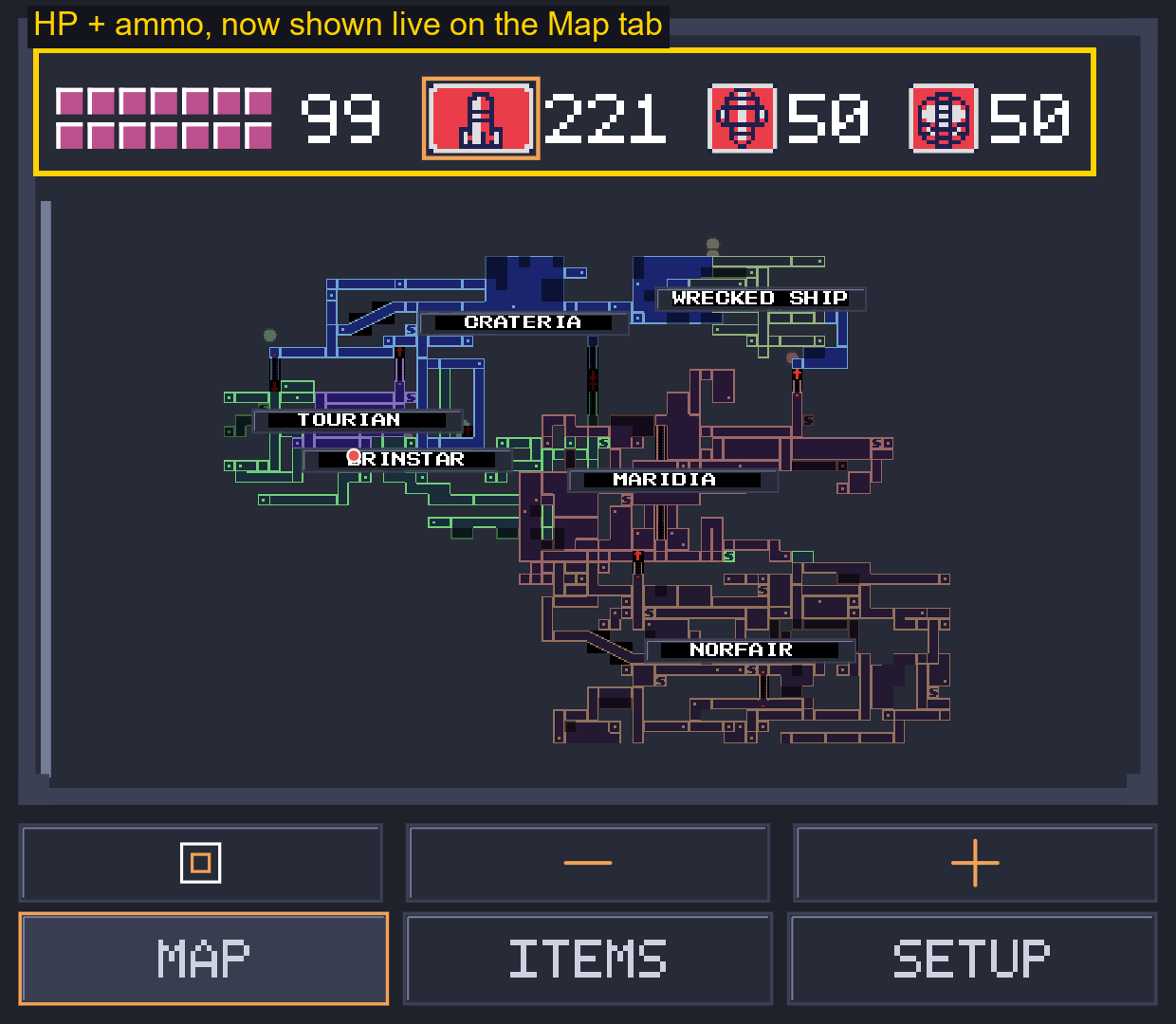 | 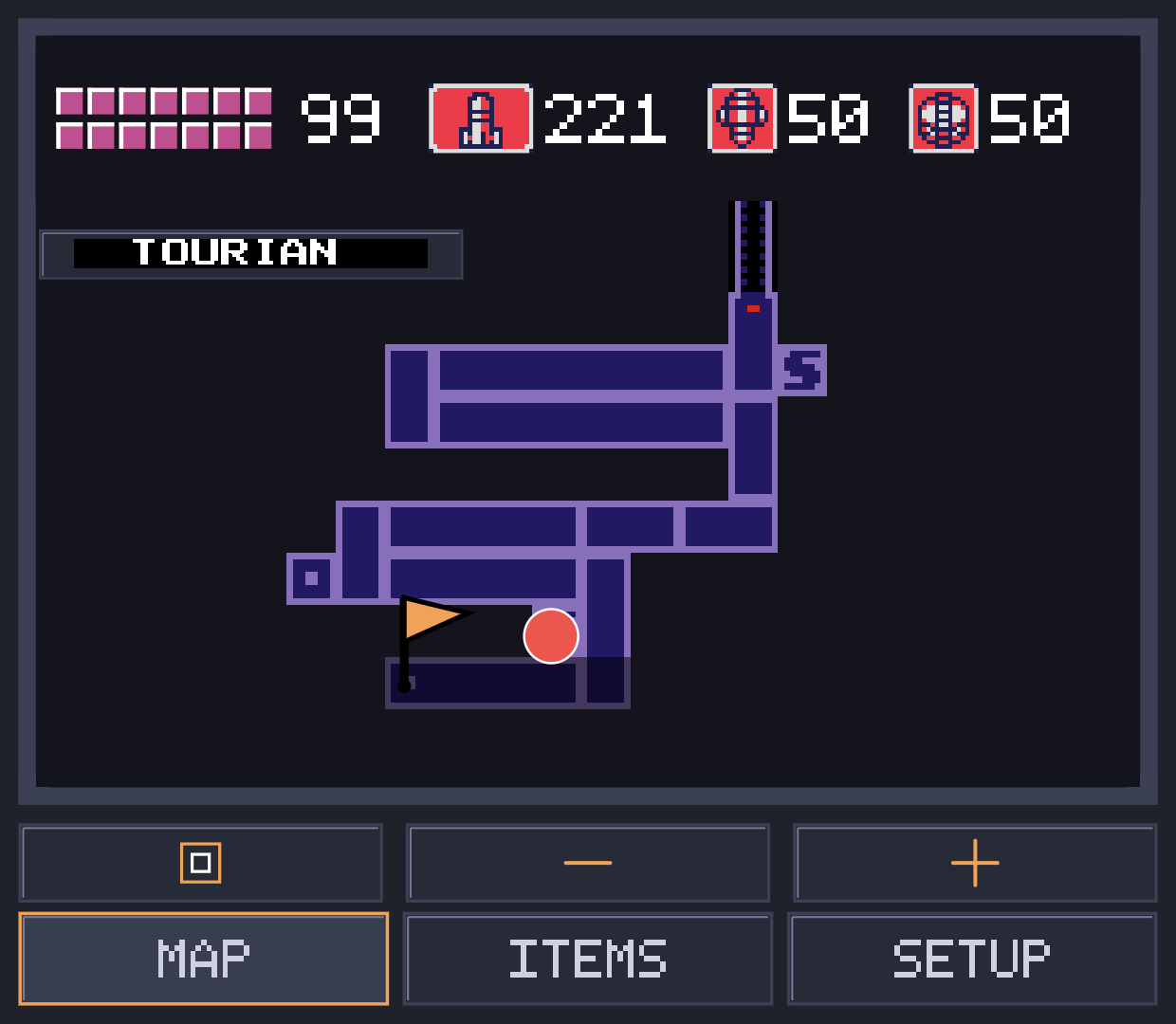 |
The left screenshot's highlighted box shows the live HP/missile/super missile/power bomb strip that sits along the top of the Map tab at all times - tap an ammo icon there to arm it, same as the old dedicated Ammo tab used to work. The room-view screenshot (right, above) also shows a placed map marker - the orange flag next to Samus's position dot. See Map markers below.
| Second screen: Map Station reveal |
|---|
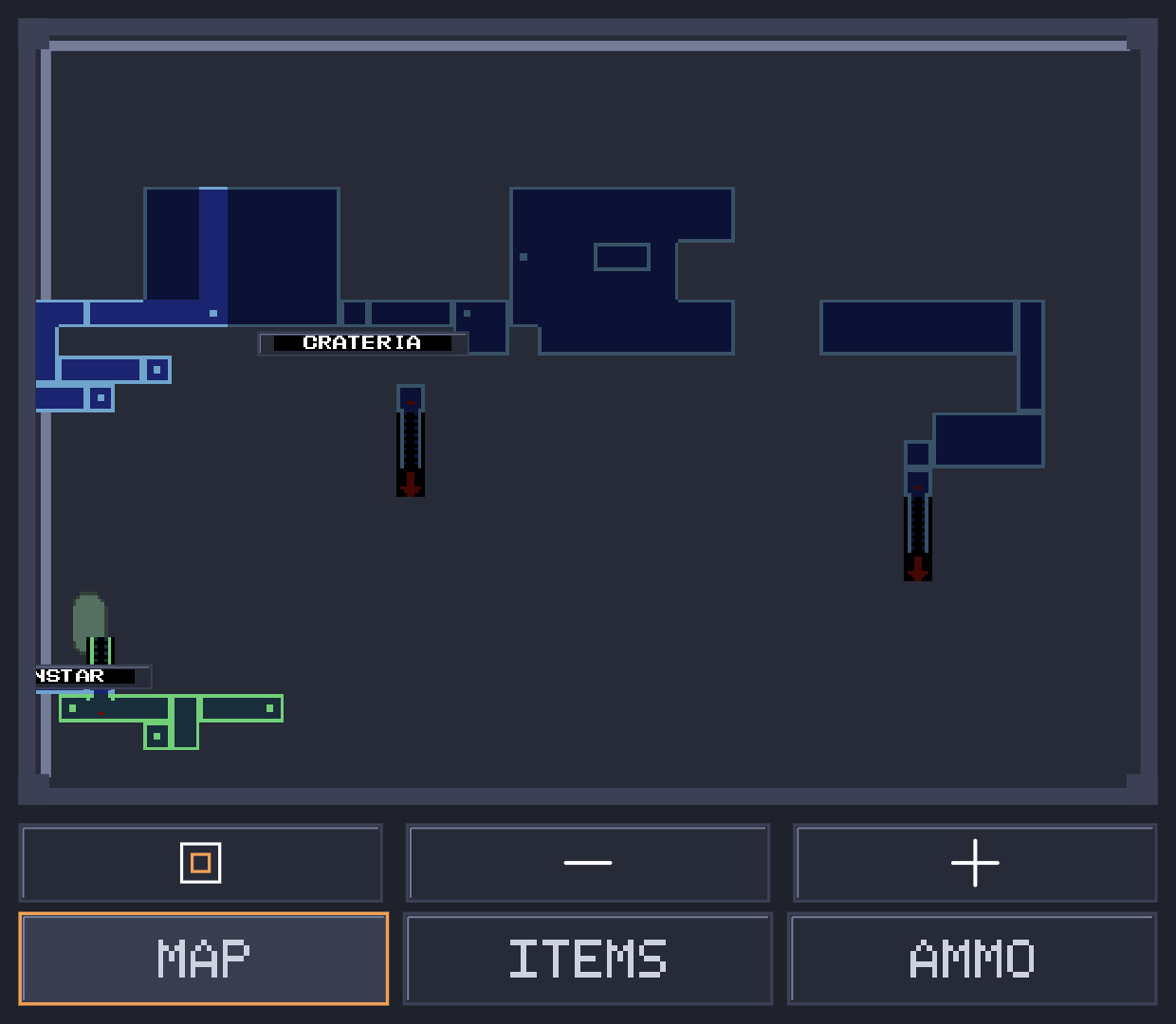 |
The Map Station screenshot above shows Crateria rendered dimmer than Brinstar below it: Crateria's Map Station has been collected, so its whole layout is shown even into rooms never actually visited, while Brinstar (no Map Station yet) only shows the handful of rooms actually walked through, at full brightness. See Map Station reveal below.
| Second screen: items |
|---|
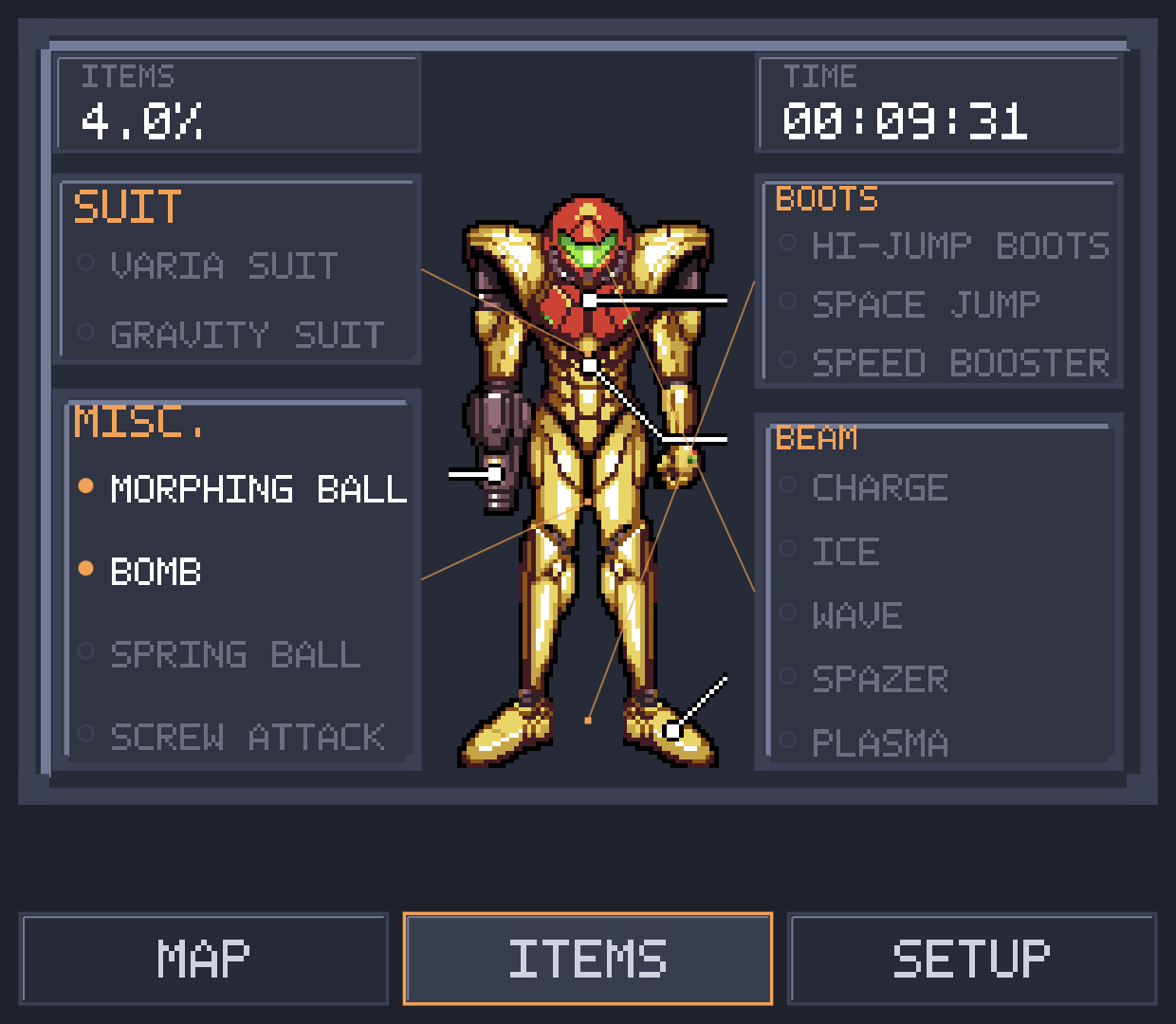 |
The Items tab's screenshot shows ITEMS 4.0% in the top-left box - this is
the same "items collected" percentage the real game itself shows on the
end-of-game stats screen, computed the same way vanilla Super Metroid
computes it (a weighted mix of how full your Energy/Missile/Super/Power
Bomb/Reserve tanks are plus whether you have each other item and beam, not
just a raw item count), just shown live during play instead of only at the
end.
The underlying decompile is still an early-stage project, and its C game logic remains in this codebase (used on desktop/Switch builds, and always available as a reference for the emulator core to be checked against), but it is not what drives gameplay in the Android build. See the original repo and its Discord for the state of the decompile effort itself. This fork does not modify the ROM's own game logic; the ammo-cycle shortcut listed below is implemented as a RAM edit from the platform layer, not as a change to gameplay code. Everything else is additive: the Android platform target and the second-screen mod.
About the development of this port
I built this with help from Claude (Anthropic's AI). I want to be upfront about that instead of leaving it a surprise.
I have a bachelor's degree in computer science and engineering and work as a software engineer, so I can read and write code fine. Game development specifically, and reverse-engineered SNES decompilation code in particular, is not my background. I wrote and modified parts of this myself, and for the rest, when I got stuck or ran into something outside what I knew (a crash coming from deep in the SNES PPU emulation, or how the game's own door/room graph needed to be walked to lay out a correct world map), I used Claude to work through it with me rather than spend days learning an unfamiliar codebase from scratch. That is what the AI assistance in this project actually was: a way to move faster on the parts I did not already know, not a replacement for understanding what I was building.
Every feature went through real back and forth. I made the design calls: what the second screen should show, how the map should behave, what the item screen should look like. I tested everything myself on real hardware, reported back what was broken or wrong, often in detail since "the map looks wrong" is not enough for anyone, human or AI, to fix a rendering bug, and went through many rounds of that per feature. Bugs that only show up in actual play (a room that crashes on a specific save, a suit color that does not match what is actually equipped) cannot be found by just reading code, so this took real hands-on debugging on my end, on top of whatever code got written.
Legal
No game assets are included anywhere in this repository or shipped in the
built app. You need your own legally-dumped copy of the ROM
(sm.smc/.sfc) to build or run this on any platform. The app reads
graphics, audio, and level data from your ROM at runtime, the same way the
original hardware did.
Android
Requirements
- Android Studio with the NDK installed (tested with NDK 27)
- Your own Super Metroid ROM
Building
cd android
./gradlew assembleDebug
Install the resulting APK (android/app/build/outputs/apk/debug/app-debug.apk)
on your device. On first launch, it prompts you to pick your ROM file. It
gets copied into the app's private storage, never bundled or shared.
Dual-screen mod
On a device with a second physical display (e.g. the AYN Thor), the second screen shows automatically once you're in-game, with three tabs along the bottom:
Map tab. A live HP/missile/super missile/power bomb readout sits in a strip along the top at all times (see screenshot above) - tap a missile, super missile, or power bomb icon there to arm it, the same effect as pressing Select on the controller until you reach it; tap the already-armed one again to disarm it back to your plain beam. Below that strip are the real in-game pause-menu map tiles, decoded straight from your ROM, not a hand-drawn placeholder. Pinch, or use the +/- buttons, to zoom from a single room out to the full connected world map, and pan around with a drag. The nested-squares button jumps straight between the two ends of that range: tap it to snap to a close-up of the room you're standing in, tap again to snap back to the full world view.
Map Station reveal
By default, only rooms you've actually explored are shown, matching the real game's own reveal-as-you-go rule. Once you collect an area's Map Station item, that area's entire known room layout is also shown - including rooms you've never set foot in - the same way the real in-game pause map works. Rooms revealed this way but not yet actually visited are rendered dimmer than rooms you've walked through, so you can tell the two apart at a glance (see the screenshot above: Crateria's Map Station is collected, so it's shown in full but dimmed, while Brinstar - no Map Station yet - only shows the few rooms actually walked, at full brightness).
The world map's area layout (where Crateria sits relative to Brinstar,
Norfair, and so on) is not eyeballed. It's derived from every real
inter-area door in the ROM: 32 doors, 16 unique connections, walked
through the game's own room and door data (room coordinates and each
door's destination room and landing point). Each door gives one hard
constraint (this point in area A's map has to line up with this point in
area B's map), and all 16 are satisfied by anchoring each area to one
real door connection to an already-placed neighbor, starting from
Crateria and working outward. The full derivation lives in
WORLD_AREA_LAYOUT and WORLD_CONNECTORS in MapStatusView.java, with
the reasoning in the comments above them. Some real overlap between
areas remains (Zebes' room data was authored independently per area and
genuinely doesn't tile edge to edge), which is expected and harmless
since only explored pixels are ever drawn.
Items tab. Your currently equipped suit, boots, beams, and misc items, shown as a list next to a full-color Samus sprite with callout lines to each equipped item. The suit art (tile graphics, palette, and layout) was extracted from a build of the Super Metroid Redux ROM hack and is used here for the same equipment-screen purpose it was originally drawn for, recolored live to match whichever suit you actually have equipped (Power, Varia, or Gravity). Credit to that hack's artists for the original graphics; if you maintain that project and would rather this not be included, open an issue and I'll take it out.
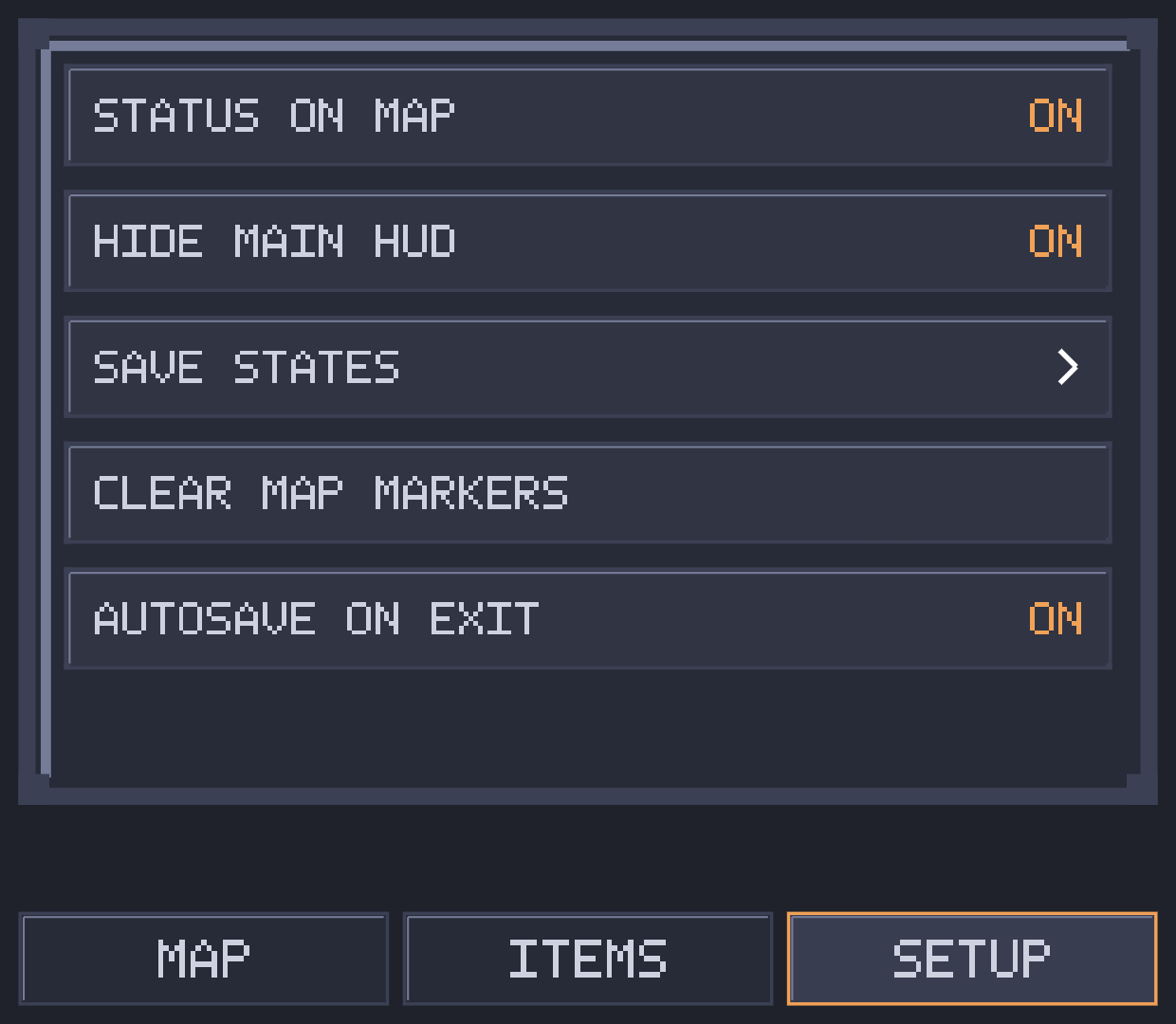
Setup tab. Toggles and options for everything else the second screen does, top to bottom:
-
Status on map: shows/hides the Map tab's HP/ammo strip described above.
-
Hide main HUD: hides the main screen's own HUD (health/ammo readout) entirely, for a cleaner view of pure gameplay - everything it shows is already available on the second screen regardless. See the side-by-side comparison near the top of this README.
-
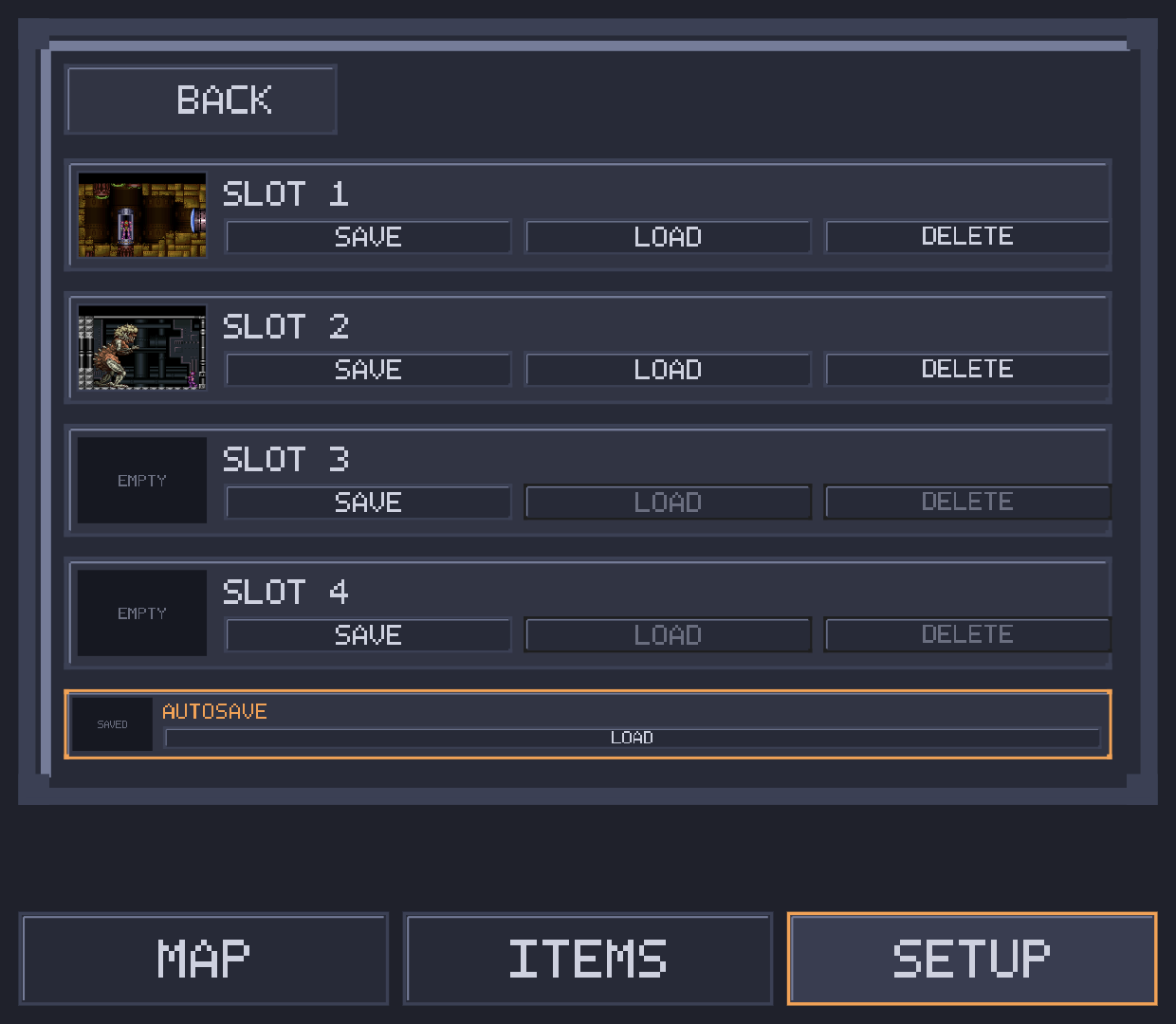
Save states: opens a dedicated save-state section alongside the normal in-game saves, with five slots - four manual slots plus an always-current "AUTOSAVE" slot that's kept up to date automatically as you play - each shown with a real screenshot thumbnail of the moment it was saved. Save/load/delete confirmations show inline in the same box rather than as a separate popup. Slots persist across closing and reopening the app.
-
Clear map markers: removes every marker you've long-pressed onto the map at once (see Map markers below for how to place them).
-
Autosave on exit: whether closing the app updates the AUTOSAVE slot above with your current progress.
Map markers
Long-press anywhere on the map (room view or world view) to drop a Metroid-themed flag marker at that spot - useful for flagging an item you saw but couldn't reach yet, a locked door, or anywhere else you want to find again later. Remove them all via Setup's "Clear map markers".
Controls
Gamepad input works out of the box. On the Thor specifically:
- A/B are remapped to match its Nintendo-style physical layout (see
main.c's__ANDROID__guard inRemapSdlButton, since SDL's controller database doesn't have an entry for this device yet). - L2/R2 cycle your armed ammo type without needing to open the second
screen's Ammo tab. Handled directly in
MainActivity.dispatchKeyEvent(Android's digitalKEYCODE_BUTTON_L2/R2key events) rather than through SDL's normal analog-trigger gamepad path, since some of the Thor's L2/R2 input-mode settings report both digital and analog events for the same physical press;main.cexplicitly ignores the analog trigger axis path for L2/R2 on Android so only one source is ever live, regardless of how the device is configured.
Quicksave/quickload (useful for testing without replaying long stretches):
hold L1+R1 and press Start to save, Back/Select to load. Bound via
android/app/src/main/assets/sm.ini, since the desktop build's F1-F10
quicksave keys aren't reachable from a gamepad-only device.
Gameplay tweaks
- Auto-run: currently disabled. It previously worked by patching the
decompiled C game logic, which no longer runs gameplay on Android (see
above) -
AutoRuninsm.inihas no effect right now. Vanilla hold-to-run behavior is what you get. Re-adding it needs an emulator/input-layer equivalent instead of a decompile-side hook.
Known issues
- Occasional black screen on launch (Thor). Sometimes the game appears
to launch to a black screen and never shows anything, usually right after
switching away from another game in Cocoon (the Thor's game-library
shell) and launching Super Metroid again shortly after. Closing and
relaunching the app fixes it every time. Investigated in depth: the app
itself is not frozen or crashed in this state - a debug build confirmed
gameplay is running normally frame by frame the entire time, and
Cocoon's own logs (
GameStateTracker) show it simultaneously losing track of which app should be in the foreground, sometimes settling on a completely different game as the one that should be visible. Android's compositor then shows that other app's window (or nothing) instead of Super Metroid's, even though Super Metroid keeps running underneath. This is a bug in Cocoon's own foreground-tracking, not in this app - there's no code path here that controls which window Android chooses to display on top. Workaround: just close and relaunch. - Rapid-fire beam-shot sound effect: firing the uncharged beam rapidly plays a sound only on the first shot; every following shot in the same burst is silent until a charged shot is fired. Extensively investigated (see the tracked issue for the full writeup) - several real, minor emulation-accuracy bugs were found and fixed along the way, but none of them were the actual cause, and the root cause remains open.
Neither of these is being worked on here, see the notice at the top of this README. The RetroArch fork doesn't use this project's own emulator core, so it isn't affected by either issue above.
Desktop / Switch
The original platforms this decompile supports (Windows, Linux/macOS, Nintendo Switch) still build the same way as upstream. See BUILDING.md.