
Animal Crossing
About the project
Animal Crossing, conocido en Japón como Dōbutsu no Mori en Japón, es un videojuego de simulador de vida desarrollado y publicado por Nintendo para la videoconsola Nintendo GameCube en el año 2001.
11 versions of Animal Crossing
You're viewing: Animal Crossing
Animal Crossinggithub.com/ACreTeam/ac-decompAndroidreddit.com/r/AndroidNativePorts/comments/1v5dbdd/animal_crossing_android_portAnimal Crossing ( animalcrossing-visionos)github.com/chrissotraidis/bellpadAnimal Crossing (ACreTeam)github.com/ACreTeam/forestAnimal Crossing (Anbernic handhelds)github.com/TechProGabe/OpenCrossing-AnbernicAnimal Crossing (Android)github.com/zwaetschge/ACGC-Android-PortAnimal Crossing (Animal Crossing PC Port - Deluxe Edition)github.com/imcynic/ACGC-Deluxe-PC-PortAnimal Crossing (Dreamcast)github.com/TechProGabe/OpenCrossing-DreamcastAnimal Crossing (PS3)github.com/EstudioCases/Animal-Crossing-Ps3-PortAnimal Crossing (Xbox)github.com/TechProGabe/OpenCrossing-XboxAnimal Crossing PC Portgithub.com/flyngmt/ACGC-PC-PortOfficial project information
Animal Crossing



<img src="https://decomp.dev/ACreTeam/ac-decomp.svg?w=512&h=256" width="512" height="256">
A decompilation of Animal Crossing for the Nintendo GameCube.
This repository does not contain any game assets or assembly whatsoever. An existing copy of the game is required.
Supported versions:
GAFE01_00: Rev 0 (USA)
A decompilation of the original N64 version of the game is being worked on here.
<!-- Quick Guides ============ - [Dumping Game Files](./docs/extract_game.md) - [Ghidra Setup](./docs/ghidra_setup.md) - [Generating Decomp Context](./docs/generating_decomp_context.md) - [decomp.me Basics](./docs/decomp_me_basics.md) - [Ghidra Basics](./docs/ghidra_basics.md) - [m2c Basics](./docs/m2c_basics.md) - [Decomp Basics](./docs/decomp_basics.md) -->Dependencies
Windows
On Windows, it's highly recommended to use native tooling. WSL or msys2 are not required.
When running under WSL, objdiff is unable to get filesystem notifications for automatic rebuilds.
- Install Python and add it to
%PATH%.- Also available from the Windows Store.
- Download ninja and add it to
%PATH%.- Quick install via pip:
pip install ninja
- Quick install via pip:
macOS
-
Install ninja:
brew install ninja -
Install wine-crossover:
brew install --cask --no-quarantine gcenx/wine/wine-crossover
After OS upgrades, if macOS complains about Wine Crossover.app being unverified, you can unquarantine it using:
sudo xattr -rd com.apple.quarantine '/Applications/Wine Crossover.app'
Linux
- Install ninja.
- For non-x86(_64) platforms: Install wine from your package manager.
- For x86(_64), wibo, a minimal 32-bit Windows binary wrapper, will be automatically downloaded and used.
Building
-
Clone the repository:
git clone --recursive https://github.com/Prakxo/ac-decomp.git -
Update and Initialize submodules:
git submodule update --init --recursive -
Copy your game's disc image to
orig/GAFE01_00.- Supported formats: ISO (GCM), RVZ, WIA, WBFS, CISO, GCZ
-
Configure:
python configure.pyTo use a version other than
GAFE01_00(USA), specify it with--version.Stock GC 2.6 with the external SJIS wrapper is the default. To use the optimized compiler with built-in SJIS conversion, run
python configure.py --version GAFU01_00 --fast-mwcc. This uses the compiler set inbuild/GAFU01_00/compilers(includingGC/2.6f1), or the directory specified by--compilers. Versions without GC 2.6 are unaffected. Omit--fast-mwccwhen configuring to return to stock. The GC/2.6f1 compiler is an unreleased modification, so most users should stick to stock GC/2.6. -
Build:
ninja
Diffing
Once the initial build succeeds, an objdiff.json should exist in the project root.
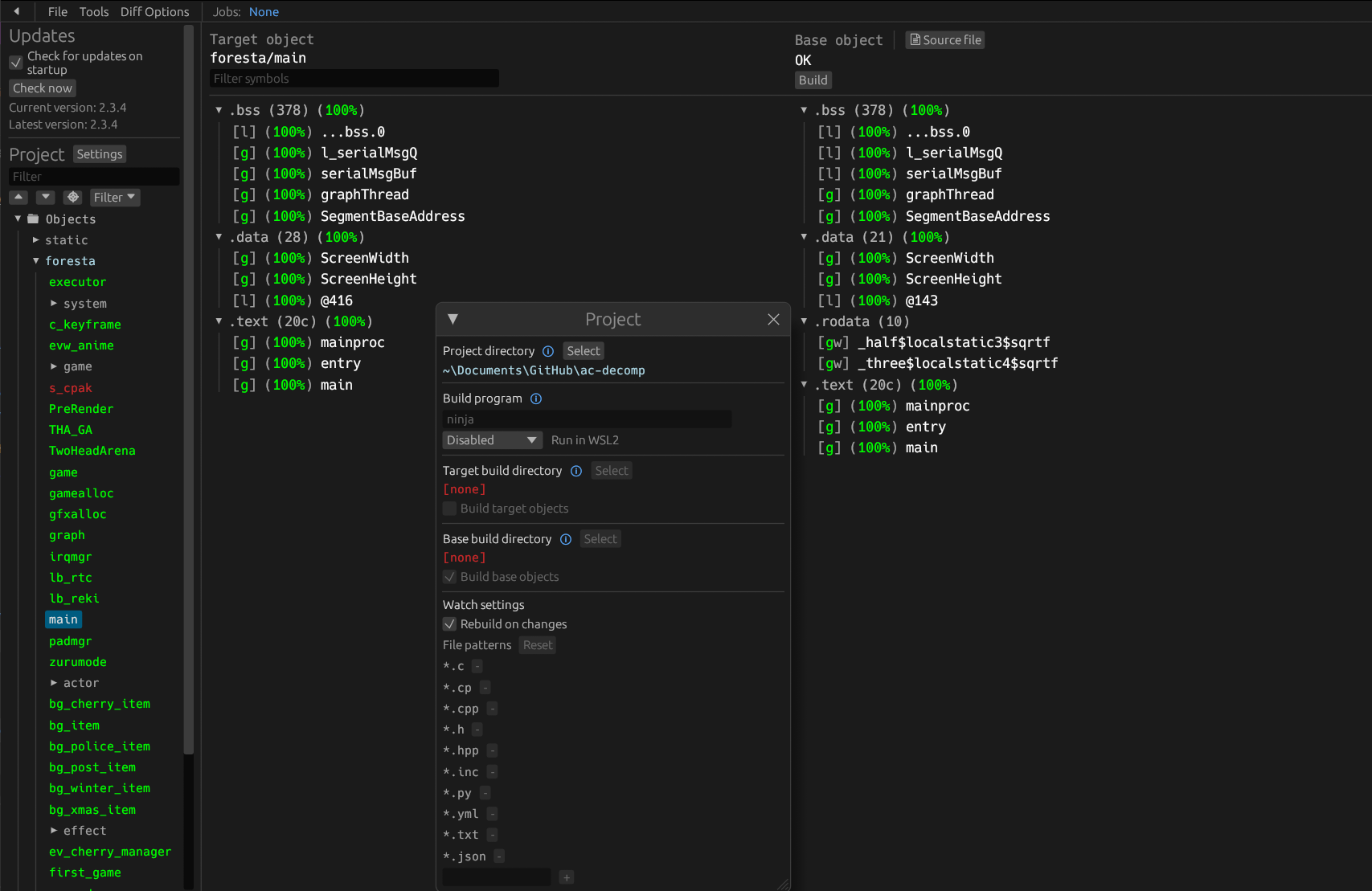
Download the latest release from encounter/objdiff. Under project settings, set Project directory. The configuration should be loaded automatically.
Select an object from the left sidebar to begin diffing. Changes to the project will rebuild automatically: changes to source files, headers, configure.py, splits.txt or symbols.txt.
Credits
- jamchamb, Cuyler36, NWPlayer123 and fraser125 for past documentation of Animal Crossing.
- encounter and NWPlayer123 for dtk-template and setting up the current build system.