
Super Smash Bros. Melee (doldecomp)
Super Smash Bros. Melee
About the project
Super Smash Bros. Melee, conocido en Japón como Dairantō Smash Brothers DX , a veces abreviado como SSBM o simplemente Melee, es el segundo título de la serie de juegos de lucha y acción crossover Super Smash Bros. distribuido para la Nintendo GameCube en el 2001 en Japón y los Estados Unidos, y al año siguiente en Europa y Australia. Es el sucesor de Super Smash Bros. para Nintendo 64 de 1999, y el predecesor de Super Smash Bros. Brawl para Wii de 2008. Fue desarrollado por HAL Laboratory, y dirigido por el productor Masahiro Sakurai.
5 versions of Super Smash Bros. Melee
You're viewing: Super Smash Bros. Melee (doldecomp)
Super Smash Bros. Melee (doldecomp)github.com/doldecomp/meleeMelee Nativegithub.com/jonrosner/melee-nativeSuper Smash Bros. Meleegithub.com/TechProGabe/Melee-Xgd melee workspace (GurekamDhillon)github.com/GurekamDhillon/gd-melee-workspaceSuper Smash Bros. Melee (Melee Unlocked)github.com/Hero88go/melee-unlockedOfficial project information
Super Smash Bros Melee


This repo contains a matching decompilation of Super Smash Bros Melee (US).
[!TIP] The DOL this repository builds can be shifted! Meaning you are able to now add and remove code as you see fit, for modding or research purposes.
It builds main.dol:
| Version | Game ID | SHA-1 |
|---|---|---|
| 1.02 | GALE01 | 08e0bf20134dfcb260699671004527b2d6bb1a45 |
Dependencies
Windows:
On Windows, it's highly recommended to use native tooling. WSL or msys2 are not required. When running under WSL, objdiff is unable to get filesystem notifications for automatic rebuilds.
- Install Python and add it to
%PATH%.- Also available from the Windows Store.
- Download ninja and add it to
%PATH%.- Quick install via pip:
pip install ninja
- Quick install via pip:
macOS:
- Install ninja:
brew install ninja - Install Game Porting Toolkit (the
wine-crossovercask was removed from this tap in favor of this one):brew install --cask gcenx/wine/game-porting-toolkit
After OS upgrades, if macOS complains about Game Porting Toolkit.app being unverified, you can unquarantine it using:
sudo xattr -rd com.apple.quarantine '/Applications/Game Porting Toolkit.app'
Linux:
- Install ninja.
- For non-x86(_64) platforms: Install wine from your package manager.
- For x86(_64), WiBo, a minimal 32-bit Windows binary wrapper, will be automatically downloaded and used.
Building
- Clone the repository:
git clone https://github.com/doldecomp/melee.git --depth=1 - Using Dolphin Emulator, find your ISO and click
Properties. Go to theFilesystemtab, right-clickDisc - GALE01and selectExtract System Data. Chooseorig/GALE01of this repository.- To save space, only
main.dol(and.gitkeep) are necessary. Other files can be deleted.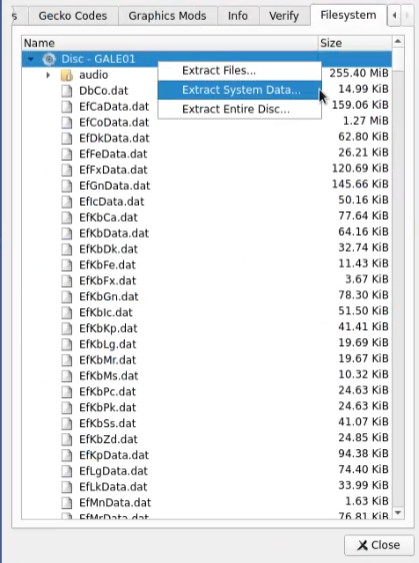
- To save space, only
- Configure:
python configure.py - Build:
ninja
Tooling
We use Python for our command line tooling. It is recommended that you use a virtual environment.
- Create a virtual environment.
python -m venv --upgrade-deps '.venv' - You'll need to activate it whenever you open a new shell.
- Windows:
.venv/Scripts/Activate.ps1 - Linux/macOS:
. .venv/bin/activate
- Windows:
- After that, you can install or update our packages with:
pip install -r reqs/decomp.txt - Now you can run
decomp.pyto decomp a function using m2c. Pass it-hto see all the options.python tools/decomp.py my_function_name
Modding
- Dump the full game disc to a folder as described under Building, not just the system files.
- After cloning the repository, you can freely add new source files/folders under
/src. - Enable the non-matching build by running:
python configure.py --non-matching - Add each of your source files to
configure.py. The order determines when your files are linked, but in most cases does not matter. You can create a newMeleeLibdefinition, but you don't have to. Make sure any newly created files are markedEquivalent.MeleeLib( "My Custom Library", [ Object(Equivalent, "my-cool-mod/helloworld.c"), ], ), - Run
ninjato build the game. - Move the build DOL from
build/GALE01/main.dolto thesysfolder of the game directory you created. - Make sure your game directory is configured under Paths in Dolphin, then launch your
main.dolfrom the Games list.
Containers
We use nix for most of our tontinuous integration, which can be containerized under nixos/nix or nix-toolbox. We plan on fully migrating our CI to nix; see issue #1368.
Diffing
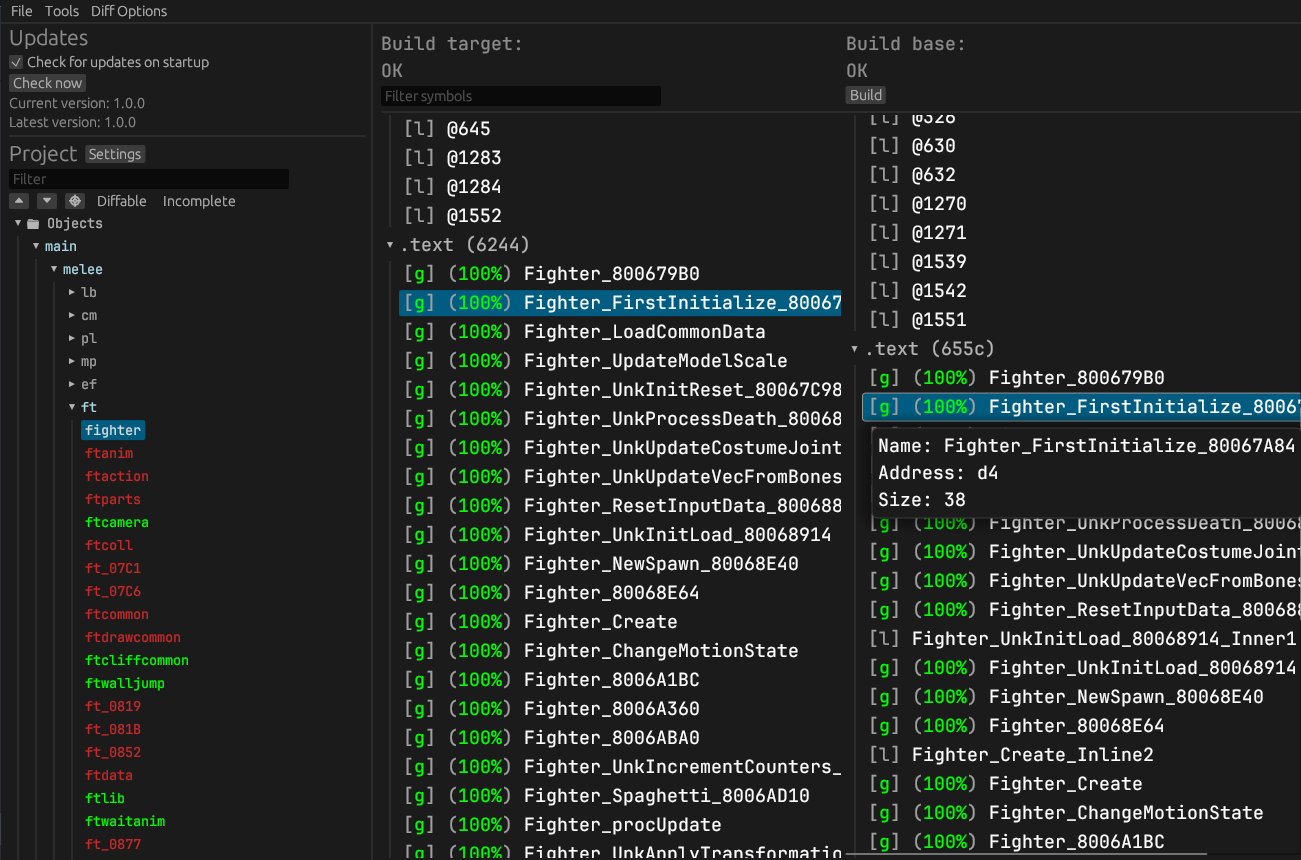
Once the initial build succeeds, an objdiff.json should exist in the project root.
Download the latest release from encounter/objdiff. Under project settings, set Project directory. The configuration should be loaded automatically.
Select an object from the left sidebar to begin diffing. Changes to the project will rebuild automatically: changes to source files, headers, configure.py, splits.txt or symbols.txt.
Contributing
Contributions are welcome! If you're new to decomp, check out our Getting Started guide. Before opening a pull request, please read our contributing guidelines. If you're new to Git and don't know how to create a pull request, we encourage you to create an issue with your decomp.me link and a maintainer will add your code to the repository.
Most of our efforts now are directed to naming and cleanup. See our todo list and cleanup index.
We're also happy to answer any questions in the #smash-bros-melee channel on Discord.

FAQ
How is the codebase structured?
The code in src is divided into several modules, the main one being melee, which is the game code.
melee
The main game code is divided into several two-letter folders, which were left behind by HAL in assert messages and game data on the original disc.
| Short | Full | Notes |
|---|---|---|
cm | Camera | |
db | Debug | |
ef | Effect | Visual effects. |
ft | Fighter | The player characters. |
gm | Game | The main game loop. |
gr | Ground | Stages and other levels. |
if | Interface | User interface. |
it | Items | |
lb | Library | Utility functions that are often thin wrappers around dolphin or baselib code. |
mn | Menu | |
mp | Map | Related to stages and contains things like mpcoll (map collisions). |
pl | Player | As in users. |
sc | Scene | Menu, versus mode, single-player, etc. The game mode. |
ty | Toy | Trophies. |
vi | Visual | Cutscenes, etc. |
melee/ft/kinds
HAL also used two-letter abbreviations for each fighter.
| Short | Full | Canonical English |
|---|---|---|
Bo | Zako<sup>1</sup> Boy | Male wire frame |
Ca | Captain | Captain Falcon |
Ch | Crazy Hand | |
Cl | Child Link | Young Link |
Co | Common | Shared code |
Dk | Donkey Kong | |
Dr | Dr. Mario | |
Fc | Falco | |
Fe | Fire Emblem | Roy |
Fx | Fox | |
Gk | Giga Koopa | Giga Bowser |
Gl | Zako Girl | Female wire frame |
Gn | Ganondorf | |
Gw | Mr. Game & Watch | |
Kb | Kirby | |
Kp | Koopa | Bowser |
Lg | Luigi | |
Lk | Link | |
Mh | Master Hand | |
Mr | Mario | |
Ms | Mars | Marth |
Mt | Mewtwo | |
Nn | Nana | |
Ns | Ness | |
Pc | Pichu | |
Pe | Peach | |
Pk | Pikachu | |
Pp | Popo | |
Pr | Purin | Jigglypuff |
Sb | Sandbag | |
Sk | Seak | Sheik |
Ss | Samus | |
Ys | Yoshi | |
Zd | Zelda |
<sup>1</sup> Zako (雑魚) is Japanese for "trash mob" in video games, literally "small fish."
sysdolphin/baselib
HAL's core internal library.
| Class | Full |
|---|---|
AObj | Animation |
CObj | Camera |
DObj | Draw/Display |
FObj | Frame |
GObj | Global/Game |
JObj | Joint |
LObj | Light |
MObj | Material |
PObj | Polygon |
TObj | Texture |
RObj | Reference |
SObj | Scene |
WObj | World |
dolphin
The Dolphin SDK.
MetroTRK
The Metrowerks Target Resident Kernel.
MSL
The Metrowerks Standard Library.
Runtime
The Gekko hardware runtime.
What can be done now that the game is fully decompiled?
See our FAQ.