Star Fox Adventures
About the project
Star Fox Adventures es un videojuego de acción en tercera persona desarrollado por Rare en el 2002 para la videoconsola GameCube, fue el último juego desarrollado por Rare para esta consola. Es la secuela del juego Star Fox 64 de Nintendo 64, y el predecesor del juego Star Fox: Assault de GameCube, pertenece a la saga de juegos de Star Fox. El nombre completo del juego es Star Fox Adventures: Dinosaur Planet y también es conocido por sus siglas SFA o SFA:DP.
3 versions of Star Fox Adventures
You're viewing: Star Fox Adventures
Official project information
Star Fox Adventures
<!-- [![Build Status]][actions] ![Progress] [![Discord Badge]][discord] -->=============
<!-- Replace with your repository's URL. --> <!-- [Build Status]: https://github.com/zeldaret/tww/actions/workflows/build.yml/badge.svg [actions]: https://github.com/zeldaret/tww/actions/workflows/build.yml --> <!--- Code progress URL: https://progress.decomp.club/data/[project]/[version]/all/?mode=shield&measure=code URL encoded then appended to: https://img.shields.io/endpoint?label=Code&url= --> <!-- [Progress]: https://img.shields.io/endpoint?label=Code&url=https%3A%2F%2Fprogress.decomp.club%2Fdata%2Ftww%2FGZLE01%2Fall%2F%3Fmode%3Dshield%26measure%3Dcode --> <!-- Replace with your Discord server's ID and invite URL. --> <!-- [Discord Badge]: https://img.shields.io/discord/727908905392275526?color=%237289DA&logo=discord&logoColor=%23FFFFFF [discord]: https://discord.gg/hKx3FJJgrV -->A work-in-progress decompilation of Star Fox Adventures.
This repository does not contain any game assets or assembly whatsoever. An existing copy of the game is required.
The SDK code is from https://github.com/doldecomp/dolsdk2001 which is also decompiled.
Supported versions:
GSAP01: Debug version "default.dol"
default.dol
This is a debug build of the game from shortly after the initial transition to GameCube (late 2001). This file is found on Interactive Multi-Game Demo Disc - July 2002 (USA), where it's unused and presumably included by mistake.
I'm targeting this build because:
- it has a lot of debugging functions/info that aren't present in retail builds (helps with identifying and reverse engineering)
- it has a lot of functions relating to content that was removed from later builds (for historical curiosity)
- it's compiled with minimial optimizations (makes decompiling easier)
- it does not currently work (see below); decompiling will make it easier to restore
- it can hopefully make a good starting point for other versions
- this game inherits a lot of code from Diddy Kong Racing, Jet Force Gemini, and Mickey's Speedway USA (may give helpful insights for their decomp projects)
This build doesn't boot on console or emulator because:
- it's built for some type of internal emulator Nintendo would have used as a debug tool
- it writes to invalid addresses seemingly for debug tracing
- it expects an RGBA framebuffer at a fixed address
- its crash handler includes the title "Windows Protection Fault"
- it's missing its assets, and isn't compatible with those of any available version
NOTE: splits are currently very approximate guesses
This code will most likely NOT compile yet
I'm just going through functions in objdiff matching them one by one. Fixing all the different references and making the whole thing build comes later.
Dependencies
Windows
On Windows, it's highly recommended to use native tooling. WSL or msys2 are not required. When running under WSL, objdiff is unable to get filesystem notifications for automatic rebuilds.
- Install Python and add it to
%PATH%.- Also available from the Windows Store.
- Download ninja and add it to
%PATH%.- Quick install via pip:
pip install ninja
- Quick install via pip:
macOS
-
Install ninja:
brew install ninja -
Install wine-crossover:
brew install --cask --no-quarantine gcenx/wine/wine-crossover
After OS upgrades, if macOS complains about Wine Crossover.app being unverified, you can unquarantine it using:
sudo xattr -rd com.apple.quarantine '/Applications/Wine Crossover.app'
Linux
- Install ninja.
- For non-x86(_64) platforms: Install wine from your package manager.
- For x86(_64), wibo, a minimal 32-bit Windows binary wrapper, will be automatically downloaded and used.
Building
-
Clone the repository:
git clone https://github.com/my/repo.git -
Using Dolphin Emulator, extract the file
files/zz_StarFox051702_e3.tgcfrom the demo disc to a temporary folder.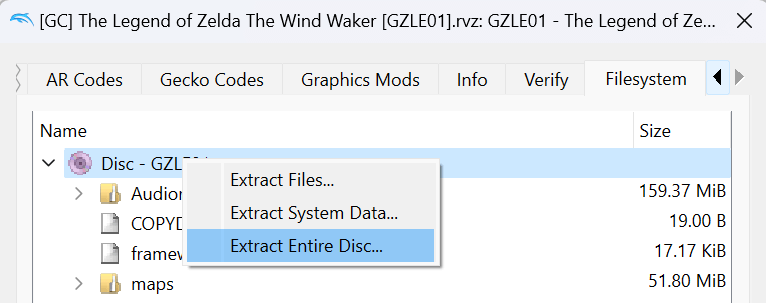
-
Load that file in Dolphin Emulator, and extract
files/default.doltoorig/GSAP01-DEBUG/default.dol.- You can then delete the
zz_StarFox051702_e3.tgcfile.
- You can then delete the
-
Configure:
python configure.pyTo use a version other than
GSAP01-DEBUG, specify it with--version. -
Build:
ninja
Visual Studio Code
If desired, use the recommended Visual Studio Code settings by renaming the .vscode.example directory to .vscode.
Diffing
Once the initial build succeeds, an objdiff.json should exist in the project root.
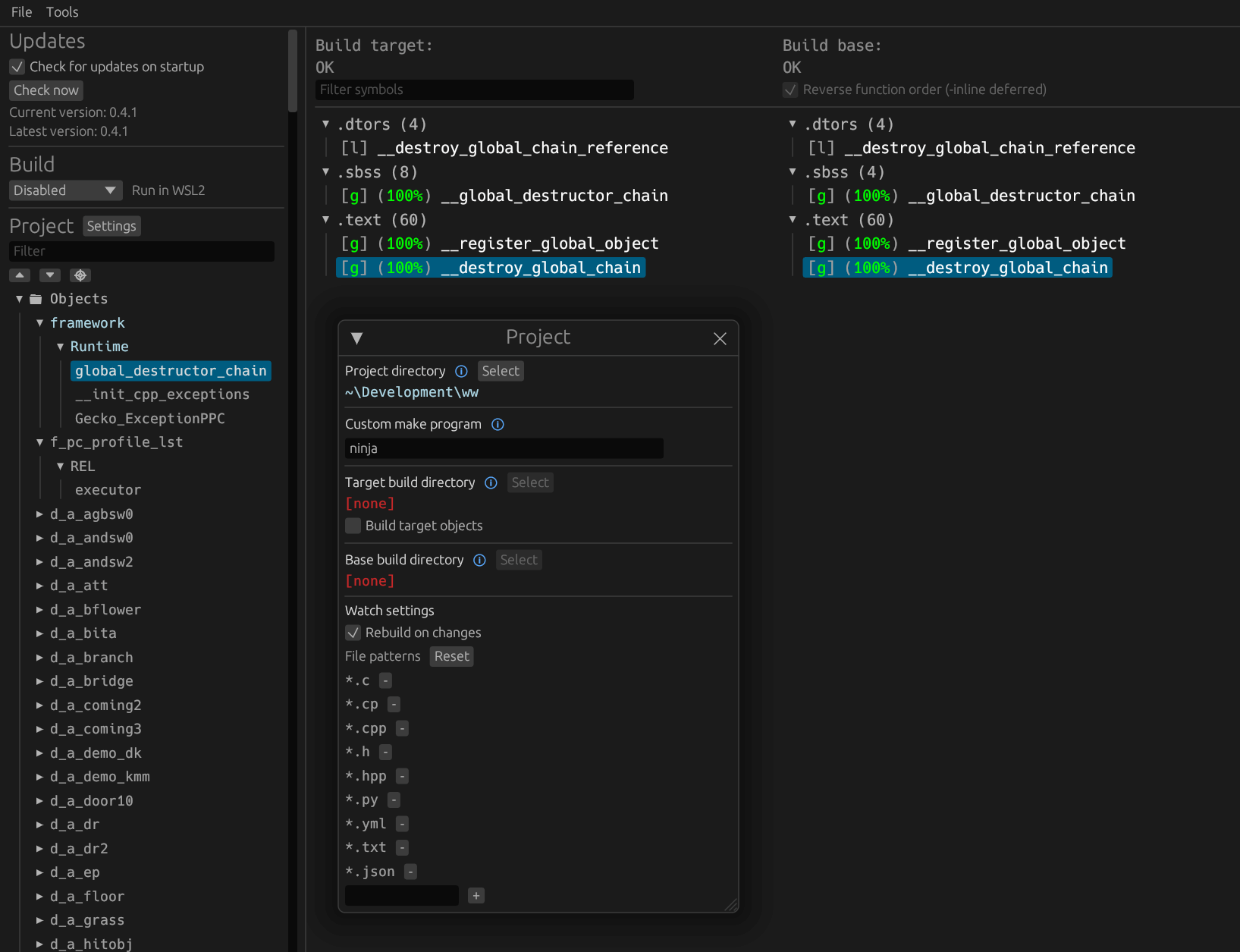
Download the latest release from encounter/objdiff. Under project settings, set Project directory. The configuration should be loaded automatically.
Select an object from the left sidebar to begin diffing. Changes to the project will rebuild automatically: changes to source files, headers, configure.py, splits.txt or symbols.txt.